30827 - Ur Stauer - Gratis brugsanvisning og manual
Find enhedens vejledning gratis 30827 Stauer i PDF-format.


Brugerspørgsmål om 30827 Stauer
0 spørgsmål om dette apparat. Besvar dem du kender, eller stil dit eget.
Stil et nyt spørgsmål om dette apparat
Download vejledningen til din Ur i PDF-format gratis! Find din vejledning 30827 - Stauer og tag din elektroniske enhed tilbage i hånden. På denne side er alle dokumenter nødvendige for brugen af din enhed offentliggjort. 30827 af mærket Stauer.
BRUGSANVISNING 30827 Stauer
WATCH DISPLAY
TIMESETTING
USING THE ALARM
USING THE CHRONOGRAPH
text_image
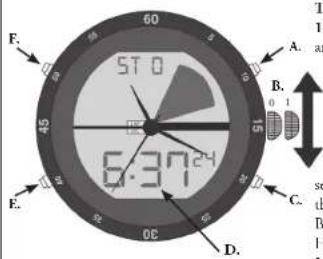
F. 57:0 A. B. 0 1 6:30:24 C. E. D.A - Start/Stop Button
B - Crown
C - Reset Button
D - Digital Time
E - Real-Time/Mode Button
F - Backlight Button
TO SET THE TIME - ANALOG
-
Pull the crown (part B) our to position "1" and rotate it to the desired time.
-
Once the correct time is set, push the crown back into "0" (zero) position.
TO SET THE TIME - DIGITAL
- Press the Real-Time/Mode Button (part E) three times to Time Setting mode. The seconds digits will blink. Select an item in the following sequence by pressing the Reset Button (part C):
Hour • Minute • Month • Date • Day NOTE: When setting the hour, an "H" will flash with 24 hour format, and either an "A" or "P" (for a.m. or p.m.) with 12 hour format.
-
Press the Start/Stop Button (part A) to adjust each selection above.
-
Press the Real-Time/Mode Burton (part F.) to return to Real Time mode.
TO SET THE DAILY ALARM/CHIME
-
Press the Real-Time/Mode Button (part E) two times to enter Alarm mode. Hour digit will blink.
-
Press the Reser Button (part C) to select the hour or minute setting. Press the Start/Stop Button (part A) to adjust the flashing item.
-
Once the time has been set, press the Start/Stop Button (part A) to turn the alarm on.
-
To exit the alarm mode press the Real-Time/Mode Button (part E) – watch will return to the real-time mode.
-
To turn the alarm off, press the Start/Stop Button (part A).
TO SET THE CHRONOGRAPH
-
Press the Real-Time/Mode Button (part E) one time to enter Stopwatch mode.
-
To start counting, press the Start/Stop Button (part A).
-
To stop counting, press the Start/Stop Button (part A).
-
Press the Reset Button (part C) to reset the stopwatch to "00."
-
To record split times, press the Reset Button (part C) while the stopwatch is running to turn the split timer on/off.
-
To exit the stopwatch mode press the Real-Time/Mode Button (part E) – watch will return to the real-time mode.
FEATURES
- Precision digital/analog hybrid movement
- Stainless steel case back
- Corswold™ mineral crystal
- Water-resistant rubber with stainless steel band
- Chronograph function
- Digital hour, minute, second, date, month.
and day of the week displays
- Hourly chime and daily alarm
- 12/24 hour option
- EL backlight
- Water resistant to 3 ATM
Visit us at www.stauer.com
to learn more about the fantastic
benefits of owning a Stauer Watch!
www.staucr.com

HERITAGE OF ART & SCIENCE
Stauer Sport Hybrid
Chronograph Watch
INSTRUCTION MANUAL
