
MXA1MC - Radio Memphis Audio - Gratis brugsanvisning og manual
Find enhedens vejledning gratis MXA1MC Memphis Audio i PDF-format.


Brugerspørgsmål om MXA1MC Memphis Audio
0 spørgsmål om dette apparat. Besvar dem du kender, eller stil dit eget.
Stil et nyt spørgsmål om dette apparat
Download vejledningen til din Radio i PDF-format gratis! Find din vejledning MXA1MC - Memphis Audio og tag din elektroniske enhed tilbage i hånden. På denne side er alle dokumenter nødvendige for brugen af din enhed offentliggjort. MXA1MC af mærket Memphis Audio.
BRUGSANVISNING MXA1MC Memphis Audio
OPERATION CONTINUED

FM MODE
JUMP TO PREVIOUS PRESET STATION - SHORT PUSH
ENTER "MANUAL MODE" (SHOWING 2 SECONDS) SHORT PUSH TO HAVE STEPPING FREQUENCY ADJUSTMENT OR PRESS AND HOLD TO HAVE FAST FORWARD FREQUENCY ADJUSTMENT.
AFTER ENTER "MANUAL MODE" IF NO ADJUSTMENT FOR 3 SECONDS, IT WILL AUTOMATICALLY SWITCH BACK TO AUTO MODE AND SHOW "AUTO" FOR 2 SECONDS
USB MODE
FAST BACKWARD - LONG PUSH

FM MODE
JUMP TO NEXT PRESET STATION - SHORT PUSH
ENTER "MANUAL MODE" (SHOWING 2 SECONDS) SHORT PRESS TO HAVE STEPPING FREQUENCY ADJUSTMENT OR PRESS AND HOLD TO HAVE FAST FORWARD FREQUENCY ADJUSTMENT.
AFTER ENTER "MANUAL MODE" IF NO ADJUSTMENT FOR 3 SECONDS, IT WILL AUTOMATICALLY SWITCH BACK TO AUTO MODE AND SHOW "AUTO" FOR 2 SECONDS
FAST FORWARD- LONG PUSH
PAIRING DEVICES
WHEN BT MUSIC IS FLASHING THE DEVICE IS IN PAIRING MODE
LOCATE THE DEVICE NAME ON YOUR PHONE TO PAIR. DEVICE NAME: MEMPHIS MXA1
Settings:
PRESS AND HOLD MODE(4) TO ENTER SETTING MENU. PRESS AND RELEASE MODE (4) TO CHANGE MENU ITEMS. TO ADJUST SETTING USE ROTARY DIAL (5). ADJUSTABLE SETTINGS ARE: BASS, TREBLE, BALANCE, FADER, BEEP, EQ, LOUD AND TUNER REGION.
WARRANTY
Electronics limited warranty (including Memphis accessories) When purchased from an Authorized Memphis Dealer, Memphis warrants this product to be free from defects in material and workmanship under normal use for a period of ONE (1) YEAR from date of original purchase (receipt required), THREE (3)YEARS years if installed by an authorized Memphis dealer (receipt required). If this product is identified as "Refurbished" or "B Goods", the warranty is limited to a period of THREE (3) MONTHS from date of original purchase. In all cases you must have the original receipt. Should service be necessary under this warranty for any reason due to manufacturing defect or malfunction during the warranty period, Memphis will repair or replace (at its discretion) the defective merchandise with equivalent merchandise. Warranty replacements may have cosmetic scratches and blemishes. Discontinued products may be replaced with more current equivalent products. Warranty is valid only for the original purchaser and is not extended to owners of the product subsequent to the original purchaser. Any applicable implied warranties are limited in duration to a period of the express warranty as provided herein beginning with the date of the original purchase at retail, and no warranties, whether express or implied, shall apply to this product thereafter. NOTE: This equipment has been tested and found to comply with the limits for a Class B digital device, pursuant to part 15 of the FCC Rules. These limits are designed to provide reasonable protection against harmful interference in a residential installation. This equipment generates, uses and can radiate radio frequency energy and, if not installed and used in accordance with the instructions, may cause harmful interference to radio communications. However, there is no guarantee that interference will not occur in a particular installation. If this equipment does cause harmful interference to radio or television reception, which can be determined by turning the equipment off and on, the user is encouraged to try to correct the interference by one or more of the following measures: Reorient or relocate the receiving antenna. Increase the separation between the equipment and the receiver. Connect the equipment into an outlet or a circuit different from that to which the receiver is connected.
CONTACT INFO

122 GAYOSO AVE, MEMPHIS, TN 38103

Tech Support: 800-903-6979
SHOW US YOUR INSTALL AND FOLLOW US TODAY!

WWW.MEMPHISCARAUDIO.COM @

PHISCARAUDIO @MEMPHISCARAUDIOUSA


EST 1965 | MEMPHIS, TN | USA
MXA1MC
Gauge Style Media Center
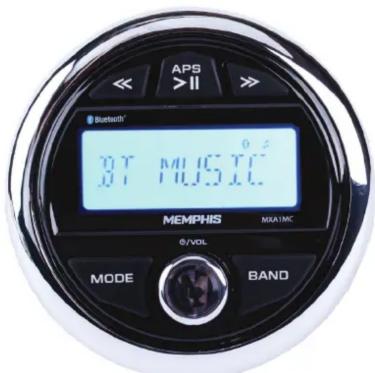
Thank you for purchasing Memphis Audio's Gauge Style Media Center. Please read this manual prior to installing and operating the unit. For additional questions or concerns please contact 800-903-6979.
Authorized Memphis Dealer:
Purchase Date:
Serial Number:
INSTALLATION OVERVIEW
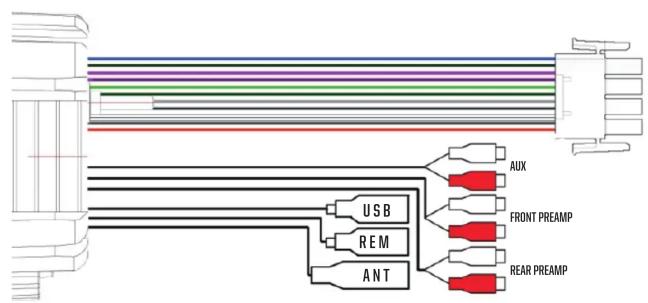
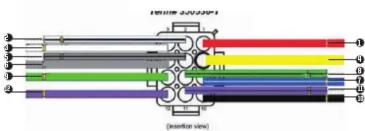
CONNECTION:
Pin 1 - Red // 12V Ignition
Pin 2 - White & Black // Left Front Speaker (-)
Pin 3 - White // Left Front Speaker (+)
Pin 4 - Yellow // 12V Constant
Pin 5 - Grey & Black // Right Front Speaker [-]
Pin 6 - Grey // Right Front Speaker (+)
Pin 7 - Blue // Remote Turn On
Pin 8 - Green & Black // Left Rear Speaker [-]
Pin 9 - Green // Left Rear Speaker (+)
Pin 10 - Black // Ground
Pin 11 - Purple & Black // Right Rear Speaker (-)
Pin 12 - Purple // Right Rear Speaker (+)
*For 2 wire zero current draw when powered off:
Wire 12v constant and 12v ignition together
BUTTON FUNCTIONS
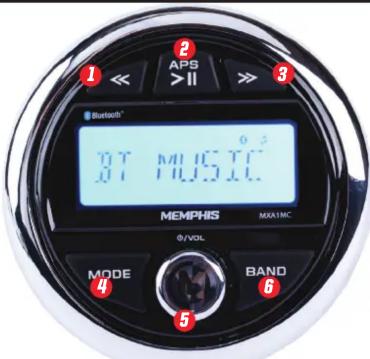
CONTROLS
-
SEEK DOWN
-
APS / PLAY / PAUSE
-
SEEK UP
-
MODE
-
POWER/VOLUME
-
BAND
POWER & ROTARY KNOB
POWER ON - LONG PUSH
MUTE - SHORT PUSH
POWER OFF - LONG PUSH
VOLUME - ROTATE KNOB
MODE
FUNCTION SELECT (FM/BT/USB (IF INSERTED) AUX CYCLE - SHORT PUSH
BASS/TREBLE/BALANCE/FADE/LOUD/EQ/CLOCK ADJUST - LONG PUSH TO ENTER MENUS
SCROLL THROUGH FUNCTIONS AND VOLUME TO ADJUST FUNCTIONS - SHORT PUSH
PLAY/PAUSE/APS
PLAY/PAUSE - SHORT PUSH
USB MODE
ENTER TRACK NUMBER BY ROTATING KNOB, PRESS KNOB TO SELECT TRACK OR LEAVE FOR 3 SECONDS TO PLAY TRACK - APS LONG PUSH
RADIO MODE
JUMP TO NEXT STATION - SHORT PUSH
AUTO-SCAN PRESET STATIONS - LONG PUSH
BAND
RADIO MODE
BAND SELECT FM1, FM2, FM3, AM1, AM2, FM1 CYCLING - SHORT PUSH
STORE DESIRED STATION AS A PRESET - LONG PUSH
USB MODE
TITLE, ARTIST, ALBUM, TRACK NUMBER, & TIME LAPPED (CYCLING) - SHORT PUSH
TURN ON/OFF "REPEAT" 1 SONG PLAYBACK - LONG PUSH
BLUETOOTH MODE
DISCONNECT LINKED BLUETOOTH DEVICE - LONG PUSH
Mærke : Memphis Audio
Model : MXA1MC
Kategori : Radio