
A-H484 - Hi-Fi System Russound - Gratis brugsanvisning og manual
Find enhedens vejledning gratis A-H484 Russound i PDF-format.


Brugerspørgsmål om A-H484 Russound
0 spørgsmål om dette apparat. Besvar dem du kender, eller stil dit eget.
Stil et nyt spørgsmål om dette apparat
Download vejledningen til din Hi-Fi System i PDF-format gratis! Find din vejledning A-H484 - Russound og tag din elektroniske enhed tilbage i hånden. På denne side er alle dokumenter nødvendige for brugen af din enhed offentliggjort. A-H484 af mærket Russound.
BRUGSANVISNING A-H484 Russound
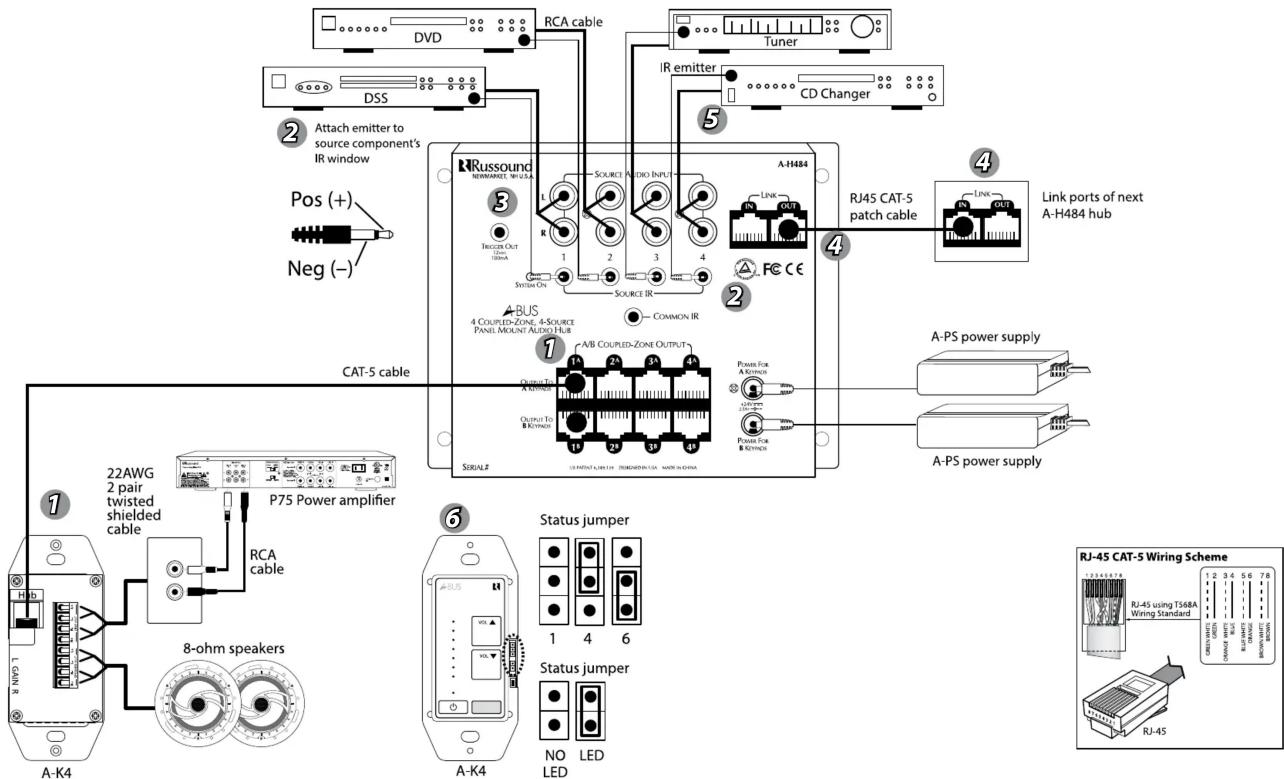
CONNECTION INSTRUCTIONS FOR A-H484. REFER TO NUMBERED DIAGRAM ON REVERSE.
1 Amplified Keypads
The A-H484 has coupled zone outputs in two groups of four (A and B) that support each of the A-K4 keypad per zone. Source selection is shared by coupled zone outputs. Connect up to eight A-BUS amplified keypads to the A-H484 with CAT-5 cable using RJ45 CAT-5.
NOTE: A-BUS keypads must be set to multisource mode to be used with the A-H484 hub. See A-K4 keypad installation manuals for complete details.
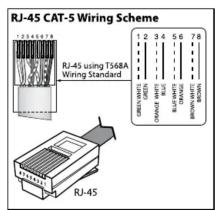
The zone output on the A-H484 is a CAT-5 RJ45 connector using T568A wire configuration. The A-K4 has an RJ45 connector with T568A wire configuration.
2 IR Emitters
Routed IR Outputs and Common IR Output. Connect an IR emitter such as the IRE-1 to each of the 4 IR connectors on the A-H484. When a source is selected from a zone, the IR signal received through the zone's keypad is routed exclusively to that source via the A-H484's Routed IR outputs. This allows the use of multiple sources of the same brand (for example, two identical DSS units). The Common IR output sends out all IR signals and can be used with an IR flasher that blankets all source components.
3 Trigger Output
The 12VC trigger output can be used to control a switched AC outlet to turn power on and off to source equipment. The trigger voltage is sent when any zone is in the system is turned on. When the ALL OFF command is used, the trigger is turned off. Use a 1/8" male 2-conductor jack (not included).
4 Link In and Link Out
The Link In and Out is used to connect multiple A-H484 hubs to allows for use of additional A-BUS keypads. The connection is made using an RJ45 patch cable. The Link connects the Routed IR, Common IR, and Status. Audio signals are shared with linked A-H484 hubs using "Y" cables to split the audio outputs.
The A-H484 CANNOT be linked to single-source A-BUS Hubs such as A-H2, A-H4P and A-H1, as these use a different format for linking.
5 Sources
The A-H484 has four stereo audio inputs that support connections to multiple audio sources. If sources are connected to an existing home theater receiver, they can be shared with the A-H484 by using "Y" connectors for the audio outputs.
6 Keypad Connection to A-H484 Hub
Each keypad connects to a Keypad Output port on the A-H484 hub. Connections use CAT-5 cable with an RJ-45 connector using T568A CAT-5 wire configuration. CAT-5 cable length should be 150 feet or less from hub to keypad.
7 Power Supply
The A-H484 hub and amplified keypads are powered by the A-PS 24VDC/2.5A power supply. Each row (A and B) must have its own power supply. The A-PS should be plugged into an unswitched AC outlet (one that is live all the time). When the A-PS is providing power, the A-H484's POWER LED will illuminate once a keypad is turned on.
8 Installation
Install the A-H484 near the system's source equipment using screws or hook and loop fastener. The A-H484 will also fit many structured wiring distribution panels.
9 Operation
The A-H484 is designed to be used with A-K4 and multisource-capable amplified keypads.
A-K4 keypad can be operated manually or by using the USRC remote control. If using installed IR emitters, sources can be operated with their own remote control by aiming it at the IR window on an A-K4 keypad.
When the A-K4 keypad is set in multisource mode, tap the power button to toggle through and select a source. The top LEDs of the volume indicator show (from top to bottom) the source that is selected (top LED is source 1, next LED down is source 2, etc).
For a clean installation when wiring from a Keypad Port, use an RJ-45 CAT-5 patch cable to connect from the keypad port to an RJ-45 wall plate (optional). Using the same RJ-45 T568A CAT-5 wiring configuration, use CAT-5 from the RJ-45 wall plate to the keypad.



Safety Instructions
- Read Instructions - All the safety and operating instructions should be read before the appliance is operated.
-
Retain Instructions - The safety and operating instructions should be retained for future reference.
-
Heed Warnings - All warnings on the appliance in the operating instructions should be adhered to.
-
Follow Instructions - All operating and user instructions should be followed.
-
Water and Moisture - The appliance should not be used near water; for example, near a bathtub, washbowl, kitchen sink, laundry tub, in a wet basement, or near a swimming pool.
-
Wall or Ceiling Mounting - The appliance should be mounted to a wall or ceiling only as recommended by the manufacturer.
-
Heat - The appliance should be situated away from heat sources such as radiators, heat registers, stoves, or other appliances (including amplifiers) that produce heat.
-
Power Sources - The appliance should be connected to a power supply only of the type described in the operating instructions or as marked on the appliance.
-
Grounding or Polarization - Precaution should be taken so that the grounding or polarization means of an appliance is not defeated.
-
Object and Liquid Entry - Care should be taken so that objects do not fall and liquids are not spilled into the enclosure through the openings.
-
Damage Requiring Service - The appliance should be serviced by qualified service personnel when:
The power supply cord or the plug has been damaged; Objects have fallen, liquid has been spilled into the appliance The appliance has been exposed to rain
The appliance does not appear to operate normally. The appliance has been dropped or enclosure is damaged. 12. Servicing - The user should not attempt to service the appliance beyond that described in the operating instructions. All other servicing should be referred to qualified service personnel.
- Care – From time to time you should wipe off the front panel with a soft dry cloth.
Limited Warranty
The Russoud A-H484 is guaranteed for two (2) years from the date of purchase against all defects in materials and workmanship. During this period Russoud will replace any defective parts and correct any defect in workmanship without charge for either parts or labor. For this warranty to apply, the unit must be installed and used according to the requirements of the product. The Russoud assumes no responsibility for defects resulting from abuse or servicing performed by an agency or person not specifically authorized in writing by Russoud. Damage to or destruction of components due to improper use voids the warranty. In these cases the repair will be made at the owner's expense. Accidental damage and shipping damage are not considered defects under the terms of the warranty. To return the sale of a dealer, it is not intended to be required to obtain a proof of the claim that any return Authorization number and documentation explaining the nature of the service required. Any product returned without prior written permission will be returned to sender. Russoud sells products only through authorized Dealers and Distributors to ensure that customers obtain proper support and service. Any Russoud product purchased from an unauthorized dealer or other source, including retailers, mail order selling and distribution of their products, which are being issued upon the request of the product. Any sale of products by an unauthorized source or other lender not authorized by Russoud shall void the warranty on the applicable product.
Copyright ©2016 Russound® All rights reserved. All trademarks are the property of their respective owners. Russound is not responsible for typographical errors or omissions. Specifications are subject to change without notice.
A-BUS is a registered trademark of LeisureTech Electronics Pty Ltd Australia. This product may be covered by one or more of the following patents: US #7,181,023, #6,389,139; EP #1004222, AU #739808, NZ #502982, Mexico #241196, Canada #CA2301062.
Russound, Inc. 1 Forbes Rd., Newmarket, NH 03857, USA tel 603.659.5170 • fax 603.659.5388 www.russound.com technical support: 866.888.7466 e-mail: tech@russound.com 28-1157 Rev. 4.09.13.16
RRussound®
ABUS®
A-H484
Multisource, Multizone Hub
for A-BUS® System
Installation Manual
A-H484 Overview
The Russound A-H484 is a four-zone, four-source audio distribution hub used with A-BUS amplified keypads. The A-H484 can be linked to another A-H484 to increase the number of zones in a system.
The A-H484 multisource hub supports four audio sources in a four-zone A-BUS system. Each zone is expandable to two rooms with inputs for A-K4 keypads. You can select any source independently in each zone at the keypad or with an USRC remote control.
A-H484 Features
- Four line-level audio inputs
• Four zone coupled outputs (2 keypads per zone)
• 12VDC trigger output
- Link in and out
• 4 routed, 1 common IR outputs
A-H484 Specifications
Power Supply: A-PS, 24VDC, 2.5A
(one required for each bank A, B)
Trigger Output: 2VDC, 100mA, 1/8" male
(tip (+). sleeve (-))
Keypad Connection: CAT-5, RJ45 connector, T568A
Link Connection: CAT-5, RJ45 connector, T568A
R Emitter Connection: 1/8" male, tip (+), sleeve (-)
Dimensions: 6.5"W x 5"H x 1.5"D
(165 × 127 × 38mm)
Weight: 1.0 lb. 12 oz. (795g)
CONNECTION DIAGRAM FOR A-H484. REFER TO THE NUMBERED INSTRUCTIONS ON REVERSE. DIAGRAMS ARE NOT TO SCALE.

- CONNECTION INSTRUCTIONS FOR A-H484. REFER TO NUMBERED DIAGRAM ON REVERSE.
- Amplified Keypads
- IR Emitters
- Trigger Output
- Link In and Link Out
- Sources
- Keypad Connection to A-H484 Hub
- Power Supply
- Installation
- Operation
- Safety Instructions
- Limited Warranty
- RRussound®
- ABUS®
- A-H484
- Multisource, Multizone Hub
- for A-BUS® System
- Installation Manual
- A-H484 Overview
- A-H484 Features
- A-H484 Specifications
Mærke : Russound
Model : A-H484
Kategori : Hi-Fi System