
Walkman WM-FX38 - Kassetteafspiller SONY - Gratis brugsanvisning og manual
Find enhedens vejledning gratis Walkman WM-FX38 SONY i PDF-format.


Brugerspørgsmål om Walkman WM-FX38 SONY
0 spørgsmål om dette apparat. Besvar dem du kender, eller stil dit eget.
Stil et nyt spørgsmål om dette apparat
Download vejledningen til din Kassetteafspiller i PDF-format gratis! Find din vejledning Walkman WM-FX38 - SONY og tag din elektroniske enhed tilbage i hånden. På denne side er alle dokumenter nødvendige for brugen af din enhed offentliggjort. Walkman WM-FX38 af mærket SONY.
BRUGSANVISNING Walkman WM-FX38 SONY
WALKMAN
Radio Cassette Player
WM-FX32/38
Operating Instructions
WALKMAN is a trademark of Sony Corporation.
Sony Corporation © 1993
Printed in Japan
OWNER'S RECORD
The model number is located at the rear and the serial number is located inside the cassette holder. Record these numbers in the spaces provided below. Refer to them whenever you call upon your Sony dealer regarding this product.
Model No. ____
Serial No. ____
Featuring
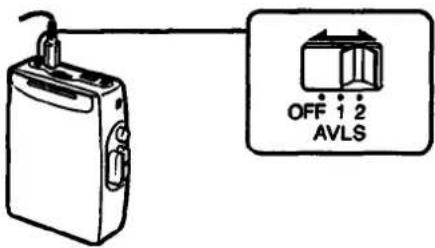
AVLS (Automatic Volume Limiter System)
The AVLS selector allows you to limit the maximum volume of your Walkman personal stereo without degrading the sound quality.
- When the AVLS selector is set to either position 1 or 2, (around 95dB and 85dB, respectively) the volume will be kept at a moderate level without the degradation of the sound quality, even if you attempt to turn the volume up higher.
- When the AVLS selector is set to either position 1 or 2, the playback sound may be distorted or unstable according to the music (especially the bass boosted part). If this happens, turn down the volume.
- When the AVLS selector is turned off, you will be able to enjoy the full volume capability of your Walkman personal stereo.
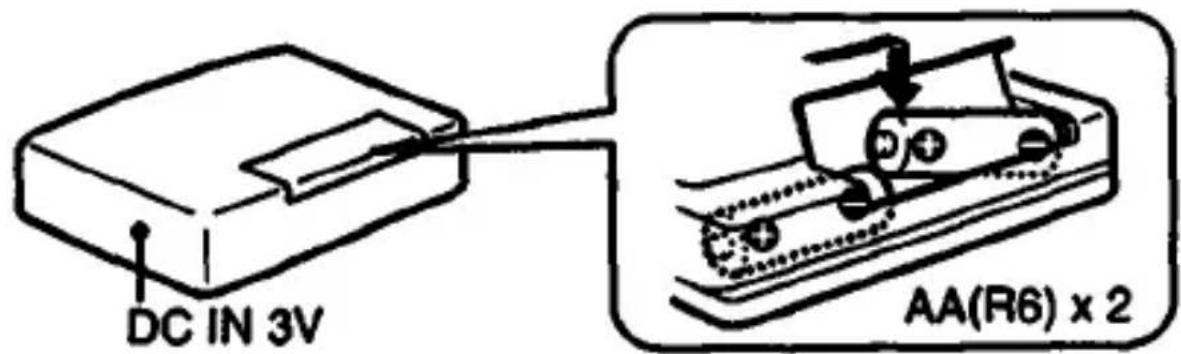
Using with Batteries
Insert two AA (R6) batteries in correct polarity.
Notes
- When you are not going to use your Walkman for a long time, remove the batteries to prevent damage from battery leakage and corrosion.
- When the sound becomes unstable, replace the old batteries with new ones.
Using External Power Sources
You can connect the following external power sources through the DC IN 3 V jack located on the bottom. (When you plug a cord into the DC IN 3 V jack, the internal batteries are automatically bypassed.)
• House current using an AC-E30L AC power adaptor
- 12 V car battery using a DCC-E130L car battery cord
Note
Use only the recommended AC-E30L AC power adaptor (not supplied). Do not use any other AC power adaptor.
natural_image
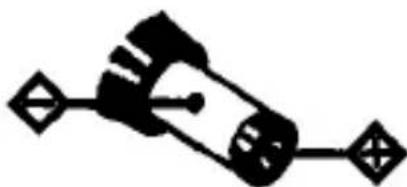
Pure electrical circuit lines without any symbolsPolarity of the plug
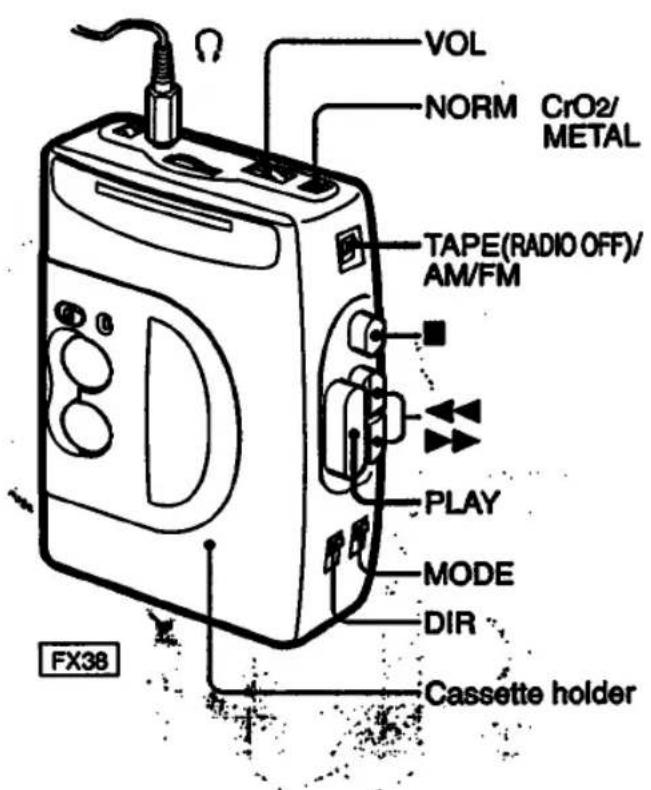
1 Insert a cassette.
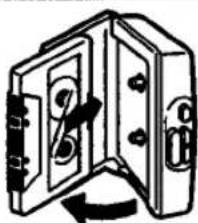
natural_image
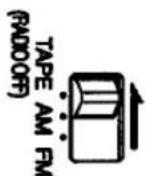
Diagram of a door switch mechanism with no text or symbols2 Set the TAPE/AM/FM selector to TAPE.
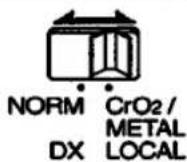
3 Select NORM or CrO2/METAL mode to match the tape type.
4 Press PLAY.

Operating the Cassette Player
| To stop | Press ■. |
| To wind the tape | Press ▶▶ or ◀◀. |
| To change sides | Set the DIR switch. |
| To play both sides once | Set MODE to ⊃. |
| To play both sides repeatedly | Set MODE to ⊗. |
| To adjust the volume | Set the VOL control. |
Note on the DIR switch
When the MODE switch is set to Ⓗ, the DIR switch turns automatically at the end of a cassette. If the switch does not turn automatically, check to make sure the MODE is properly set (see above). If the DIR switch still does not turn, the batteries are weak. Replace them with a new set of batteries.
Notes on playing cassettes
- Do not use cassettes longer than 90 minutes except for long continuous playback.
- If your Walkman has not been used for a long time, run the Walkman for a few minutes before inserting a cassette.
- Avoid winding the headphones cord around the Walkman. The buttons may be kept pressed, causing unnecessary battery usage.
Using MEGA BASS (FX38 only)
Set the MEGA BASS switch to ON to produce deep and powerful sound. And set the HIGH and LOW control to adjust the tone level.
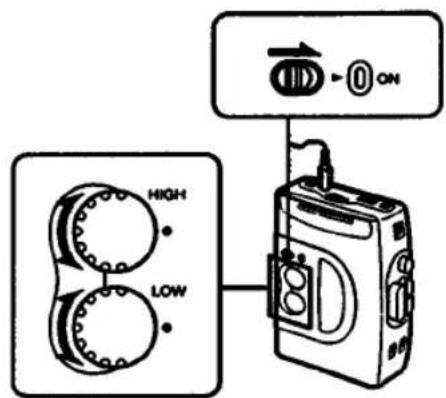
When using MEGA BASS:
If the AVLS selector is set 1 or 2, the MEGA BASS effect is reduced.
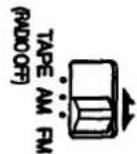
1 Set the TAPE/AM/FM selector to AM or FM.
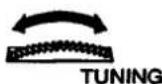
2 Tune in the desired station.
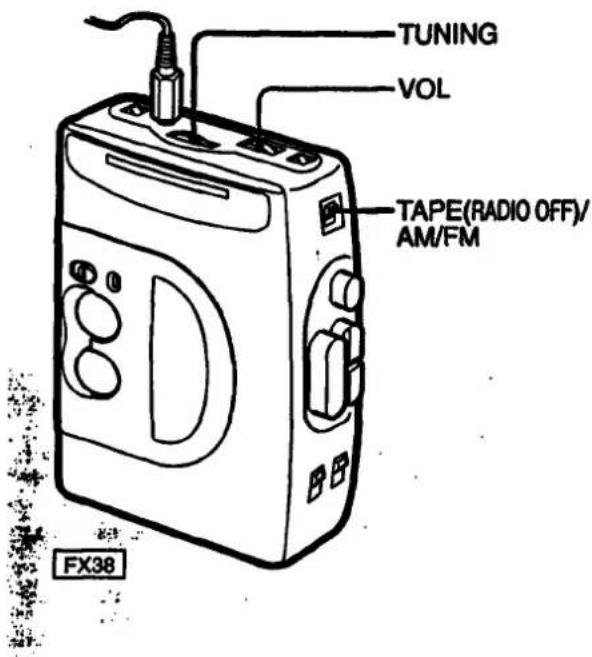
| To turn off | Set the TAPE/AM/FM selector to TAPE (RADIO OFF). |
| To adjust the volume | Set the VOL control. |
Note
If you have inserted a cassette with a metallic shell or label and radio reception interference occurs, remove the cassette.
Improving Radio Reception
Improving FM reception
Extend the headphones cord or adjust the DX/LOCA selector.
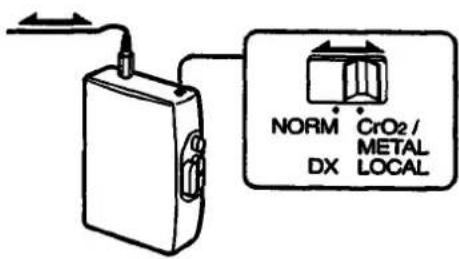
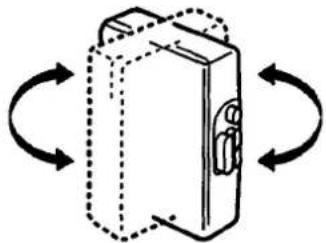
Improving AM reception
Rotate the Walkman.
natural_image
Diagram of a closed box with directional arrows indicating rotation or movement (no text or symbols)Specifications
Radio Frequency
FM: 87.6 - 108 MHz
AM: 530 - 1,710 kHz
Power Requirements
3 V DC Batteries AA (R6) x 2
External DC 3 V power sources
Battery Life
(approximate hours when using the batteries specified below
| Battery | Playback | Radio |
| Sony Alkaline AM3 (N) | 8 hours | 30 hours |
| Sony SUM-3 (NS) | 4 hours | 15 hours |
Supplied Accessories
- Stereo headphones (1)
- Belt clip (1)
Optional Accessories
- AC power adaptor AC-E30L
- Car battery cord DCC-E130L
Your dealer may not handle some of the above listed accessories. Please ask the dealer for detailed information.
Design and specifications are subject to change without notice
Precautions
Notes on headphones
Concerning Road Safety
Do not use headphones while driving, cycling, or operating any motorized vehicle. It may create a traffic hazard and is illegal in many areas. It can also be potentially dangerous to play your headsets at high volume while walking, especially at pedestrian crossings. You should exercise extreme caution or discontinue use in potentially hazardous situations.
Preventing hearing damage
Avoid using headphones at high volume. Hearing experts advise against continuous, loud and extended play. If you experience a ringing in your ears, reduce volume or discontinue use.
Caring for others
Keep the volume at a moderate level. This will allow you to hear outside sounds and to be considerate to the people around you.
Taking Care of Your Walkman
- Avoid exposing the Walkman to extreme temperatures, direct sunlight, moisture, sand, dust or mechanical shock. Never leave the Walkman in a car parked in the sun.
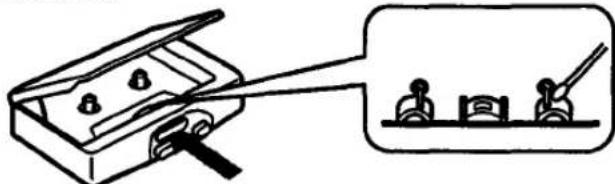
- Prolonged use may contaminate the tape head. If sound drop-out or excessive noise occurs, clean the head and tape path with alcohol.
natural_image
Simple line drawing of a mechanical clamp or bracket with a separate view showing two tools (no text or symbols present)- Clean the headphones plug periodically for optimum sound.
- Do not use alcohol, benzine or thinner to clean the case.
If you have any question or problem concerning your Walkman, please consult your nearest Sony dealer.
About the battery compartment lid
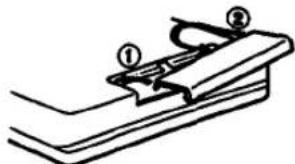
If the battery compartment lid is detached by an accidental drop, excessive force, etc., attach it as illustrated in the numbered order.
natural_image
Simple line drawing of a mechanical clamp or bracket with two numbered parts (① and ②), no text or symbols present.If you have any question or problem concerning your Walkman, please consult your nearest Sony dealer.
Using the Belt Clip
With the supplied belt clip, you can wear your Walkman on a belt for convenient use.
Removing the belt clip
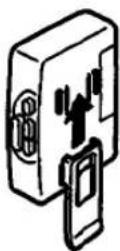
Lift the tab slightly and push down with your finger to remove the belt clip from the Walkman.
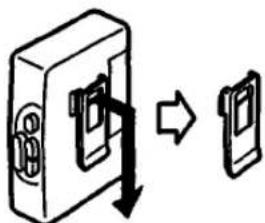
Attaching the belt clip
Align the belt clip with the grooves on the back of the Walkman and slide the belt clip up until you hear a click, to firmly attach it to the Walkman.
PERSONAL/PORTABLE AUDIO PRODUCTS
SONY: LIMITED WARRANTY
SONY ELECTRONICS INC. ("SONY") warrants this product against defects in metal or workmanship, as follows:
- For a period of 90 days from the date of retail purchases, SONY shall at its sole and absolute option either repair the defective product at no charge or replace the defective product with the same model or its equivalent model at no charge through a SONY SERVICE CENTER.
To obtain warranty service during the initial 90-day period, you must take the product, or deliver the product prepaid, to one of the SONY SERVICE CENTERS located in the United States.
- After the initial 30-day period, SONY will supply, at no charge, new or rebuilt replacements for defective parts for a period of 1 year from the date of retail purchases.
Labor for removal and installation of these parts is available from your SONY authorized service facility or SONY SERVICE CENTER, at your expense.
Proof of purchase in the form of a bill of sale or receipted invoice, which indicates that the product is within the warranty period, must be presented to obtain warranty service.
This warranty does not cover osmestic damage, and damage to any part of the product, including the entrance, which results from acts of God, accident, misuse, abuse, improper maintenance, or connection to an improper voltage supply.
This warranty is valid only if the serial number appears on the product. This warranty is valid only in the United States of America.
REPAIR OR REPLACEMENT AS PROVIDED UNDER THIS WARRANTY IS THE EXCLUSIVE REMEDY OF THE CONSUMER, BOND SHALL NOT BE LIABLE FOR ANY INCIDENTAL OR CONSEQUENTIAL DAMAGES FOR BREACH OF ANY EXPRESS OR IMPLIED WARRANTY ON THIS PRODUCT. EXCEPT TO THE EXTENT PROHIBITED BY APPLICABLE LAW, ANY IMPLIED WARRANTY OF MERCHANTABILITY OR FITNESS FOR A PARTICULAR PURPOSE ON THIS PRODUCT IS LIMITED IN DURATION TO THE CURATION OF THIS WARRANTY.
Some states do not allow the exclusion or limitation of incidental or consequential damages, or allow limitations on how long an implied warranty tests, so the above limitations or exclusions may not apply to you. In addition, if you enter into a service contract with the Sony Partnership as within 90 days of the date of sale, the limitation on how long an implied warranty tests does not apply to you. This warranty gives you specific legal rights, and you may also have other rights which vary from state to state.
Please refer to the list of SONY SERVICE CENTERS on the reverse side for the SONY SERVICE CENTER nearest you.
For your convenience, Sony Electronics Inc. has established the Customer Information Center to supply you with product or service information.
Important: If returning product for service, please see reverse side of this card for your nearest Sony Service Center.
SONY CUSTOMER INFORMATION CENTER
201-930-SONY (7669)
714-821-SONY (7668)
708-205-SONY (7669)
or write to:
SONY CUSTOMER INFORMATION CENTER
Drive, Mail Drop eTI-
Park Ridge, New Jersey 07656
SONY ELECTRONICS INC.
Sony Drive Park Ridge, New Jersey 07656
Sony Service Centers
| Arizona | Hawaii | Missouri |
| Phoenix2340 North Seattle RoadTempa, AZ 95281(002) 949-7668 | Honolulu950 Mapmaprano StreetHonolulu, HI 95816(008) 834-6632 | St. Louis12462-D Natural Bridge RoadBridgston, MO 63044(314) 291-2201 |
| California | Illinois | New Jersey |
| Burbark Gas Angleside street4100 Riverside Drive, Suite ABurbark, CA 91906(018) 842-7669 | Chicago1720 West Forterton, Suite 4Riversport Shopping CenterChicago, IL 80614(312) 829-5585 | McKinsh City: Metropolitan Aveil386 Route 17 SouthMcKinsh, NJ 07430(208) 629-1656 |
| Costa Mesa (Orange County street)2729 Brent Street SouthCosta Mesa, CA 92526(716) 549-4633 | Mass (Change NW)7540 North Caldwell AvenueMass, IL 80548(708) 647-2400 | UnionBradstone Shopping CenterUS Highway 22 At Monte AvenueUnion, NJ 07083(204) 687-5556 |
| San Bruno (San Francisco street)751 Conna PlazaSan Bruno, CA 94066(415) 871-2810 | Westmont (Chicago SW)6036-38 South Cass AvenueWestmonte, IL 80559(708) 989-0048 | OhioCleveland6370 Van RoadParma Heights, OH 44130(216) 845-7689 |
| San Diego8975 Complex DriveSan Diego, CA 92123(019) 279-2724 | KansasKansas City11712 West 95th StreetOxford Park85 96214(913) 688-2622 | PennsylvaniaPhiladelphia651 Park AvenueKing of Prunes, PA 19408(215) 768 8850 |
| San Jose1359 Old Oakland RoadSan Jose, CA 95112(408) 280-7669 | ||
| Colorado | Maryland (Washington D.C.) | PittsburghWestford Plaza10610 Perry Highway Rd: 1998Westford, PA 16090(413) 935-9498 |
| DenverHavana Place Center10740 East 8th AvenueAurora, CO 80014(303) 755-7669 | Washington DC.5300 Sunnyside AvenueSuttonville, MD 20706(309) 691-1818 | |
| Florida | MassachusettsBoston390 University Avenue128 Westwood Industrial CenterWestwood, MA 02090(617) 329 6130 | TexasDallas401 Preston Valley Shopping CenterDallas, TX 75230(214) 681 3537 |
| Fort Lauderdale2850 North 28th TerraceHollywood, FL 330201306 820-5800 | MichiganDetroit43304 Golden Mile RoadNew, MI 48050(313) 344-4044 | Houston7639 WesthamerHouston, TX 27063(713) 783 9761 |
| Georgia | WashingtonSeattle835 FridgeSeattle, WA 96108(208) 762-6500 | |
| Atlanta120 Interstate North Parkway EastSuite 410Atlanta, GA 30339(406) 953-5871 | MinnesotaMinnesota4300 W 36'19 StreetSt. Louis Park, MN 55416(612) 830-8000 |
Sony District Service Offices
| Western Zone | Central Zone | Eastern Zone |
| Western District | Mid-West District | Eastern District |
| Sony Service Company | Sony Service Company | Sony Service Company |
| 2726 East Street South | 1200 N Arlington Hughes Rd | 386 Route 17 South |
| Casta Mesa, CA 92626 | Hasta, IL 60143 | Mahwash, NJ 07430 |
| (1714) 549-6336 | (1708) 773-7856 | (201) 529 1816 |
| Northwestern District | East Central District | Mid Atlantic District |
| Sony Service Company | Sony Service Company | Sony Service Company |
| 1359 Old Oakland Road | 26200 Town Center Drive | 651 Park Avenue |
| San Jose, CA 89112 | Suite 300 Nov, MI 48050 | King of Pudala, PA 18408 |
| (408) 280-7675 | (213) 347-2281 | (215) 768 8845 |
| Southwestern District | Southeastern District | |
| Sony Service Company | Sony Service Company | |
| 3201 Premier Dr. Suite 100 | 120 Interstate North Parkway East | |
| Irving, TX 35043 | Suite 414 | |
| (214) 650-8270 | Atlanta, GA 30338 | |
| (404) 953 1658 |
- WALKMAN
- OWNER'S RECORD
- Featuring
- AVLS (Automatic Volume Limiter System)
- Using with Batteries
- Notes
- Using External Power Sources
- Note
- Note on the DIR switch
- Notes on playing cassettes
- Using MEGA BASS (FX38 only)
- When using MEGA BASS:
- Improving Radio Reception
- Improving FM reception
- Improving AM reception
- Specifications
- Radio Frequency
- Power Requirements
- Battery Life
- Supplied Accessories
- Optional Accessories
- Precautions
- Notes on headphones
- Concerning Road Safety
- Preventing hearing damage
- Caring for others
- Taking Care of Your Walkman
- About the battery compartment lid
- Using the Belt Clip
- Removing the belt clip
- Attaching the belt clip
- SONY: LIMITED WARRANTY
Mærke : SONY
Model : Walkman WM-FX38
Kategori : Kassetteafspiller