
Walkman WM-GX670 - Kassetteafspiller SONY - Gratis brugsanvisning og manual
Find enhedens vejledning gratis Walkman WM-GX670 SONY i PDF-format.


Brugerspørgsmål om Walkman WM-GX670 SONY
0 spørgsmål om dette apparat. Besvar dem du kender, eller stil dit eget.
Stil et nyt spørgsmål om dette apparat
Download vejledningen til din Kassetteafspiller i PDF-format gratis! Find din vejledning Walkman WM-GX670 - SONY og tag din elektroniske enhed tilbage i hånden. På denne side er alle dokumenter nødvendige for brugen af din enhed offentliggjort. Walkman WM-GX670 af mærket SONY.
BRUGSANVISNING Walkman WM-GX670 SONY
Radio Cassette-Corder
Operating Instructions
사용 설명서
WALKMAN
WALKMAN is a registered trademark of Sony Corporation.
WALKMAN(워크맨)은 소니 주식회사(Sony Corporation)의 통록 상표입니다.
WM-GX670
Sony Corporation © 1999 Printed in Japan
Printed on recycled paper
Sony on line
http://www.world.sony.com/
WARNING
To prevent fire or shock hazard, do not expose the unit to rain or moisture.
경고
화재나 감전 사고를 예방하려면, 본체를 비나 습기에 노출시키지 마십시오.
A
b
U.K., Australian, and Hong Kong model
영국, 호주 및 홍콩 모델
Other models
기타 모델
©
→
natural_image
Technical line drawing of a mechanical bracket with mounting holes and a downward arrow indicating direction (no text or symbols)d
B
U.S.A. model
미국 모델
Other models
기타 모델
C
natural_image
Diagram of a CD-ROM drive showing internal components and directional arrows (no text or labels)FWD (forward) side
FWD(정방향)
REV (reverse) side
REV(역방향)
D
a
b
©
▶Getting Started
Choosing a Power Source
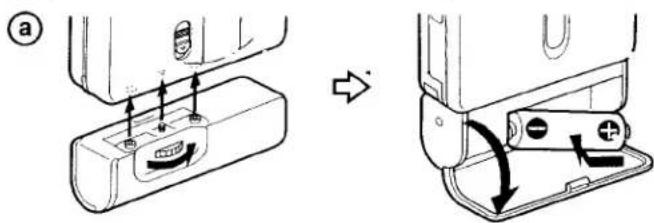
Dry Battery (see Fig. A-⑧)
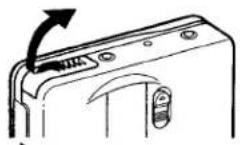
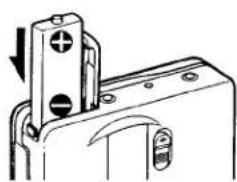
Attach the supplied battery case, and then insert one R6 (size AA) battery with correct polarity.
Note
- For maximum performance we recommend that you use a Sony alkaline battery.
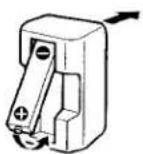
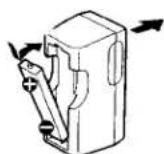
Rechargeable Battery (see Fig. A-①)
1 Insert the supplied rechargeable battery (NC-6WM) into the charger with correct polarity.
2 Plug in the charger to the house current (mains).
U.K., Australian, and Hong Kong model: Full charging takes about 3.5 hours.
U.S.A., Canadian, European Continent, and Arabian model: Full charging takes about 2.5 hours.
Korean model: The full charging time depends on the voltage of your mains.
110 V: 10 hours 220 V: 2.5 hours
Other models: The full charging time depends on the voltage of your mains.
120 V: 10 hours
220-240 V: 2.5 hours
If the plug does not fit to your mains, attach the supplied AC plug adaptor (Excluding Chinese model).
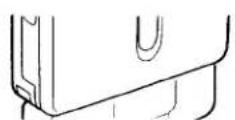
3 Insert the fully charged battery into the rechargeable battery compartment (see Fig. A-©).
You can charge the battery about 300 times.
When to replace/charge the battery
Replace or charge the battery when "☐" flashes in the display.
The battery remainder mark has 3 steps to show the remaining battery power.
| Display | Condition |
| There is enough battery power. | |
| The battery power is decreasing. | |
| The battery is exhausted. Replace it with a new battery. |
Notes
- When you insert a charged battery, the battery remainder mark may show "☐" even if it is not fully charged.
- The battery remainder mark may temporarily show a lower level during fast forwarding or rewinding or use in extremely low temperatures.
Battery life
(Approx. hours)
(EIAJ*)
| Sony alkaline LR6 (SG) | |
| Tape playback | 31.5 |
| Radio reception | 32 |
| MIC recording | 10 |
| Radio recording | 6.5 |
Rechargeable battery (NC-6WM)
| Tape playback | 8.5 |
| Radio reception | 10 |
| MIC recording* | 4 |
| Radio recording | 3 |
Sony alkaline LR6 (SG) and Rechargeable NC-6WM
| Tape playback | 40 |
| Radio reception | 42 |
| MIC recording | 13 |
| Radio recording | 9 |
* Measured value by the standard of EIAJ (Electronic Industries Association of Japan). (Using a Sony HF series cassette tape)
Note
• The battery life may shorten depending on the operation of the unit.
House Current
(see Fig. A-①)
Remove the rechargeable battery if inserted. Attach the battery case and connect the AC power adaptor AC-E15HG (not supplied) to the DC IN 1.5 V jack of the battery case and to the wall outlet.
Do not use any other AC power adaptor.
Specifications for AC-E15HG vary for each area. Check your local voltage and the polarity of the plug before purchasing.
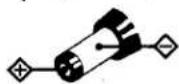
Polarity of the plug
Connecting the Headphones/
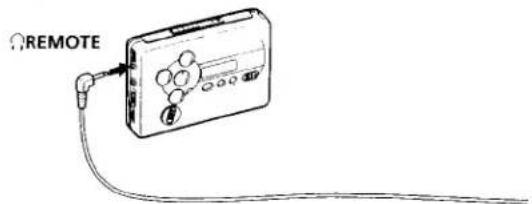
Earphones (see Fig. B)
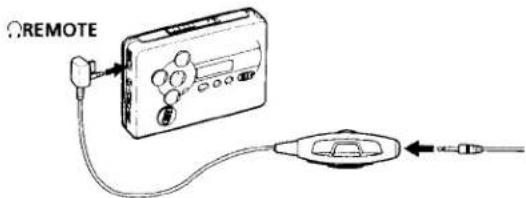
1 Connect the stereo mini plug finally to the remote control (excluding U.S.A. model).
2 Connect the headphones/earphones to ⓃREMOTE.
3 Wear the "L" marked side to the left ear and the "R" marked side to the right ear. If the earphones do not fit to your ears or the sound is unbalanced, adjust the earphones to fit to your ears firmly.
▶Operating the Walkman
Playing a Tape (see Fig. C)
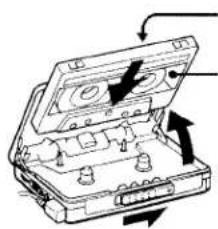
1 Open the cassette holder and insert a cassette.
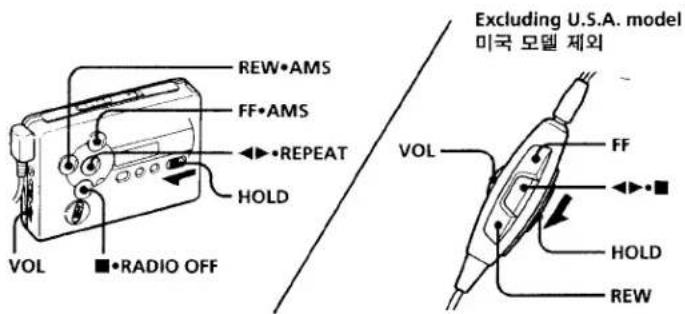
2 Make sure the HOLD function is turned off. If it is on, slide the HOLD switch to turn it off.
3 Press ◀▶•REPEAT on the main unit, or if using the remote control (excluding U.S.A. model), press ◀▶ (play)
- ■ (stop).
Adjust the volume with VOL.
When adjusting the volume on the main unit (excluding U.S.A. model) Set the VOL control on the remote control at maximum.
When adjusting the volume on the remote control (excluding U.S.A. model)
Set the VOL control on the main unit to around 6.
Note on the cassette holder
When opening the cassette holder on the main unit, make sure the tape is stopped, then slide the OPEN switch. If the cassette holder is opened when the tape is running, the tape may loosen and be damaged.
Operation on the main unit
| To | Press |
| Play the other side | ◀▶•REPEAT during playback |
| Stop playback | ■ (stop)•RADIO OFF |
| Fast forward | FF•AMS during stop |
| Rewind | REW•AMS during stop |
Operation on the remote control (excluding U.S.A. model)
| To | Press |
| Play the other side | ◀▶▶■ for 2 seconds or more during playback |
| Stop playback | ◀▶▶■ once during playback |
| Fast forward* | FF during stop |
| Rewind* | REW during stop |
* If ◀▶●■ on the remote control is pressed during fast forward or rewind, the Walkman switches to playback.
Other tape operations
On the remote control, press FF or REW (excluding U.S.A. model).
| To | Press |
| Play the next track/succeeding 9 tracks from the beginning (AMS*) | FF•AMS once/repeatedly during playback |
| Play the current track/previous 8 tracks from the beginning (AMS*) | REW•AMS once/repeatedly during playback |
| Play the other side from the beginning (Skip Reverse function) | FF•AMS for 2 seconds or more during stop |
| Play the same side from the beginning (Rewind Auto Play function) | REW•AMS for 2 seconds or more during stop |
* Automatic Music Sensor
Note on AMS
- The AMS function detects a blank of 4 seconds or longer between the tracks. If there is noise between the tracks, AMS may not recognize the blank and may not operate. Likewise, if there is a low-level segment within a track, AMS may recognize it as a blank space.
A-B Repeat
A-B Repeat plays back repeatedly any portion of the tape you specified. Specify by tagging the beginning (point A) and the end (point B) of the portion during playback.
On the main unit
1 Press ◀▶•REPEAT for 2 seconds or more during playback to tag point A. "A-" will flash in the display of the main unit.
2 Press ◀▶•REPEAT again to tag point B.
"A-B" will flash and the tape will be rewound to point A. Then "REP" appears in the display and the specified portion is played repeatedly.
On the remote control (excluding U.S.A. model)
1 Press ◀▶•■ twice quickly during playback to tag point A.
2 Press ◀▶•■ once more to tag point B.
The tape will be rewound to point A. Then the specified portion is played repeatedly.
To cancel the A-B Repeat playback
Press ◀▶•REPEAT on the main unit.
On the remote control, press ◀▶•■ (excluding U.S.A. model).
Notes
- You cannot specify a repeat portion to include both sides of the tape.
- You cannot specify a repeat portion of shorter than 2 seconds.
• After repeated operation, the actual portion that is played back may shift off somewhat from the exact portion specified with the tags due to tape slack.
• A-B Repeat will repeat 50 times before returning to normal playback if not canceled manually. - Do not use the A-B Repeat function with tapes longer than 90 minutes. If you do, the tape may be damaged.
Recording
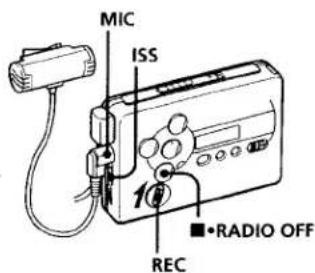
(see Fig. D-①)
You can record radio programs from the built-in radio, or record with the supplied microphone. In either case, use a new or fully charged battery.
Note
- If the record-protect tab is broken, you cannot record on that side.
1 Insert a normal (TYPE I) tape. To record on both sides Insert the cassette with the side to be first recorded on as the FWD (forward) side*.
* Make sure that "FWD" is displayed. If not, press and hold ■•RADIO OFF until "REV" changes to "FWD".
To record on one side only
Insert the cassette with the side
to be recorded on as the REV
(reverse) side**.
** Make sure that "REV" is displayed. If no, press and hold ■•RADIO OFF until "FWD" changes to "REV".
Note
- When the cassette holder is opened, the direction of the tape will be automatically set to "FWD".
2 Select a recording source: To record with the microphone
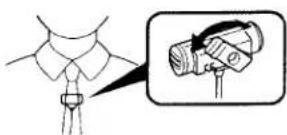
Connect the supplied microphone to the MIC (PLUG IN POWER) jack. You can attach the microphone to your clothes as illustrated (see Fig. D-6).
To record from the radio Tune in to the station you want to record (see "Listening to the Radio").
3 Slide REC.
"REC" appears in the display and recording starts after about two seconds. If you have started recording from the FWD side, recording will switch to reverse side automatically at the end of the FWD side.
To stop recording
Press ■•RADIO OFF (Excluding U.S.A. model: on the remote control, press ◀▶•■ to stop recording).
To reduce noise while
recording AM programs
Set the ISS (Interference Suppress Switch) to the position that reduces noise the most.
To monitor the recording sound
You can monitor the recording sound through headphones/earphones. Adjust monitoring level using VOL.
Note
- You may hear some noise in the monitor sound in the RV, MB, or GRV mode, but this does not affect recording.
Notes on recording
• The recording level is fixed.
• Sound emphasis (RV, MB, or GRV), AVLS and Dolby B NR settings do not affect recording.
- Actual recording will start about 2 seconds after you slide REC. Slide REC about 2 seconds before the moment you want to start recording, or you will miss the beginning of your recording.
- When recording on both sides, recording will not be made for about 10 seconds while the tape is switching sides.
- Do not use a CrO_2 (TYPE II) or metal (TYPE IV) tape. If you do, the sound may be distorted when you play back the tape, or the previous recording may not be erased completely.
- Do not connect or disconnect the headphones/earphones to/from ⓄREMOTE while recording from the radio. The recording condition may change abruptly, or noise may be recorded.
- To avoid noise interference, do not place it near a lamp cord or a fluorescent lamp when recording with the microphone.
- If a howling effect occurs, turn down the volume.
- All other operation cannot be made while recording. For other operation, stop recording first.
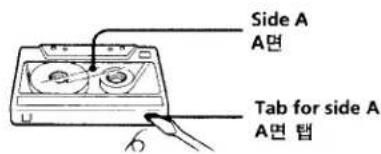
To prevent a tape from being accidentally recorded over (see Fig. D-©)
Break off the tabs from side A and/or B. To reuse the tape for recording, cover the tab hole with adhesive tape.
반국어
▶시작하기
전원 선택하기
건전지(그림 A-⑧ 참조)
제공된 건전지 캐이스를 부착한 다음 R6(AA 크기) 전지 한 개론 극을 맞추어 넣습니다.
주의
- 최대 성능을 위해서는 Sony 알칼라인 배터리(전지)를 사용할 것을 권합니다.
충전식 전지 (그림 A-⑥ 참조)
1 제공된 충전식 전지(NC-6WM)를 충전기에 극을 맞추어 넣습니다.
2 충전기의 풀러그를 옥내 전류(간선)에 끼お願い.
영국,호주 및 홍콩 모델:완전 충전하는데 약 3.5시간 걸립니다.
미국,캐나다,유럽 대륙 및 아 랍 모델:완전 충전하는데 약 2.5시간 걸립니다.
한국 모델:사용 간선의 전압에 따라 완전 충전 시간이 다릅니다.
110 V: 10시간 220 V: 2.5시간
기타 모델:사용 간선의 전압에 따라 완전 충전 시간이 다릅니다.
120V:10시간
220-240V:2.5시간
플러그가 사용 간선에 맞지 않으면,제공된 AC 플러그 어댑터(중국 모델 제외)를 부착합니다.
3 완전 충전된 전지를 충전식 전지 집에 넣습니다(그림 A-© 참조).
전지는 약 300회 정도 총전할 수 있습니다.
전지 교체/충전 시기
“□”가 표시화면에서 깜박이면 전지를 교체하거나 충전합니다.
전지 잔량 표시는 남아있는 전지의 전원을 3단계로 보여줍니다.
| 표시화면 | 상태 |
| 전지의 전원이 충분합니다. | |
| 전지의 전원이 감소되어 있습니다. | |
| 전지가 모두 소모되었습니다.새 전지로 교체하십시오. |
주의
-충전된 전지를 넣을 경우, 완전히 충전이 되지 않았더라도 전지 잔량 표시가 "☐"로 나타날 수 있습니다.
- 전지 잔량 표시가 빨러감기나 되감기 하는 동안 혹은 극저온에서 사용할 때 일시적으로 낮은 레벨을 보여줄 수 있습니다.
전지 수명
(약 시간
(EIA)
| Sony 알칼라인 LR6 (SG) | |
| 테이프 재생 | 31.5 |
| 라디오 수신 | 32 |
| MIC(마이크)녹음 | 10 |
| 라디오 녹음 | 6.5 |
| 층전식 전지 (NC-6WM) | |
| 테이프 재생 | 8.5 |
| 라디오 수신 | 10 |
| MIC(마이크)녹음 | 4 |
| 라디오 녹음 | 3 |
| Sony 알칼라인 LR6 (SG) 및충전식 NC-6WM | |
| 테이프 재생 | 40 |
| 라디오 수신 | 42 |
| MIC(마이크)녹음 | 13 |
| 라디오 녹음 | 9 |
- EIAJ(Electronic Industries Association of Japan: 일본 전기 공의 협회) 표준에 의한 측정치. (Sony H 시라즈 카세드 테이프 사용)
주의
- 전지 수명은 본 유닛의 작동에 따라 짧아질 수 있습니다.
옥내 전류(그림 A-⑥ 참조)
충전식 전지가 끼워져 있는 경우 읽 빠내십시오. 전지 케이스를 부착하고 AC 전원 어댑터 AC-E15HG(박도 구입)를 전지 케이스의 DC IN 1.5V 채과 벽의 콘센트에 연결합니다 다른 종류의 AC 전원 어댑터는 사용하지 마십시오.
AC-E15HG 사양은 지역에 따라 름니다. 구입하기 전에 사용 지역의 전압과 플러그의 극성(極性)을 확인 하십시오.
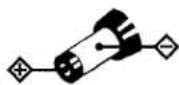
플러그의
극성
헤드폰/이어폰 연결하기 (그림 B 참조)
1 스테레오 미니 플러그를 리모컨에 짧 끼 Oh니다.(미국 모델 제외).
2 헤드폰/이어폰을 ⓀREMOTE에 연결합니다.
3 "L" 표시된 쪽을 위쪽 귀에 "R" 표시된 쪽을 오른쪽 귀에 연결합니다.
이어폰이 귀에 맞지 않거나 소리의 균형이 맞지 않으면, 이어폰을 조정하여 귀에 꽐 끼우도록 하십시오.
E
a
b
U.S.A. model
미국 모델
Other models
기타 모델
©
Excluding U.S.A. model
미국 모델 제외
d
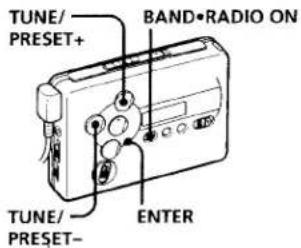
F
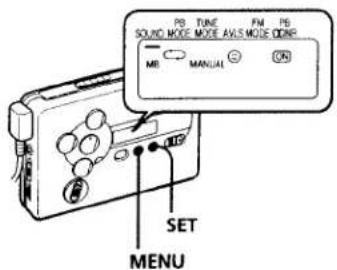
G
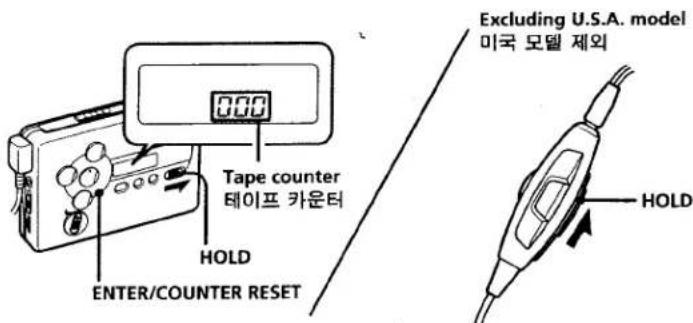
english
Listening to the Radio (see Fig. E-①)
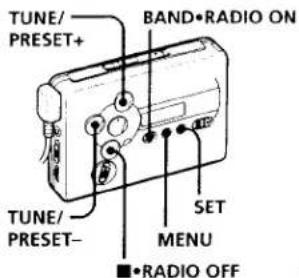
1 Press BAND • RADIO ON to turn on the radio.
2 Press BAND • RADIO ON repeatedly to select AM, FM1, or FM2.
3 Press MENU on the main unit repeatedly and set “_” (the cursor) in the display to TUNE MODE.
4 For manual tuning
① Press SET to choose MANUAL. ② Press TUNE/PRESET + or – repeatedly to tune in to the desired station. Keep pressing TUNE/PRESET + or – to scan for stations.
For preset tuning
① Press SET to choose PRESET.
② Press TUNE/PRESET + or - repeatedly to recall the desired preset station. To use preset tuning, preset stations first (see "Presetting Radio Stations").
To turn off the radio Press ■•RADIO OFF.
To improve the broadcast reception
- For AM: The Walkman has a built-in antenna. Reorient the Walkman horizontally to obtain optimum AM reception.
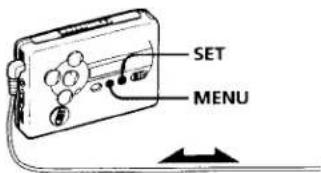
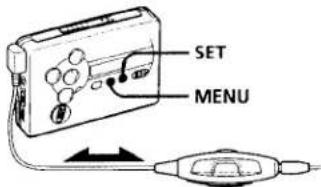
- For FM (see Fig. E-⑥): Extend the headphones cord, the aerial (U.S.A. model only). Extend the cord of the remote control, the aerial (excluding U.S.A. model). If the reception is still not good, press MENU repeatedly to set the cursor in the display to FM MODE. Then press SET to choose from "MONO" (monaural), "LOCAL" or none (stereo) for best reception.
To operate from the remote control (excluding U.S.A. model) (see Fig. E-©)
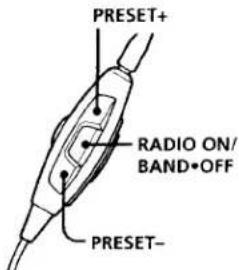
To turn on the radio, press RADIO ON/BAND•OFF for more than one second (while the tape is in stop mode only). To tune in or recall a preset station, press PRESET+ or -. To turn off the radio, press RADIO ON/BAND•OFF.
Presetting Radio Stations (see Fig. E-①)
Once you store your favorite stations in memory, you can play them easily. You can preset up to 32 stations —12 each for FM1 and FM2 and 8 for AM (for the JPn area*, up to 16 stations — 8 each for FM and AM).
* See "Receiving Stations Outside Your Country" (Excluding European, Saudi Arabian, and Chinese model).
Tuning in to and Storing Radio Stations Automatically (Auto-Memory Scanning function)
1 Press BAND • RADIO ON to turn on the radio.
2 Press BAND • RADIO ON repeatedly to select AM, FM1, or FM2.
3 Press ENTER until "A" appears in the display.
The Walkman starts searching and storing stations.
Then the preset number appears.
Note
- Do not remove the power sources until all the stations are stored.
Storing Radio Stations Manually (Manual- Memory function)
You can preset the stations in any order.
1 Press BAND • RADIO ON to turn on the radio.
2 Press BAND • RADIO ON repeatedly to select AM, FM1, or FM2.
3 Press ENTER.
The frequency digits will flash in the display.
4 Press TUNE/PRESET + or - repeatedly to tune in to the desired station and press ENTER.
The preset number will flash in the display.
5 Press TUNE/PRESET + or - repeatedly to select the desired preset number and press ENTER.
The station is preset to the number of your choice.
Notes
- If you cannot complete step 4 or 5 while the indications are flashing, repeat from step 3.
- If you preset a new station to the same preset number, the previously stored station will be erased.
To cancel the stored station Follow the procedure above and in step 4, instead of tuning in to a station, press and hold TUNE/PRESET + or - until "----" is displayed. Press ENTER while "----" is flashing. The preset number will flash in the display. Press TUNE/PRESET + or - repeatedly to select the preset number you want to cancel and press ENTER.
Receiving Stations Outside Your Country (Excluding European, Saudi Arabian, and Chinese model) (see Fig. E-①)
1 Press BAND • RADIO ON to turn on the radio.
2 Press ENTER.
The frequency digits will flash in the display.
3 Press and hold BAND • RADIO ON until "Fur"."IPn".
4 Press BAND • RADIO ON repeatedly to select "Eur", "JPn", or "USA" and press ENTER.
5 Tune in to and store stations as necessary following the procedure of "Listening to the Radio" and "Presetting Radio Stations".
Area indication and frequency range
| Area* | Frequency range | |
| FM (MHz) | AM(kHz) | |
| Eur | 87.5-108 | 531-1,602 |
| JPn | 76-90 | 531-1,710 |
| USA | 87.5-108 | 530-1,710 |
*Eur : European and other countries
JPn : Japan
USA: USA, Canada, and Central and South America
Using the Menu (see Fig. F)
Adjusting playback modes
To select playback direction mode
Press MENU repeatedly to set “_” (the cursor) in the display to PB MODE. Then press SET to select the desired mode.
| To play | Select |
| both sides repeatedly | |
| both sides once from the FWD side |
To play a tape recorded with Dolby\* NR system
Press MENU repeatedly to set the cursor in the display to PB ☐ NR (Dolby noise reduction). Then press SET to show "☐".
* Dolby noise reduction manufactured under license from Dolby
Laboratories Licensing Corporation.
"DOLBY" and the double-D symbol
□ are trademarks of Dolby
Laboratories Licensing Corporation.
Emphasizing Sound
1 Press MENU repeatedly to move “_” in the display to SOUND.
2 Press SET repeatedly to select the sound emphasis of your choice.
RV : Sound Revitalizer.
Emphasizes treble sound.
MB : Mega Bass.
Emphasizes bass sound
(moderate effect).
GRV : Groove.
Emphasizes bass sound
(strong effect).
no message : normal (no effect).
Note
- If the sound becomes distorted with the GRV effect, select the mode MB or no message.
Protecting Your Hearing (AVLS)
When you set the AVLS (Automatic Volume Limiter System) function to active, the maximum volume is kept down to protect your ears.
1 Press MENU repeatedly in the playback, stop or radio mode to set the cursor to AVLS in the display. Then press SET to show "©".
To cancel the AVLS function
Press SET so that "💡" disappears.
Note
- If the sound is distorted when you listen to the bass-boosted sound with the AVLS function, turn down the volume.
Note on the menu mode
- The menu setting (except for AVLS) is stored even after the battery is replaced.
Using Other Functions (see Fig. G)
To lock the controls
— Hold function
Slide HOLD switch on the main unit in the direction of the arrow to lock the controls of the main unit. To lock the controls on the remote control, slide the HOLD switch on the remote control in the direction of the arrow (excluding U.S.A. model).
To use the tape counter
The tape counter is displayed on the main unit during playback, recording, fast forward, rewind, and stop (except when the radio is turned on). The number will increase when playing back the FWD side, and decrease when playing back the REV side. To reset the counter to "000", press ENTER/COUNTER RESET.
Notes
• The tape counter may show some deviation.
• The tape counter will not be displayed when the cassette compartment is empty.
▶ Additional Information
Precautions
On rechargeable battery and charger
- Remove the charger unit from the wall outlet as soon as possible after the rechargeable battery has been charged. Overcharging may damage the rechargeable battery.
- The battery charger and the rechargeable battery may become warm during charging, but this is not a problem.
- Do not tear off the film on the rechargeable battery.
- Use only the supplied battery charger to charge the supplied rechargeable battery.
- Be sure not to short-circuit the battery. When you carry it with you, use the supplied carrying case. If you are not using the case, do not carry the battery with other metallic objects such as keys rings in your pocket.
- If the rechargeable battery is new or has not been used for a long time, it may not be charged completely until you use it several times.
- The nameplate indicating the operating voltage, power consumption, etc. is located on the bottom exterior of the battery charger.
On batteries
- Do not charge a dry battery.
- Do not carry the dry or rechargeable batteries with coins or other metallic objects. It can generate heat if the positive and negative terminals of the batteries are accidentally contacted by a metallic object.
- When you do not use the Walkman for a long time, remove the battery to avoid any damage caused by battery leakage and subsequent corrosion.
On the unit
- Do not drop the unit or give a shock to the unit, or it may cause a malfunction.
- Do not leave the unit in a location near heat sources, or in a place subject to direct sunlight, excessive dust or sand, moisture, rain, mechanical shock, or in a car with its windows closed.
- The LCD display may become hard to see or slow down when using the unit at high temperatures (above 40°C/104°F) or at low temperatures (below 0°C/32°F). At room temperature, the display will return to its normal operating condition.
- If the unit has not been used for long period of time, set it in the playback mode and warm it up for a few minutes before you start using again.
On tapes longer than 90 minutes
We do not recommend the use of tapes longer than 90 minutes except for a long continuous recording or playback. They are very thin and tend to be stretched easily.
On the remote control (excluding U.S.A. model)
On headphones/earphones Road safety
Do not use headphones/earphones while driving, cycling, or operating any motorized vehicle. It may create a traffic hazard and is illegal in some areas. It can also be potentially dangerous to play your headphones/earphones at high volume while walking, especially at pedestrian crossings.
You should exercise extreme caution or discontinue use in potentially hazardous situations.
Preventing hearing damage Do not use headphones/earphones at high volume. Hearing experts advise against continuous, loud and extended play. If you experience a ringing in your ears, reduce volume or discontinue use.
Caring for others
Keep the volume to a moderate level. This will allow you to hear outside sounds and to be considerate to the people around you.
Maintenance
To clean the tape head and path
Use the cleaning cassette CHK-1W (not supplied) for every 10 hours of use.
Note
- Use only the recommended cleaning cassette.
To clean the exterior
Use a soft cloth slightly moistened in water. Do not use alcohol, benzine or thinner.
Note
- Clean the battery case terminals (both inside and outside) periodically.
Troubleshooting
The sound drops out or comes with excessive noise.
- Clean the headphones/earphones and remote control plugs.
The unit does not operate at all.
- Charge the battery or replace the dry battery with a new one.
- HOLD is activated. Deactivate HOLD.
Tape operation is not possible.
- Insert a cassette tape.
The volume cannot be turned up.
• If AVLS is on, turn it off.
A beep sounds and recording is not possible when REC is slid.
- If the tab of the tape is broken off, cover the tab hole with adhesive tape.
The display and the operations are not normal.
- Remove the power sources for 15 seconds or more, and then set them again.
The radio and playback operates but recording is not possible.
- This condition may occur when the battery becomes weak.
Specifications
Radio section
Frequency range
| FM: 65-74/87.5-108 MHz (Eastern Europe) |
| 87.5-108 MHz (other countries) |
| AM:530-1,710 kHz (North, Central, and South America) |
| 531-1,602 kHz (other countries) |
Tape section
Frequency response
| (Dolby NR off) |
| Playback: 40-15,000 Hz |
| Recording/ playback: 100-8,000 Hz |
Output
| Headphones (○ REMOTE) jack |
| Load impedance 8-300 ohms |
Input
| Microphone (MIC) jack |
General
Power requirements
| 1.5 V |
| Rechargeable battery |
| One R6 (size AA) battery |
Dimensions (w/h/d)
| Approx. 108.4 x 77.7 x 23.8 mm(4 18 x 3 18 x 15 116 inches), incl.projecting parts and controls |
Mass
| Approx. 150 g (5.3 oz) |
| Approx. 215 g (7.6 oz) incl.rechargeable battery and acassette |
Supplied accessories
| Battery case (1) |
| Stereo earphones with remote control (1) (except for U.S.A. model) |
| Stereo headphones (1) (U.S.A. model only) |
Battery charger (1)
| AC plug adaptor (1) (except for European, Australian, Saudi Arabian, Chinese, Hong Kong, U.S.A., Canadian, and Korean model) |
| Rechargeable battery (NC-6WM, 1.2 V, 600 mAh, Ni-Cd) (I) |
| Rechargeable battery carrying case (1) |
Carrying pouch (1)
| Stereo microphone (1) |
Design and specifications are subject to change without notice.
라디오 듣기(그림 E-⑧ 참 조)
1 BAND • RADIO ON(대역 라디오 커짐)을 늘러 라디오를 칼니다.
2 BAND • RADIO ON을 반복해서 농러 AM. FM1이나 FM2를 선택합니다.
3 본체에서 MENU(메뉴)를 반복 해서 누르고 본체의 표시화면에 “_” (커서)를 TUNE MODE로 맞춤니다.
4 수동 튜닝
① SET(설정)를 눌러 MANUAL(수동)을 선택합니다.
② TUNE/PRESET +나 -를 반 복해서 놀러 원하는 방송국 에 틈을 맞춤니다. TUNE/PRESET +나 -를계속 들러 방송국을 검색합니다.
사전설정 튜닝
① SET를 눌러 PRESET를 선택 합니다.
② TUNE/PRESET +나 -를 반복해서 눌러 원하는 사전설정 방송국을 부릅니다. 사전설정 튜닝을 사용하려면, 우선 방송국을 사전설정하십시오 ("라디오 방송국 사전설정하기" 참조).
라디오를 끄려면
■•RADIO OFF(라디오 꺼짐)를 누릅니다.
방송 수신율 좋게 하려면
- AM: 워크맨에는 내장 안테나가 있습니다. 워크맨을 수평으로 이리저. 리 방향을 바꾸어 보아 최적의 AM 수신이 되도록 합니다.
- FM (그림 E⑥ 참조): 헤드폰 코드를 안테나로 영장합니다(미국 모델에 한함). 리모컨의 코드 안테나를 길게 영장합니다(미국 모델 제외). 수신이 그래도 좋지 않으면. MENU를 반복해서 눌러 표시화면의 커서를 FM MODE로 놓습니다. 그 다음, 가장 나은 수신을 위해 "MONO" (모노럴), "LOCAL" 시스테레오(아무 표시없음) 모드에서 선택하여 SET를 누릅니다.
리도론에서 작동하려면(미국 모델 제외)(그림 E-© 참조)
라디오를 켜려면. RADIO ON/ BAND•OFF률 1초 이상 누릅니다(테이프가 정지 모드에 있는 동안). 사전설정 방송국에 틀을 맞추거나 부르려면, PRESET+나 -를 누릅니다. 라디오를 끄려면. RADIO ON/ BAND•OFF률 누릅니다.
라디오 방송국 사전설정 하기 (그림 E-① 참조)
일단 원하는 방송국들을 메모리에 저장해 놓으면, 그것들을 쉽게 재생활할 수 있습니다. 방송국을 32개까지 — FM1 및 FM2에 각각 12개씩, AM에 8개(JPn 지역*에서는 16개까지 — FM 및 AM에 각 8개씩) — 사전설정할 수 있습니다.
* “국외 방송 수신하기” 참조(유럽, 사우디 아라비아 및 중국 모델 제외).
라디오 방송국을 자동으로 맞추고 저장하기 (자동-메모리 검색 기능)
1 BAND • RADIO ON을 눌러 라
디오름 캡니다.
2 BAND • RADIO ON을 반복해서 늘러 AM. FM1이나 FM2를 선택합니다.
3 표시화면에 "A"가 나타냥 때까지 ENTER를 누릅니다.
워크맨이 방송국 검색 및 서징을 시작합니다.
그다음에, 사전설정된 번호가 나타납니다.
주의
-모는 방송국이 저장될 때까지는 전위을 빼지 마십시오.
라디오 방송국을 수동으로 저장하기(수동 메모리 기능)
방송국을 어떤 순서로든 사전설정할 수 있습니다.
1 BAND • RADIO ON를 눌러 라
디오틀 캡니다.
2 BAND • RADIO ON를 반복해서 눌러 AM, FM1이나 FM2를 선택합니다.
3 ENTER를 누릅니다.
표시화면에 주파수 숫자가 깜박
일 것입니다.
4 TUNE/PRESET +나 -를 반복해서 눌러 원하는 방송국에 틨을 맞추고 ENTER를 누릅니다. 사전설정 변호가 표시화번에서 잠박일 것입니다.
5 TUNE/PRESET +나 를 반복해서 눌러 원하는 사전설정 번호를 선택하고 ENTER를 누릅니다.
방송국이 선택한 번호에 사전설정됩니다.
주의
• 표시등이 깜박이는 동안 4번 단계 혹은 5번 단계를 완료할 수 없으면, 3번 단계부터 반복합니다.
-새 방송국을 같은 사전설정 번호에
사진설정하게 되면, 이전에 저장되어
있던 방송국은 지위지게 됩니다.
저장된 방송국을 취소하려면
위의 절차를 따르고 4번 단계에서 방송국에 튜을 맞추는 대신 “----”이 화면에 표시될 때까지 TUNE/PRESET +나 -를 계속 누릅니다. “----”이 깁박이는 동안 ENTER를 누릅니다. 사전설정 번호가 표시화 면에서 깁박이게 될 것입니다. TUNE/PRESET +나 -를 반복해서 눌러 취소하기 원하는 시전설정 번호를 선택하고 ENTER를 누릅니다.
국외 방송 수신하기 (유럽, 사우디 아라비아 및 중국 모델 제외)
(그림 E-⑭ 참조)
1 BAND • RADIO ON을 눌러 라
디오를 캝니다.
2 ENTER를 누릅니다.
주파수 숫자가 표시화면에서 깜
박이게 될 것입니다.
3 "Eur". "JPn"이나 "USA"가 깜
박일 때까지 BAND • RADIO
ON을 계속 누릅니다.
4 BAND • RADIO ON를 반복, 눌러 "Eur", "JPn" 또는 "USA"를 선택하고 ENTER를 높들니
5 “라디오 듣기” 및 “라디오 방국 시전설정하기” 절차을 때 필요에 따라 방송국에 둔을 추고 저장합니다.
지역 표시 및 주파수 범위
| 지역* | 주파수 범위 FM (MHz) | AM(kHz) |
| Eur | 87.5-108 | 531-1,602 |
| JPn | 76-90 | 531-1,710 |
| USA | 87.5-108 | 530-1,710 |
*Eur:유럽 및 기타 국가
| JPn:일본 |
| USA:미국.캐나다.중미 및 납미 |
메뉴 사용하기
(그림 F 참조)
재생 모드 조정하기
재생 방향 모드룸 선택하려면
| MENU를 반복해서 눌러 표시화면어서 “_” (커서)를 PB MODE로 설정합니다. 그런 다음 SET를 눌러 원하는 모드를 선택합니다. |
| 재생하려면 | 선택 |
| 양면 반복 | |
| FWD면에서 양면을 한 번씩 |
Dolby(돌비)\* NR 시스템으로 녹음된 테이프를 재생하려면
MENU를 반복해서 늘러 표시화면에서 커서를 PB ☐ NR(돌비 잡음 감소)로 설정합니다. 그 다음에 SET를 늘러 “ON”가 나타나게 합니다.
* 돌비 잠유감쇄 장치는 돌비 라보라토리스 라이센싱 코오포레이션의 승인하에 제작됨. 돌비, DOLBY, 및 ☐는 돌비 라보라토리스 라이센싱 코오포레이션의 싱표들임.
음 강조하기
1 MENU를 반복해서 눌러 표시화 면에서 “_”를 SOUND로 이동 합니다.
2 SET를 반복해서 눌러 원하는 음
강조를 선택합니다.
RV:Sound Revitalizer(음 재생 기).
고음(高音)을 강조.
MB: Mega Bass
저음(低音)을 강조(일반 효과).
GRV: Groove.
저음을 강조(강한 효과)
아무 메시지 없음:정상(무효과).
주의
- GRV 효과시 소리가 일그러지게 되면. MB 모드 혹은 메시지 없음을 선택하십시오.
청각 보호하기 (AVLS)
AVLS(Automatic Volume Limiter System: 자동 유량 제한 시스템) 기능이 확성화되면. 최대 유량이 사용자의 귀를 보호할 정도로 낮춰집니다.
1 재생, 징지 혹은 라디오 모드에서 MENU를 반복해서 눌러 커서를 표시화면에서 AVLS로 설정합니다. 그 다음 SET를 눌러 “山区”가 나타나게 합니다.
AVLS 기능을 취소하려면
SET를 눌러 "©"가 사라지게 합니다.
주의
• AVLS 기능을 사용하여 저음이 강조된 음을 들을 때 소리가 일그러지면. 음량을 낮줍니다.
메뉴 모드에 대한 주의사항
- 메뉴 설정(AVLS 제외)은 전원이 교체된 후애라도 저장됩니다.
다른 기능 사용하기
(그림 G 참조)
컨트롤을 잠그려면
—Hold(보류) 기능
본체에서 HOLD 스위치를 화살표 방 향으로 밀어 본체의 컨트롤을 잡급 니다.
리모콘에서 컨트롤을 잠그려면. 리모콘에서 HOLD 스위치를 화살표 방향으로 믿니다(미국 모델 제외).
테이프 카운터를 사용하려면
데이프 카운터는 재생, 녹음, 빨리 감기, 되감기 및 정지 동안(라니오가 켜져 있는 경우 제외) 본채상에 화면 표시됩니다. FWD(정방향) 쪽을 재생할 때는 솟기가 증가하나! REV(역방향) 쪽을 재생할 때는 감소합니다.
카운터를 "000"에 재설정하려면. ENTER/COUNTER RESET를 누릅니다.
주의
-네이프 카운터는 약간의 편차를 보일 수 있습니다.
- 카새트실이 비어있으면 태이프 카을 더는 표시되지 않습니다.
▶추가 정보
예방 조치
충전식 전지와 충전기에 대하여
-충전식 전지가 충전된 후 가능한한 빨리 벽 콘센트에서 충전기 유닛을 뽑니다. 과충전은 충전식 전지를 손상시킬 수 있습니다.
- 전지 충전기 및 충전식 전지는 충전하는 동안 더워질 수 있으나. 이것은 문제가 되지 않습니다.
-충전식 전지에서 필름을 찢어내지 마십시오.
-제공된 충전식 전지를 충전하려면
제공된 전지 충전기만 사용해야 합니다.
- 전지가 누전되지 않도록 하십시오. 휴대시에는 제공된 운반 케이스를 사용하십시오. 케이스를 사용하지 않는 경우, 주머니에 열쇠 고리와 같은 다른 금속성 물체와 함께 가지고 다니지 마십시오.
- 총전식 전지가 새 것이거나 오랫동안 사용하지 않은 경우. 그것을 여러 번 사용할 때까지는 완전히 충전되지 않을 수 있습니다.
- 작동 전압, 전력 소비량 등을 표시하는 명판은 진지 충전기의 바닥 외부에 있습니다.
전지에 대하여
-건전지를 충전하지 마십시오
-건전자나 충전식 전지를 동전이나 다른 금속성 물체와 함께 가지고 다니지 마십시오. 전지의 양극 및 음극 단자에 금속 물체가 우연히 닿게 되면 열이 발생할 수 있습니다.
-오랫동안 워크맨을 사용하지 않는 경우, 전지 누설 및 이에 따른 부식으로 인한 손상을 피하려면 전지를 빼도록 하십시오.
본 유닛에 대하여
-본 유닛을 떨어뜨리거나 축격을 주
-지 마십시오. 이는 고장의 원인이
될 수 있습니다.
- 본 유닛을 열원과 가까운 곳이나 직사광선, 과도한 먼지나 모래, 습기, 비, 물리적 총격의 영향을 받기 쉽거나 창문이 닫힌 차안과 같은 곳에 두지 마십시오.
-고온(40℃ 이상)이나 저온(0℃)에서 본 유닛을 사용할 때는 LCD(액정) 화면이 보기 어렵거나 속도가 느려질 수 있습니다. 실온에서는 표시화면이 정상적인 작동 상태로 되돌아오게 될 것입니다.
- 본 유닛을 오랜 기간동안 사용하지 않은 경우, 이들 다시 사용하기 전에 재생 모드로 설정하고 몇 분간 워밍업시키십시오.
90분 이상 길이의 테이프에 대해 오랫동안 계속 녹음하거나 재생이 필요한 경우 외에는 90분 이상되는 테이프의 사용을 권하지 않습니다. 테이프는 매우 알아 쉽게 늘어나는 경향이 있습니다.
리모컨에 대해 (미국 모델 제외)
제공된 리모컨은 본 유닛에만 사용 하십시오.
헤드폰/이어폰에 대해
교통 안전
헤드폰/이어폰을 자동차 운전시, 시 이들을 달 때나 어떤 종류의 차이론 운전하면서 사용하지 마십시오. 교 동 사고을 잃으킬 수 있으며 일부 지 역에서는 불법입니다. 걸어가면서, 특히 횡단보도에서 음량을 높여 헤 드폰/이어폰으로 듣는 것도 사고의 위험이 있습니다.
사고가 우려되는 상황에서는 극도로 조심하거나 계속해서 사용하지 않도록 해야 합니다.
청각 손상의 방지
헤드폰/이어폰을 음량을 높여 사용 하지 마십시오. 청각 전문가는 계속 큰 소리로 오랫동안 듣지 않도록 조 언하고 있습니다. 귀에 올림 현상을 느끼게 되면. 음량을 줄이고 사용을 중지하십시오.
주위에 대한 배려
음량을 너무 크게 하지 않도록 하여 주십시오. 음량을 너무 크게 하면 주위의 소리가 들리지 않게 될 뿐만 아니라 주위 사람에게 폐를 끼치게 됩니다.
유지 관리
테이프 헤드 및 경로를 청소하려면
사용 매 10시간마다 청소용 카세트 CHK-1W(별도 구입)를 사용하십시오.
주의
-권장된 청소용 카세트만을 사용하십시오.
외부품 청소하려면
부드러운 형ぐ에 물을 가법계 직서 사용하십시오. 알코올. 벤진 또는 시너를 사용하지 마십시오.
주의
-전지 케이스 단자(안쪽 및 바깥쪽 모두)를 정기적으로 청소하십시오.
문제 해결
소리가 나지 않거나 지나천 잡음이 납니다.
-해드폰/이어폰과 리모콘의 플러그를 깨끗이 청소합니다.
본 유닛이 전혀 작동하지 않습니다.
-전지를 충전하거나 건전지를 새 것으로 교체합니다.
• HOLD(보류) 기능이 활성화되어 있습니다. HOLD를 비활성화시킵니다.
테이프 작동이 되지 않습니다.
-카세트 테이프를 넣습니다
음량이 높여지지 않습니다.
•AVLS가 켜져있는 경우. 그것을 끝니다.
REC 스위치를 밀었을 때 "뼈"하는 신호음이 둘리고 녹음이 되지 않습니다.
-테이프의 탱이 떨어져 나간 경우, 탱 구멍을 접착 테이프로 덧습니다.
표시화면과 작동이 정상적으로 되지 않습니다.
-전원을 15초 이상 했다가 다시 연결합니다.
라디오와 재생이 작동되나 녹음이 되지 않습니다.
-이러한 상태는 전지가 약해졌을 때 생길 수 있습니다. 전지를 교체하거나 초저하니다
제품 사양
라디오 부분
주파수 범위
FM: 65-74/87.5-108 MHz (동부 업)
87.5-108 MHz(기타 국가)
AM:530-1,710 kHz (북미. 중미 남미)
531-1,602 kHz(기타 국가)
테이프 부분
주파수 응답
(Dolby NR 과)
재생:40-15,000Hz
녹음/재생:100-8,000Hz
층력
헤드폰(Ω REMOTE)석
부하 임피던스 8-300Ω
입력
마이크(MIC)직
일반
전원 요구사항
1.5 V
충전식 전지
R6(AA크기)전지한개
규격(w/h/d)
108.4×77.7×23.8mm
동층부 및 컨트볼 포함
중량
150g
약 215 g 충전식 진지 및 카세트
제공 부속품
전지 캐이스(1)
리모컨이 달린 스테레오 이이폰 (1 (미국 모델 제외)
스테레오 헤드폰 (1) (미국 모델 등용)
전지 충전기(1)
AC 플러그 어댑터 (1) (유럽, 호주
사우디 이라비아, 중국, 홍콩, Ⅱ 국, 캐나다 및 한국 모델 제외)
중전식 전지 (NC-6WM, 1.2 V 600 mAh, Ni-Cd) (1)
충전식 전지 운반 케이스(1)
운반용 주머니(1)
스테레오 마이크(1)
설계 및 사양은 통보없이 변경될 수 있습니다.
테이프 재생하기
(그림 C 참조)
1 카세트 훔더를 열고 카세트를 넣습니다.
2 HOLD(보류) 기능이 꺼져 있는지 확인합니다. 겨져 있으면. HOLD 스위치를 밀어 끄도록 하십시오.
3 본체에서 ◀▶▶▶▶▶▶▶▶▶▶▶▶▶▶▶▶▶▶▶▶▶▶▶▶▶▶▶▶▶▶▶▶▶▶▶▶▶▶▶▶▶▶▶▶▶▶▶▶▶▶▶▶▶▶▶▶▶▶▶▶▶▶▶▶▶▶▶▶▶▶▶▶▶▶▶▶▶▶▶▶▶▶▶▶▶▶▶▶▶▶▶▶▶▶▶▶▶▶▶▶>
본체에서 음량을 조절할 경우 (미국 모델 제외)
리모컨의 VOL 컨트롤을 최대로 놓습니다.
리모컨에서 음량을 조절할 경우 (미국 모델 제외)
본치의 VOL 컨트롤을 6 정도로 맞ります. 다..
카세트 흡더에 대한 주의사항
본체에서 카세트 흘더를 열 때는, 테이프가 정지되어 있는지 확인한 다음, OPEN 스위치를 믹니다.
테이프가 돌아가고 있을 때 카세트 훌 더가 열려있게 되면.테이프가 느슨해 져서 손상을 입기 접습니다.
본체에서의 작동
| 목적 | 누름 버튼 |
| 만대면 재생 | 재생중 ◀▶•REPEAT |
| 재생 정지 | ■(정지)•RADIO OFF |
| 빨기 감기 | 정지중 FF•AMS |
| 되감기 | 정지중 REW•AMS |
리모컨에서의 작동 (미국 모델 제외)
| 목적 | 누름 버튼 |
| 반대면 재생 | 재생중 ◀▶●■를2초 이상 누릅니다. - |
| 재생 정지 | 재생중 ◀▶●■를한 번 누릅니다. |
| 빨리 감기* | 정지중 FF |
| 퇴감기* | 정지중 REW |
* 빨리 감기나 되감기중 리모콘에서 ◀▶●■를 누르면, 워크맨은 재생으로 전환됩니다.
리모콘에서, FF나 REW를 누르십시오(미국 모델 제외).
| 목적 | 누름 버튼 |
| 다음 트랙 재생/처음부터 9 트랙을연속 재생(AMS*) | 재생중 FF•AMS를 한 번/반복하여 누름 |
| 현재 트랙 재생/처음부터 이전8 트랙을 재생(AMS*) | 재생중 REW•AMS를 한 번/반복하여누름 |
| 처음부터 반대면을 재생(스킷 리버스 기능) | 정지중 FF•AMS를 2초 이상 |
| 처음부터 같은 면을 재생(자동 되감기 재생기능) | 정지증 REW•AMS를 2초 이상 |
* Automatic Music Sensor(자동 음악 센서)
AMS에 대한 주의사항
- AMS 기능은 트랙 사이 4초 이상의 공백을 담지합니다. 트랙 사이에 잡음이 있으면, AMS는 공백을 인식하지 못하고 작동하지 않을 수 있습니다. 마찬가지로, 트랙 내에 저례벨의 세 그먼트가 있으면, AMS는 그것을 공백으로 인식할 수도 있습니다
A-B 반복
A-B Repeat(반복)는 특별히 지정한 테이프 부분을 반복해서 재생합니다. 재생중 처음 부분(A 지접)과 그 부분의 끝부분(B 지접)을 태그를 붙여 지정합니다.
본체에서
1 재생중 ◄▶•REPEAT를 2조 이상 눌러 A 지점에 태그를 붙입니다.
본체의 표시화면에서 "A-"가 감박이게 된 것입니다.
2 ▶REPEAT를 다시 늘러 B 시점에 태그를 붙입니다.
“A-B”가 감박이고 테이프가 A 지점으로 되감기게 될 것입니다. 그 다음, 표사화면에 “REP”가 나타나고 지정된 부분이 반복해서 재생됩니다.
리모컨에서(미국 모델 제외)
1 재생중 ◀▶•■를 두 번 빠르게 눌러 A 지점에 태그를 붙입니다.
2 ◀▶●■를 한 번 더 툴러 B 지점
에 태그를 붙입니다.
테이프가 A 지점으로 되감기계
될 것입니다.
그 다음, 지정된 부분이 반복해
서 재생됩니다.
A-B 반복 재생을 취소하려면
본체에서 ◀▶●REPEAT를 누릅니다. 리모콘에서, ◀▶●■ 를 누릅니다(미국 모델 제외).
- 레이프의 양면을 포함한 반복 지정을 할 수 없습니다.
•2초 이하로 반복 지정을 할 수 없습니다 - 반복 작동후. 재생된 실제 부분은 태이프 슬렉으로 인해 태그로 지정된 정확한 부위로부터 약간 이동될 수 있습니다.
- A-B 반복은 수동으로 취소하지 않으면 정상 재생으로 되돌아가기 전에 50회 반복될 것입니다.
- 90분 이상 되는 테이프로는 A-B 반복 기능을 사용하지 마십시오. 사용하게 되면, 테이프가 손상을 입을 수 있습니다.
녹음하기
(그림 D-① 참조)
내장 라디오로부터 라디오 프로그램 이나 또는 제공된 마이크를 가지고 녹음할 수 있습니다. 어떤 경우이든, 새 전지나 완전히 충전된 전지를 사용하십시오.
주의
• 녹음 보호 탐이 파손되는 경우. 그 면에는 녹음을 할 수 없습니다.
1 정상(TYPEI) 데이프를 넣으십 사오.
양면을 녹음하려면
첫 번째로 녹음될 면을 FWD(정방향)*으로 하여 카세트를 넣으십시오.
- "FWD"가 표시되는지 확인하십시오, 표시되지 않으면, "REV"가 "FWD"로 바릴 데까지 ■•RADIO OFF를 계속 누릅니다.
한 족 면만 녹음하려면
녹음될 면을 REV(역방향)**으로 하여 카세트를 넣으십시오.
** "REV"가 표시되는지 확인하십시오. 표시되지 않으면, "FWD"가 "REV"로 바탕 때까지 ■•RADIO OFF를 계속 누릅니다.
주의
- 가세트 홀더가 열려져 있으면, 테이프의 방향은 자동으로 "FWD"로 맞춰집니다.
2 녹음원을 선택합니다:
마이크를 이용하여 녹음하려면
제공된 바이크를 MIC (PLUG IN POWER) 책에 연결합니다.
그림에 보이는 예처럼 마이크를 사용자의 옷에 부착할 수 있습니다.(그림 D-⑥ 참조).
리디오로부터 녹음하려면
녹음하기 원하는 방송국에 튼을 맞춤니다(“라디오 듣기”참조).
3 REC를 믿니다.
"REC"가 표시화면에 나타나고 약 2초 후에 녹음이 시작됩니다. FWD(정방향) 쪽에서 녹음을 시작했다면. FWD쪽의 끝에서 녹음이 자동으로 역방향 쪽으로 전환될 것입니다.
녹음을 멈추려면
■•RADIO OFF(라디오 꺼짐)를 누 류니다(미국 모델 제외: 리모콘에서,
◀▶•■률 눌러 녹음을 정지합니다).
응울 감소시키려면
ISS(Interference Suppress Switch: 간 십 억제 스위치)들 잡음을 최대로 감 소시키는 위치에 놓습니다.
녹음되는 음을 모니터하려면
헤드폰/이어폰을 통해 녹음되는 음의 상태를 모니터할 수 있습니다. VOL을 사용하여 모니터 레벨을 조정합니다.
주의
• RV, MB나 GRV모드에서 모니터 음에 일부 잡음이 들릴 수 있지만. 이것은 녹음에 영향을 미치지 않습니다.
녹음에 대한 주의사항
• 녹음 레벨이 고정되어 있습니다.
• 음 강조(RV, MB, 또는 GRV), AVLS 및 Dolby(돌비)B NR 설정은 녹음에 영향을 미치지 않습니다.
- REC 스위치를 민 후 약 2초 후 실제 녹음이 시작됩니다. 녹음을 시작하기 원하는 순간 약 2초 전에 REC 스위치를 링니다. 그렇지 않으면 원하는 녹음의 시작 부분을 놓칠 수 있습니다.
•양면을 녹음할 때는 테이프가 다른 면으로 전환되는 약 10초 동안 녹음이 되지 않을 것입니다.
- CrO₂(크롬)(TYPE II) 테이프나 금속(TYPE IV) 테이프를 사용하지 마십시오. 사용하게 되면, 테이프를 재생할 때 소리가 일그러지거나 이전에 녹음한 것이 완전히 지휘지지 않을 수 있습니다.
- 라디오로부터 녹음하는 동안 채드폰/이어폰을 ⓊREMOTE로/에서 연결하거나 뼐지 마십시오. 녹음 상태가 갑자기 바뀌거나 잡음이 녹음될 수 있습니다.
• 잡음 간섭을 피하려면, 마이크로 녹음시 랼프 코드나 형광등 랼프 가까 이에 누지 마십시오.
•PINGYIN이 나면, 음량을 낮추십시오
• 녹음하는 동안에는 모든 다른 작동들이 이뤄지지 않습니다. 다른 작동을 하려면, 우선 녹음을 정지하도록 하십시오.
테이프가 뜻하지 않게 녹음이 끝 나는 것을 방지하려면 (그림 D- © 참조)
A면 및/또는 B면에서 탱을 때어내십시오. 테이프를 녹음에 재사용하려면, 탱구멍을 접작 테이프로 씩웁니다.
▶워크맨 작동하기
테이프 재생하기
(그림 C 참조)
1 카세트 흘더를 열고 카세트를 넣습니다.
2 HOLD(보류) 기능이 끼져 있는
지 확인합니다. 켜져 있으면.
HOLD 스위치를 밀어 꼬도록 하
십시오.
3 본체에서 ◀▶●REPEAT를 누르 거나, 리모콘을 사용하는 경우 (미국 모델 제외) ◀▶(재생)●■ (징지)를 누릅니다.
VOL로 음량을 조절합니다.
본체에서 음량을 조절할 경우 (미국 모델 제외)
리모컨의 VOL 컨트롤을 최대로 놓습니다.
리모컨에서 음량을 조절할 경우 (미국 모델 제외)
본제의 VOL 컨트롤을 6 정도로 맞춤니다.
카세트 흘더에 대한 주의사항
본체에서 카세트 홀더를 열 때는, 테이프가 정지되어 있는지 확인한 다음, OPEN 스위치를 믿니다.
네이프가 돌아가고 있을 때 카세드 흩 더가 열려있게 되면.테이프가 느슨해 져서 손상을 입기 쉽습니다.
본체에서의 작동
| 목적 | 누름 버튼 |
| 반대면 재생 | 재생중 ◀▶●REPEAT |
| 재생 징지 | ■(정지)●RADIO OFF |
| 빨기 감기 | 정지중 FF●AMS |
| 되감기 | 정지중 REW●AMS |
리모컨에서의 작동(미국 모델 제외)
| 목적 | 노름 버튼 |
| 반대면 재생 | 재생종 ◀▶▪■를 2초 이상 누릅니다. |
| 재생 징지 | 재생종 ◀▶▪■를 한 번 누릅니다. |
| 빨리 감기* | 정지증 FF |
| 되감기* | 정지증 REW |
* 딸리 감기나 외감기중 리모콘에서 ◀▶●■를 누르면. 워크맨은 재생으로 전환됩니다.
기타 테이프 작동
리모콘에서,FF나 REW를 누르십시오(미국 모델 제외).
| 목적 | 누름 버튼 |
| 다음 트래 재생/처음부터 9 트래을연속 재생(AMS*) | 재생중 FF•AMS를 한 번/반복하여 누름 |
| 현재 트랙 재생/처음부터 이전8 트랙을 재생 →(AMS*) | 재생중 REW•AMS를 한 번/반복하여누름 |
| 처음부터 반대면을 재생(스킹 리버스 기능) | 정지중 FF●AMS를 2초 이상 |
| 처음부터 같은 면을 재생(자동 되감기 재생기능) | 정지증 REW•AMS를 2초 이상 |
* Automatic Music Sensor(자동 음악 센서)
AMS에 대한 주의사항
- AMS 기능은 트랙 사이 4초 이상의 공백을 탐지합니다. 트랙 사이에 잡음이 있으면, AMS는 공백을 인식하지 못하고 작동하지 않을 수 있습니다. 마찬가지로, 트랙 내에 저래벨의 새 그먼트가 있으면, AMS는 그것을 공백으로 인식할 수도 있습니다.
A-B 반복
A-B Repeat(반복)는 특별히 지정한 데이프 부분을 반복해서 재생합니다. 재생중 처음 부분(A 지점)과 그 부분의 곧부분(B 지점)을 대그를 붙여 지정합니다.
본체에서
1 재생증 ◀▶●REPEAT를 2초 이
. 상 눌러 A 지점에 태그들 붙입니다.
본체의 표시화면에서 "A-"가 감
바이게 될 것입니다.
2 ◀▶▶REPEAT를 다시 눈러 B 지점에 태그를 붙입니다.
“A-B”가 감박이고 테이프가 A 지점으로 되감기게 될 것입니다. 그 다음, 표시화면에 “REP”가 나타나고 지정된 부분이 반복해서 재생됩니다.
리모컨에서(미국 모델 제외)
1 재생중 ◀▶●■를 두 번 빠르게 둘러 A 지점에 태그를 붙입니다.
2 ◀▶●■를 한 번 더 눌러 B 지점
에 태그를 붙입니다.
테이프가 A 지점으로 되감기계될 것입니다.
그 다음,지정된 부분이 반복해 서 재생됩니다.
A-B 반복 재생을 취소하려면
본체에서 ◀▶●REPEAT를 누릅니다. 리모콘에서, ◀▶●■ 를 누릅니다(미국 모델 제와).
주의
- 데이프의 양면을 포함한 반복 지정을 할 수 없습니다.
-2초 이하로 반복 지정을 할 수 없습니다. - 반복 작동후. 재생된 실제 부분은 태이프 슬래으로 인해 태그로 지정된 정확한 부위로부터 약간 이동될 수 있습니다.
- A-B 반복은 수동으로 취소하지 않으면 정상 채생으로 되돌아가기 전에 50회 반복될 것입니다.
- 90분 이상 되는 테이프로는 A-B 반복 기능을 사용하지 마십시오. 사용하게 되면, 테이프가 손상을 입을 수 있습니다.
녹음하기
(그림 D-⑨ 참조)
내장 라디오로부터 라디오 프로그램 이나 또는 제공된 마이크를 가지고 녹음할 수 있습니다. 어떤 경우이든. 새 전지나 완전히 충전된 전지를 사용하십시오.
주의
- 녹음 보호 탐이 파손되는 경우, 그 떼에는 녹음을 할 수 없습니다.
1 정상(TYPE I) 태이프를 넣으심 시오.
양면을 녹음하려면
첫 번째로 녹음될 면을 FWD(정방향)*으로 하여 카세트를 넣으십시오.
- "FWD"가 표시되는지 확인하십시오. 표시되지 않으면, "REV"가 "FWD"로 바 Perl 때까지
■•RADIO OFF를 계속 누릅니다.
한 족 면만 녹음하려면
녹음될 면을 REV(역방향)**으로
하여 카세트를 넣으십시오.
** "REV"가 표시되는지 확인하십시오. 표시되지 않으면, "FWD"가 "REV"로 바 Joel 때까지 ■●RADIO OFF를 계속 누릅니다.
주의
- 카세트 흘더가 열려져 있으면, 테이프의 방향은 자동으로 "FWD"로 맞춰집니다.
2 녹음원을 선택합니다:
마이크를 이용하여 녹음하려면
제공된 마이크를 MIC (PLUG IN POWER) 책에 연결합니다.
그림에 보이는 예처럼 마이크를 사용자의 옷에 부착할 수 있습니다.(그림 D-⑥ 참조).
라디오로부터 녹음하려면
녹음하기 원하는 방송국에 둔을 맛줍니다(“라디오 듣기”참조).
3 REC를 맥니다
"REC"가 표시화면에 나타나고 약 2초 후에 녹음이 시작됩니다. FWD(정방향) 쪽에서 녹음을 시작했다면. FWD쪽의 끝에서 녹음이 자동으로 역방향 쪽으로 전환될 것입니다.
녹음을 멈추러면
■•RADIO OFF(라디오 꺼짐)를 누 류니다(미국 모델 제외:리모콘에서,
◄►●■를 눌러 녹음을 정지합니다).
AM 프로그램을 녹음하는 동안 잡 음을 감소시키려면
ISS(Interference Suppress Switch: 간섭 억제 스위치)를 잡음을 최대로 감소시키는 위치에 놓습니다.
녹음되는 음을 모니터하려면
헤드폰/이어폰을 통해 녹옵되는 음의 상태를 모니터할 수 있습니다. VOL을 사용하여 모니터 레벨을 조정합니다.
주의
• RV, MB나 GRV모드에서 모니터 음에 일부 잠음이 툴릴 수 있지만, 이것은 녹음에 영향을 미치지 않습니다.
녹음에 대한 주의사항
•녹음 레벨이 고정되어 있습니다
• 음 강조(RV, MB, 또는 GRV), AVLS 및 Dolby(돌비)B NR 설정은 녹음에 영향을 미치지 않습니다.
- REC 스위치를 민 후 약 2초 후 실제 녹음이 시작됩니다. 녹음을 시작하기 원하는 순간 약 2초 전에 REC 스위치를 말니다. 그렇지 않으면 원하는 녹음의 시작 부분을 놓칠 수 있습니다.
•양면을 녹음할 때는 테이프가 다른 면으로 진환되는 약 10초 동안 녹음 이 되지 않을 것입니다.
- CrO₂(크롬)(TYPE II) 테이프나 금속(TYPE IV) 테이프를 사용하지 마십시오. 사용하게 되면, 테이프를 재생할 때 소리가 일그려지거나 이전에 녹음한 것이 완전히 지워지지 않을 수 있습니다.
- 라디오로부터 녹음하는 동안 헤드폰/이어폰을 ⚠REMOTE로/에서 연결하거나 빼지 마십시오. 녹음 상태가 감자기 바뀌거나 잡음이 녹음될 수 있습니다.
• 잡읍 간섭을 피하려면, 마이크로 녹음시 램프 코드나 청광등 램프 가까 이에 두지 마십시오.
• Ping음이 나면, 음량을 낮추십시오
- 녹음하는 농안에는 모든 다른 작동들이 이뤄지지 않습니다. 다른 작동을 하려면, 우선 녹음을 정지하도록 하십시오.
테이프가 뜻하지 않게 녹음이 끝 나는 것을 방지하려면 (그림 D- © 참조)
A면 빛/또는 B면에서 탱을 메어내십시오. 테이프를 녹음에 재사용하려면, 탱구멍을 접착 테이프로 씨 Oh니다.