S15WC18 - Chargeur pour appareil mobile Sandstrøm - Gratis brugsanvisning og manual
Find enhedens vejledning gratis S15WC18 Sandstrøm i PDF-format.


Brugerspørgsmål om S15WC18 Sandstrøm
0 spørgsmål om dette apparat. Besvar dem du kender, eller stil dit eget.
Stil et nyt spørgsmål om dette apparat
Download vejledningen til din Chargeur pour appareil mobile i PDF-format gratis! Find din vejledning S15WC18 - Sandstrøm og tag din elektroniske enhed tilbage i hånden. På denne side er alle dokumenter nødvendige for brugen af din enhed offentliggjort. S15WC18 af mærket Sandstrøm.
BRUGSANVISNING S15WC18 Sandstrøm
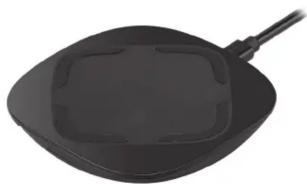
Sandstrøm 15W Universal Wireless Charger
Instruction Manual
S15WC18
natural_image
Black frying pan with a square lid and handle, isolated on white background (no text or symbols)
Safety Warnings
- Do not drop, tamper, disassemble or attempt to repair the unit by yourself.
- Do not immerse it in water or expose it to wet conditions.
- Do not expose it to fire or any heat source.
- Do not dispose the unit in your household waste.
- Before charging, please refer to the user's manual of your specific device for manufacture's required charging amperage and determine the appropriate charging cable for your device.
- Always insert the USB device in the correct direction. Failure to do so may result in damage to the USB device and this unit.
- Only use with products designed to be powered or charged via a USB socket.
- Do not use with a damaged USB charging cable as it can cause overheating and damage to your device.
While in use
- Unwind the cable to its full length.
- Never wrap the cable around the unit, or coil it together or leave it tangled. Doing so may result to product damage and related hazards.
Specifications
| Power Supplies 1. Input:5V 2.0A, == Output:5W (max.)2. Input: 12V=2.0A, Output: 15W (max.) | |
| Charging Distance 5 mm (max.) | |
| Frequency Band(s) 112.4 - 186.6 KHz | |
| Max. Radio Frequency Power Transmitted | -4 dBuA/m @10m distance |
| Dimension (L x W x H) 86 x 86 x 12 mm | |
| Net Weight 120 g | |
Features and specifications are subject to change without prior notice.
For general information about this appliance and handy hints and tips, please visit: www.TeamKnowhow.com/discover or call 0344 561 1234 Team Knowhow Help with all life's kit*
Partmaster.co.uk Visit Partmaster.co.uk today for the easiest way to buy electrical spares and accessories. With over 1 million spares and accessories available we can deliver direct to your door the very next day. Visit www.partmaster.co.uk or call 0344 800 3456 (UK customers only). Calls charged at National Rate.
The symbol on the product or its packaging indicates that this product must not be disposed of with your other household waste. Instead, it is your responsibility to dispose of your waste equipment by handling it over to a designated collection point for the recycling of waste electrical and electronic equipment. The separate collection and recycling of your waste equipment at the time of disposal will help conserve natural resources and ensure that it is recycled in a manner that protects human health and the environment.
For more information about where you can drop off your waste for recycling, please contact your local authority, or where you purchased your product.
All trademarks are the property of their respective owners and all rights are acknowledged.
DSG Retail Ltd. (co. no. 504877) 1 Portal Way, London, W3 6RS, UK
IB-S15WC18-180606V2
Thank you for purchasing your new
We recommend that you spend some time reading this instruction manual in order that you fully understand all the operational features it offers. You will also find some hints and tips to help you resolve any issues.
Read all the safety instructions carefully before use and keep this instruction manual for future reference.
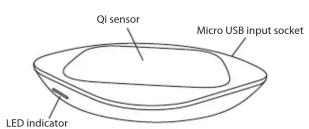
Product Overview
Charging Your Digital Devices
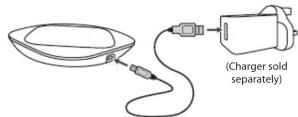
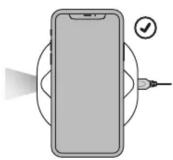
- Connect the USB charging cable to the product.
- Connect the other end of the USB charging cable to a powered USB device.
- Place your mobile device on the top of the product. Ensure it is on the right position/direction.
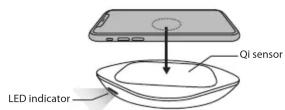
This product only supports mobile device with Qi feature.
- Recommend to use a QC3.0 adapter for fast charging function (sold separately).
Status Charging indicator
Charging Flash in green. Fully charged Light will turn off.
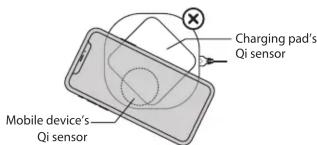
- Mobile device is not placed in a correct position. Both Qi sensors must overlap.
Trouble Shooting
If any functional abnormality is encountered, unplug the unit from the mains socket and reconnect it again. Replace your mobile device on the unit.
- The LED indicator flash in red.
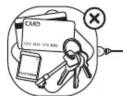
- Placing any metal or other item with electric fi eld may cause short circuit, such as credit card, key, memory card, etc.
• The charging system is malfunction.
Mærke : Sandstrøm
Model : S15WC18
Kategori : Chargeur pour appareil mobile