
Stack-up - Spil NINTENDO - Gratis brugsanvisning og manual
Find enhedens vejledning gratis Stack-up NINTENDO i PDF-format.


Brugerspørgsmål om Stack-up NINTENDO
0 spørgsmål om dette apparat. Besvar dem du kender, eller stil dit eget.
Stil et nyt spørgsmål om dette apparat
Download vejledningen til din Spil i PDF-format gratis! Find din vejledning Stack-up - NINTENDO og tag din elektroniske enhed tilbage i hånden. På denne side er alle dokumenter nødvendige for brugen af din enhed offentliggjort. Stack-up af mærket NINTENDO.
BRUGSANVISNING Stack-up NINTENDO
Look for this seal on all software and accessories for your Nintendo Entertainment System. It represents Nintendo's commitment to bringing you only the highest quality products. Items not carrying this seal have not been approved by
Nintendo, and are not guaranteed to meet our standards of excellence in workmanship, reliability and most of all, entertainment value.

INTRODUCTION
Thank you for selecting the Nintendo® Entertainment System Stack-up™ Pak. This game requires R.O.B., your Robotic Operating Buddy.
OBJECT OF THE GAME/GAME DESCRIPTION
Your challenge is to get R.O.B. ^TM to stack the colored discs to match the colored pattern on the screen. This exciting high-strategy Robot game can be played four ways: In the Direct mode, try to match the pattern by directing R.O.B. through the shortest number of moves. The Memory mode allows you to program up to 100 robot moves as you try to match the on-screen pattern. Or, try one or two player Bingo and bounce your way to success against some nasty on-screen competitors!
Please read this Instruction Booklet to ensure proper handling of your new game, and then save it for future reference.
Please follow the instructions in the NES Instruction Manual to properly set up your NES and R.O.B.
Nintendo of America Inc. ©1985 Nintendo
TABLE OF CONTENTS
Page
- Introduction. 2
- Setting Up For Stack-up Game Play 4\~8
- Game Menu and Game Play....9\~19
- Precautions 19
- FCC Compliance 20
- Consumer Parts List & Order Form....21
- Product Warranty
SETTING UP FOR STACK-UP GAME PLAY
- Turn R.O.B.'s power switch on. R.O.B. will start to move automatically and take the standby pose (arms open, body facing forward at the top of the center shaft).
* If R.O.B. does not assume the standby position, switch the power off and switch it on again.
* Please note that R.O.B. will not move when his batteries are run down.

natural_image
Line drawing of a mechanical device with mounted sensors and a base (no text or symbols)- Names of R.O.B.'s Parts and Attachments
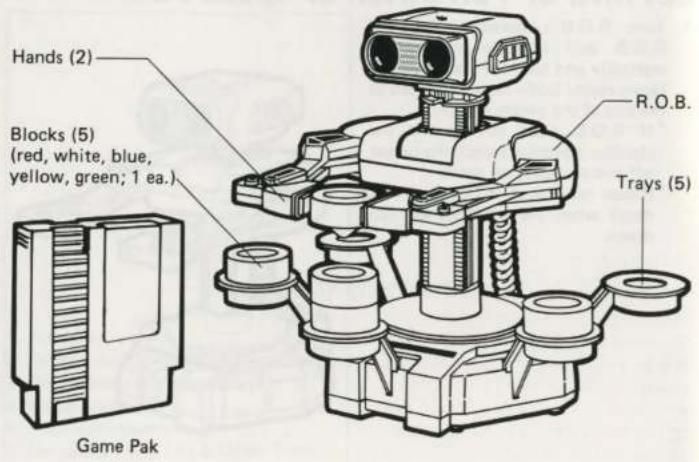
- Fit the hands onto the ends of R.O.B.'s arms. Next, fit the trays into the five slots on R.O.B.'s base.

natural_image
Illustration of a robot with head-mounted sensors and a gear shift indicator (no text or symbols)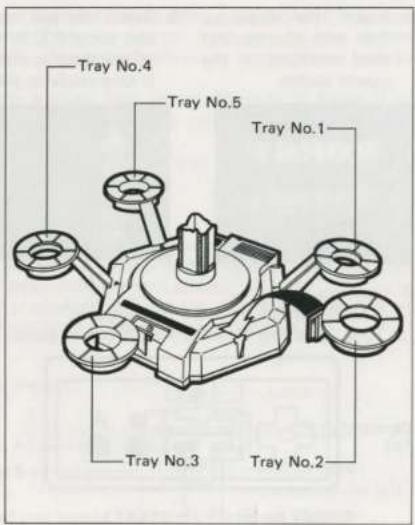
-
Insert the Stack-up Pak into the control deck and turn on the power switch.
-
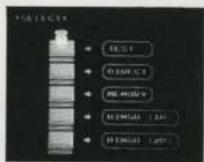
Select the test mode from the select mode menu and focus R.O.B.'s head on the T.V. screen per the instructions in the NES Instruction Manual. R.O.B. is now ready to play Stack-up.


- Controls:
*Use Controller 1 for a 1 player game.
*Use Controllers 1 and 2 for a 2 player game.

Select Button
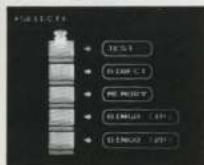
*When the select mode menu is displayed, this button moves Professor Hector from key to key on the screen. Move the Professor to the game you wish to play.
*While playing Test, Direct, Memory or Bingo (1 or 2 players), this button returns you to the select mode menu.
* The select button does not work during the "Phase XX" display.
Start Button
* After selecting the desired game mode, use the start button to start the game.
* After you have completed a phase and restacked the blocks, press the start button to add up the score and move onto the next phase.
* After completing the memory programming, press the start button once to go to the speed selection screen. Press again to start memory playback.
Control Pad
* This is used to operate Professor Hector.
The Professor jumps up,down,
left and right depending on
which position is pressed.


Note: On Controller 2, the control pad is used to operate Professor Vector.
A and B Buttons
* During memory programming use these buttons to choose the commands you want to write into memory. The cursor moves to the right when the A button is pressed, and to the left when the B button is pressed.
* During Memory playback and Bingo (1 or 2 players), if the A or B button is pressed during these times, the game will pause. To continue the game, press the A or B button again.
GAME MENU AND GAME PLAY

A) TEST — Sends a signal so you can focus R.O.B.'s eyes onto the T.V. screen. (See NES Instruction Manual).
Characters

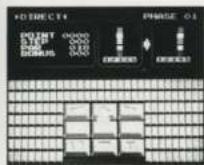
B) DIRECT
- The object of this game is to move the colored blocks from a starting configuration to a final configuration in as few moves as possible and as fast as possible.
- Stack the blocks on Tray No.3 (directly in front of R.O.B.) from top to bottom in the following order: red, white, blue, yellow and green.

-
R.O.B. moves according to the command key that Professor Hector jumps on. R.O.B. Makes Three Kinds of Movement:
-
Grasps and releases objects
- Raises and lowers objects
- Turns and carries objects to the left and right

- Control R.O.B. using the commands above, and restack the blocks as directed in the upper right of the T.V. screen in as few moves as possible. The faster you do it the more bonus points you will get.
- Press the start button immediately after the restacking has been successfully completed, and the current score will be added up. Then challenge a new stack.
- If you weren't successful, press the select or reset button and start over from the beginning.
C) MEMORY
-
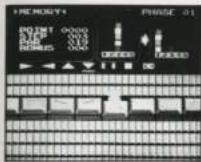
This is a challenging game where you must write into memory the procedure you think will restack the blocks from a starting configuration to a final configuration in as few moves as possible. The faster you figure it out the more bonus points you get! After you finish, play back the memory to see if the memorized procedure works.
-
Stack the blocks on Tray No.3 (directly in front of R.O.B.) from top to bottom in the following order: red, white, blue, yellow and green.

- Commands will be written onto the row of unmarked keys.
- Use the A or B button to move the cursor beneath the command symbol you wish to use.

- Make Professor Hector jump on top of the memory key where the command will be written. The command shown above the cursor will then be written on the key (up to 100 keys can be written).
- Write commands onto the keys one after another in the order you think will restack the blocks according to the instructions in the upper right part of the screen. Use as few commands as possible and do it as quickly as possible to score more points.
- After you are finished, write an "END" command onto the last key, or simply leave a space.
- Press the start button. The speed selection screen will then appear. Press it again, and Professor Hector will play back the program you wrote into memory while accompanied by music and R.O.B. will restack the blocks.
NOTE: If there is a discrepancy between the movement of the Professor and R.O.B. during playback (i.e., the Professor is too fast or too slow for R.O.B.) adjust the speed of Professor Hector.

A) Press the start button after your memory commands are finished (Professor Hector is on the END key or the space key). The speed selection screen will then appear.
B) There is a speedometer at the bottom of the screen. When the A button is pressed, the scale increases and the Professor will slow down. When the B button is pressed, the scale decreases and the Professor will speed up.
C) Using the speedometer, adjust the speed with which Professor Hector jumps.
D) Press the start button to start playback. (Playback begins automatically after a certain period of time if the start button is not pressed.)
- If the A or B button is pressed during play, the game will pause.
- If your memory commands didn't work, press the select or reset button and try again!
When the blocks have been restacked correctly (and Professor Hector is on top of the END key or the space key), press the start button. The current score will then be added up. Then you can go onto a new challenge in the next phase.
BINGO (1 Player) Colors in any order
D) BINGO (1 Player)
-
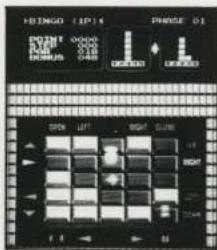
This is an exciting game where you must move the blocks from a starting configuration to a final configuration without dropping any of them. But watch out because Flipper and Spike can interrupt your best laid plans!
-
Stack the 5 blocks on Tray No.3 (directly in front of R.O.B.) from top to bottom in any order. (In this game, disregard the color of the blocks.)

natural_image
Technical line drawing of a mechanical device with labeled tray No.3 (no readable text or symbols)-
Begin by figuring out the necessary commands to restack the blocks. Using Professor Hector, complete a row or column of five keys to send the corresponding command to R.O.B. (The commands appear to the side of the rows and columns.)
-
The keys must all be dark to complete a row.
-
The bugs Flipper and Spike will try to interrupt your plans. Flipper — Flips along the keys, changing them as he goes along.
Spike — Crawls around on the keyboard. If the Professor collides with one of the bugs, he is sent flying off the screen. He then returns to the game at the re-entrance position.
-
If the A or B button is pressed, the screen will scroll up and the game will pause. You can then see the top of the screen to check on the block restacking instructions.
-
Restack the blocks as fast as possible and in as few moves as possible to collect more bonus points.
-
When a row and a column are completed at the same time by pushing a common key, the command signal cannot be sent (both commands are flashing). No command is sent until you make one of the commands incomplete again.
-
When all the blocks have been stacked as designated, press the A or B button for a pause, then press the start button and your score will be calculated and displayed. Now try the next challenge!
-
If you drop one of the blocks, press the select or reset button and start again from the beginning!

E) BINGO (2 Players)
- In this head-to-head game, two players compete to see who can get the most blocks onto their trays in 5 minutes.
- Put three blocks in tray No. 3, and one block in trays No. 2 and 4 (in any order of color).
BINGO (2 Players)
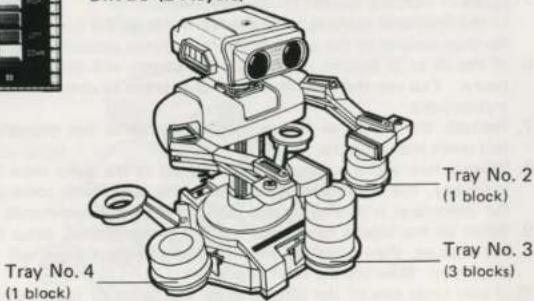
Professor Hector: Controller 1, tray No. 1 and 2 Professor Vector: Controller 2, tray No. 4 and 5
- Each player tries to complete rows/columns to send commands to R.O.B. in the same way as in 1 Player Bingo.
- In this game, the bug Spike appears, but not Flipper.
* If a Professor collides with Spike, he is sent flying off the screen. When he returns, he starts to flash.
* While the Professor is flashing, his speed drops by half (for about 20 seconds). During that period, he can go past the other Professor and Spike without getting bumped off the screen.
* If the Professors collide with each other, whoever was not moving will be sent flying off the screen and start to flash.
-
If you press the A or B button on Controller 1, the screen will scroll and the game will pause.
-
If all the keys on two rows or columns are completed simultaneously, the command signal cannot be sent. As in 1 Player Bingo, the command signal can only be sent after a key on one of the rows or columns is changed.
- The game time limit is 5 minutes. Get as many blocks as you can before time runs out.
* There are lots of other games you can invent to play on this screen. Have fun making up your own rules for new games.
Scoring
For Direct, Memory and Bingo (1 Player) games, once you have managed to restack the blocks as designated, press the start button to add up the score. (In the Bingo (1 Player) game, press the start button during pause.)
10 x (Par - Step) + Bonus = Score
POINT : Points
STEP : The number of commands sent by the Professor
PAR : The average number of steps needed to restack the blocks
BONUS : Extra points for restacking all the blocks in a short period of time
PRECAUTIONS
1) Do not put it in places that are very hot or cold. Never hit or drop it. Do not take it apart.
2) Do not touch the connectors or get them wet or dirty. Doing so may damage the game.
3) Do not clean with benzene, paint thinner, alcohol or other solvents.
4) Play the game from a normal viewing distance from the TV screen.
5) For your health, take 10 \~ 15 minute breaks every 2 hours when playing for an extended period of time.
6) Please read the instruction booklet for R.O.B. carefully.
COMPLIANCE WITH FCC REGULATIONS
This equipment generates and uses radio frequency energy and if not installed and used properly, that is, in strict accordance with the manufacturer's instructions, may cause interference to radio and television reception. It has been type tested and found to comply with the limits for a Class B computing device in accordance with the specifications in Subpart J of Part 15 of FCC Rules, which are designed to provide reasonable protection against such interference in a residential installation. However, there is no guarantee that interference will not occur in a particular installation. If this equipment does cause interference to radio or television reception, which can be determined by turning the equipment off and on, the user is encouraged to try to correct the interference by one or more of the following measures:
— Reorient the receiving antenna
— Relocate the NES with respect to the receiver
— Move the NES away from the receiver
- Plug the NES into a different outlet so that computer and receiver are on different circuits.
If necessary, the user should consult the dealer or an experienced radio/television technician for additional suggestions. The user may find the following booklet prepared by the Federal Communications Commission helpful:
How to Identify and Resolve Radio-TV Interference Problems.
This booklet is available from the U.S. Government Printing Office, Washington, D.C. 20402, Stock No. 004-000-00345-4.
STACK-UP PAK CONSUMER PARTS LIST & ORDER FORM
| PART NO. | ITEM | PRICE | QUANTITY | AMOUNT OF PURCHASE |
| NES-013 | Colored Blocks (5, sold as set) | 3.00 set | ||
| NES-014 | Block Trays (5, sold as set) | 3.00 set | ||
| NES-015 | Block Hands (2, sold as set) | 2.00 set | ||
| SUBTOTAL | ||||
| WASHINGTON STATE RESIDENTS ADD 8.1% SALES TAX Orders over4.00 (Add 2.00) POSTAGE & HANDLING Orders under4.00 (Add .50€) | ||||
| TOTAL DUE | $ | |||
PRINT YOUR NAME AND ADDRESS IN THE SPACE PROVIDED BELOW. ENCLOSE YOUR CHECK OR MONEY ORDER (MADE PAYABLE TO NINTENDO OF AMERICA INC.) AND MAIL TO:
NINTENDO OF AMERICA INC.
4820-150th Avenue N.E.
Redmond, WA 98052
ATTN: CONSUMER SERVICE DEPARTMENT
ALLOW 4-6 WEEKS FOR DELIVERY. PLEASE PAY BY CHECK OR MONEY ORDER. WE CANNOT ACCEPT CASH, STAMPS OR C.O.D. ORDERS. PRICES ARE APPLICABLE WITHIN THE U.S. ONLY AND ARE SUBJECT TO CHANGE WITHOUT NOTICE.
FOR ASSISTANCE CALL:
(800) 422-2602 FOR OUTSIDE WASHINGTON
(206) 882-2040 FOR WASHINGTON RESIDENTS
NINTENDO OF AMERICA INC. 4820-150th Avenue N.E., Redmond, WA 98052
SHIP TO:
Please print clearly as this will be your return label.
NAME
ADDRESS
CITY
STATE & ZIP CODE
90-DAY LIMITED WARRANTY NINTENDO GAME PAKS
90-DAY LIMITED WARRANTY:
Nintendo of America Inc. ("Nintendo") warrants to the original consumer purchaser that this Nintendo Game Pak ("PAK") (not including Game Pak Accessories or Robot Accessories) shall be free from defects in material and workmanship for a period of 90 days from date of purchase. If a defect covered by this warranty occurs during this 90-day warranty period, Nintendo will repair or replace the PAK, at its option, free of charge.
To receive this warranty service:
- DO NOT return your defective Game Pak to the retailer.
- Notify the Nintendo Consumer Service Department of the problem requiring warranty service by calling Outside Washington State (800) 422-2602, or Inside Washington State (206) 882-2040. Our Consumer Service Department is in operation from 8:00 A.M. to 5:00 P.M. Pacific Time, Monday through Friday.
- If the Nintendo service technician is unable to solve the problem by phone, he will provide you with a Return Authorization number. Simply record this number on the outside packaging of your defective PAK, and return your PAK freight prepaid, at your risk of damage, together with your sales slip or similar proof-of-purchase within the 90-day warranty period to:
Nintendo of America Inc.
NES Consumer Service Department
4820-150th Avenue N.B
Redmond, WA 98052
This warranty shall not apply if the PAK has been damaged by negligence, accident, unreasonable use, modification, tampering, or by other causes unrelated to defective materials or workmanship.
REPAIRS AFTER EXPIRATION OF WARRANTY:
If the PAK develops a problem after the 50-day warranty period, you may contact the Nintendo Consumer Service Department at the phone number noted above. If the Nintendo service technician is unable to solve the problem by phone, he may provide you with a Return Authorization number. You may then record this number on the outside packaging of the defective PAK and return the defective PAK freight prepaid to Nintendo, enclosing a check or money order for \10.00 payable to Nintendo of America Inc. Nintendo will, at its option, subject to the conditions above, repair the PAK or replace it with a new or repaired PAK. If replacement PAKS are not available, the defective PAK will be returned and the \10.00 payment refunded.
WARRANTY LIMITATIONS:
ANY APPLICABLE IMPLIED WARRANTIES; INCLUDING WARRANTIES OF MERCHANTABILITY AND FITNESS FOR A PARTICULAR PURPOSE, ARE HEREBY LIMITED TO NINETY DAYS FROM THE DATE OF PURCHASE AND ARE SUBJECT TO THE CONDITIONS SET FORTH HEREIN. IN NO EVENT SHALL NINTENDO BE LIABLE FOR CONSEQUENTIAL OR INCIDENTAL DAMAGES RESULTING FROM THE BREACH OF ANY EXPRESS OR IMPLIED WARRANTIES.
The provisions of this warranty are valid in the United States only. Some states do not allow limitations on how long an implied warranty lasts or exclusion of consequential or incidental damages, so the above limitations and exclusion may not apply to you. This warranty gives you specific legal rights, and you may also have other rights which vary from state to state.

- INTRODUCTION
- OBJECT OF THE GAME/GAME DESCRIPTION
- TABLE OF CONTENTS
- SETTING UP FOR STACK-UP GAME PLAY
- Start Button
- Control Pad
- A and B Buttons
- GAME MENU AND GAME PLAY
- B) DIRECT
- C) MEMORY
- D) BINGO (1 Player)
- E) BINGO (2 Players)
- Scoring
- PRECAUTIONS
- COMPLIANCE WITH FCC REGULATIONS
- 90-DAY LIMITED WARRANTY NINTENDO GAME PAKS
- 90-DAY LIMITED WARRANTY:
- REPAIRS AFTER EXPIRATION OF WARRANTY:
- WARRANTY LIMITATIONS:
Mærke : NINTENDO
Model : Stack-up
Kategori : Spil