Ultra Plus Flex - Blodsukkermåler OneTouch - Gratis brugsanvisning og manual
Find enhedens vejledning gratis Ultra Plus Flex OneTouch i PDF-format.


Brugerspørgsmål om Ultra Plus Flex OneTouch
0 spørgsmål om dette apparat. Besvar dem du kender, eller stil dit eget.
Stil et nyt spørgsmål om dette apparat
Download vejledningen til din Blodsukkermåler i PDF-format gratis! Find din vejledning Ultra Plus Flex - OneTouch og tag din elektroniske enhed tilbage i hånden. På denne side er alle dokumenter nødvendige for brugen af din enhed offentliggjort. Ultra Plus Flex af mærket OneTouch.
BRUGSANVISNING Ultra Plus Flex OneTouch
Register your meter or download the Spanish Owners booklet support.onetouch.com

Quick Start Guide
OneTouch Ultra Plus Flex™ Blood Glucose Monitoring System
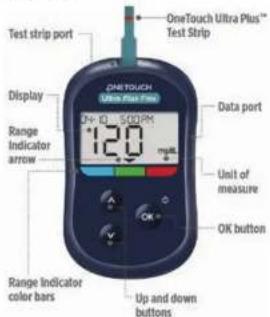
Use this guide to get to know your meter, and follow the steps inside to get started.
text_image
OneTouch Ultra Plus™ Test Strip OneTouch Ultra Plus Max Display Range Indicator arrow 12.0 Data port Unit of measure OK button Range Indicator color bars Up and down buttonsIMPORTANT: Please read the Owner's Booklet that came with your system.
Intended use
The OneTouch Ultra Plus Flex™ Blood Glucose Monitoring System is intended to be used for the quantitative measurement of glucose (sugar) in fresh capillary whole blood samples drawn from the fingertip.
The OneTouch Ultra Plus Flex™ Blood Glucose Monitoring System is intended for self-testing outside the body (in vitro diagnostic use) by people with diabetes at home as an aid to monitor effectiveness of diabetes control.
Limitations
The OneTouch Ultra Plus Flex™ Blood Glucose Monitoring System is intended to be used by a single patient and should not be shared. Do not use on multiple patients. The OneTouch Ultra Plus Flex™ System is not to be used for the diagnosis or screening of diabetes or for neonatal use. The OneTouch Ultra Plus Flex™ System is not for use on critically ill patients, patients in shock, severely dehydrated patients or hypersmolar patients (with or without ketosis). Do Not use the OneTouch Ultra Plus Flex™ System for alternate site testing (AST).
PLEASE REFER TO YOUR OWNER'S BOOKLET FOR ADDITIONAL LIMITATIONS OF USE.

t the time and date on your meter
Turn it on
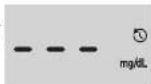
Press and hold until the start-up screen appears.
Use ▼ Buttons to edit each setting and press ▲ confirm.
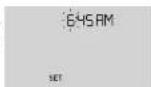
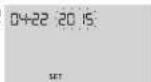
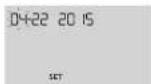
Set the time on the first SET screen
Hour flashes. Press ☐ if correct or edit and confirm.
Minutes flash. Press @correct or edit and confirm.
AM/PM flashes. Press correct or edit and confirm.
Set the date on the next SET screen
Year flashes. Press ☑ if correct or edit and confirm.
Month flashes. Press correct or edit and confirm.
Day flashes. Press correct or edit and confirm.

ake a test
Silver prongs
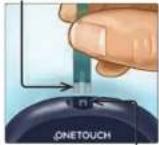
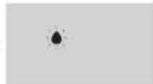
Flashing blood drop appears.
Insert a test strip (blue side and 2 silver prongs facing you) to turn the meter on.
Channel
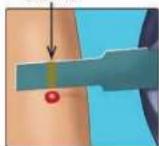

Apply blood sample to the channel on either side of the test strip. Wait for the channel to fill.
The channel turns red and the meter counts down from 5 to 1.

view your reading
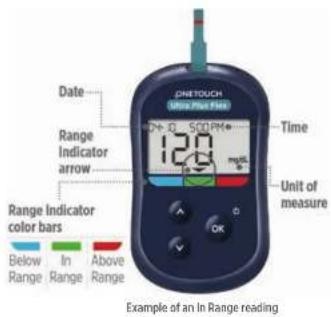
text_image
DNTOUCH Miss Post Fire Date Range Indicator arrow 12.0 Time Unit of measure Range Indicator color bars Below Range In Range Above Range OK Example of an in Range readingYour reading appears on the display. The Range Indicator arrow points to the blue, green, or red Range Indicator color bar, to let you know your reading is below, within, or above your range limit.
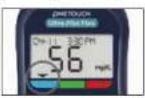
Example of a Below Range reading
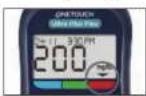
Example of an Above Range reading

Optional: Connect to a mobile device
Your meter comes with Bluetooth® technology. This allows you to wirelessly send your readings to a mobile device such as a phone or a tablet, where you can view and graph them.
To learn more about using your meter's wireless feature and view a complete listing of compatible devices and software applications, visit us at www.OneTouch.com.
Connecting your meter
Press 📄 and 🔒 at the same time to turn the Bluetooth® feature on and off. When prompted by your mobile device, enter the PIN shown on your meter into your device.

The symbol means Bluetooth ^3 is on.
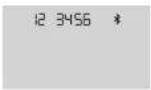
Example of a PIN number.
Meter symbols

Meter power

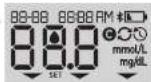
Low batteries

Battery empty

Syncing

Bluetooth feature on

History Mode (past readings)

Apply sample

Setting mode
About the Range Indicator
Your meter comes with a Range Indicator that automatically lets you know if your reading is below, above or within your range limits. The high and low range limits used by the Range Indicator are pre-set as follows:
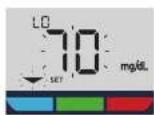
Pre-set low range limit Pre-set high range limit
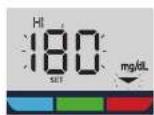
For details about changing the pre-set range limits to suit your needs, refer to your Owner's Booklet.
The Bluetooth ^1 word mark and logos are registered trademarks owned by Bluetooth SIG, Inc., and any use of such marks by LifeScan Scotland Ltd. is under license. Other trademarks and trade names are those of their respective owners.
IMPORTANT SAFETY INSTRUCTIONS:
- Refer to the User Guide or Owner's Booklet for important information about cleaning and disinfecting your meter, lancing device and caps.
• After use and exposure to blood, all parts of this kit are considered biohazardous. A used kit may potentially transmit infectious diseases even after you have performed cleaning and disinfection.
For more information see: FDA Public Health Notification: "Use of Fingerstick Devices on More than One Person Poses Risk for Transmitting Bloodborne Pathogens: Initial Communication" (2010) http://wayback.archive-it.org/7993/2017011013014/ http://www.fda.gov/MedicalDevices/Safety/AlertsandNotices/ ucm224025.htm.
CDC website on "Infection Prevention during Blood Glucose Monitoring and Insulin Administration" (2010) http://
www.cdc.gov/injectionsafety/blood-glucose-monitoring.html.
As your partner in diabetes care, we welcome you to contact us (7 days a week, 8:00 AM - 8:00 PM Eastern Time) at 1888 567-3003 (English), 1888 567-3010 (Español), or www.OneTouch.com
Meter Made in China Manufactured by: Consult instructions for use.
LifeScan Europe GmbH
Gubelsstrasse 34
6300 Zug
OneTouch
AW 072952014
Rev. Delz: 07/2022
© 2018-2022 LifeScan IP Holdings, LLC
6300 2ug
Switzerland