
Extron V-3900T - Støvsuger LG - Gratis brugsanvisning og manual
Find enhedens vejledning gratis Extron V-3900T LG i PDF-format.


Brugerspørgsmål om Extron V-3900T LG
0 spørgsmål om dette apparat. Besvar dem du kender, eller stil dit eget.
Stil et nyt spørgsmål om dette apparat
Download vejledningen til din Støvsuger i PDF-format gratis! Find din vejledning Extron V-3900T - LG og tag din elektroniske enhed tilbage i hånden. På denne side er alle dokumenter nødvendige for brugen af din enhed offentliggjort. Extron V-3900T af mærket LG.
BRUGSANVISNING Extron V-3900T LG

LG
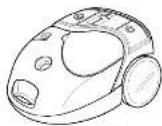
Extron
V-3900D/T/DV/TV
V-3900RD/RT/RDV/RTV
V-3910D/T/DV/TV
![2 1 3 4 [Fig. 1] 6 [Fig. 2] 5 6 [Fig. 3] 6](/content/2026/05/871730/images/6a39c174afc59149a324f6991cc4fd77e4452756394684ecadedbff726e6410b.jpg)
Information for your safety
Please read all the following information, which contains important instructions for the safety, the use and the maintenance of the appliance. This appliance complies with the following EC Directives: -73/23/EEC, 83/68/EEC-Low Voltage Directive-B9/S36EEC-EMC Directive.
■ Never allow children to use the appliance unsupervised.
■ Do not use the appliance if the mains lead is damaged or faulty.
■ If the mains lead is damaged, it must be replaced by an approved LG Electronics Service Agent as special too's are needed to repair it.
■ Always switch the vacuum cleaner off before:
- changing the dust bag
- changing of cleaning the filters.
■ If no dust bag is inserted, the cover cannot be closed. Please do not use force!
■ Do not vacuum flammable or explosive substances/liquids or gases)
■ Do not vacuum hot ash, embers etc. nor sharp objects.
■ Do not vacuum water or other liquids.
■ When you vacuum with an attachment appliance that has a rotating brush roller: do not reach into the running brush roller.
How to Use
Connecting the flexible hose
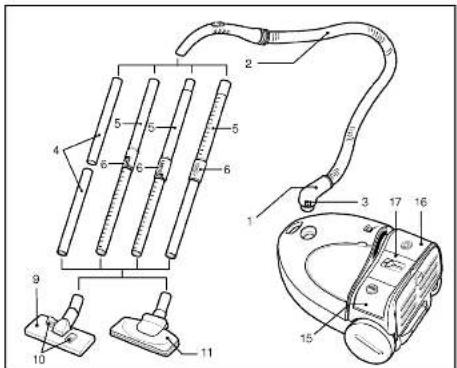
Push the end of the head(1) on the flexible hose(2) into the attachment point on the vacuum cleaner.
To remove the flexible hose from the vacuum cleaner, press on the button (3) situated on the head, then pull upwards.
Assembling the tubes
(depending on in
- Fit together the two tubes by twisting slightly
• Telescopic tube(5)[fig. 1] - Hold spring latch(6)
- Pull out the tube to required length.
- Release spring latch to lock
• Telescopic tube(5)[fig. 3]
- Push spring latch(6) forward.
- Pull out tube to required length.
- Release spring latch to lock.
• Telescopic tube(5)[fig. 2]
- Release locking knob(6) (turn clockwise).
- Pull out tube to required length
- Turn kicking knob anti-clockwise as far as
it will go.
Using the cleaning head and Acces-
sory Nozzies (depending on model) Fit the large cleaning head onto the end of the tube.
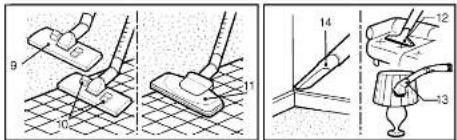
The 2 position head(9) is equipped with a pedal(10) which allows you to alter its position according to the type of floor to be cleaned.
Hard floor position (iles, parquat floors...)
Press on the pedal to lower the brush.
Carpet or Rug position. Press on the pea
at to hit the brush up.
If your appliance is equipped with an automatic cleaning head(11) without pedal, it automatically adapts to the type of floor to be cleaned.
Upholstery Nozzle(12)
For vacuuming upholstery, mattresses, etc. The thread collectors help to pick up the threads and lluff.
Dusting brush(13)
For vacuuming picture frames, furniture
cullies, books and other uneven objects.
Device Tool(14)
For vacuuming in those normally Inaccess-
ble places i.e. reaching conwebs, or down
the side of a sofa!
How to plug in and use
Pull out the mains lead to the desired length and plug into the socket.
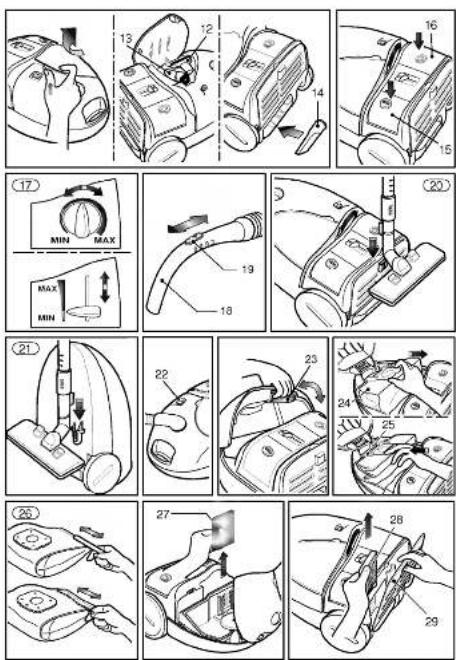
Press button(15) to start the vacuum cleaner.
To stop it press the button (15) again. Adjusting the power level
/depending on model:
Suction capacity increases steeplessly up to
MAX (17)
The flexible hose handle (16) has a manual
air flow regulator(19) which allows you to
briefly reduce the suction level
Park-System (20)
For short breaks during vacuuming, for example to move a small piece of furniture or a rug, use the Park-system, to support the flexible hose and cleaning head.
Side the book attached to the large clearing tool into the slot on the rear of the appliance.
Carrying and storage (21)
When you have switched off and unplugged the appliance, press on the button(16) to automatically rewind the cord.
You can move or store your appliance in a vertical position by sliding the hook on the large cleaning head into the clip on the underside of the appliance.
Changing the dust bag
The dust bag needs changing when the cleaner is set to maximum power and the cleaner head is off the floor but the "bag full" indicator window(22) is completely coloured red.
Even if the dust bag does not appear to be full at this stage. It should be changed.
It could be that a great deal of very fine dust has clogged up the pores of the dust bag.
• Turn off the appliance and unplug it
- Open the cover by pressing the hook(23) and lifting it up until it snaps into place. Your appliance is equipped with either a paper dust bag or a fabric dust bag(24). (depending on model)
- Take hold of the dust bag by the handle and pull. Remove the bag and throw it away. - To refit a new bag push the cardboard support of a new bag into the bag mount(25) until it will go no further.
If your appliance is fitted with a fabric dust bag follow the same instructions as above. Empty it and replace it(26). Do not wash it. Note: as the appliance is fitted with a safety device which checks that the bag is in place you cannot close the lid if the bag is not fitted correctly.
Cleaning the motor filter
The motor filter is situated inside the appliances between the dust bag and the motor. Each time that you change the air outlet filter we advise you to remove the motor filter(27) and to clean it by tapping to remove the dirt and then replacing it in the vacuum cleaner.
Changing the air outlet filters
Depending on the model you have chosen your appliance is equipped with different types of filters: foam filter or electrostatic filter or anti-odour charcoal filter (28).
To change these filters remove the cover of the filter compartment (29) situated at the rear of the appliance, by lifting the little catch. The foam filter, should be cleaned regularly by tapping it to remove the dirt.
The electrostatic filter or anti-odour charcoal filter should be changed regularly (approximately every 5 bag changes)
What to do if your appliance does not work
Check that the appliance is correctly plugged in and that the electrical socket is working
What to do when the suction performance reduces?
- Stop the appliance and unplug it. - Check that the tubes, flexible hose and cleaning tool are not blocked. - Check that the dust bag is not full. Replace if necessary. - Check that the air outlet filter is not blocked. Replace if necessary.

LG Electronics Inc.
P/NO.: 3828Fi2001A
- Information for your safety
- How to Use
- Connecting the flexible hose
- Assembling the tubes
- Using the cleaning head and Acces-
- /depending on model:
- Park-System (20)
- Carrying and storage (21)
- Changing the dust bag
- Cleaning the motor filter
- Changing the air outlet filters
- What to do if your appliance does not work
- What to do when the suction performance reduces?
Mærke : LG
Model : Extron V-3900T
Kategori : Støvsuger