SKBENT11 - Tastatur Sandstrøm - Gratis brugsanvisning og manual
Find enhedens vejledning gratis SKBENT11 Sandstrøm i PDF-format.


Brugerspørgsmål om SKBENT11 Sandstrøm
0 spørgsmål om dette apparat. Besvar dem du kender, eller stil dit eget.
Stil et nyt spørgsmål om dette apparat
Download vejledningen til din Tastatur i PDF-format gratis! Find din vejledning SKBENT11 - Sandstrøm og tag din elektroniske enhed tilbage i hånden. På denne side er alle dokumenter nødvendige for brugen af din enhed offentliggjort. SKBENT11 af mærket Sandstrøm.
BRUGSANVISNING SKBENT11 Sandstrøm
Sandstrøm
Quick Start Guide
Wireless Entertainment Keyboard
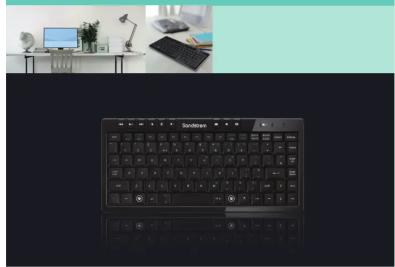
Thank you for purchasing your new Sandstrøm Wireless
Entertainment Keyboard. Before commencing the installation and set up, please check that you have all the items and familiarise yourself with this Quick Start Guide.
UNPACKING
Remove all packaging from the unit. Retain the packaging. If you dispose of it please do so according to local regulations. The following items are included:
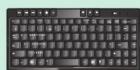
Keyboard

AAA Batteries x 1
P.N.: SKBENTIMBAT
If items are missing or damaged, please contact Partmaster (UK only). Tel: 0844 800 3456 for assistance.
INSTALLING THE BATTERIES CONNECTING THE USB RF RECEIVER
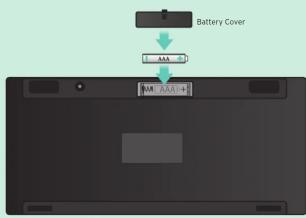
- Press and lift the battery cover.
- Insert the batteries as shown.
- Close the battery cover.
Please insert the battery with the correct polarity.
Step I
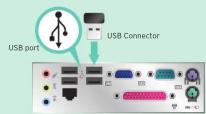
Turn your computer off.
Step 2
Plug the USB connector into your computer's USB port.
ACTIVATING THE KEYBOARD
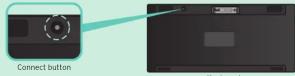
If the keyboard does not response, press the Connect Button to activate the connection between the keyboard and the PE receiver.
connection between the keyboard and the RF Receiver
1 2 3 4 5 6
7 8 9
Low Battery Indicator
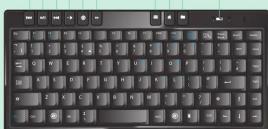
1 Move to the previous audio / video file
2 ▶/II Play / Pause Play / Pause an audio or video file.
3 Move to the Next audio/video file
4 - Volume - Decrease the Volume
5 Mute Mute / Restore the sound.
6 Volume + Increase the Volume
7 E-mail Open the default e-mail program
8 Home Start the default Web browser and Dsiplay the
home Web page. If the browser is already open,
go to the home page.
9 Favourites Bring up the Favourites menu in a web browser.
TROUBLESHOOTINGFUNCTION KEYS
Keyboard not working:
1. Move the USB receiver to a different USB port.
2. Change the batteries.
3. Move the receiver to different location or positions.
4. Move the keyboard closer to the receiver.
5. Keep other electrical devices at least 8 inches (20cm) away from the Wireless receiver.
SAFETY WARNINGS
- Don't disassemble the keyboard and the mouse or remove any parts.
- Don't put the keyboard and the mouse into water or any liquid.
- Don't use the keyboard and the mouse close to heat sources or expose to high temperatures.
- Don't use the keyboard and the mouse where strong electromagnetic waves are present. Strong electromagnetic waves will cause damage to the keyboard.
- Keep the keyboard away from direct sunlight, moisture, dirt or abrasive chemical products (cleaning products etc).
Wireless Devices
Before boarding any aircraft or packing a wireless device in luggage that will be checked in, remove the batteries from the wireless device. Wireless devices can transmit radio frequency (RF) energy, whenever batteries are installed and the wireless device is turned on.
Battery Powered Devices
Improper use of batteries may result in battery fluid leakage, overheating, or explosion. Released battery fluid is corrosive and may be toxic. It can cause skin and eye burns, and is harmful if swallowed.
To reduce the risk of injury :
- Keep batteries out of the reach of children.
- Do not heat, open, puncture, mutilate, or dispose of batteries in fire.
- Do not mix new and old batteries or batteries of different types.
- Do not allow metal objects to touch the battery terminals on the device; they can become hot and cause burns.
Features and specifications are subject to change without prior notice. Windows is a registered trademark of Microsoft Corporation in the United States and other countries.
DSG International Sourcing declares that the wireless keyboard and mouse comply with the essential requirements and other relevant provisions of Directive 1999/5/EC.
Partmaster COUK
Visit Partmaster.co.uk today for the
easiest way to buy electrical spares and accessories With over 1 million
and accessories. With over 1 million spares and accessories available we can deliver direct to your door the very next day. Visit www.partmaster.co.uk or call 0844 800 3456 (UK customers only) Calls charged at National Rate.

This symbol on the product or in the instructions means that your electrical and electronic equipment should be disposed at the end of its life separately from your household waste. There are separate collection systems for recycling in the EU. For more information, please contact the local authority or your retailer where you purchased the product.
DSG Retail Ltd • Maylands Avenue • Hemel Hempstead Herts • HP2 7TG • England
(P.N. SKBENT11-001)
Mærke : Sandstrøm
Model : SKBENT11
Kategori : Tastatur