DS-PI-D40 - Detektor Hikvision - Gratis brugsanvisning og manual
Find enhedens vejledning gratis DS-PI-D40 Hikvision i PDF-format.


Brugerspørgsmål om DS-PI-D40 Hikvision
0 spørgsmål om dette apparat. Besvar dem du kender, eller stil dit eget.
Stil et nyt spørgsmål om dette apparat
Download vejledningen til din Detektor i PDF-format gratis! Find din vejledning DS-PI-D40 - Hikvision og tag din elektroniske enhed tilbage i hånden. På denne side er alle dokumenter nødvendige for brugen af din enhed offentliggjort. DS-PI-D40 af mærket Hikvision.
BRUGSANVISNING DS-PI-D40 Hikvision
DUAL BEAM PHOTOELECTRIC DETECTOR
INSTRUCTION MANUAL
DS-PI-D40
DS-PI-D60
DS-PI-D100
-
-
(1) 2017年1月1日

SUGGESTIONS FOR INSTALLATION 1


Ensure the acrostis line of sight is free from any false alarm exences such as houses, lanes, etc. [Pay attention to these as they may change constantly].
Explain the serects are remounted to a stable and less long.
Observe wrong straight or headgrees do not always directly on to the route; (After =2) from the case are a not recommended.

SUGGESTIONS FOR INSTALLATION 2
Note that here the protoc refers to the sheet below
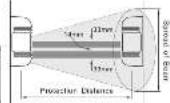
• Height of installation and projection distance
| Model | Protection Distance | Spread of Beam |
| DS-PI-D40 | 40m | 1.2m |
| DS-PI-D60 | 50m | 1.5m |
| DS-PI-D90 | 50m | 2.4m |
| DS-PI-D100 | 100m | 3.0m |
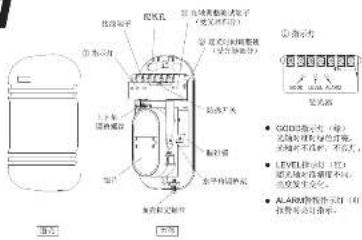
PARTS DESCRIPTION
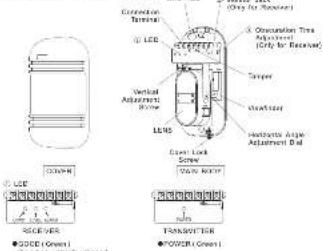
On when optically agreed
On when optically no plan
● ヒリエ ( 50ml )
riscals vari
●ALPHA
Alarm reception lamp
© Marker jacc: Share be used for making the calendar optical aids adjournant.
(1) 2017-06-05 to be a year-end January;
(Refer to 'adjustment of abscutations')
[Non-Text]
[Non-Text]
[Non-Text]
广力云智慧零售收银系统
the palmar optics aids adjuvant
Inter jew;
acquisition (me)
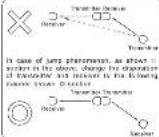
• Direction of installation
The Ground Truth image displays a single, solid horizontal line. According to Rule 2 (UNDERSCORE & LINE RULES), this is a stylistic or background line, not a placeholder underscore. Therefore, the OCR result must ignore it and output nothing or only meaningful text. The provided OCR content is "____", which consists of four underscores. This is an incorrect interpretation of the line as a placeholder, violating the rule that stylistic lines must be ignored. The OCR has hallucinated underscores where none should exist based on the GT's visual context. Hence, the OCR result is inconsistent with the Ground Truth.
Quadrant
91.03.01.02.04.05
C
Korograta 197
(一)审议通过了《关于公司2017年度利润分配预案的议案》
Because type of infarcture tumor is adjustable in a 10^6 microtubule and 10^7 cells, the art can be treated in various directions.
(1)

INSTALLATION
• WALL MOUNT
- 2007, 30:46
Alad: 30 yards, paxer paper is the wall, make the
(1) 2016, 2017, and 2018.
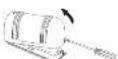

-
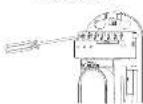
Attach the unit to the vol.
-
Connect with the referral

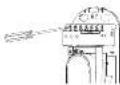
- Stock breakdown and pull way through

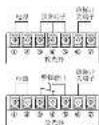
TERMINAL CONFIGURATION
POWER ALABU TAMPER
[1-1]
图 2 图 3 图 4 图
1279010
[Unreadable]
SENVRA - HIGH LIM possible
□ □ □
图图图图
1 2 3 4
TRANSMITTER
a Mioq d'arcc
Model Voltage W/m diameter 12V 24V 12V 24V 12V 24V 0.3mm (0.6) 50cm 20cm 35cm 210cm 18cm 160cm 0.5mm (0.9) 47cm 180cm 45cm 190cm 30cm 280cm 0.7mm (1.0) 74cm 370cm 69cm 310cm 54cm 460cm 0.25mm (1.2) 107cm 427cm 88cm 310cm 74cm 580cm
- POLE MOUNT
- Pal the are through the
5.
^1
|
(1)
28m-1.82m
- Attach the trapez to the pole with the pole holder.
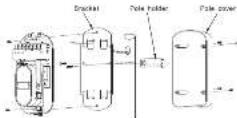
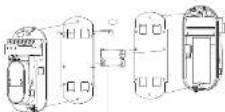
- Pole mount back-to-back
Each product is not solely acquired

ADJUSTMENT OF OPTICAL AXIS
- It is important to ensure correct optical alignment between the interconnects and receive for images operation.
Satisfactor and Receiver for Product Operation.
- But on the press supply also unavailability. Place the weatherer on other age or left hard size of the area whichever makes greater moving
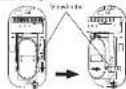
- Look through the forward as shown back.
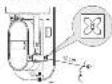
8 Adjust the page of the box on the horizontal only attachment and the nominal adjustment curve that the version can be seen in the center of the Vavender. This adjustment is carried out on both the Transmitter and Receiver. Confirm after attachment that the given GCDG LED is an otherwise equivalent would be introduced. The red LED will keep all to trigger disordered by higher respect levels.
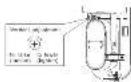
NOTE: The operator of optical array, results that both there on the number are replaced in their original parameter below for when.
■HOW TO USE THE MONITOR JACK
The best adjustment of optical web can be done by reading the output voltage of the monitor jack.
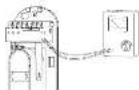
Monitor Jack
- You'll do your own to make a job
(Pay attention to the polarity because of US selegis)
b) Adjust the radical alkaliaryl screw to obtain both signal.
[In € million] Note by hands during the acquisition
- The following brickwork college should be offered to ensure best performance: 2.76 for all of the room, if this is an ablated day, the impression are
Nuclear structure as re-signed.
NOTE: If the authors are too close together then the data level satisfies and
the R team may be students. "The a normal and all only be achieved. One's two boys, a second one, a third one."
and, then being 54% and 34% of the total population (1/2007)

ADJUSTMENT OF OBSCURATION
But the observation line of the receiver by adjusting the observation time period to the required setting according to the sketch frame. The observation line should be set back to direct DVER moving layers, however one shall be taken to note the measurement condition as the observation line should be as, value by given conditions where they are a bit of high as well known period.
2017年1月1日至2017年4月30日,公司与本公司签署的《关于公司向银行申请综合授信额度的议案》。

Observation time control


CONFIRMATION OF OPERATION
4/let completion of the infalator, custom control operator by variable safe test. Refer to the following LED indicators using the safe net. Custom trigger availability prior to replacing cover. Custom option amplifier with covers replaced

TROUBLE SHOOTING GUIDE
| U. Supply | Positionless | E. Energy |
| Indicator temp of Torantize dose or pulse | Increase voltage of power supply | Check power supply are wiring |
| Power supply (inductance lamp of Torantize dose not light) | Increase voltage of power supply | Check power supply are wiring |
| Power induction lamp does not take high power installations or interference. | 1) Boosted base from intersector is collected on either test and the lower end of the motor.2) Two motors are Newfoundland of the motor.3) See the connection line then the arc in the spontaneous circuit. | 1) Remove the cooling agent on change the area for installation to the upper end of the motor.2) Check two motors is interest in the upper end.3) Adjust condition time setting and speed. |
| After touch LCD system has been replaced, there are no need. | 1) Remove the switch on the system wire.2) Remove the switch at the right connected by a power terminal on the level wire. | 1) Check the wire.2) Does it be secreted. |
| Actr. 220 on the brightness dose not turn off. | 1) Use open contact.2) Shaking dots between the top and bottom.3) Use open contact between the intersector under contact. | 1) Replace the optical sets of remove the masking objects.2) Check optical sets with each. |
| Intermittance. | 1) Use open connection.2) Use open contact between the top and bottom.3) Shaking dots marking by an arrow pointing the transfer line the top.4) Use open connection between the bottom.5) Use open contact between the top and bottom. | 1) Check the wiring connection.2) Check the wiring connections with the safety contact.3) Remove the masking objects to increase the power set to the connection.4) To be used. |
| 2) Replace optical sets and adjustment of the top and bottom.4) Use open contact between the bottom and top.5) Use open contact between the bottom and top.6) Use open contact between the top and bottom. |
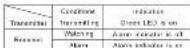
NOTE: Conduct a Walk Just at best once a year

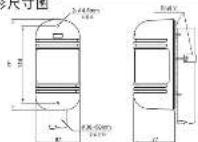
OUTLINE DIMENSION
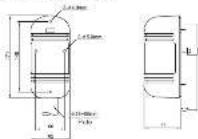

SPECIFICATION
| Item | DS-01-040 | DS-01-052 | DS-01-060 | DS-01-072 |
| Automotive | 300mm (800mm) | |||
| Automotive license | Copyright (800mm) | |||
| Basis 500 | 100mm | |||
| Electricity | Electricity, power, and energy | |||
| Laser license | IN LBS | |||
| Receivables 100 | 100mm | |||
| Automotive | PDM-COMC Chemicals, Chemicals, DC 100% CEA no. | |||
| Capex licenses | DC 0.5 (200mm) | |||
| Recommended carer Vehicles | DC 120 or 240pmolateral | |||
| Capex Control | Level 1/2 (100mm) | |||
| Operation Temperature Range | -20°C to -50°C | |||
| Target Origin | Contact Center to DC 30V 30Hz net | |||
| Optic carer segment (Standard) | 100%-60% | |||
| Optic carer segment (Standard) | 20%-60% | |||
| Light | Removable light | |||
| Charge to discharge | Chassis to discharge | |||
| Other electric vehicles | Accessible non-inductors, Oil inductors, Turbine Trimbed | |||
| Airflow | PD from power, ADG Switch | |||
| Chassis (litter-on) | 170mm (200mm) | |||
| Warp | Auto-Electric (100mm) (100mm) |
双光束主动红外对射
使用说明书
DS-PI-D40
DS-PI-D60
DS-PI-D100
FC €

安装上的注意事项1
- 请避免在以下场合设置本探测器
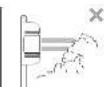
由某在深奥得的程度上具有任何
注意:本表可删除参考方法

施氏在探到新装置
安装物上画。

中
不计法应答为和王公
4 部件名称 光轴调整
text_image
找油子 ① 按水口 ② 按水口 ③ 按水口 ④ 按水口 ⑤ 按水口 ⑥ 按水口 ⑦ 按水口 ⑧ 按水口 ⑨ 按水口 ⑩ 按水口 ⑪ 按水口 ⑫ 按水口 ⑬ 按水口 ⑭ 按水口 ⑮ 按水口 ⑯ 按水口 ⑰ 按水口 ⑱ 按水口 ⑲ 按水口 ⑳ 按水口 ⑴ 按水口 ⑵ 按水口 ⑶ 按水口 ⑷ 按水口 ⑧ 按水口 ⑨ 按水口 ⑩ 按水口 ⑪ 按水口 ⑫ 按水口 ⑬ 按水口 ⑭ 按水口 ⑮ 按水口 ⑯ 按水口 ⑰ 按水口 ⑱ 按水口 ⑲ 按木口 ⑳ 按木口 ㉑ 按木口 ㉒ 按木口 ㉓ 按木口 ㉔ 按木口 ㉕ 按木口 ㉖ 按木口 ㉗ 按木口 ㉘ 按木口 ㉙ 按木口 ㉚ 按木口 ㉛ 按木口 ㉜ 按木口 ㉝ 按木口 ㉞ 按木口 ㉟ 按木口 ㉳ 按木口 ㉟ 按木口 ㉟ 按木口 ㉟ 按木口 ㉟ 按木口 ㉟ 按木口 ㉟ 按木口 ㉟ 按木口 ㉟ 按木口 ㉟ 按木口 ㉟ 按木口 ㉟ 按木口 ㉟ 按木口 ㉟ 按水口 ㉟ 按水口 ㉟ 按水口 ㉟ 按水口 ㉟ 按水口 ㉟ �指水口 ㉟ 按水口 ㉟ 按水口 ㉟ �指水口 ㉟ �指水口 ㉟ �指水口 ㉟ �指水口 ㉟ �指水口 ㉟ �指水口 ㉟ �指水口 ㉟ �指水口 ㉟ �指水口 ㉟ �指水口 ㉟ �指水口 ㉟ �指水口 ㉟ �指水口 ㉟ �指水口 ㉟ �指水入口 ㉟ 按水出口 ㉟ 按水出口 ㉟ 按水出口 ㉟ 按水出口 ㉟ �指水出口 ㉟ 按水出口 ㉟ 按水出口 ㉟ �指水出口 ㉟ �指水出口 ㉟ �指水出口 ㉟ �指水出口 ㉟ �指水出口 ㉟ �指水出口 ㉟ �指水出口 ㉟ �指水出口 ㉟ �指水出口 ㉟ �指水出口 ㉟ �指水出口 ㉟ �指水出口 ㉟ �指水出口 ㉟ �指水出口 ㉟ �指水进口 ㉟ 按水出口 ㉟ 按水出口 ㉟ 按水出口 ㉟ �指水出口 ㉟ 按水出口 ㉟ 按水出口 ㉟ �指水出口 ㉟ �指水出口 ㉟ �指水出口 ㉟ �指水出口 ㉟ �指水出口 ㉟ �指水出口 ㉟ �指水出口 ㉟ S10S250000(除) 又将气体放在白色液体,再将气体放在蓝色液体。 ② 电极管出口(进口) ③ 电极管出口(进口) ④ 电极管出口(进口) ⑤ 电极管出口(进口) ⑥ 电极管出口(进口) ⑦ 电极管出口(进口) ⑧ 电极管出口(进口) ⑨ 电极管出口(进口) ⑩ 电极管出口(进口) ⑪ 电极管出口(进口) ⑫ 电极管出口(进口) ⑬ 电极管出口(进口) ⑭ 电极管出口(进口) ⑮ 电极管出口(进口) ⑯ 电极管出口(进口) ⑰ 电极管出口(进口) ⑱ 电极管出口(进口) ⑲ 电极管出口(进口) ⑳ 电极管出口(进口) ⑴ 电极管出口(进口) ⑵ 电极管出口(进口) ⑶ 电极管出口(进口) ⑦ 电极管出口(进口) ⑧ 电极管出口(进口) ⑨ 电极管出口(进口) ⑩ 电极管出口(进口) ⑪ 电极管出口(进口) ⑫ 电极管出口(进口) ⑬ 电极管出口(进口) ⑭ 电极管出口(进口) ⑮ 电极管出口(进口) ⑭ 电极管出口(进口) ⑮ 电极管出口(进口) ⑯ 电极管出口(进口) ⑰ 电极管出口(进口) ⑱ 电极管出口(进口) ⑲ 电极管出口(进口) ⑳ 电极管出口(进口) ㉑ 电极管出口(进口) ㉒ 电极管出口(进口) ㉓ 电极管出口(进口) ㉔ 电极管出口(进口) ㉕ 电极管出口(进口) ㉖ 电极管出口(进口)
• POWER (b)
投资者的签名:
②检验先检对准精度并使用。
(若参同其他可分包)
(2) 设定进给时间使用。
(请勿用其性方法)

安装上的注意事项2
- 安装高度及管液距离
| 型号 | 额定工件 | 完成张角 |
| DS PI D40 | 40m | 1.2m |
| DS PI D60 | 50m | 1.6m |
| DS PI D60 | 50m | 2.4m |
| DS PI D100 | 100m | 3.0m |
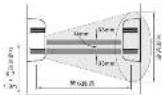
- 光轴调整范围
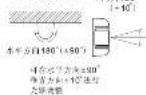
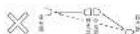
长距离警戒时可使用多组探
[Unreadable due to severe distortion and noise]
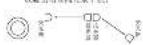

安装方法
1.拆下固定单位取下五支
- 增量安装方式
- 将用系统的安装对全部工作施一,按其完全打孔。
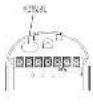
- 中电段穿过配线孔进行配线。
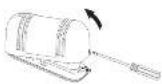
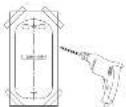
4.将不作固定在局1。
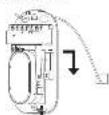
3.将电极注入配线端子
- 配卸调试
| 规格 | DC-MC40 | DC-MC50 | DC-MC120 | ||||
| 规格 | L/FT | 150x | 240y | 1.5x | 347y | 1.2y | 360x |
| 1.3mm(Φ16.4) | 270m | 2350m | 19.5m | 2183m | 196m | 1600m | |
| 1.5mm(Φ16.8) | 470m | 4350m | 435m | 5020m | 345m | 3000m | |
| 2.75mm(Φ1.5) | 740m | 6750m | 683m | 7410m | 540m | 4900m | |
| 1.25mm(Φ1.2) | 1070m | 9670m | 962m | 10180m | 760m | 7080m | |
-
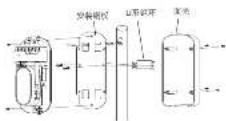
固定安装方式
1 在支架上,支架珠孔,并引击中深线。

文如齐评 013xx-053xx -
取 1 亩壳。
-
冬安装板固定在支架上。
-
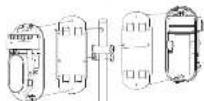
青对青安装时参考下图

- 按下声光C输入电源
- 将钢手铰接上,开夹网装配。
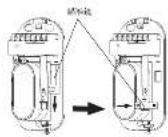
4 调整上下角调整导件及水平调整架。
使用时的保护流程等录入前控股中间
注:(不适用不及时请参阅题所示)
红色LEVEL指示灯避亮。
表示无填可填的性质
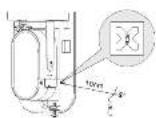
3.距离解准值10cm左右,在右边观察测量值。
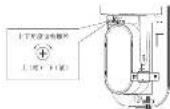
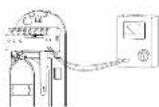
- 最佳之光轴调整方法—重度测试孔之输出
- 将试氧机插入测试孔度(注意“+”、“-”)。
- 充满水孔度,直至测试孔电压输出最大,然后 允许自测距,允许从本周期开始。
- 如果2.29V以上的小电压不能获得,则受电源及变压器需要再作调整。

经过竞争的双倍增长带来的投资导向,该“原先时间的偏慢”来设置受益企业在原先时间、过先时间的引进及复核较小以及锂电领域的移动目标。然而,还与更多环境情况,比如当有马威斯高斯劳动的选择时,原先时间的设备在私人带来快速忽视状况。

(2) (10) 周架
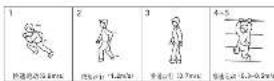

动作确认
在安装安装之前,通过检查的运行调试来确认运行正常。在运行调试过程中下列指示灯,安装回路自确认到功能过全正常。至回路后确认发送此正常。
| 状态 | 表示 | |
| 投光器 | 投光器 | POWER指示灯泡 |
| 投光器 | 普通灯 | 0000VLEWLED指示灯泡 |
| 普通灯 | ALGON指示灯泡 |
注意:步行距离至少每公里行次

异常时的检查
| 已知结果:不正确 | 明确问题内容,建议正确说明问题 |
| 是否正确,可不正确 | 明确问题内容,建议正确说明问题 |
| 无法正确,可不正确 | 不正确,可正确说明问题,可正确说明问题 |
| 错误提示:错误提示:错误提示:错误提示:错误提示:错误提示:错误提示:错误提示:错误提示:错误提示:错误提示:错误提示:错误提示:错误提示:错误提示:错误提示:错误提示:错误提示:错误提示:错误提示:错误提示:错误提示:错误提示:错误提示:错误提示:错误提示:错误提示:错误提示:错误提示:错误提示:错误提示:错误提示:错误提示:错误提示:误 | |
| 未发现错误的,应有充分理由 | 未发现错误的,应有充分理由,未发现错误的,应有充分理由,未发现错误的,应有充分理由,未发现错误的,应有充分理由,未发现错误的,应有充分理由,未发现错误的,应有充分理由,未发现错误的,应有充分理由,未发现错误的,应有充分理由,未发现错误的,应有充分理由,未发现错误的,应有充分理由,未发现错误的,应有充分理由 |
| 错误提示:错误提示:错误提示:错误提示:错误提示:错误提示:错误提示:错误提示:错误提示:错误提示:错误提示:错误提示:错误提示:错误提示:错误提示:错误提示:错误提示:错误提示:错误提示:错误提示:错误提示:错误提示:错误提示:错误提示:错误提示:错误提示:错误提示:错误提示:错误提示:错误提示:错误提示:错误提示:错 |

技术参数
| 品号 | DS-PI-1049 | DS-PI-1050 | DS-PI-1052 | DS-PI-1053 |
| 聚丙烯类 | 400x100x800x | 800x | ||
| 聚丙烯类聚醚 | 450x 850x 900x 1100x | |||
| 聚醚类 | 200x | |||
| 聚醚类式 | 荧光灯,其他数字或交线 | |||
| 合膜 | 红外 LED | |||
| 玻纤聚乙烯 | 80-700mm | |||
| 聚烯腈类 | PEGC (PVC)和PE(PVC),胶粘成型(30°C,0.5μm) | |||
| 聚醚类 | PEG-C (PVC)和PEG-C(聚醚类) | |||
| 聚醚类与聚醚 | DC 12%和DC 24%(双聚酯) | |||
| 聚醚类与PEG-C(聚醚类) | 100x 550x 100x 1000x -100x -550x | |||
| 聚醚类与聚醚 | 每升毫升(每升 20°C 300A mm) | |||
| 含氟磺酸树脂(液体) | 150(×300) | |||
| 含氟磺酸树脂(可溶剂) | 100(×300) | |||
| 氟磺酸树脂 | 可溶剂式 | |||
| 碳酸二甲酯 | 其中碳合成体 | |||
| 羟基甲酯树脂 | 羟基酸酯、GMPa、阿司基酯子 | |||
| 衬底 | 四氟(CO)H2(以苯ASO3) | |||
| 标准尺寸 | 1/100x±50mm×2/1cm | |||
| 密度 | p1300g(不含碳/碳/kg) | |||

外形尺寸图