Sirui

Travel T-25SK - Fotostativ Sirui - Gratis brugsanvisning og manual

Find enhedens vejledning gratis Travel T-25SK Sirui i PDF-format.

📄 1 sider Dansk DA Download 💬 AI-spørgsmål
Notice Sirui Travel T-25SK - page 1
Pick your language and provide your email: we'll send you a specifically translated version.

Brugerspørgsmål om Travel T-25SK Sirui

0 spørgsmål om dette apparat. Besvar dem du kender, eller stil dit eget.

Stil et nyt spørgsmål om dette apparat

E-mailen forbliver privat: den bruges kun til at underrette dig, hvis nogen svarer på dit spørgsmål.

Ingen spørgsmål endnu. Vær den første til at stille et.

Download vejledningen til din Fotostativ i PDF-format gratis! Find din vejledning Travel T-25SK - Sirui og tag din elektroniske enhed tilbage i hånden. På denne side er alle dokumenter nødvendige for brugen af din enhed offentliggjort. Travel T-25SK af mærket Sirui.

BRUGSANVISNING Travel T-25SK Sirui

图纸名称:T-OS系列说明书

物料编号:

材质:100g双胶/CMYK四色印刷

展开尺寸:504x210mm

成型尺寸:72x105mm

T-0S说明书正面(英文版):
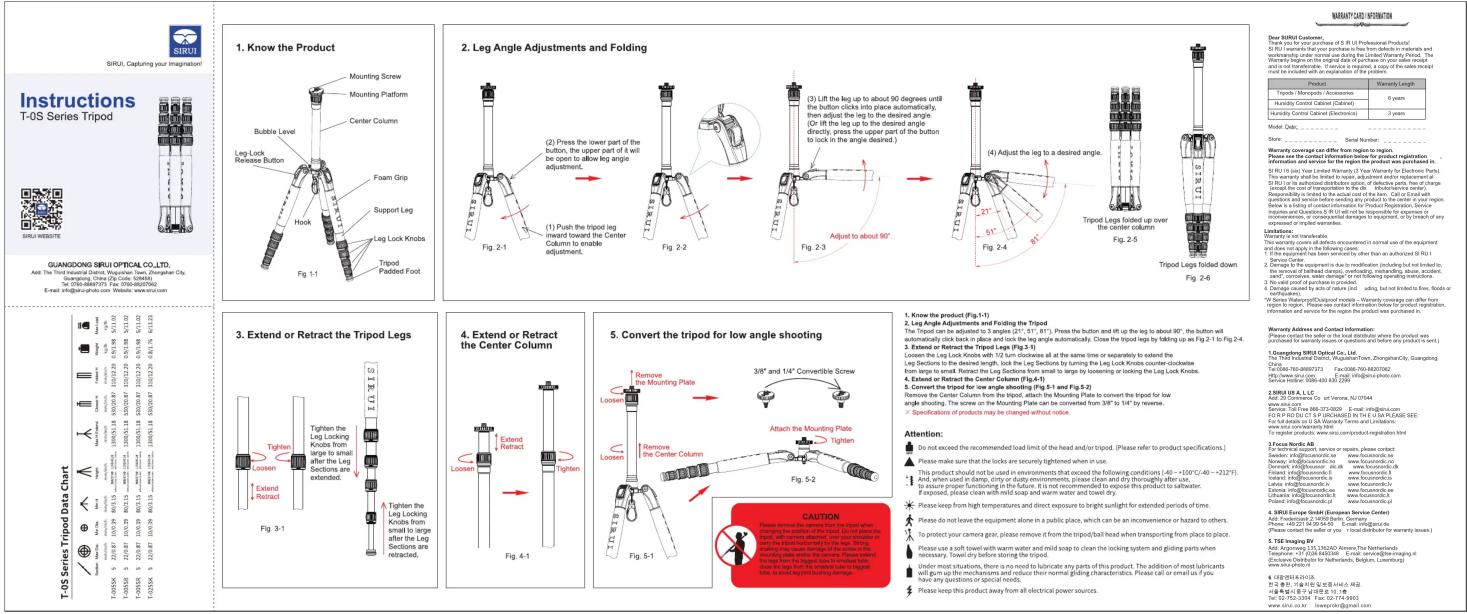
1. Know the Product Mounting Screw Mounting Platform Center Column Bubble Level Leg Lock Revee Button Support Leg Foot Grip Support Leg Leg Lock Knobs Tripod Padded Foot Fig. 1-1 2. Leg Angle Adjustments and Folding Press the lower part of the button, the upper part of it will be open to allow leg angle adjustment. (1) Push the tripod leg forward towards the Center Column to enable adjustment. Fig. 2-1 (3) Lift the leg up to about 90 degrees until the button clicks into place automatically, then adjust the leg to the desired angle. (Or lift the leg up to the desired angle directly, press the upper part of the button to lock in the angle desired.) Fig. 2-2 (4) Adjust the leg to a desired angle. (5) Adjusted to about 90°. Fig. 2-3 (7) Adjusted to about 90°. Fig. 2-4 (8) Adjusted to about 90°. Fig. 2-5 (9) Adjusted to about 90°. Fig. 2-6 Fig. 2-7 (10) Adjusted to about 90°. Fig. 2-8 (11) Adjusted to about 90°. Fig. 2-9 (12) Adjusted to about 90°. Fig. 2-10 (13) Adjusted to about 90°. Fig. 2-11 (14) Adjusted to about 90°. Fig. 2-12 (15) Adjusted to about 90°. Fig. 2-13 (16) Adjusted to about 90°. Fig. 2-14 (17) Adjusted to about 90°. Fig. 2-15 (18) Adjusted to about 90°. Fig. 2-16 (19) Adjusted to about 90°. Fig. 2-17 (20) Adjusted to about 90°. Fig. 2-18 (21) Adjusted to about 90°. Fig. 2-19 (22) Adjusted to about 90°. Fig. 2-20 (23) Adjusted to about 90°. Fig. 2-21 (24) Adjusted to about 90°. Fig. 2-22 (25) Adjusted to about 90°. Fig. 2-23 (26) Adjusted to about 90°. Fig. 2-24 (27) Adjusted to about 90°. Fig. 2-25 (28) Adjusted to about 90°. Fig. 2-26 (29) Adjusted to about 90°. Fig. 2-27 (30) Adjusted to about 90°. Fig. 2-28 (31) Adjusted to about 90°. Fig. 2-29 (32) Adjusted to about 90°. Fig. 2-30 (33) Adjusted to about 90°. Fig. 2-31 (34) Adjusted to about 90°. Fig. 2-32 (35) Adjusted to about 90°. Fig. 2-33 (36) Adjusted to about 90°. Fig. 2-34 (37) Adjusted to about 90°. Fig. 2-35 (38) Adjusted to about 90°. Fig. 2-36 (39) Adjusted to about 90°. Fig. 2-37 (40) Adjusted to about 90°. Fig. 2-38 (41) Adjusted to about 90°. Fig. 2-39 (42) Adjusted to about 90°. Fig. 2-40 (43) Adjusted to about 90°. Fig. 2-41 (44) Adjusted to about 90°. Fig. 2-42 (45) Adjusted to about 90°. Fig. 2-43 (46) Adjusted to about 90°. Fig. 2-44 (47) Adjusted to about 90°. Fig. 2-45 (48) Adjusted to about 90°. Fig. 2-46 (49) Adjusted to about 90°. Fig. 2-47 (50) Adjusted to about 90°. Fig. 2-48 (51) Adjusted to about 90°. Fig. 2-49 (52) Adjusted to about 90°. Fig. 2-50 (53) Adjusted to about 90°. Fig. 2-51 (54) Adjusted to about 90°. Fig. 2-52 (55) Adjusted to about 90°. Fig. 2-53 (56) Adjusted to about 90°. Fig. 2-54 (57) Adjusted to about 90°. Fig. 2-55 (58) Adjusted to about 90°. Fig. 2-56 (59) Adjusted to about 90°. Fig. 2-57 (60) Adjusted to about 90°. Fig. 2-58 (61) Adjusted to about 90°. Fig. 2-59 (62) Adjusted to about 90°. Fig. 2-60 (63) Adjusted to about 90°. Fig. 2-61 (64) Adjusted to about 90°. Fig. 2-62 (65) Adjusted to about 90°. Fig. 2-63 (66) Adjusted to about 90°. Fig. 2-64 (67) Adjusted to about 90°. Fig. 2-65 (68) Adjusted to about 90°. Fig. 2-66 (69) Adjusted to about 90°. Fig. 2-67 (70) Adjusted to about 90°. Fig. 2-68 (71) Adjusted to about 90°. Fig. 2-69 (72) Adjusted to about 90°. Fig. 2-70 (73) Adjusted to about 90°. Fig. 2-71 (74) Adjusted to about 90°. Fig. 2-72 (75) Adjusted to about 90°. Fig. 2-73 (76) Adjusted to about 90°. Fig. 2-74 (77) Adjusted to about 90°. Fig. 2-75 (78) Adjusted to about 90°. Fig. 2-76 (79) Adjusted to about 90°. Fig. 2-77 (80) Adjusted to about 90°. Fig. 2-78 (81) Adjusted to about 90°. Fig. 2-79 (82) Adjusted to about 90°. Fig. 2-80 (83) Adjusted to about 90°. Fig. 2-81 (84) Adjusted to about 90°. Fig. 2-82 (85) Adjusted to about 90°. Fig. 2-83 (86) Adjusted to about 90°. Fig. 2-84 (87) Adjusted to about 90°. Fig. 2-85 (88) Adjusted to about 90°. Fig. 2-86 (89) Adjusted to about 90°. Fig. 2-87 (90) Adjusted to about 90°. Fig. 2-88 (91) Adjusted to about 90°. Fig. 2-89 (92) Adjusted to about 90°. Fig. 2-90 (93) Adjusted to about 90°. Fig. 2-91 (94) Adjusted to about 90°. Fig. 2-92 (95) Adjusted to about 90°. Fig. 2-93 (96) Adjusted to about 90°. Fig. 2-94 (97) Adjusted to about 90°. Fig. 2-95 (98) Adjusted to about 90°. Fig. 2-96 (99) Adjusted to about 90°. Fig. 2-97 (100) Adjusted to about one or more of the product was purchased in the SIRUI series Tripod Data Chart (SIRUI Series Tripod Data Chart) TOWA GONGQING SIRUI OPTICAL CO.,LTD.Aaa: The Third harmonic Dator, Magician Tank, Zhongshan City, Qingdao, Guangdong, China (File Code: No Account Number) Tel: (C): (C): (C): (C): (C): (C): (C): (C): (C): (C): (C): (C): (C): (C): (C): (C): (C): (C): (C): (C): (C): (C): (C): (C): (C): (C): (C): (C): (C): (C): (C): (C): (C): (C): 3. Extend or Retract the Tripod Legs 4. Extend or Retract the Center Column3/8" and "1/4" Convertible Screw4.Knee's Order Product (Fg.(1)-1) Loose the Mounting PlateLoose the Mounting Plate can be converted from a tight angle of the body between the body and the body of the body of the body of the body of the body of the body of the body of the body of the body of the body of the body of the body of the body of the body of the body of the body of the body of the body of the body of the body of the body of the body of the body of the body of the body of the body of the body of the body of the body of the body of the body of the body of the body of the body of

T-0S说明书背面(中文版):
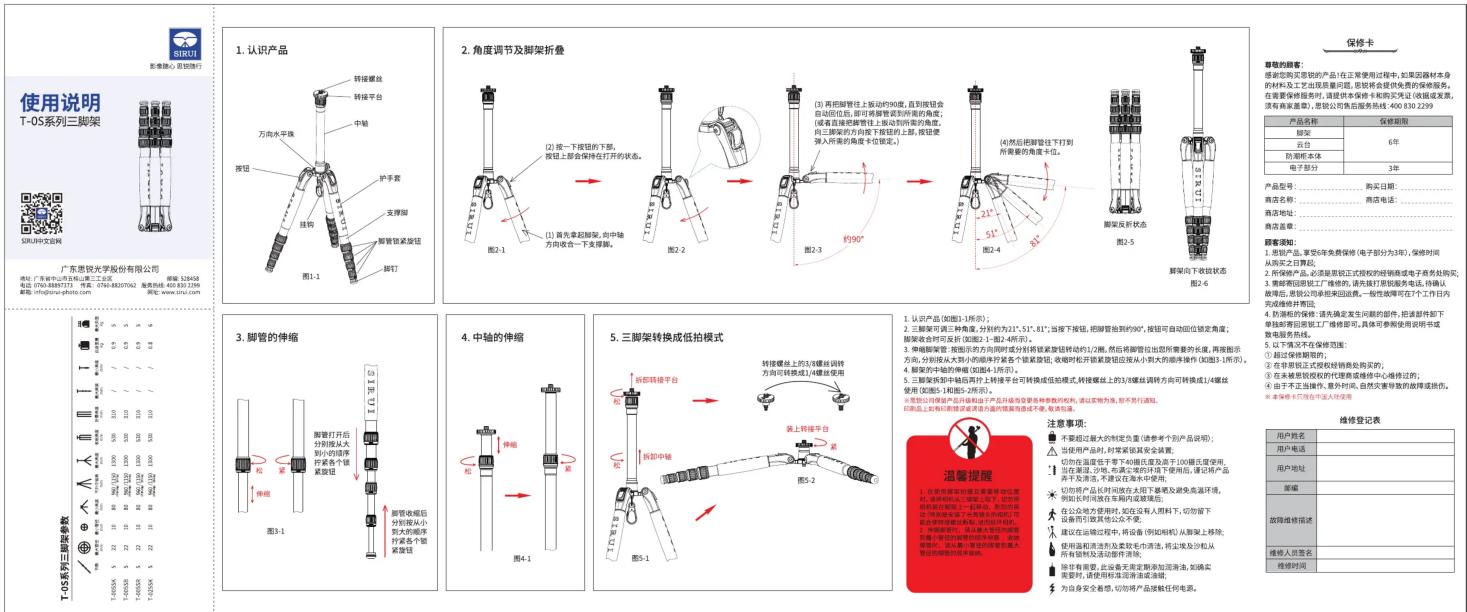
使用说明 T-OS系列三脚架参数 T-OS系列三脚架参数 新修心: 要锁锁 新修心: 要锁锁 1. 认识产品 2. 角度调节及脚架折叠 3. 脚管的伸缩 4. 中轴的伸缩 5. 三脚架转换成低拍模式 6. 三脚架打开后分别限从大到小的顺序拧紧紧按钮 7. 脚管缩后分别从小到大的顺序拧紧紧按钮 8. 脚管螺栓上各螺栓方向可转换成1/4螺丝使用 9. 脚管螺栓上各螺栓方向可转换成2/4螺丝使用 10. 脚管螺栓上各螺栓方向可转换成3/4螺丝使用 11. 脚管螺栓上各螺栓方向可转换成4/4螺丝使用 注意事项: 不要超过最大的制定质量(请参考个别产品说明): 当使用产品时, 时刻紧接其安全装置, 切向在速度若干下400摄氏度高于100摄氏度使用, 正在通过、秒长、充满尘零的环境下使用后, 速记将产品序开及滚动, 不建议在水平使用。 切向产品时对放在太阳下翻墙及避免高温环境, 例如长时间放在车内或玻璃处。 在公众地方使用时, 应在没有人用料下, 切勿放下 设备所引致其他人不牢。 建设在调试过程中, 将设备(例如相机)从测量上扣除; 使用温度清洁及表面毛冷清洁, 将尘埃及沙梭从 所有限制及活动部件清除。 除含有两套, 此设备无需定制或加湿清洗。如确实 需要时, 请使用标准清洗或滤镜。 为自身安全感想, 切勿将产品接触任何电源。 修缮登记表 保修卡 产品名称 保修期限 脚架 6年 月日 防潮实体 3年 电子部分 型号: 购买日期: 商品名称: 商店电话: 商品地址: 商务信息... 销售额说明: 1. 货币产品, 爱享6年免费保修(电子部分为3件), 保修时间 从购买之日起起; 2. 所保修产品, 必须提前正式授权的经销商或电子商务处购买; 3. 维规需按照工厂维修的, 请先打底识别服务电话, 并确认 售后服务, 家销公司承租和回租费, 一般性能将在7个工作日内 完成维修并费用; 4. 防测标的: 请先确定发生问题的件, 把课部件卸下 等待前需要按工厂维修即可, 具体可参照使用说明书或 发布发布材料。 5. 以下情况不在保修范围: ① 超过保修期的, ② 在预留栏正反视材料修改机的。 ③ 在本操作授权的代理销售维修中心维修过程中; ④ 由于不当操作、意外伤害、自然灾害导致的故障或损伤。 ⑤ 本操作卡应符合中文文本使用。

说明书折叠方法:
Sirui Travel T-25SK - 3

flowchart
graph LR
    A[" "] --> B["..."]
    B --> C["宽度72MM为一折, 依次折叠, 直到折完为止, 共7折"]
    C --> D["成品形状"]
    D --> E["成品尺寸"]
Vejledningsassistent
Drevet af Anthropic
Venter på din besked
Produktinformation

Mærke : Sirui

Model : Travel T-25SK

Kategori : Fotostativ