TSL08CN00 - Fotostativ Benro - Gratis brugsanvisning og manual
Find enhedens vejledning gratis TSL08CN00 Benro i PDF-format.


Brugerspørgsmål om TSL08CN00 Benro
0 spørgsmål om dette apparat. Besvar dem du kender, eller stil dit eget.
Stil et nyt spørgsmål om dette apparat
Download vejledningen til din Fotostativ i PDF-format gratis! Find din vejledning TSL08CN00 - Benro og tag din elektroniske enhed tilbage i hånden. På denne side er alle dokumenter nødvendige for brugen af din enhed offentliggjort. TSL08CN00 af mærket Benro.
BRUGSANVISNING TSL08CN00 Benro
DENRO IMAGE TECHNOLOGY INDUSTRIAL CO., LTD. The Third Industrial Area Tianzhou Town Zhongshan City, Hampzhou, China
Ludwig, USA Tel: 01-755-8324666. Tel: +86-766-86216218
http://www.bento.com/www.bento.cn
广东西诺斯科技工业有限公司
地址:广东省中山市天泽镇第三工业区文轩路2号
电话:0760-85738666 传真:0760-85211711
http://www.benro.com www.benro.cn
BENRO
Operating Instructions
SLIM TRIPOCKITS
单页尺寸:130X85mm
| 适用机型 |
| A | 一般公差 | B BENRO 广东百诺影像科技工业有限公司 | ||||||||||||||
| A | 范围 | I级 | M级 | C级 | ||||||||||||
| A | 16以下 | ±0.05 | ±0.1 | ±0.3 | 产品型号 | TSL08AN00 | 部品名称 | 说明书 | 总页数 | 共8页 | ||||||
| A | 16-63以下 | ±0.1 | ±0.2 | ±0.5 | 当前页码 | 第 页 | ||||||||||
| A | 63-250以下 | ±0.15 | ±0.3 | ±0.8 | 设计 | 林锦鸿 | 日期 | 2017.3.8 | 规格 | 图号 | PT-06-004690 | 版本 | ||||
| 序号 | 年月日 | 图面修改 | 担当 | 250-500以下 | ±0.2 | ±0.5 | ±1.2 | 审核 | 承认 | 材料 | 128g钢板班 | A | ||||
Thank you for making BENRO your choice for
professional photographic equipment
Your BENEO gear is manufactured to provide users of dependable services
In order to obtain optimum satisfaction and performance.
we suggest that you carefully read these instructions.
感谢您选用百诺专业摄影器材。
自著产品征询
注释的出售方为了化阳
对西诺产品的使用更加满意
我们建议您仔细阅读下面的更所说明。
部件名称 Name of Components
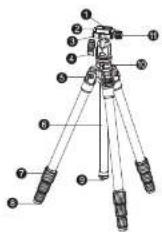
1.相机螺丝
CATHA SCEN
- 快鼓板
Quick Release Plate
- 安徽平
Mounting Platform
4.主体锁紧度低
Head Locking Knob
5.调节片
Log Angle Adjustment Lock
6.中轴
Reversible Center Column
- 脚管锁紧度低
Leg Log On
8.橡胶脚垫
Rutter Foot
- 送货注饱
Retractants Weight Hook
10.中轴锁紧旋钮
Camber Column Lock Knob
- 快装板锁紧贴铝
Quick Release Locking Knot
www.benro.com
③
④
www.benro.com ⑤
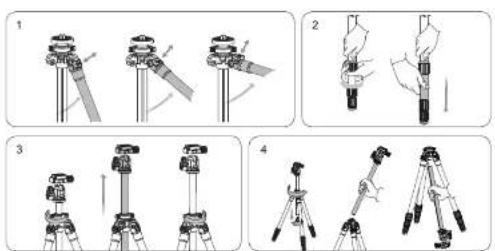
Leg Angle Adjustment (Figure 1)
To accommodate uneven terrain, awkward shooting situations or for low angle shooting, your Berro Tripod includes a 3-position Leg Angle Adjustment Sliding Lock. Each Leg can be adjusted by pulling the Leg Angle Lock out and selecting one of the Three positions. Please make sure that the Leg Angle Lock is securely pushed back into the lock position after you have selected the desired Leg Angle.
Leg Section Adjustment (Figure 2)
Each Leg section can be adjusted to the desired length by turning the Leg Lock grip 1/2 turn (180°) clockwise until the Leg is free to slide in or out. Once the desired length is achieved, turn the Leg Lock Grip counter-clockwise until the Leg Section is securely locked. Repeat this step for each Leg until the Tripod is set to the desired height. NOTE: To prevent any accidental damage to your gear, always remove any mounted equipment camera, etc.) from the Tripod before adjusting the Leg Sections.
Raising and Lowering the Center Column (Figure 1)
To raise the column loose the center column lock knob in a counter clockwise direction and lift the column to the desired height and no tighten the column lock knob. Please do not over lock the center column, which might damage the locking system. Note: Carefully adjust the center column when equipment is mounted. Hold onto your equipment until the center column is fully locked.
Reversible Center Column (Figure 4)
Your Triped has the ability to reverse the Center Column for close-up photography, copy work and far difficult to reach objects. To reverse the Center Column, under the Retractable Weight Hook located on the bottom of the Center Column. Leason the Center Column lock knob and pull the Center Column out. Insert the Center Column through the bottom with the Mounting Plate upside down and weighen the Center Column Locks knot securely. NOTE: Do not reverse the Center Column when a camera or equipment is mounted.
⑥ Specifications and design are subject to change without notice.
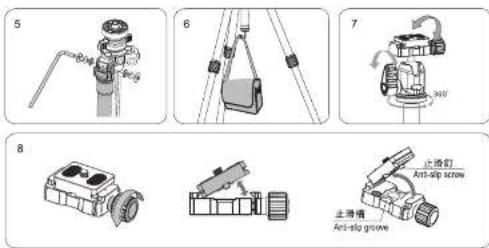
Allen Key (Figure 5)
An Allen Key is provided as a convenience to tighten or loosen the tension screws on your tripod. Removable Weight Hock (Figure 6)
An included Removable Weight Hook threads into the bottom of the Center Column. To help stabilize the tripod (such as during windy conditions), carefully hang a camera bag, sandbag or other similar item from the Weight Hook
NOTE: Take care not to overload the Tripod with extra weight as this could have a reverse effect and decrease the stability of the Tripod.
HEAD OPERATION
Benro Single Action Ballheads feature a single Locking Lever to provide simple and rapid control of both camera positioning and parking movements. The head incorporates a convenient Universal Quick Release Clamp with quick Safety Lock system.
Ballhead Controls (FIGURE 7)
A large Head Locking Lever kicks the Ballhead in place. Once the Lever is turned counterclockwise and lcosened, the Ballhead can move freely allowing the Mounting Platform to be positioned anywhere within a 0-90° vertical orientation and with a full 360° horizontal pan rotation.
NOTE: Do not over eighten the Locking Levers as this could damage the Ballhead locking mechanism.
Universal Quick Release Plate System
The Single Action Ballhead features a Universal Quick Release Plate system with Safety Lock. It offers a quick method of mounting or releasing a Camera or Equipment from the Head. Extra Plates are recommended as you can screw one to each Camera or Lens for even greater convenience when rapidly mounting and dismounting gear.
www.benro.com ⑦
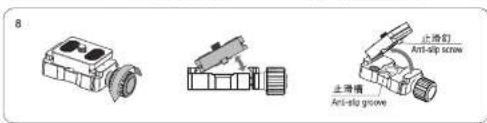
Quick Release Lock (FIGURE 8)
The Quick Release Lock can help you to remove the Quick Release Plate Quickly. To remove the Quick Release (QR) Plate, turn the Quick Release Locking Knob counter-clockwise. Aspartal opening of the clamping mechanism allows the QR Plate to slide on the Mounting Platform for proper balance and positioning. Two Stop Screws (removable) on the bottom of the QR Plate provide this first level of security. An additional counter-clockwise turn of the Quick Release Locking Knob opens the clamp fully so that the QR Plate can be filled out to be removed. Reverse the process and tighten the Quick Release Locking Knob to secure the QR Plate. NOTE: Accessed Bumble Level in the Mounting Platform helps position the Camera prior to mounting.
LIMITED WARRANTY COVERAGE
Your Banco products has been carefully manufactured, has passed many quality assurance checks and has been thoroughly tested before shipment. It is warranted in the country from which you purchased it based on the date of purchase to the original owner, against defects in materials and workmanship. The warranty does not apply to damages caused by misleading, dripping, or leaving batteries, nor modification or servicing performed by others. Please contact your local Banco dealer for further information and details about your warranty. To find the Banco distributor in your country, please check the distributor information at Banco official website www.benro.com.
⑧ Specifications and design are subject to change without notice.
USER NOTICE

Do not exceed the maximum specified load capacity (see specifications on the package label or visit www.benra.com).

Always ensure that Leg and Head Locks are slightly engaged before mounting any gear on your Tripod.

Do not use any Tripod below temperatures of -4°F or above +158°F (-20°C / +70°C)

Always clean and dry any Tripod after it has been exposed to wet, dusty, sandy or salty conditions. Your Tripod is not recommended for use in salt water. If required, clean tripod using a mild soap solution applied with a soft cloth, rinse with fresh water and dry with soft towel. Remove any dust, dirt or sand from all Leg Locks, Leg Sections and all moving parts.

Do not leave any Tripod in the sun for prolonged periods and avoid high temperature exposure.

Avoid leaving any Triped unattended in areas where people could trip over the goal and get hurt.

Remove camera, lens, and all gear from any Tripod when transporting

For your safety, don't let your BENRO gear come in contact with any electrical power source.
www.benro.com ⑨
使用方法(简体中文)
三屏架角度调节:(如图1所示)
为了适应凹凸地面或者低角度拍摄,而端架架外拔式角度调节片,更容易调节高、中、低三个角度。调整好角度后,请确保把角度调节片推到锁紧的位置。
三瓣架高度调节:(如图2所示)
即时针180°旋转脚管锁紧按钮,直到每节脚管都可以自由伸缩。调节三脚梁的每支脚管到要求的长度,然后适时针旋转脚管锁紧按钮。直到脚管完全锁紧、重复以上操作,调节三脚架请您所需要的高度。
注意事项:在调节脱管时,务必取下相机等设备,避免意外损坏。
拉伸中轴:(如图3所示)
定时针旋转中轴锁紧旋钮,拉伸中轴调到合适位置,然后顺时针旋转中轴锁紧旋钮锁紧中轴,请不要过度锁紧中心管,这样会损坏锁紧装置。
注意:装有相机等设备时,小心调节中轴,松开中心管锁紧旋钮时务必设置中心管,请遵照说明书进行操作。
中轴倒置:(如图4所示)
倒置中轴可以拍量将写镜头、复制图片和拍摄率接近的物体。将驻钩座拧开,拧松中轴锁紧圈将中轴取出,将中轴倒置然后锁紧。
注意事项:前置中轴时,债务必卸下安装在中轴上相机或其他器材
六角扳手:(如图5所示)
通过六角板手调节脚架螺丝的松紧度
百塔领首临时变更设计及说明书内资料权利,是不另行遗漏。
可伸缩挂钩:(如图6所示)
在刮风时,需要柱上重物增加三脚架的稳定性,可在结构上排上沙骏、圆相机袋或类似的物品。注意不要超重,否则反而会影响三脚架的稳定性。
云台使用说明
百瑞大凌钰云台设计集微调与锁置于一体,操作更加实时简单,方便快捷。采用国际标准式的快捷夹带有快速装置设置。
云台操作(如图7所示)
超大云台锁紧旋钮控制云台的实时锁紧。定时针松开主体锁紧旋钮,云台球体可以自由旋转。云台快装夹可以在垂直90度方向自由定位,云台可以进行360度水平调节。
注意事项:不要过度频繁主体锁紧症因,这样会损坏云台的锁紧结构。
通用快装板
云台所配的通用快装模带有保险功能。快装模可以快速取下相机以及摄影设备。附带的快装模与其他快装模兼容,并方便快速安装相机和镜头。
快速锁紧装置(如图8所示)
快装锁紧装置可以给您的摄影设备快速取下快装板,逆时针松开快装板锁紧盘框,快装板可在快装夹上滑动进行平衡定位调节。快装板上的两颗可拆卸止滑螺丝有首要安全保险作用。逆时针松开快装板锁紧盘框,即可取下快装板。反之,即可锁紧快装板。
注意事项:快装夹面板上的水平仪可以帮助您在安装相机之前确定相机的位置。
www.benro.com ⑪
注意事项:
使用此产品时,请不要超过规定的最大承重(详细参数请参考产品品卡或者百适官网。)
使用此产品时,为了避免意外损坏相机,在实验相机之前,请务必确认产品的各个锁紧系统处于安全状态。
请勿在零下20度或高于零上70度的温度下使用本产品。
在潮湿、泥沙、风尘等环境中使用过后,一定要用干布将绷紧螺牙,和可能蘸有泥沙的部分清敷干净,可使
当
请勿长时间将产品放在太阳下,避免长时间将产品放置在高温下,例如靠近汽车玻璃数小时。
在公共场所使用本产品时,请勿离人,避免小裘靠近,造成拿外伤害。在危险的地方使用时,请谨慎操作。
禁止搭载设备(相机)等一起携带移动。
为了人身安全,使用本产品时,偏好靠近高电压区域,或与强效化学接触。
保修范围
您所使用的消耗产品是经过精密加工,多项严密质量检测,所有功能严格测试才完整包装出厂的。所有材料或者工艺方面的瑕疵
定晨电表体损坏。
质量保修可以联系您所在您的经销商,海外代理及详细信息可登陆www.banc.com管理。
⑫
使用方法(繁體中文)
三様架角度調節:(如圖1所示)
易了这康因凸地面或者低角度拍摄,百面面架外拔式角度调剪片,更容易调剪高、中、低三個角度。调整好角度後,结被保把角度调剪片推到眼紧的位置。
三膝架高度调节:(如图2所示)
断隔到180°旋转脚管紧接组,直到每套脚管都可以自由伸缩,圆筒三脚架的每支脚管到要求的长度。然后通过此波翻瓣等翻瓣切削,直到跨着完全翻瓣,重复以上操作,圆筒三脚架即使所需要的亮度。
注意事项:在钢筋管时,接必取下相撞等段骨。避免意外碰撞。
拉伸中触:(如图3所示)
送降针旋释中轴锁紧绕缸,拉伸中轴隅到合适位置,然後顺降针旋释中轴锁紧绕缸锁紧中轴,要不要遇度锁紧中心等,这也会使端锁紧装置。
注意:求有相機等設備時,小心請節中輪,認同中心管銷緊張鋸時換必因緊中心管,請遵照說明查進行操作。
中華側圖:(如圖4所示)
倒置中轴可以拍摄特写锁项、复制图片和拍摄难接近的柴盘。将驻钩应擦阴,摩擦中轴锁紧围拆中轴取出,拆中轴倒置活后延紧。
注意事项:倒置中轴时,插替必卸下安装在中轴上相接或其他器材
六角板手:(如图5所示)
通通六角板于柄部图案重贴的繁繁度。
www.benro.com ⑬
可伸略挂钩:(如图6所示)
在到風時,需要按上面裝增加三腳架的穩定性,可在掛胸上柱上沙袋、銅橋袋或類似的物品。注意不要超重,否則反而會影響三腳架的穩定性。
雲臺使用說明
百萬大戲鋁器臺設計集磚鋼與鋁縶子一圓,操作更加實時簡單。方便快捷。采用國際標準式的快裝夾帶有快速鋁縶裝置。
需要操作(如图7所示)
超大雲裏鎖緊旋區控制雲臺的實時鎖緊。這時針電洞主盤鎖緊旋鈕,雲臺球圈可以自由旋轉,雲臺快張突可以在雲臺90度方向自由定位,雲臺可以進行360度水平調節。
注意事项:不要过度频繁主着频繁旋犯,這樣會預填質囊的頻繁結構。
通用快装板
需要所配的通用快装板带有保险功能。快装板可以快速取下相撞以及摄影设备。用带的快装板具其他快装板套管,并方便快速安装拍摄和调用。
快速明显装置(如需8所示)
快速超紧装置可以给您的摄影设备快选取下快装板,这时斜翼同快装板路繁旋铝,快装板可在快装夹上滑垫进行平衡的调整。
定位偏紧。快装锁上的用锁可拆卸正滑重等有首要安全保戴作用。定时折叠两块装锁紧紧贴后,每可靠下快装锁。反之,即可解锁快装锁。
注意事项:快装夹面板上的水平儀可以幫助您在安裝相機之前確定相機的位置。
④ 百某供应商对数量及资料费内资料费利,等不另行遗漏。
注意事项:
使用此商品时,结不要超逼设定的最大承重!详细参数请参考商品吊卡或者百能官网。
使用此商品种,除了避免意外指策相機,在安裝相機之前,請勿確認產品的各個緊繫系統處於安全狀態。
1 首勿在零下20度或高于零上70度的温度下使用本产品。
在潮湿、泥沙、風塵等環境中使用過後,一定要用幹布筒須緊繡牙,和可能沒有泥沙的部分清除干净。可使用每水蒸餃、油墨蒸餃、渣墨劑等燒淨,不推車在滌水中使用本產品。
额勿長時間將產品放置在大梁下,避免長時間將產品放置在高架下,例如靠近汽車玻璃着小燈。
在公共场所使用本产品时,请勿催人,避免小孩靠近,造成意外伤害。在危险的地方使用时,谨慎操作。
禁止相載設備(相機)等一起損帶移動。
① 具了人身安全,使用本产品时,请勿靠近高可靠区域,或具强化化学接触。
保修范围 每件使用以下商品及规格要求加工,各项国家质量检验。所有仅限要得到其主要备货险出库的,应有材料或在工具方面均照
可以在给所摘要的渠道免费维修或者更换。所有人渠道因所造成的渠道损害不在保修范围内,例如:错误操作、课堂擦落,或者零
先漏電波器接信。 管量保修可以联系您所在地的路招商,海外代可直接卸信息可登陆www.binfo.com查询。
www.benro.com 15