
FAS-18200M - Smartphone DENVER - Gratis brugsanvisning og manual
Find enhedens vejledning gratis FAS-18200M DENVER i PDF-format.


Brugerspørgsmål om FAS-18200M DENVER
0 spørgsmål om dette apparat. Besvar dem du kender, eller stil dit eget.
Stil et nyt spørgsmål om dette apparat
Download vejledningen til din Smartphone i PDF-format gratis! Find din vejledning FAS-18200M - DENVER og tag din elektroniske enhed tilbage i hånden. På denne side er alle dokumenter nødvendige for brugen af din enhed offentliggjort. FAS-18200M af mærket DENVER.
BRUGSANVISNING FAS-18200M DENVER
DENVER®
Mobile Phone
FAS-18200M
www.facebook.com/denverelectronics
User Guide
English, Deutsch, Dansk, Suomalainen, Svenska, Français, Nederlands, Español, Italiano, Polski, Português, Norwegian
ENG-1
Start to Use
Put in/Take out battery
Put in battery
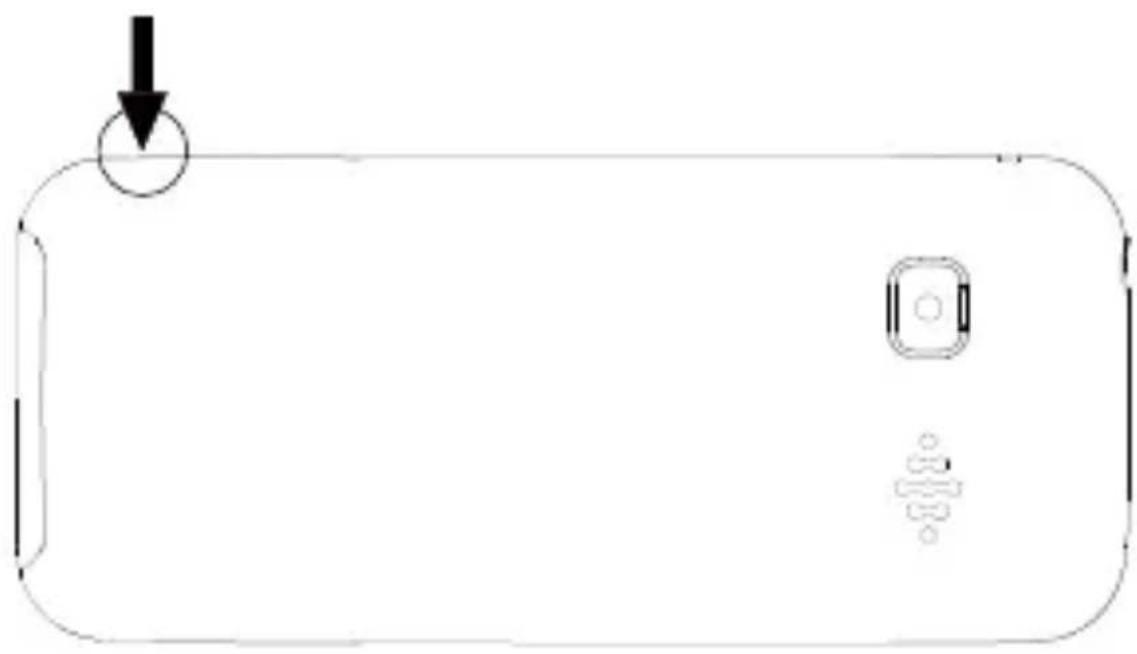
1.Open the battery cover
natural_image
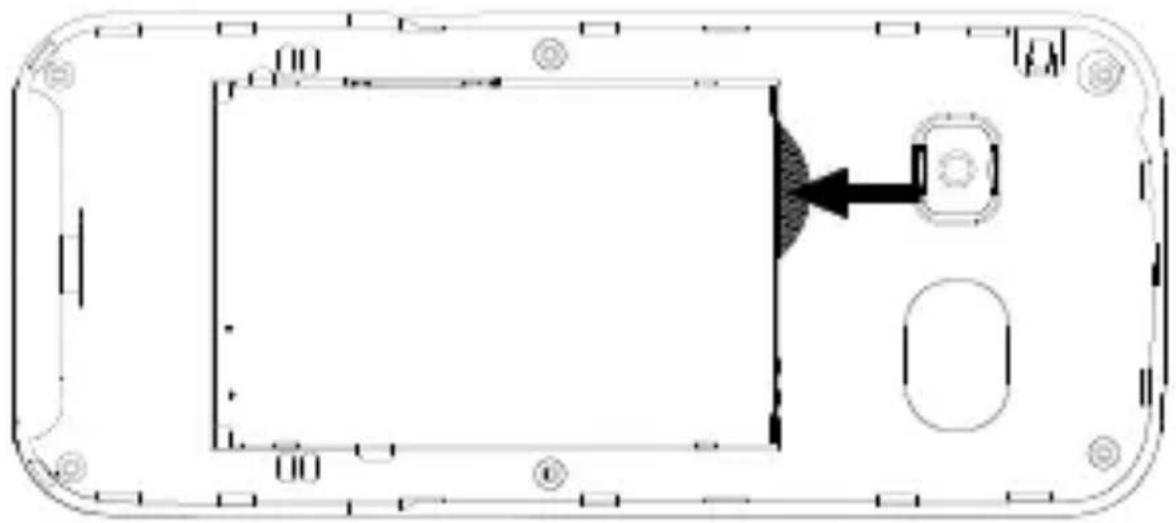
Simple line drawing of a smartphone with a download icon and control buttons (no text or symbols)- Put battery into the battery slot. Keep three metal points of battery facing downward and matching with the three metal connection points on phone.
natural_image
Top-down schematic of a device casing with internal components and mounting holes (no text or symbols)- Close the cover. Make sure that cover is completely matched and the cover matching sound could be heard.
Remark: Shut down all devices and cut the connection with charger when removing battery. Please use battery which is matched with this phone only.
Insert/Take out SIM card
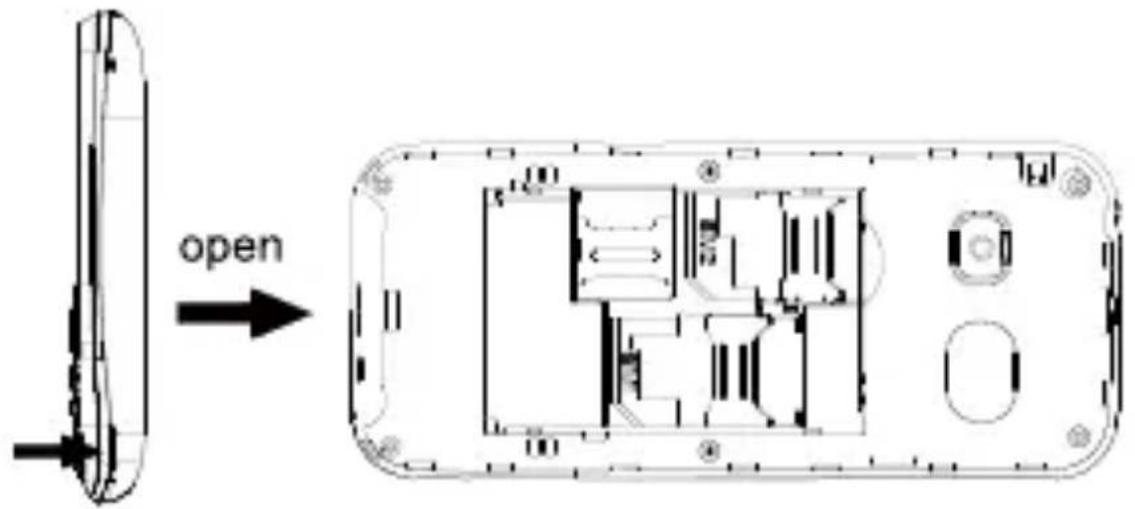
- Insert SIM card: Remove battery cover; Insert and slide the SIM card with the metal part facing downward by following below arrow direction at battery slot until SIM card is completely inserted in right position.
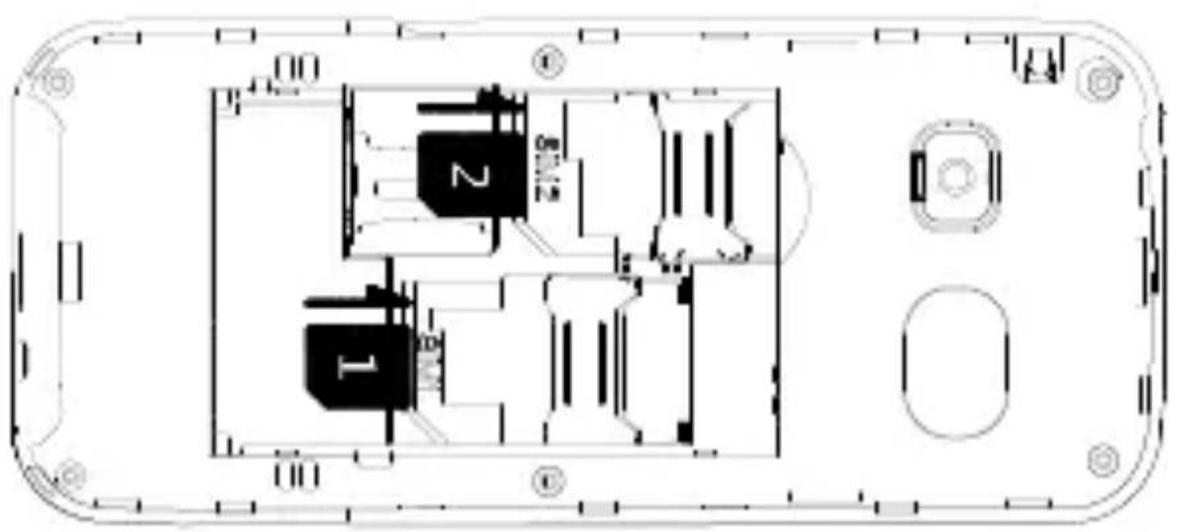
- Take out SIM card: Hold the notch of SIM card and lift it slightly up by the other hand to take card out.
Remark: Please note that you should use GSM SIM card only, because it doesn't support 3G.
Remark: Phone must be power off when putin and take out battery.
SIM card and the contact point will be easily damaged due to scratch and bending. Please be careful when inserting and taking out the SIM card.
Battery Charging
Phone could be charged when phone is power off or power
Make sure that battery is inserted in phone before charging.
- Plug in the charger.
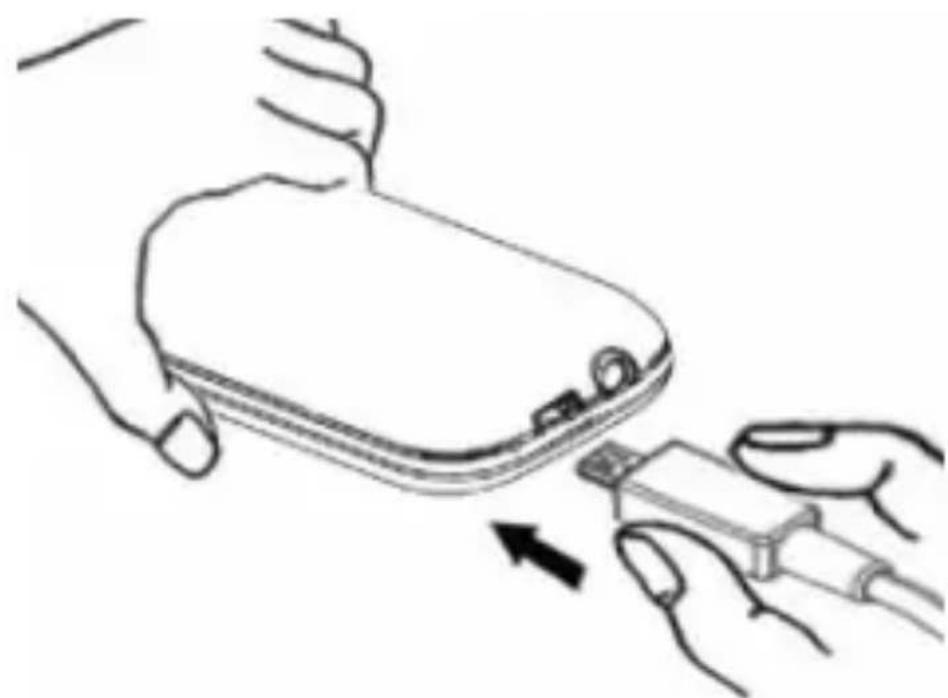
natural_image
Line drawing of a hand holding a device with an arrow pointing to it, no text or symbols present- Plug out the charger from power jack first after it is charged. Then unplug charger from phone.
ENG-5
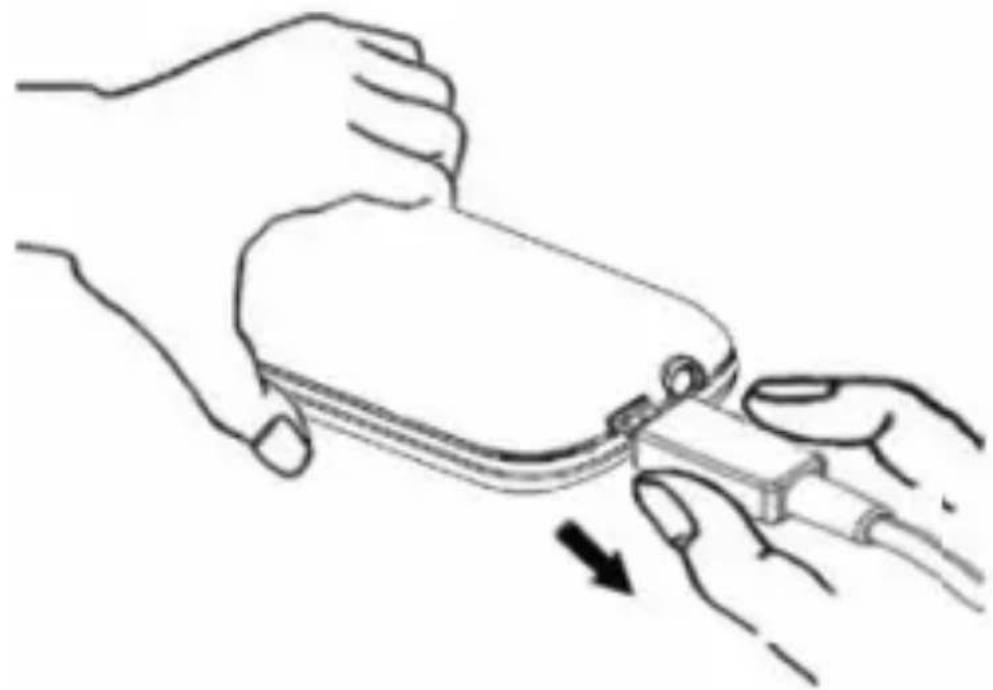
natural_image
Line drawing of two hands holding a small object, one being cut with a arrow indicating motion (no text or symbols)Remark: Battery indication will bedisplayed after several minutes if battery is over-discharged.
Not enough battery alert
Phone will give alert when battery is not enough and display a message of low battery on screen. Please charge battery. Please charge battery when you receive the alert of low battery during calling in order to keep the calling.
Your Phone
Turn ON, Turn OFF and keypad lock: to turn on and turn off the phone, press and hold the
ENG-6
red end call key.
Press and hold *button to lock keypad
Stand by Mode
When phone is ready to use but no operation is done on phone, then phone is under stand by modelcons on Screen
Icons might be displayed on screen.
 | Battery status | |
 | Signal status | |
 | Alarm | |
 | Message | |
 | Silent mode | |
 | General mode | |
 | Vibration mode | |
 | Missed call | |
Key Functions
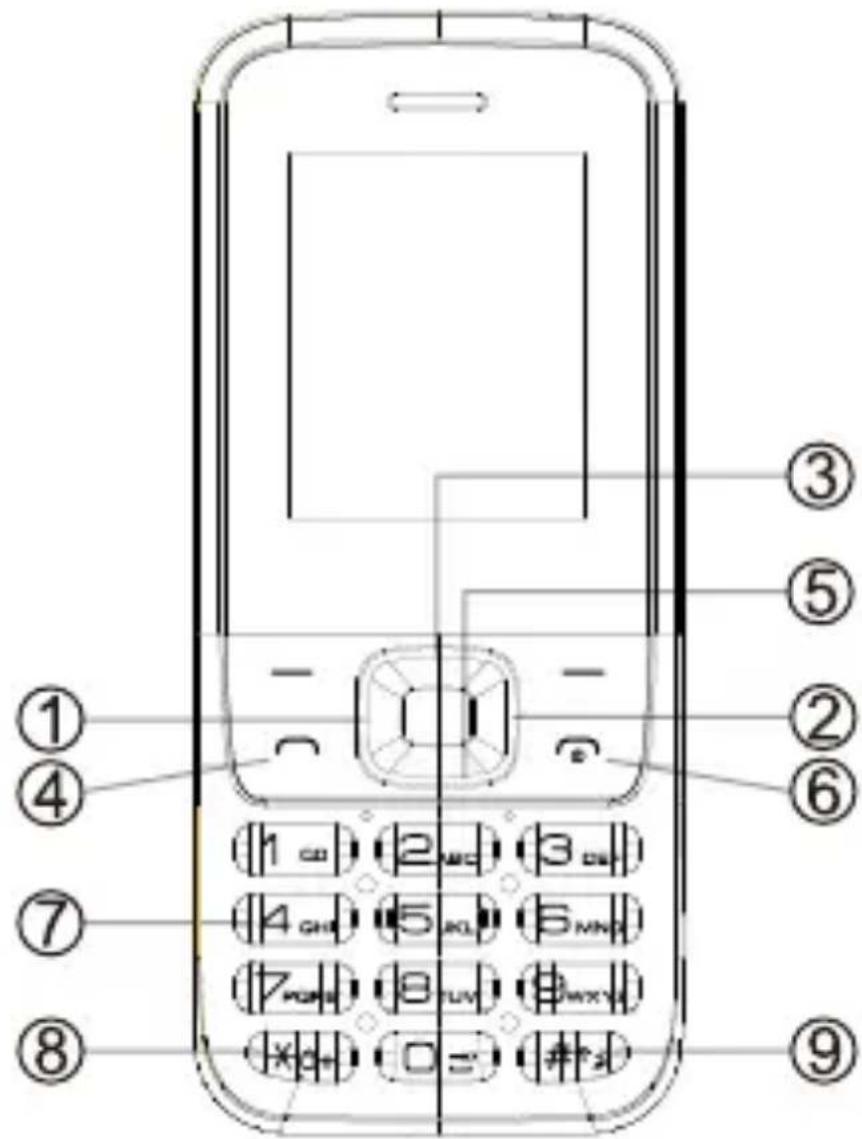
| Key | Key Name | Functions |
| 1 | Navigation Left key | Standby mode: press to enter messageOperating: press to move cursor left |
| 2 | Navigation Right key | Standby mode: press to enter profilesOperating: press to move cursor right |
| 3 | Navigation Up key | Standby mode: press to enter main menuOperating: press to move cursor up |
| 4 | Answer Key (Green key) | Press to make outgoing call or press to pick up phone when there is incoming call.Standby mode: press to enter call list |
| 5 | Navigation Down key | Standby mode: press to enter phonebook Operating : press to move cursor down |
| 6 | End Key (Red Key) | Phone Off: Long press to switch on; Phone On: Long press to switch off; Operating: Press to go back to idle screen |
| 7 | Numeric key | Pressto input numbers or letters |
| 8 | * key | Standby mode: Long press to lock the keypad. Short press to type in *, +,P. Editing mode: Press to use normal symbol. |
| 9 | # key | Standby mode: Long press to set phone silent mode, short press to type in #.Editing mode : Press to switch typing method. |
Voice Dial
Make an International Call
- Press 0 key for twice times and sign "+" will come out. Then enter country code, area code and phone number (without a zero in front of mobile phone number) Press Send key to enter voice dial to call out.
- Dial a fixed line: "+"country code + entirephone number + Send key.
Dial extension No. of a Fixed line
Some extension numbers of fixed line couldn't be dialed directly. You need to dial telephone exchange first and then dial the extension number. Type in a P symbol between telephone exchange number and
ENG-10
extension number, this phone willdial the extension number automatically. Follow below method to make a symbol P: short press * key for three times. Then it will display a P symbol on screen.
Shortcuts: Menu > Settings > Phone Setting > Shortcut setting. UP and DOWN selection keys can open some shortcuts; by default, the UP selection key directly enters the Music Player, while the DOWN selection key opens the alarm list.
Main menu: To access the Main Menu on your phone, press the selection key on the top left
- Messaging: to write and read SMS text messages
- Contacts: to manage and save contacts
- Calls Log: Missed Calls, dialled calls...
- Multimedia: Video player, Recorder
- Audio player: You can play music, it's better to insert SD card.
- My files: You canopen/delete/view/edit the file here.
- Settings: to customize your phone
ENG-11
- Tools: with Calendar, Calculator, Alarm, STK..
- Profiles: to activate the mode, and to customize General, indoor, outdoor mode.
Answer an incoming call: respond to an incoming call simply by pressing the green button. To set up the answer mode select Settings > Call settings > Answer mode
Making a call: to make a call from the Home screen, select the desired number by using thekeypad and then press the green call button. To end the call, press the red end call key.
Call a number from the contacts:from the main screen, press the upper right selection key; this will automatically open the Contacts. Scroll through contacts with the UP/DOWN keys and press the green call button to call the desired contact.
Call anumber from the call log: from the main screen, press the green call key, the missed, received, and outgoing calls will be automatically displayed.
Scroll with UP/Down keys and press the green call button when you find the number you want to call.
Add contacts to the Contacts: Select Menu > Contacts > Options > New, and choose to save the number on the SIM or the Phone. Enter the name and the new number, then press Save.
Speed dial:inMenu > Contacts > Options >Others> Speed Dial > Options > Edit, you can assign to keys 2-9 certain numbers that will be called automatically if you press and hold the related button.
Memory status: this feature within the contacts settings allows you to see how much free storage there is on the phone and SIM card.
Send and read SMS
Send SMS: from the main screen, choose Menu > Messaging > Write message and write your message. Press Options > Send to > Insert number and enter the number using the
ENG-13
numeric keypad or Insert contacts to select from the Contacts the contact you want to text.
Read SMS: when you receive a new text message, the phone displays an envelope icon on the top bar (until the message is read/for as long as the message is unread) and a notification pop up appears on the main screen. Press the upper left selection key to enter the Inbox or access it from the main screen by selecting Menu >Messages >Inbox.
Bluetooth: In Settings > Connections> Bluetooth >Open Bluetooth you can turn on Bluetooth. With the Paired Device, you can search for other devices (headsets, phones...). Select the device you would like to associate with and confirm it on both devices.
Set Ringtones: select Menu >Profiles >Options>Settings>Ring settings >Set as incoming call ringtone, Select Call Ringtone and set the desired tone from those available.
Pressing and hold # button to change Vibration
mode, General mode, Silence mode.
Phone Settings: from Menu > Settings > Phone settings, you have/will have access to various settings such as Date and Time, Language, and Display. Select Restore to reset the factory settings of FAS-18200M: enter the phone password 1234 to confirm the restoring.
Radio frequency (RF) exposure and SAR THIS DEVICE MEETS INTERNATIONAL GUIDELINES FOR EXPOSURE TO RADIO WAVES
Your mobile device is a radio transmitter and receiver. It is designed and manufactured not to exceed the limits for exposure to radio frequency (RF) recommended by international guidelines (ICNIRP). These limits are part of comprehensive guidelines and establish permitted levels of RF energy for the general population. The guidelines were developed by independent scientific organizations through periodic and thorough evaluation of scientific studies. The guidelines include a substantial safety margin designed to assure the safety of all persons, regardless of age and health.
ENG-15
The exposure standard for mobile devices employs a unit of measurement known as the Specific Absorption Rate, or SAR. The SAR limit stated in the international guidelines is 2.0 watts/kilogram (W/kg)*. Tests for SAR are conducted using standard operating positions with the device transmitting at its highest certified well below the maximum value. This is because the device is designed to operate at multiple power levels so as to use only the power required to reach the network. In general, the closer you are to a base station, the lower the power output of the device. power level in all tested frequency bands.
Although the SAR is determined at the highest certified power level, the actual SAR of the device while operating can be well below the maximum value. This is because the device is designed to operate at multiple power levels so as to use only the power required to reach the network. In general, the closer you are to a base station, the lower the power output of the device.
SAR values may vary depending on national reporting and testing requirements and the network band. Use of device accessories and enhancements may result in
ENG-16
different SAR values.
The SAR limit for mobile devices used by the public is 2.0 W/kg averaged over 10 grams of body tissue. The guidelines incorporate a substantial margin of safety to give additional protection for the public and to account for any variations in measurements. SAR values may vary depending on national reporting requirements and the network band. The highest SAR value for this model phone tested for use is 0.470W/kg.
Electric and electronic equipment and included batteries contains materials, components and substances that can be hazardous to your health and the environment, if the waste material (discarded electric and electronic equipment and batteries) is not handled correctly.
Electric and electronic equipment and batteries is marked with the crossed out trash can symbol, seen below. This symbol signifies that electric and electronic equipment and batteries should not be disposed of with other household waste, but should be disposed of separately.
As the end user it is important that you submit your used batteries to the appropriate and designated facility. In this manner you make sure that the batteries are recycled in accordance with legislature and will not harm the environment.
All cities have established collection points, where electric and electronic equipment and batteries can either be submitted free of charge at recycling stations and other collection sites, or be collected from the households. Additional information is available at the technical department of your city
ALL RIGHTS RESERVED
DENVER ELECTRONICS A/S

ENG-18
- DENVER®
- Start to Use
- Put in/Take out battery
- Insert/Take out SIM card
- Battery Charging
- Not enough battery alert
- Your Phone
- Stand by Mode
- Voice Dial
- Make an International Call
- Dial extension No. of a Fixed line
- ENG-10
- ENG-11
- Send and read SMS
- ENG-13
- Radio frequency (RF) exposure and SAR THIS DEVICE MEETS INTERNATIONAL GUIDELINES FOR EXPOSURE TO RADIO WAVES
- ENG-15
- ENG-16
Mærke : DENVER
Model : FAS-18200M
Kategori : Smartphone