Q760 - Armbåndsur Danish Design - Gratis brugsanvisning og manual
Find enhedens vejledning gratis Q760 Danish Design i PDF-format.


Brugerspørgsmål om Q760 Danish Design
0 spørgsmål om dette apparat. Besvar dem du kender, eller stil dit eget.
Stil et nyt spørgsmål om dette apparat
Download vejledningen til din Armbåndsur i PDF-format gratis! Find din vejledning Q760 - Danish Design og tag din elektroniske enhed tilbage i hånden. På denne side er alle dokumenter nødvendige for brugen af din enhed offentliggjort. Q760 af mærket Danish Design.
BRUGSANVISNING Q760 Danish Design
IQ16Q760
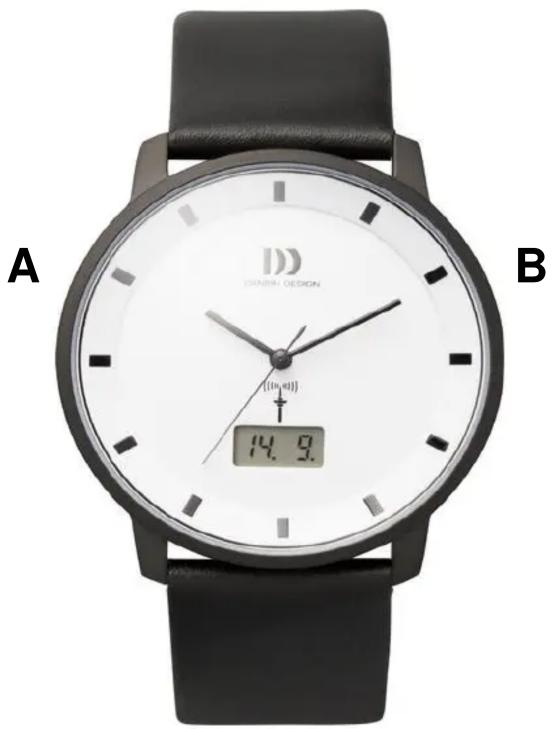
Setting the watch to a different time zone:
By pressing button “A” (<3 seconds) the current time zone is displayed. By pressing “A” again for a shorter period, this time zone can be altered to the one you are currently in. The hands will then automatically turn to this time zone.
Date and signal strength:
Normally the date can be read in the display. By pressing button “B” (<3 sec) a seconds counter will appear, a symbol for an RC tower and a number. The number represents the number of days since the last signal was received. If it reads “0”, the signal has been received in the last 24 hours.
Setting the hands:
Press button “B” for more then 3 seconds. The hands should turn to the 12 O’clock position. When they don’t, the hands should be calibrated manually. To do this, press both buttons at the same time for a few seconds. The letter “H” will appear, indicating that the hour- and minute hand can be altered. Continue pressing button “A” until the hour and minute hand have reached the 12 O’clock position.
If these hands have been set, press button “B” once. An “S” should appear in the display., which indicates the seconds hand can be altered. Keep pressing button “A” until the seconds hand reaches the 12 O ‘clock position. If all 3 hands have reached the 12 O’clock position, press button “B” once (>3 seconds) to return to the normal time. The watch should automatically set itself to the correct time within a few minutes.
General information
The range of the watch is a radius of approximately 1000 miles from Frankfurt.
Mærke : Danish Design
Model : Q760
Kategori : Armbåndsur