1061 - Ur Skmei - Gratis brugsanvisning og manual
Find enhedens vejledning gratis 1061 Skmei i PDF-format.


Brugerspørgsmål om 1061 Skmei
0 spørgsmål om dette apparat. Besvar dem du kender, eller stil dit eget.
Stil et nyt spørgsmål om dette apparat
Download vejledningen til din Ur i PDF-format gratis! Find din vejledning 1061 - Skmei og tag din elektroniske enhed tilbage i hånden. På denne side er alle dokumenter nødvendige for brugen af din enhed offentliggjort. 1061 af mærket Skmei.
BRUGSANVISNING 1061 Skmei
INSTRUCTION
A. Features
➢ 12 Digits LCD Display , Display Hour ,Minute ,Second ,Month ,Day and Week
Chime hourly and Daily Alarm
➢ 12 / 24H format selectable , Auto Calendar
➢ 1/100 second Chronograph with Split functions
EL backlight
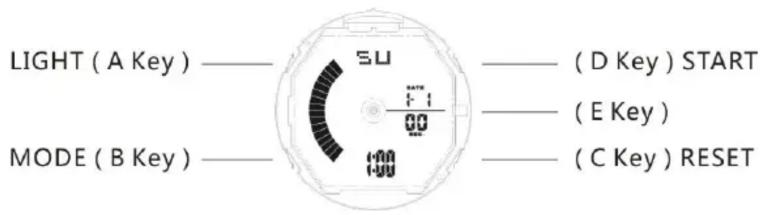
B. Operational Manual
At any state, press A key EL backlight for 3s.
➢ Press B key convert mode:
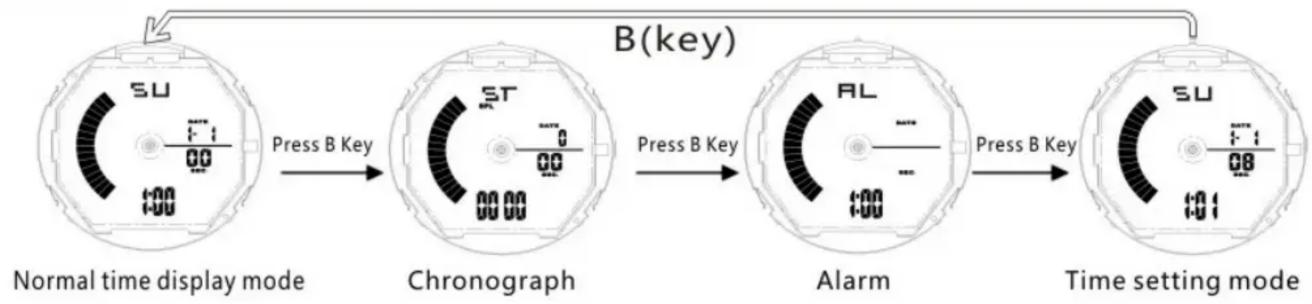
flowchart
graph LR
    A["Normal time display mode"] -->|Press B Key| B["Chronograph"]
    B -->|Press B Key| C["Alarm"]
    C -->|Press B Key| D["Time setting mode"]
    style A fill:#f9f,stroke:#333
    style B fill:#ccf,stroke:#333
    style C fill:#cfc,stroke:#333
    style D fill:#fcc,stroke:#333
Chronograph functions
In normal display mode: press B key once, enter Chronograph mode
➢ Press D key to Start running ;When running, If press D key again will stop running, If press C key,will stop display running,but run at back. Press D key again , will running again. Press C key to zero
Alarm Setting
in normal display Mode, press B key twice enter into Alarm Mode
➢ Press C key the Hours will flash, Press D key to adjust the correct hour for your Alarm.
➢ Press C key the Minutes will flash. Press D key to adjust the correct minutes.
➢ Press B key to exit.
Alarm & Chime ON/OFF
In normal mode press B key twice enter into alarm mode, press D key to ON/OFF the "ALM"/"SIG" function,
➢ Press B key to exit.
Time & Date Setting
In normal Mode, press B key three times to enter setting mode and the seconds will flashing. Press D key to zero.
➢ Press C key the Hours will flash. Press D key to adjust correct Hours
➢ Press C key the Minute will flash. Press D key to adjust the correct Minutes.
➢ Press C key the Month will flash. Press D key to adjust correct Month
➢ Press C key the Date will flash. Press D key to adjust correct date
➢ Press C key the week will flash. Press D key to adjust the correct week.
▶ Press B key to exit.