Power-Walker Lite PZ-270 - Skridttæller Yamasa - Gratis brugsanvisning og manual
Find enhedens vejledning gratis Power-Walker Lite PZ-270 Yamasa i PDF-format.


Brugerspørgsmål om Power-Walker Lite PZ-270 Yamasa
0 spørgsmål om dette apparat. Besvar dem du kender, eller stil dit eget.
Stil et nyt spørgsmål om dette apparat
Download vejledningen til din Skridttæller i PDF-format gratis! Find din vejledning Power-Walker Lite PZ-270 - Yamasa og tag din elektroniske enhed tilbage i hånden. På denne side er alle dokumenter nødvendige for brugen af din enhed offentliggjort. Power-Walker Lite PZ-270 af mærket Yamasa.
BRUGSANVISNING Power-Walker Lite PZ-270 Yamasa
YAMASA
PZ-270/271
POWER-WALKER lite
Instruction manual
natural_image
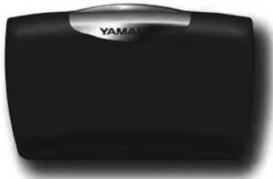
Black rectangular electronic device with a metallic label reading 'YAMAC' on its side (no additional text or symbols visible)Thank you for purchasing POWER-WALKER lite. Please read the Instruction manual carefully.
Cautions
Caution – when handling this product
◆This product is not waterproof. Please do not use or store it in a place where it can get wet.
◆Please avoid using or storing this product in direct sunlight, near heating devices, or in areas with a lot of dust or moisture.
◆Please do not take this product apart or tamper with its inner parts.
◆Please do not drop, step on, or apply strong force to this product.
When cleaning this product, please do not use things like benzene, thinners, or gasoline.
Proper measurement may not be possible in the following situations:
- When the POWER-WALKER lite is not worn properly.
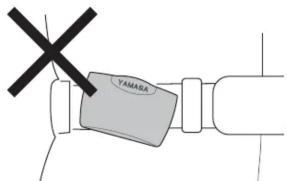
- When the POWER-WALKER lite is attached to the belt at an angle.
-
When the clip and front case are not closed.
-
When jogging or taking irregular steps.
-
Shuffling feet.
• Walking with sandals, etc. -
Walking in crowded areas where steps can be disrupted.
-
When moving up and down or shaking about.
• Standing and sitting.
• Sports other than walking or jogging
- Climbing or descending stairs or steep slopes.
- Shaking up and down or side to side while in transport in a motor vehicle.
※POWER-WALKER lite has a programmed 1 direction accelerometer sensor inside.
So display does not show number 1 as first step even if you began walking.
Because 1D accelerometer sensor has Electronic Walking-Cognitive (EWC sensor) function which can distinguish just vibrations occurred by not walking action like sitting and standing from actual walking activity. You can know actual walking data more precisely because of this function.
※If you walk continuously more than 5 steps, the steps you took will be added to the number of steps totally you have taken and display total data at once.

Replacing the Battery
When the battery is drained, the display is dimming. Please replace the battery. New Battery life is approx 2 years.
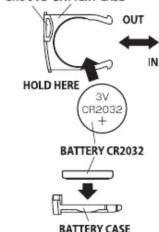
- Pull out the battery case.
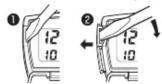
To remove, stick a small screw-driver in the groove side of the battery case.
- Insert the new battery (CR2032) in the case with the positive side + facing up.
- Put the battery case all the way back into the POWER-WALKER lite.
- Press the System Reset Switch.
GROOVE BATTERY CASE
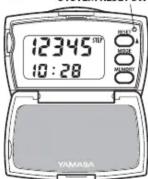
Please make sure to press the System Reset Switch after replacing the battery.
When the System Reset Switch is pressed, all stored memory and personal data (stride length, body weight) and clock time will be erased, so please do initial setting once again. The attached battery when you bought is for trial use, so the battery life may be shorter than normal life.
Please follow your local guidelines when disposing of old batteries
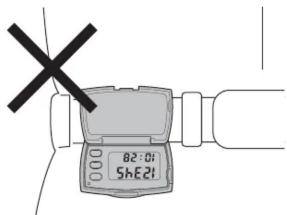
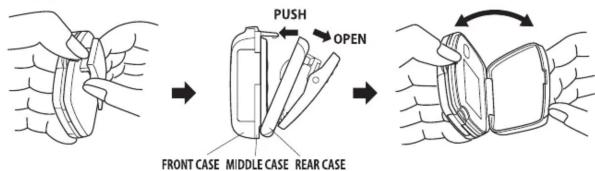
How to Open the POWER-WALKER lite to see display to see display
When you want to see display or push buttons, please open the front, middle, and rear cases as shown in the diagram:
How to wear POWER-WALKER lite
●Please clip the POWER-WALKER lite securely to the waist part of your slacks, skirt, training pants, etc.
●Standard placement is on the right or left side above the crease line of the slacks.
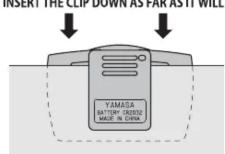
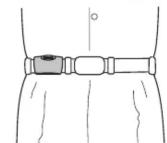
EXAMPLE ATTACHMENT WITH A BELT
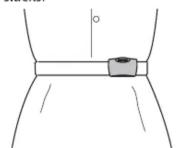
EXAMPLE ATTACHMENT WITHOUT A BELT
- Please insert the clip down as far as it will go.
●The POWER-WALKER lite will not measure properly if it is attached loosely or if the case is attached at an angle or askew.
Troubleshooting
| Situation | Cause | Remedy |
| Display dimming | The battery is drained | Replace it with a new battery (CR2032) |
| Display shows nothing | The +/- battery terminals are not facing the correct way | Place the battery inside the product correctly |
| The battery is drained completely | Replace it with a new battery(CR2032) | |
| Display values are incorrect | The product is not being worn properly | Read"How to wear POWER-WALKER lite" |
| Walking is irregular | Always take care to walk with a regular rhythm | |
| Settings are incorrect | Change the settings | |
| Display contents look irregular | Press the System Reset switch | |
WARRANTY
Terms: 1 year from purchasing date
Coverage: Everything bad condition or defect except LCD broken, Battery and clip broken.
Please contact local distributor or retailer you bought.
Further Products information, please visit our web site http://www.yamaxx.com
YAMASA TOKEI KEIKI CO., LTD. YAMAX international Division Tokyo, Japan
Before Using Your POWER-WALKER lite
Part Names
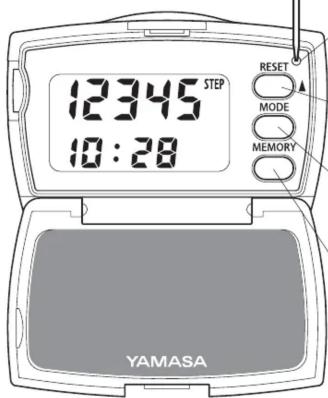
System Reset Switch
When you want to delete all stored data and record and want to be in factory default, please push this tiny hole with small stick. We recommend you do system reset when replacing battery, and when unusual segment was displayed.
Reset/ ▲Button
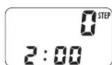
1) Holding this button for at least two seconds until the display to read "0."
2) When input personal data, this button works as increment numbers.
Mode (Settings) Button
1) Pressing this button cycles through the displays in this order: Steps→Distance→Calories.
2) Holding this button for at least two seconds to begin Settings Mode. You can change the clock Time, stride length, and Weight settings here.
Memory Button
You can recall stored memory up to 14 days ago with pushing this button.
In Memory Mode, pressing this button cycles through the displays in this order: Steps→Distance→Calories.
How to Set Your Stride Length
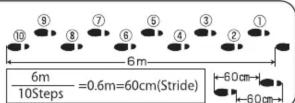
●It is important to set the correct stride length for distance measurement.
●Your Step Length is the distance between your feet from toe to toe.
●To calculate your average Stride Length accurately, take 10 steps and divide
the total distance by 10. Please refer to the diagram for an example.
Setting Clock Time, Stride Length, and Body Weight
Hold the Mode Button for at least two seconds and begin initial setting.
"Hours" will be blinking first, and settings can be performed in the order of Clock Time→Stride Length→Body Weight.
| Clock Time Setting | Setting Range 0:00~23:59 (Initial Setting · · 0:00; 24-hour clock) |
| Stride Length Setting | Setting Range 30~180cm (Initial Setting · · 70cm) |
| Body Weight Setting | Setting Range 30~120kg (Initial Setting · · 60kg) |
※While in Setting Mode, if no buttons are pressed for 3 seconds, the display will switch to Step Count Mode. If you need to take time for setting mode, please do again from the beginning of setting mode describe this section.
※While in Setting Mode, holding the Reset/▲Button will works for increment number rapidly.
Using Your POWER-WALKER lite
Each Modes (how to read display)
When you have finished initial settings, the display shows Step Count Mode.
Properly fasten the POWER-WALKER lite to your pants or belt. (Please refer to "How to Wear the POWER-WALKER lite") Hold the Reset Button for at least two seconds and begin walking once the Step Count reads "0."
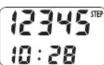
●Step Count Mode
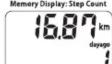
The Upper row display is showing the number of steps you have taken,
and the lower display is the clock time (24 hours current time).
[Display Example] 12345 steps 10:28 a.m.
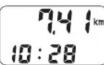
●Walking Distance Mode
The upper row display is showing the distance you have walked (km/mile).
[Display Example] 7.41km 10:28 a.m.
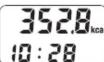
●Calories Mode
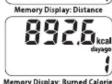
The upper row display is showing calories burned (kcal),
and the lower row display is the clock time (current time).
[Display Example] 352.8kcal 10:28 a.m.
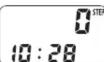
■ If you want to reset walking number of steps to "0" ■
Please hold the Reset/▲Button for at least two seconds in any Mode, the display will read "0." Today's data in the memory does not reset.
(Data in the POWER-WALKER lite before resetting remains in the memory.)
How to Use the Memory Function
Each of the average step count, walking distance, and calories burned by exercise data from one day to 14 days prior is stored in the memory.
At 2:00 a.m. every day, the memory automatically saves the day's data and the display becomes "0." ※Please set clock time before using the POWER-WALKER lite.
In the event you have used POWER-WALKER lite less than 7 days or 14 days, Display shows daily average value (number of steps, distance and calorie burned) of the days since you began using till yesterday.
How to View the Memory Data
Any time you press the Memory Button, you can see your overall average values or your average values for one to 14 days prior for step count, walking distance, and calories burned by walking.
-
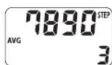
When you press the Memory Button, You can see "AVG" along with the average number of steps of recent 7 days first.
-
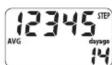
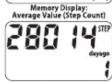
When you press the Reset/▲Button, you can see your stored record in the following order: seven-day average, 14-day average, yesterday's record, last two days', last three days' ... last 14 days' record
When you press the Memory Button from this stage, you can see the step count, walking distance, and calories burned data.
※It is not possible to modify the stored memory data.
※If no buttons are pressed for three minutes, the display will return to the clock time.
■When you press the Mode Button, the display will return to Step Count Display (Today's Step Count)