LC100WP - Vægbeslag Lucasey - Gratis brugsanvisning og manual
Find enhedens vejledning gratis LC100WP Lucasey i PDF-format.


Brugerspørgsmål om LC100WP Lucasey
0 spørgsmål om dette apparat. Besvar dem du kender, eller stil dit eget.
Stil et nyt spørgsmål om dette apparat
Download vejledningen til din Vægbeslag i PDF-format gratis! Find din vejledning LC100WP - Lucasey og tag din elektroniske enhed tilbage i hånden. På denne side er alle dokumenter nødvendige for brugen af din enhed offentliggjort. LC100WP af mærket Lucasey.
BRUGSANVISNING LC100WP Lucasey
LC100WP Wall Mount for Flat Panel Screens up to 35lbs with 75mm or 100mm Mounting Patterns
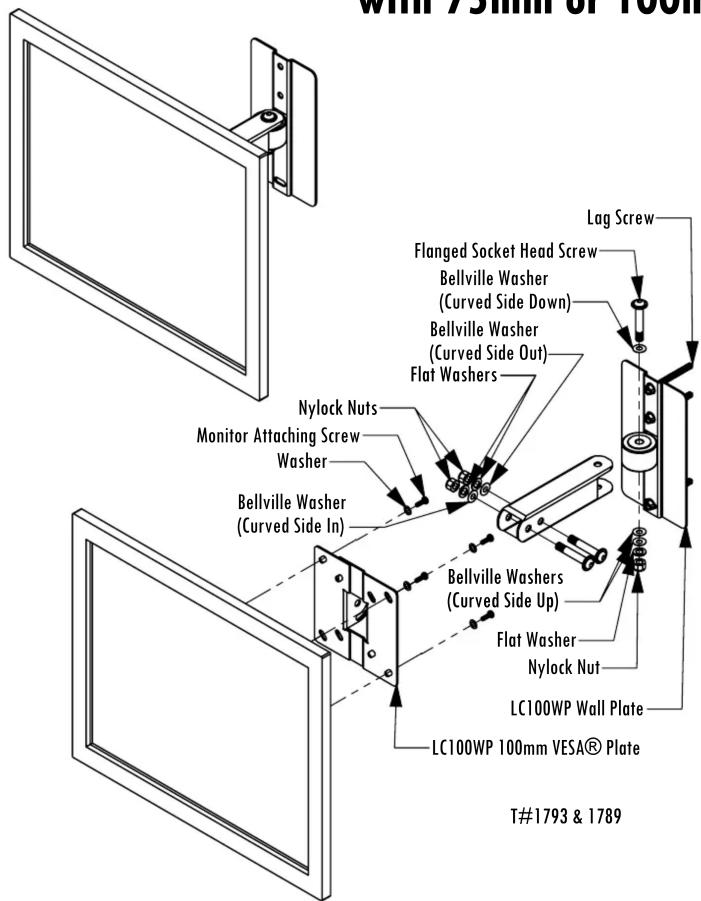
Wood Lag Screws are provided for wood stud installations. For concrete or metal sutds, use the WMAAB3, concrete anchor bolt kit, or WMATB3, toggler bolt kit, and follow the instructions specific to these fasteners.
- Remove the Flanged Socket Head Screw from the LC100WP Wall Plate. Keep the Washers and Nuts oriented the same for re-assembly.
- Find a wood stud in the wall. Determine the best possible viewing location for the monitor. Use the LC100WP Wall Plate as a template to mark and drill three 1/8" pilot holes, 2-3/4" deep.
- Attach the LC100WP Wall Plate to the wall using the provided Lag Screws.
- Attach the 100mm VESA® Plate to the Monitor using hardware specified by the monitor manufacturer. Additional washers and setscrews have been provided when additional spacers are needed between the monitor and the 100mm VESA® Plate.
- Attach the LC100WP Wall Arm with attached monitor to the LC100WP Wall Plate with the hardware removed in step 1.
- Check the mount for stability and make sure all the fasteners are secure.
- If the screen is not level, loosen the Monitor Attaching Screws, adjust the monitor and re-tighten the screws.
Assembly Hardware
3 ... 5/16-18 x 1-7/8" Flanged SHC Bolt (06-10831200)
3 ... 5/16-18 Nylock Nuts Black (06-40253127)
7 ... 5/16" Bellville Washers (06-32585160)
3 ... 5/16" Flat Washers (06-31010517)
Hardware Kit:
3 ... #14 x 2-1/2" HWH Lag Screws (06-10010025)
4 ... 4mm x 25mm Set Screws (06-10800425)
8 ... 4mm Hex Nuts (06-40110040)
12 ... 5mm Flat Washers (06-30150010)
4 ... 4mm x 12mm Phillips Screws (06-12410412)