
SEC X - Sportsur SILVA - Gratis brugsanvisning og manual
Find enhedens vejledning gratis SEC X SILVA i PDF-format.


Brugerspørgsmål om SEC X SILVA
0 spørgsmål om dette apparat. Besvar dem du kender, eller stil dit eget.
Stil et nyt spørgsmål om dette apparat
Download vejledningen til din Sportsur i PDF-format gratis! Find din vejledning SEC X - SILVA og tag din elektroniske enhed tilbage i hånden. På denne side er alle dokumenter nødvendige for brugen af din enhed offentliggjort. SEC X af mærket SILVA.
BRUGSANVISNING SEC X SILVA
FULL VERSION MANUAL
SEC X
Art.no 37518

Thank you for choosing the SILVA SEC X smartband. We know how to make first class pedometers. From that it's a small and very natural step to develop SILVA smartbands. A lifestyle marker that can help you on your way to a healthier and more active life. The built in 3D sensor in the SEC X and the SILVA smartband app will help you to keep track of your daily activity as well as the quality of your sleep.
KEEP TRACK OF YOUR DAILY ACTIVITY FOR A HEALTHIER LIFESTYLE
Exercise is a prerequisite for leading a healthy life. Physical activity keeps you fit, lowers the risk of heart disease and circulation problems and you will notice that your well-being improves. Physical activity covers all exercises that use up energy. As a result, daily activities such as walking, cycling or climbing the stairs play an important part. With the SILVA smart band you will be able to objectively assess and record your daily motion activity. In this way, it can also motivate you to increase your daily exercise. A daily quota of at least 7,000–10,000 steps is ideal.
PRODUCT OVERVIEW
The SEC X package consists of the following parts:
- Smartband
- USB charging cable
- Quickguide
THE ACTIVITY SENSOR
The smart band continuously records your physical activity using the built-in 3D sensor. All your physical movements are then converted into steps. The information on the distance covered can therefore differ from the actual distance.
BEFORE USE
ATTENTION!
The SILVA SEC X is splash/rain-proof. DO NOT use it in the shower or whilst swimming!
CHARGE THE SMART BAND
Connect the charge cable to any USB output. This can be from a computer, a mains adaptor, or any other USB port. Connect the clip end of the charge cable to the smart band. Make sure to attach the clip connector in the correct direction. Once connected, the smart band will indicate a charge symbol for one second. The smart band will be fully charged in 2 hrs.
WAKE UP THE SMART BAND
When you first unpack your SEC X, the smart band is in sleep mode. Therefore, remove the protective sticker on the front display, then press and hold button Ⓐ for 3-5 seconds. Then the SEC X will wake up and show 12345 for a few seconds.
DOWNLOAD AND INSTALL THE APP
For Iphone, to download and install the SILVA smart band app, go to App Store and search for SILVA Smartband. Then follow the instructions on the screen. For Android phone, to download and install the SILVA smart band app, go to Google play and search for SILVA Smartband. Then follow the instructions on the screen.
SET UP THE APP
Once the App is installed and started you are requested to enter your personal setting in the profile page. Please tap each data field (white text) to enter your gender, stride length, age, height, weight, goal, distance unit and app language.
SYNC SMART BAND WITH PHONE
Make sure Bluetooth is activated on your phone. Press and hold button 📁 until "SYNC" is shown in the wrist band display. Once the App and the smart band have been synchronized once, sync will be made every time the app is started and when certain settings in the app are changed. Iphone users will be prompted to pair the devices by entering the request code/passkey shown in the smart band display.
DURING USE
SMART BAND BUTTONS AND DISPLAY
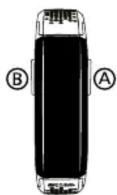
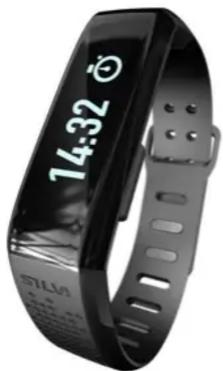
The SILVA SEC X Smart band has the buttons Ⓐ and Ⓑ that are used for navigating and controlling the different functions that are shown in the Smart band display (LCD). The smart band also has a vibrating function that alerts the user in different situations.
natural_image
Black Siemens SLISA 14:32 smartwatch with display showing time (no text or symbols on device body)57LM
CREATE YOUR OWN
SMART BAND FUNCTIONS
The SILVA SEC X Smart band has the following functions:
- Time
- Stop watch
- Interval training
- Reminders
- Step count
- Goals
- Phone finder
- Battery status
- Calories count
• Heart rate monitor (HRM)
- Sleep monitor
- Distancecount
- Exercise time
- Notifications
The separate functions can be activated/deactivated in the App depending on your needs.
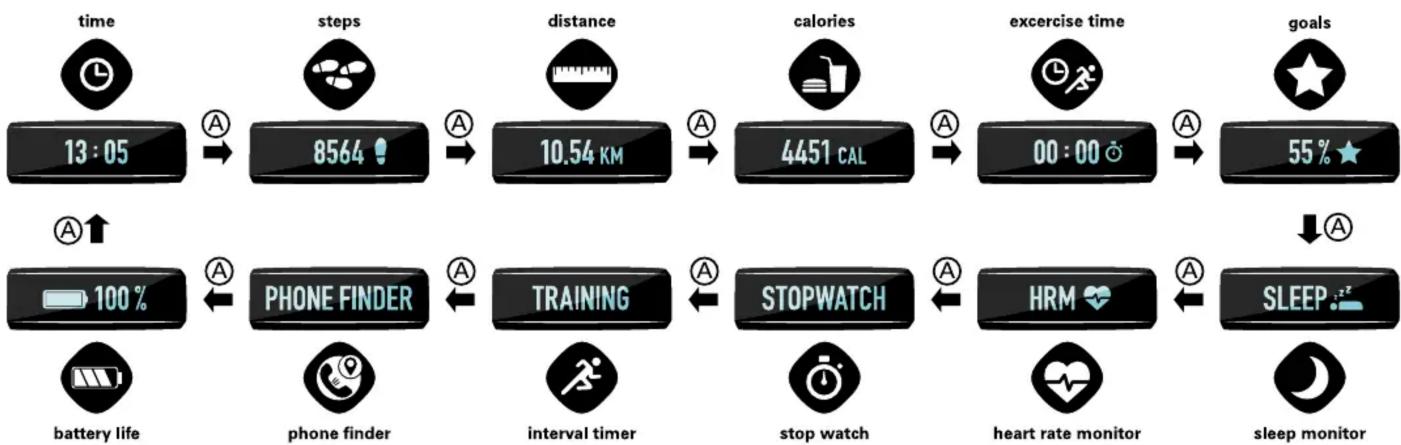
To cycle through the different functions use the ① button. To enter/activate different functions use the ② or ③ button as described below.
Time
The time displayed in you smart band is automatically set from your telephone during synchronization.
Step count
The smart band will detect and count the steps you take. Other type of movements will be detected and converted to the corresponding amount of steps.
Calories count
Calories are estimated based on the personal data you put into the smart band. i.e gender, age etc. When you wake up in the morning the device will already show a number of calories burned, as your body also burns calories whilst resting.
Distance count
Distance is calculated based on the amount of steps taken and the stride length that is entered into the personal settings in the app.
Stop watch
Press button Ⓑ to activate the stop watch.
Press button Ⓐ to start/pause/resume the timer.
Press button Ⓑ to stop/reset the stop watch.
Once reset, press button Ⓑ again to exit the stopwatch and return to main menu.
Goals
This functions shows how many percent of your daily goal that has been achieved. The goal is set in the app and can be based on the amount of steps taken or the calories consumed. One common recommendation is to take at least 10.000 steps per day.
When the goal has been achieved, the smart band will vibrate.
Heart rate monitor (HRM)
This function requires a chest band with BLE 4.0. After putting on your chest band and enter the HRM function in your smart band, press and hold button and the smart band will start to scan for chest bands. When scanning is successful, your heart rate will be displayed. In the app you can select which pulse zone you want to do your exercise. Select upper and lower pulse limit. Arrows in the smart band will indicate if you are above or below your selected zone. When leaving this function, press and hold button Please note that using the HRM function will significantly reduce the battery time of your smart band. Exercise time
Exercise time is calculated based on the activity sensor in the smart band.
Interval training
Interval setting i.e, training time and resting time, is entered into the personal setting page in the app. Press button Ⓑ to activate the Interval timer.
Press button Ⓐ to start the count down to first set.
Press button Ⓐ to pause.
Press button Ⓑ to exit after pause.
Phone finder
If your phone and your smart band are connected, press button
⑧ and you phone will start to beep.
Sleep monitor
Activate the sleep function when going to bed by holding button The smart band will then measure your movements and calculate your deep sleep, light sleep and awake time during the night. Short press button during sleep mode to check the current time. When waking up in the morning, deactivate sleep function by holding button If movement is continuously detected for 15 minutes, the sleep function will be automatically deactivated and your sleep data will be stored. You can then analyse your sleep in the sleep page in the app.
Notifications
SEC X automatically alerts you when you have an incoming message, phone call, Facebook message etc. Separate functions can be activated through the app.
Reminders
Don't miss out on your workout or forget to take your vitamins. SEC X can even remind you to take a zip of water to make sure you stay hydrated during the day. Separate functions and time intervals can be set through the app.
Battery status
Here you see the battery status in you smart band in %. The SEC X also alerts you by showing LOW BATT when the battery level reaches 10%.
flowchart
graph TD
    A["time 13:05"] --> B["steps 8564"]
    B --> C["distance 10.54 KM"]
    C --> D["calories 4451 CAL"]
    D --> E["exercise time 00:00"]
    E --> F["goals 55% ★"]
    G["battery life 100%"] --> H["PHONE FINDER"]
    H --> I["TRAINING"]
    I --> J["STOPWATCH"]
    J --> K["HRM"]
    K --> L["sleep monitor"]
    M["heart rate monitor"] --> L
    N["stop watch"] --> J
    O["open hand icon"] --> J
    P["unknown clock icon"] --> J
    Q["unknown clock icon"] --> R["A"]
    S["unknown clock icon"] --> S["A"]
    T["unknown clock icon"] --> T["A"]
    U["unknown clock icon"] --> U["A"]
    V["unknown clock icon"] --> V["A"]
    W["unknown clock icon"] --> W["A"]
    X["unknown clock icon"] --> X["A"]
    Y["unknown clock icon"] --> Y["A"]
FULL VERSION MANUAL
SEC X
Art.no 37518

natural_image
Black fitness tracker with digital display showing 14:32, no visible text or symbols on the device itself57LM
CREATE YOUR OWN
NAVIGATING THE APP
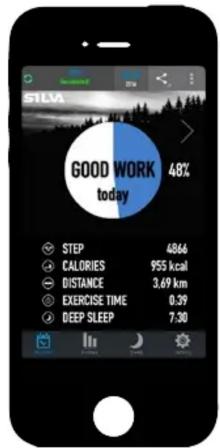
MAIN PAGE
The main page shows an overview of todays activity. Swipe center of screen to show data from earlier dates.
Tap the menu in top right corner to reset your data or access and update your profile page that was set up in the installation process. Return to main page by pressing back button.
Tap icons or swipe lower part of screen to switch between the main functions: Activity, History, Sleep and Settings.
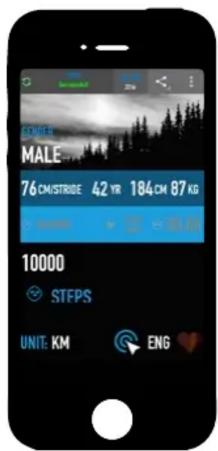
PROFILE PAGE
In the profile page you can set up various personal data and goals. Activate greyed out functions by tapping them. Once activated they will be shown in white.
In the interval function you set the number of intervals, the rest time in seconds between activity and the activity time in seconds.
Set a number for your goal target. You can then set either Calories or steps as your goal to be shown in main screen or smart band alerts.
Return to main page by pressing back button.
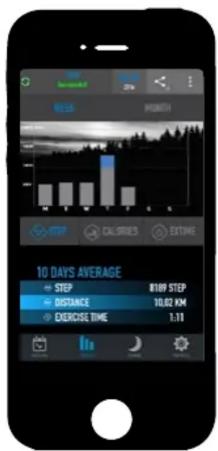
HISTORY
Tap words WEEK or MONTH to switch time span shown in the diagram
Swipe diagram to switch between diagram or table data.
Tap STEPS, CALORIES or EXTIME to switch between type of data shown in the diagram.
Tap 10 DAYS AVERAGE to change time period.
SLEEP
Tap DAY, WEEK or MONTH to switch time span shown in the diagram
Swipe diagram to switch between diagram or table data.
Tap diagram to switch between staple diagram or graph.
Tap AVERAGE SLEEP to change time period.
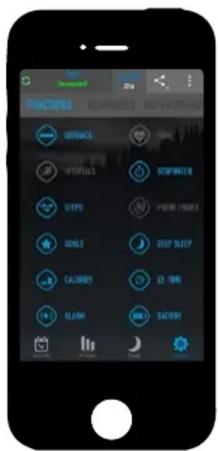
SETTING
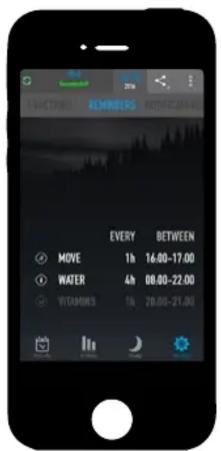
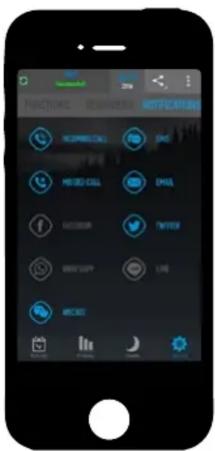
Tap words in top segment or swipe center of screen to switch between "functions", "reminders" or "notifications".
Functions: Activate/deactivate different functions to be shown in the smart band display cycle. Activated functions are blue and deactivated are greyed out. Once activated, the app will automatically sync this to the smart band.
Reminders: Tap MOVE, WATER or VITAMINS to set frequency of occurrence for desired reminder. Once set, the reminder will be active and change from greyed out to white. To deactivate, tap again. Once activated, the app will automatically sync this to the smart band. The user gets reminder alerts via the smart band display and vibration in the smart band.
Notifications: Activate/deactivate different kinds of notifications to be sent from the phone and shown in the smart band display. Activated notifications are blue and deactivated are greyed out. The user gets notification alerts via the smart band display and vibration in the smart band.
Other notifications: Gerneral notifications that are set in your phone notification settings are shown in the smart band display with this symbol:
AFTER USE
MAINTENANCE
Carefully clean the smart band from time to time using a damp cloth.
Do NOT immerse in water!
TECHNICAL SPECIFICATIONS (APP)
App compatibility: iOS8 and up / Android 4.3 and up.
App languages:
- English
• German
- French
- Spanish
- Swedish
- Norwegian
- Finnish
- Russian
- Dutch
- Chinese
- Japanese
- Italian
TECHNICAL SPECIFICATIONS (SMART BAND SEC X)
Battery time: Up to 5 days.
Battery type: Li-Po
Water protection: IPX6 - Rain proof / splash proof
Charging time: 2h
Charging temperature: 0-45°C
Operating temperature: 0-50°C
HRM compatibility: BLE 4.0 (Bluetooth Low Energy)
Total weight: 18g
Wrist circumference: Approx. 13,5-20cm
PERSONAL DATA
Your personal data will not be stored or used for commercial purposes. The data collected will only be stored locally on the phone and used for operating the smart band/app.
PROTECT THE ENVIRONMENT.
Smart band and cable should be recycled and must not be thrown in the regular trash. Dispose these items in accordance with applicable local regulations.
WARRANTY
Silva warrants that, for a period of two [2] years, your Silva Product will be substantially free of defects in materials and workmanship under normal use. Silva's liability under this warranty is limited to repairing or replacing the product. This limited warranty extends only to the original purchaser. If the Product proves defective during the Warranty Period please contact the original place of purchase. Make sure to have your proof of purchase on hand when returning the product. Returns cannot be processed without the original proof of purchase. This warranty does not apply if the Product has been altered, not been installed, operated, repaired, or maintained in accordance with instructions supplied by Silva, or has been subjected to abnormal physical or electrical stress, misuse, negligence or accident. Neither does the warranty cover normal wear and tear. Silva is not responsible for any consequences, direct or indirect, or damage resultant from use of this product. In no event will Silva's liability exceed the amount paid by you for the product. Some jurisdictions do not allow the exclusion or limitation of incidental or consequential damages, so the above limitation or exclusion may not apply to you. This Warranty is valid and may be processed only in the country of purchase.
For more information please visit www.silva.se


Visit: www.silva/environment for more information about the Waste Electrical and Electronic Equipment (WEEE) Directive.