VX-351 - Walkie-talkies Vertex Standard - Gratis brugsanvisning og manual
Find enhedens vejledning gratis VX-351 Vertex Standard i PDF-format.


Brugerspørgsmål om VX-351 Vertex Standard
0 spørgsmål om dette apparat. Besvar dem du kender, eller stil dit eget.
Stil et nyt spørgsmål om dette apparat
Download vejledningen til din Walkie-talkies i PDF-format gratis! Find din vejledning VX-351 - Vertex Standard og tag din elektroniske enhed tilbage i hånden. På denne side er alle dokumenter nødvendige for brugen af din enhed offentliggjort. VX-351 af mærket Vertex Standard.
BRUGSANVISNING VX-351 Vertex Standard
Vertex Standard
VX-350 Series Operating Manual
Controls & Connectors
| LED Indicator | |
| Glows Green | Monitor on (or Side 1, or 2 switch is activated: Non-LCD version) |
| Binking Green | Busy Channel (or SQL off) |
| Glows Red | Transmitting |
| Binking Red | Battery Voltage is Low |
| Yellow | Receiving a Selective Call |
| AntennaSpeakerPush To Talk(PTT) SwitchSide 1 SwitchSide 2 SwitchLCD(LCD Version) | CH(Channel) SelectorVOL/PWR KnobMIC/SP Jack(External Mic/Earphone)Microphone4 Key(LCD Version) |
| Battery Pack LatchEC065N207 | |
Accessories & Options
| FNB-V96L1A 7.4 V 2300 mAh Li-Ion Battery Pack | |
| FNB-V130LI-UNI 7.4 V 2300 mAh Li-Ion Battery Pack | |
| VAC-300 Desktop Rapid Charger Set (CD-34+PA42, for FNB-V96LI) | |
| VAC-6300 6-unit Multi Charger (for FNB-V96LI) | |
| CD-5600 6-unit Desktop Charger (FNB-V130LI-UNI) | |
| PA-55 AC Adapter (for CD-58) | |
| VAC-6058 6-unit Multi Charger (for FNB-V130LI-UNI) | |
| MH-37A4@Earpiece/Microphone | |
| MH-45B@Speaker/Microphone | |
| MH-360S Speaker/Microphone | |
| MH-450S Speaker/Microphone | |
| VCM-2 Vehicle Charger Mount Adapter (for VAC-300) | |
| DCM-1 Desktop Charger Mount Adapter (for VAC-300) | |
| FVP-25 Encryption/DTMF pager Unit | |
| FVP-35 Rolling Code Encryption Unit | |
| FVP-36 Voice Inversion Encryption Unit | |
| VME-100 MDX-200®(G3 Star® ANI Encoder Unit | |
| ATU-6A Rubber Antenna 400-430 MHz | |
| ATU-6B Rubber Antenna 420-450 MHz | |
| ATU-6C Rubber Antenna 440-470 MHz | |
| ATU-6D Rubber Antenna 450-485 MHz | |
| ATU-6F Rubber Antenna 485-520 MHz | |
| ATV-6XL Rubber Antenna 134-174 MHz (Untuned) | |
| ATV-8A Rubber Antenna 334-151 MHz | |
| ATV-8B Rubber Antenna 150-163 MHz | |
| ATV-8C Rubber Antenna 161-174 MHz | |
| CLIP-17E Swivel Belt Clip | |
| CLIP-18 Belt Clip | |
| LCC-350 Leather Case | |
| CE86 Programming Software | |
| FIF-12 USB Programming Interface | |
| CT-27 Radio to Radio Programming Cable | |
| CT-106 PC Programming Cable (for FIF-12) |
Operating Temperature Range
| Operation: | USA/EXP versions: -30 °C to +60 °C (-22 °F to +140 °F) |
| European version: -25 °C to +55 °C (-13 °F to +131 °F) | |
| Battery Charging: | +10 °C to +40 °C (+50 °F to +104 °F) |
BATTERY PACK INSTALLATION AND REMOVAL
| ☐To install the battery, hold the transceiver with your left hand, so your palm is over the speaker and your thumb is on the top of the belt clip. Insert the battery pack into the battery compartment on the battery pack of the radio while tilting the Belt Clip outward, then push the bottom side of the battery pack until the battery pack locks with the Battery Pack Latch. | Push the bottom side of the battery pack |
| Insert the Battery Pack | |
| ☐to remove the battery, turn the radio off and remove any protective cases. Slide the Battery Pack Latch on the bottom of the radio, then slide the battery downward and out from the radio while holding the Belt Clip. | |
Caution!
Do not attempt to open any of the rechargeable Lithium-Ion packs, as they could explode if accidentally short-circuited.
LOW BATTERY INDICATION
As the battery discharges during use, the voltage gradually becomes lower. When the battery voltage becomes to low, substitute a freshly charged battery and recharge the depleted pack. When the battery voltage is low, the LED indicator on the top of the radio will blink red and "Battery Indicator" on the LCD will blink on the LCD version. Furthermore, if your Dealer sets the "Low Battery Alert" feature into the transceiver, an alert beeper will sound when the battery voltage is low.
IMPORTANT NOTICE
Please follow these cautions to prevent hearing damage: □Always adjust the audio level of the transceiver to the minimum before connecting the Earpiece/Headset to the transceiver.
□Use the Earpiece/Headset at as low a volume as possible for existing conditions
□ Slowly adjust the VOL/PWR knob when increasing the audio level.
OperationBefore You Begin
PRELIMINARY STEPS
- Install a charged battery pack onto the transceiver, as described previously.
- Screw the supplied antenna onto the Antenna jack. Never attempt to operate this transceiver without an antenna connected.
☐If you have a Speaker/Microphone, we recommend that it not be connected until you are familiar with the basic operation of the VX-350.
OPERATION QUICK START
Turn the top panel's VOL/PWR knob clockwise to turn on the radio on.
Turn the top panel's CH selector knob to choose the desired operating channel.
☐ Rotate the VOL/PWR knob to set the volume level. If no signal is present, press and hold in the Programmable key assigned to "SQL OFF" for more than one second; background noise will now be heard, and you may use this to set the VOL/PWR knob for the desired audio level.
☐ Press and hold in the Programmable key assigned to "SQL OFF" for more than one second (or press the key twice) to quiet the noise and resume normal (quiet) monitoring.
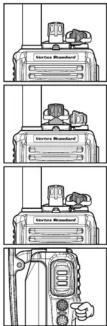
☐To transmit, monitor the channel and make sure it is clear.
☐ To transmit, press and hold in the PTT switch. Speak into the microphone area of the front panel grille (lower right-hand corner) in a normal voice level. To return to the Receive mode, release the PTT switch.
Do not transmit the radio without an antenna connected.
☐ If a Speaker/Microphone is available, remove the plastic cap and its two mounting screws from the right side of the transceiver, then insert the plug from the Speaker/Microphone into the MIC/SP jack; secure the plug using the screws supplied with the Speaker/Microphone. Hold the speaker grille up next to your ear while receiving. To transmit, press the PTT switch on the Speaker/Microphone, just as you would on the main transceiver's body.
Note: Save the original plastic cap and its mounting screws. They should be re-installed when not using the Speaker/Microphone.
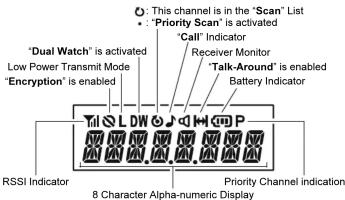
Display Icons & Indicators (LCD Version)
SAFETY TRANING INFORMATION
This Radio has been tested and complies with the Federal Communications Commission (FCC) RF exposure limits for Occupational Use/Controlled exposure environment. In addition, it complies with the following Standards and Guidelines:
□FCC 96-326, Guidelines for Evaluating the Environmental Effects of Radio-Frequency Radiation
☐FCC OET Bulletin 65 Edition 97-01 (1997) Supplement C, Evaluating Compliance with FCC Guidelines for Human Exposure to Radio Frequency Electromagnetic Fields.
☐ANSI/IEEE C95.1-1992, IEEE Standard for Safety Levels with Respect to Human Exposure to Radio Frequency Electromagnetic Fields, 3kHz to 300 GHz
☐ANSI/IEEE C95.3-1992, IEEE Recommended Practice for the Measurement of Potentially Hazardous Electromagnetic Fields-RF and Microwave.
WARNING: This radio generates RF electromagnetic energy during transmit mode. This radio is designed for and classified as Occupational Use Only, meaning it must be used only during the course of employment by individuals aware of the hazards, and the ways to minimize such hazards. This radio is not intended for use by the General Population in an uncontrolled environment.
CAUTION: To ensure that your expose to RF electromagnetic energy is within the FCC allowable limits for occupational use, always adhere to the following guidelines:
Please read this manual carefully to become familiar with the features of this transceiver.
Do not transmit the radio without an antenna connected.
This radio is NOT approved for use by the general population in an uncontrolled environment. This radio is restricted to occupational use, work related operations only where the radio operator must have the knowledge to control its RF exposure conditions.
When transmitting, hold the radio in a vertical position with its microphone 1 to 2 inches (2.5 to 5 cm) away from your mouth and keep the antenna at least 1 inch (2.5cm) away from your head and body.
The radio must be used with a maximum operating duty cycle not exceeding 50 %, in typical Push-to-Talk (PTT) configurations. DO NOT transmit for more than 50 % of total radio use time (50 % duty cycle).
Transmitting more than 50 % of the time can cause FCC RF exposure compliance requirements to be exceeded.
To keep the Body Worn configuration with the Vertex Standard CLIP-18 belt-clip, reduce the maximum operating duty cycle still more. The radio is transmitting when the red LED on the top of the radio is illuminated. You can cause the radio to transmit by pressing the PTT button.
When operate the radio with the Vertex Standard CLIP-18 belt-clip, make the transmission time as short as possible, to keep the Body Worn configuration.
○Always use the FNB-V96LIA or FNB-V130LI-UNI Lithium-Ion Battery.
○Perform the battery charging where the ambient temperature range +10 °C to +40 °C. Charge out of this range could cause damage to the battery pack.
○Battery Pack shall not be exposed to excessive heat such as sunshine, fire or the like.
○Always use Vertex Standard authorized accessories.
Vertex Standard shall not be liable for any damage or accidents such as fire, leakage or explosion of batteries, etc., caused by the malfunction of non-Vertex Standard accessories.
The information listed above provides the user with the information needed to make him or her aware of RF exposure, and what to do to assure that this radio operates with the FCC RF exposure limits of this radio.
Electromagnetic Interference/Compatibility
During transmissions, this radio generates RF energy that can possibly cause interference with other devices or systems. To avoid such interference, turn off the radio in areas where signs are posted to do so.
Do not operate the transmitter in areas that are sensitive to electromagnetic radiation such as hospitals, health care facilities, aircraft, and blasting sites.
FCC License Information
This radio operates on communications frequencies which are subject to FCC (Federal Communications Commission) Rules and Regulations. FCC Rules require that all operators using Private Land Mobile radio frequencies obtain a radio license before operating their equipment.
This device complies with Part 15 of the FCC rules. Operation is subject to the condition that this device does not cause harmful interference.
NOTICE!
There are no owner-serviceable parts inside the transceiver. All service jobs must be referred to an authorized VERTEX STANDARD Service Representative. Consult your Authorized VERTEX STANDARD Dealer for installation of optional accessories.
IMPORTANT NOTICE FOR NORTH AMERICAN USERS
REGARDING 406 MHz GUARD BAND
The U.S. Coast Guard and National Oceanographic and Atmospheric Administration have requested the cooperation of the U.S. Federal Communications Commission in preserving the integrity of the protected frequency range 406.0 to 406.1MHz , which is reserved for use by distress beacons. Do not attempt to program this apparatus, under any circumstances, for operation in the frequency range 406.0 - 406.1 MHz if the apparatus is to be used in or near North America.
Warning - Frequency band 406 - 406.1 MHz is reserved for use ONLY as a distress beacon by the US Coast Guard and NOAA. Under no circumstance should this frequency band be part of the preprogrammed operating frequencies of this radio.
DISPOSAL OF YOUR ELECTRONIC AND
ELECTRIC EQUIPMENT
Products with the symbol (crossed-out wheeled bin) cannot be disposed as household waste.
Electronic and Electric Equipment should be recycled at a facility capable of handling these items and their waste byproducts.
In EU countries, please contact your local equipment supplier representative or service center for information about the waste collection system in your country.

Description of Operating FunctionsKey Functions
All versions of the VX-350 provide [Side 1] and [Side 2] keys. The LCD version of the VX-350 provide [A], [B], [C], and [D] function keys. These Program
mable* keys functions can be customized (set to other functions), via programming by your VERTEX STANDARD dealer, to meet your communications/network requirements. Some features may require the purchase and installation of optional internal accessories. The possible Programmable key features are illustrated below, and their functions are explained in the next chapter. For further details, contact your VERTEX STANDARD dealer.
For future reference, check the box next to each function that has been assigned to the Programmable key on your particular radio, and keep it handy.
| FUNCTION | PROGRAMMABLE Key (PRESS / PRESS AND HOLD) | |||||
| [A] | [B] | [C] | [D] | [Side 1] | [Side 2] | |
| None | / | / | / | / | / | / |
| Mon (Monitor) | / | / | / | / | / | / |
| Lamp *1 | / | / | / | / | / | / |
| Scan | / | / | / | / | / | / |
| DW (Dual Watch) | / | / | / | / | / | / |
| Low Power | / | / | / | / | / | / |
| TA (Talk Around) | / | / | / | / | / | / |
| TX Save Disable | / | / | / | / | / | / |
| Encryption*2 | / | / | / | / | / | / |
| CH Up*1 | / | / | / | / | / | / |
| CH Down *1 | / | / | / | / | / | / |
| Call | / | / | / | / | / | / |
| Reset | / | / | / | / | / | / |
| Call 2 | / | / | / | / | / | / |
| Call 3 | / | / | / | / | / | / |
| Code Up*1 | / | / | / | / | / | / |
| Code Down*1 | / | / | / | / | / | / |
| Code Set *1 | / | / | / | / | / | / |
| Speed Dial*1 | / | / | / | / | / | / |
| Emergency | -/- | -/- | -/- | -/- | -/- | -/- |
| Option Switch 1*3 | / | / | / | / | / | / |
| Option Switch 2*3 | / | / | / | / | / | / |
| Lock | / | / | / | / | / | / |
| FM-Scan | / | / | / | / | / | / |
| SQL Set*1 | / | / | / | / | / | / |
| Lone Worker | -/- | -/- | -/- | -/- | -/- | -/- |
| TA Scan | / | / | / | / | / | / |
| SQL Off | / | / | / | / | / | / |
| Scan Set | / | / | / | / | / | / |
| Whisper | / | / | / | / | / | / |
| Beep Off | / | / | / | / | / | / |
×1: LCD Version only
×2: Requires FVP-25, FVP-35, or FVP-36 Encryption Unit.
※3: FVP-35 only
WARRANTY POLICY
Vertex Standard warrants, to the original purchaser only, its Vertex Standard manufactured communications products against defects in materials and workmanship under normal use and service for a given period of time from the date of purchase.
Limited Warranty Details:
• North America customers (USA and Canada);
http://www.vertexstandard.com/lmr/warranty-terms.aspx
• Customers outside of North America:
Contact the authorized dealer in your country
Copyright 2013
Vertex Standard LMR, Inc
All rights reserved.
No portion of this manual
may be reproduced
without the permission of
Vertex Standard LMR, Inc
P_1 + A_1 - C_1
Vertex Standard LMR, Inc.
Mon (Monitor)
Press (or Press and hold) the assigned Programmable key momentarily to disable the Tone squelch.
Lamp
Press (or Press and hold) the assigned Programmable key to illuminate the LCD for five seconds (LCD version).
Scan
The Scanning feature is used to monitor multiple channels programmed into the transceiver. While scanning, the radio will check each channel for the presence of a signal, and will stop on a channel if a signal is present.
□To activate scanning:
Press (or Press and hold) the assigned Programmable key.
The scanner will search the channels, looking for active ones; it will pause each time it finds a channel on which someone is speaking.
To stop scanning:
Press (or Press and hold) the assigned Programmable key. Operation will revert to the channel to which the CH knob is set.
DW (Dual Watch)
The Dual Watch feature is similar to the Scan feature, except that only two channels are monitored: the current operating channel, and the "Priority" channel.
□To activate Dual Watch:
Press (or Press and hold) the assigned Programmable key.
The scanner will search the two channels; it will pause each time it finds a channel on which someone is speaking.
□To stop Dual Watch:
Press (or Press and hold) the assigned Programmable key. Operation will revert to the channel to which the CH knob is set.
Low Power
Press (or Press and hold) the assigned Programmable key to set the radio's transmitter to the "Low Power" mode, thus extending battery life. Press (or Press and hold) the assigned Programmable key again to return to "High Power" operation when in difficult terrain.
When the radio's transmitter is set to "Low Power" mode, the "L" icon will be indicated on the LCD (LCD version).
TA (Talk Around)
Press (or Press and hold) the assigned Programmable key to activate the Talk Around feature when you are operating on duplex channel systems (separate receive and transmit frequencies, utilizing a "repeater" station). The Talk Around feature allows you to bypass the repeater station and talk directly to a station that is nearby. This feature has no effect when you are operating on "Simplex" channels, where the receive and transmit frequencies are already the same.
When the "TA" function is activated, the "icon will be indicated on the LCD (LCD version).
TX Save Disable
Press (or Press and hold) the assigned Programmable key to disable the Transmit Battery Saver, if you are operating in a location where high power is almost always needed.
The Transmit Battery Saver helps extend battery life by reducing transmit power when a very strong signal from an apparently nearby station is being received. Under some circumstances, though, your hand-held radio may not be heard well at the other end of the communication path, and high power may be necessary at all times.
Encryption
When the Voice Scrambler feature is enabled, pressing the assigned Programmable key of the “Encryption” toggles the Scrambler “on” and “off.”
Channel Up
Press (or Press and hold) the assigned Programmable key to switch to a higher operating channel number.
Channel Down
Press (or Press and hold) the assigned Programmable key to switch to a lower operating channel number.
Call, Reset
Press (or Press and hold) the assigned Programmable key to silence the receiver and reset for another call, when a communication is finished.
Call 2. Call 3
Press (or Press and hold) the assigned Programmable key to send a 5-Tone sequential tone group which is pre-defined.
Code Up, Code Down
Press (or Press and hold) the assigned Programmable key to switch to a higher (or lower) paging code number for the 5-Tone Paging System.
Code Set
Press the assigned Programmable key to change the encode digits for 5-tone operation. To change a specific digit, select the desired digit using the [A] key, then change the number using the [B]/[C] keys, and store the number using the [D] key.
Speed Dial
Your Dealer may have pre-programmed Auto-Dial telephone number memories (up to five memories) into your radio.
To dial a number, press (or Press and hold) the assigned Programmable key to toggle the pre-programmed Auto-Dial telephone number memory, then press the PTT switch. The DTMF tones sent during the dialing sequence will be heard in the
Emergency
The VX-350 series includes an “Emergency” feature, which may be useful, if you have someone monitoring on the same frequency as your transceiver’s channel. For further details contact your VERTEX STANDARD dealer.
Option Switch 1, Option Switch 2
When the optional unit is installed, these functions have various uses.
For further details, contact your VERTEX STANDARD dealer.
Lock
Press (or Press and hold) the assigned Programmable key to lock the VX-350's knob, Programmable keys, and PTT switch. The precise lockout configuration is programmed by your VERTEX STANDARD dealer.
Follow-Me Scan
“Follow-Me” Scan feature checks a User-assigned Priority Channel regularly as you scan the other channels. Thus, if only Channels 1, 3, and 5 (of the 8 available channels) are designated for “Scanning,” the user may nonetheless any channel as the “User-assigned” Priority Channel via the “Follow-Me” feature.
Press the assigned Programmable key to activate "Follow-Me" scanning, then turn the CH selector knob to the channel which you want to designate as the "User-Assigned Priority Channel". When the scanner stops on an "active" channel, the User-assigned Priority Channel will automatically be checked every few seconds.
SQL Set
You can manually adjust the squelch level using this function:
☐ Press the assigned Programmable key. A tone will sound, and the current squelch level will appear on the display.
□Press the [Side 1]/[Side 2] key to select the desired squelch level.
☐ Two seconds after releasing the [Side 1]/[Side 2] key, the display will revert to the normal channel indication.
Lone Worker
Press and hold the assigned Programmable key to toggle the Lone Worker feature "ON" and "OFF."
The Lone Worker feature will emit an audible alarm for 30 seconds at one second intervals when the Lone Worker Timer has expired. If the user does not reset the timer by pressing the PTT switch, the radio switches to the Emergency mode.
TA Scan
Press the assigned programmable key to toggle the TA (Talk Around) scan feature "On" and "Off."
While TA scan is proceeding, the VX-350 will search both the transmit and receive frequencies (the “Micon will blink on the LCD versions). When a signal is encountered on the receive frequency, the VX-350 will pause until the signal disappears (“Micon will appear but not blink). When a signal is encountered on the transmit frequency, the VX-350 will check for activity on the receive frequency every few seconds (interval programmed by your Dealer).
SQL Off
Press (or Press and hold) the assigned Programmable key to disable the Noise and Tone squelch. Again press (or Press and hold) the assigned Programmable key to resume normal (quiet) Noise and Tone squelch action.
Scan Set
Press (or press and hold) the assigned Programmable key to delete the Current Memory Channel from the Scanning List. When you delete a channel from the Scanning List, a ringing beeper will sound, and "Oicon will disappear from the LCD (LCD version). To restore a particular channel to your Scanning List, press (or press and hold) the assigned Programmable key again; a ringing beeper will sound, and "Oicon will appear on the LCD (LCD version).
Whisper
Press (or Press and hold) the assigned Programmable key to increase the microphone gain; thus you can speak in a low voice (whisper) temporarily. Again press (or Press and hold) the assigned Programmable key to resume normal microphone gain.
Beep Off
Press (or Press and hold) the assigned Programmable key to disable the radio beeps temporarily. Again press (or Press and hold) the assigned Programmable key to enable the radio beeps.
ARTS (Auto Range Transpond System)
This system is designed to inform you when you and another ARTS-equipped station are within communication range.
During ARTS operation, your radio automatically transmits for about 1 second every 55 seconds (or 25 seconds: Dealer Programmed) in an attempt to shake hands with the other station.
If you are out of range for more than two minutes, your radio senses that no signal has been received, a ringing beeper will sound, and "OUT RANGE" will appear on the LCD (on the LCD version). If you subsequently move back into range, as soon as the other station transmits, your beeper will sound and "IN RANGE" will appear on the LCD (on the LCD version).
DTMF Paging System
This system allows paging and selective calling, using DTMF tone sequences. When your radio is paged by a station bearing a tone sequence which matches yours, your radio's squelch will open and the alert will sound. On the LCD version, the three-digit code of the station which paged you will be displayed on your radio's LCD.
ATTENTION IN CASE OF USE
This transceiver works on frequencies which are not generally permitted.
For frequency allocation, apply for
a licence at your local spectrum
management authority
For actual usage contact your
dealer or sales shop in order to get
your transceiver adjusted to the al-
located frequency range
| List of the practicable area | |||||
| AUT BEL BGR CYP CZE DEU | |||||
| DNK ESP EST FIN FRA GBR | |||||
| GRC HUN IRL ITA LTU LUX | |||||
| LVA MLT NLD POL PRT ROU | |||||
| SVK SVN SWE CHE SL LIE | |||||
| NOR | |||||
Vertex Standard (€)
Declaration of Conformity
We, YAESU UK Ltd. declare under our sole responsibility that the following equipment complies with the essential requirements of the Directive 1999/5/EC.
Type of Equipment: FM Transceiver
| Brand Name: | VERTEX STANDARD |
| Model Number: | VX-351-D0-5, VX-354-D0-5,VX-351-G6-5, VX-354-G6-5 |
Manufacturer: Vertex Standard Co., Ltd
Address of Manufacturer: 4-8-8 Nakameguro Meguro Ku, Tokyo
Address of manufacturer: 4-6-6 Nakameguro Meguro-Ku, Tokyo 153 8644 Japan
153-8644, Japan
Applicable Standards:
This equipment is tested and conforms to the essential requirements of directive, as included in following standards.
| Radio Standard: | EN 300 086-2 V1.3.1 |
| EN 300 113-2 V1.4.2 | |
| EMC Standard: | EN 301 489-01 V1.8.1 |
| EN 301 489-05 V1.3.1 | |
| Safety Standard: | EN 60065: 2002 +A1: 2006 +A11: 2008 |
,
The technical documentation as required by the Conformity Assessment procedures is kept at the following address:
Company
YAESU UK Ltd.
Unit 12, Sun Valley Business Park, Winnall Close Winchester, Hampshire, SO23 0LB, U.K.
MODEL REFERENCE
| MODEL | FREQUENCY | TX POWER | DISPLAY/KEYPAD |
| VX-351-D0-5 | 134-174 MHz | 5 W | Non |
| VX-354-D0-5 | 134-174 MHz | 5 W | LCD/4 Key |
| VX-351-G6-5 | 400-470 MHz | 5 W | Non |
| VX-354-G6-5 | 400-470 MHz | 5 W | LCD/4 Key |
| VX-351-G7-5 | 450-512(520) MHz | 5 W | Non |
| VX-354-G7-5 | 450-512(520) MHz | 5 W | LCD/4 Key |