Luminex - Massageapparat Breo - Gratis brugsanvisning og manual
Find enhedens vejledning gratis Luminex Breo i PDF-format.


Brugerspørgsmål om Luminex Breo
0 spørgsmål om dette apparat. Besvar dem du kender, eller stil dit eget.
Stil et nyt spørgsmål om dette apparat
Download vejledningen til din Massageapparat i PDF-format gratis! Find din vejledning Luminex - Breo og tag din elektroniske enhed tilbage i hånden. På denne side er alle dokumenter nødvendige for brugen af din enhed offentliggjort. Luminex af mærket Breo.
BRUGSANVISNING Luminex Breo
DIGITAL (LUMINEX MODEL)
1. MOVEMENT FUNCTION
In the normal time mode, the display can show month, day, hour, minute, seconds and week day. Alarm function can maintain the sound for 20 seconds, report the correct time at each hour. Stopwatch function, 12/24 hours format, backlight function.
2. SETTING THE ALARM AND TIME REPORTING
At the normal time display mode, press button B to enter into alarm setting mode. At this moment AL icon will flash, press button A to turn on and off the alarm and time reporting function, press C once the hour will flash, at this moment press A to adjust the hour; if the PM icon is shown, the alarm time will be at afternoon. Press C once, minutes will flash, press A to adjust the minutes. Press B to exit alarm mode.
3. STOPWATCH OPERATION
At the normal time display mode, press button B twice to enter into stopwatch setting mode. Press A to start the stopwatch, press A again to stop the stopwatch. Button C can pause the stopwatch, but it is still
working for timing, press C again and the stopwatch continues to work, press button A then C to set the stopwatch to 00.00. Press button B to return to normal display mode.
4. TIME ADJUSTING
At the normal time display mode press B three times to enter into time setting mode; at this moment seconds will flash, press A once to set the seconds to zero. Press button C, hours will flash, press A to adjust hours, press C again and when minutes will flash press A for setting, press C once more, month will flash then press A to select it. Press again C and then A to select the day and the day of the week. Press B to exit time adjusting mode.
5. BACKLIGHT
At any mode just press button C to have the backlight.
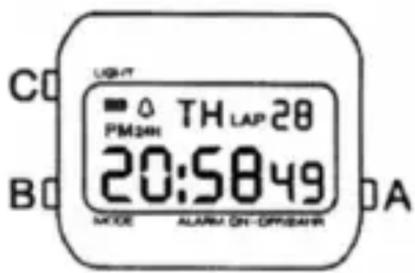
ADJUSTING STRAP FOR WRIST SIZE
1
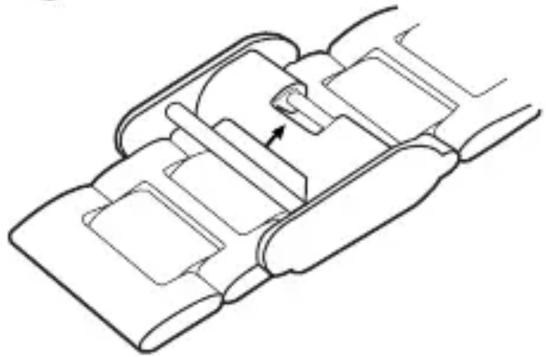
natural_image
Technical line drawing of a mechanical assembly with no visible text or symbolsLook for arrow on adjustment clasp. Gently pull clasp back and then slide the entire bracket up or down the strap.
2
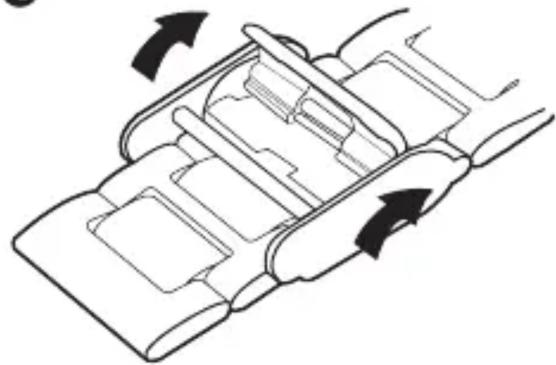
natural_image
Diagram of a vehicle rear lift or lift mechanism with directional arrows indicating flow (no text or symbols)Once you have your desired length clip the clasp back into place to secure the bracket.