XTDF5500 - USB-nøgle Xit - Gratis brugsanvisning og manual
Find enhedens vejledning gratis XTDF5500 Xit i PDF-format.


Brugerspørgsmål om XTDF5500 Xit
0 spørgsmål om dette apparat. Besvar dem du kender, eller stil dit eget.
Stil et nyt spørgsmål om dette apparat
Download vejledningen til din USB-nøgle i PDF-format gratis! Find din vejledning XTDF5500 - Xit og tag din elektroniske enhed tilbage i hånden. På denne side er alle dokumenter nødvendige for brugen af din enhed offentliggjort. XTDF5500 af mærket Xit.
BRUGSANVISNING XTDF5500 Xit

Item # XTDF5500
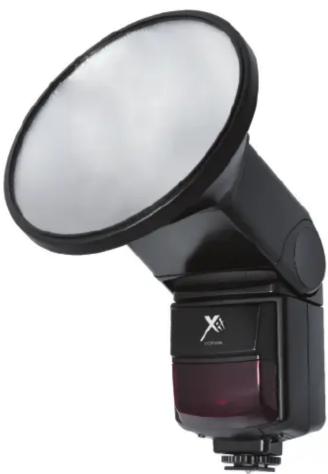
Elite Series Universal Flip Flash
designed for
Most Cameras
natural_image
Black and white photo of a compact flash unit with a circular lens and a small display unit (no visible text or symbols)PLEASE READ BEFORE YOU USE THE FLASH
IMPORTANT NOTES FOR FLASH PHOTOGRAPHY AND MAINTENANCE
-
After each picture, wait for at least 4 -5 seconds for the flash to be fully charged before taking the next shot even though the ready light is on. This will help to prolong the lifespan of the flash tube as well as to attain the full charging capacity of the flash capacitor for precise flash photography.
-
For precise flash output, it is best to wait till an intermittent humming sound is heard before depressing the shutter.
-
Maintain at least 6.6 ft. away from your subject.
-
In the event that the flash exposure is incorrect (over or under exposed or green auto check light does not light up), you may take either one or more of the corrective action: (1) move closer to the object (2) re-adjust your bounce angle (3) Increase ISO setting.
-
Bounce should only be used on lighter color ceiling. Note that when using this feature, 2-3 f/stop of light will be lost due to reflection.
-
Always use a fresh set of 4 batteries of the same brand and type when old batteries are depleted. Mix and match batteries of different types/brands will greatly deteriorate flash performance.
-
When flash is not being used for extended period of time (>2 weeks), remove all batteries to prevent battery leakage. After batteries removal, do not expose the flash unit and batteries to excessive heat such as fire or sun.
- Charge up and test fire the flash unit at least once per month to maintain the optimal performance of the flash tube and charging capacitor.
BATTERY INSTALLATION
Ensure the ON/OFF is in the OFF position. Insert 4 new AA size batteries according to the battery polarity indicated inside the battery chamber.
WARNING
Note: This flash unit may halt and not function when the battery power is not sufficient or when user operates this unit inappropriately. Please switch it off by its main switch. Wait for a few seconds and replace the battery if necessary before switching it on again. This flash unit should then work again as normal.
COMPATIBILITY
C - Canon Digital E-TTL, E-TTL II cameras & E-TT film cameras
N - Nikon Digital TTL, i-TTL Cameras & TTL, i-TTL film cameras
P - Pentax Digital TTL or film
O - Olympus Digital TTL or film
P - Panasonic Digital TTL or film
SA - Sony Alpha & Minolta Digital ADI, D Lenses cameras & TTL film cameras
MOUNTING THE FLASH ON THE CAMERA
Ensure the ON/OFF is in the OFF position. Slide the flash hot shoe base onto the camera's hot shoe contact and fasten the lock ring in an anti-clockwise motion. Slide the ON/OFF Switch to the ON position. When the Ready Light lights up, the flash is ready to fire. Pressing the Test Button will test fire the unit.
SLAVE FLASH
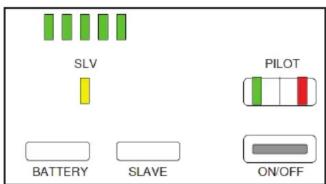
XTDF5500 can be used as a slave unit. You can enjoy creative flash photography with multiple lightings from the various directions.
XTDF5500 synchronizes to any flash produced by the master flash (either Camera's built-in flash or camera manufactures' original flash) on the camera. Please make sure XTDF5500 mode is switch to Slave mode.
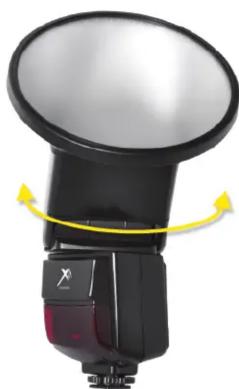
USING BOUNCE HEAD
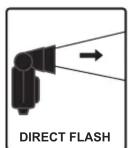
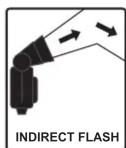
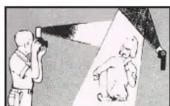
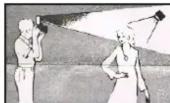
Various combination of bounce angle can be used to cut off unwanted shadow or for special soft effect purposes.
ROUND-STYLE REFLECTOR
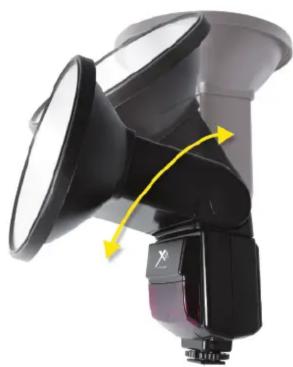
A round style reflector is attached to flash head. This reflector helps throw clean and diffused light over your subject. This reflector can be moved into or out of place in front of your flash.
SPECIFICATIONS:
Guide Number: 40m/118ft. @ 105
Circuitry: IGBT (Insulated Gate Bipolar Transistor)
Color Temperature: 5600
Bounce Angle: Up 30-45-60-75-90
Swivel Angle: Left 60-75-90-120-150-180
Right 60-75-90
Flash Duration: 1/700 sec. (Full power)
Recycling Time: 0.5-6 sec.
Number of flashes: 100-300 per set of new batteries
Power Source: 4 AA Batteries (Alkaline, NiCd or NiMH)
Dimension (in): 6.7 x 2.7 x 1.6 (170 x 70 x 40mm)
Weight: 8.8 oz. (250 grams) (w/o batteries & reflector)
FLASH FEATURES
• Guide No: 40m/118ft. @ 105
• Bounce construction
- Slave function
- Round Style Reflector
* Camera dependent features.
Please check your camera operating instruction manual.
natural_image
Close-up of a black and white mechanical device with yellow directional arrows indicating motion or force (no text or symbols visible)