G2 Pro - Smartwatch MOTA - Gratis brugsanvisning og manual
Find enhedens vejledning gratis G2 Pro MOTA i PDF-format.


Brugerspørgsmål om G2 Pro MOTA
0 spørgsmål om dette apparat. Besvar dem du kender, eller stil dit eget.
Stil et nyt spørgsmål om dette apparat
Download vejledningen til din Smartwatch i PDF-format gratis! Find din vejledning G2 Pro - MOTA og tag din elektroniske enhed tilbage i hånden. På denne side er alle dokumenter nødvendige for brugen af din enhed offentliggjort. G2 Pro af mærket MOTA.
BRUGSANVISNING G2 Pro MOTA
MOTA®
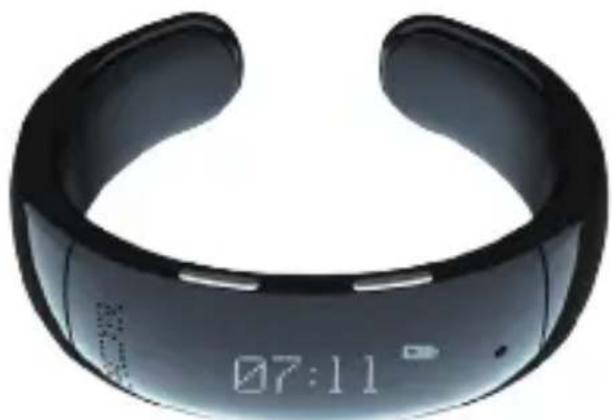
SmartWatch G2 Pro
natural_image
Black smartwatch with digital display showing 07:11 (no text or symbols on device body)WELCOME
Congratulations on your purchase of the MOTA SmartWatch G2 Pro. This quick start guide will help you learn the basics of using your device. Welcome to the world of wearable technology!
Join MOTA

facebook.com/MOTA

instagram.com/mota

twitter.com/mota

pinterest.com/mota
TABLE OF CONTENTS
-
FUNCTION OVERVIEW 1
-
CHARGING 2
-
POWER 6
-
SET TIME 7
-
PAIRING 8
-
NFC 10
-
SYNC CONTACTS 13
-
SILENT / VIBRATE MODE 14
-
INCOMING CALL 15
-
REDIAL 16
-
USING SIRI / GOOGLE NOW 17
-
PLAY MUSIC 18
-
ANTI-LOST 19
-
SAFETY GUIDELINES 20
-
SPECIFICATIONS 21
-
LEGAL 22
SIRI/VOICE BLUETOOTH BATTERY BUILT-IN ID SHARING ACTIVATION ENABLED INDICATOR SPEAKER FAST PAIRING
12 HR TIME AM/PM CALLER ID MUSIC STREAM ANTI LOST AUTO PAIR RECONNECT
2. CHARGING
▶ Charging Time
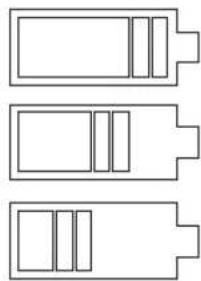
Charging time is approximately 2 hours. When your SmartWatch is finished charging, the battery symbol on the screen will indicate full.
▶ Charge Indication
When charging the SmartWatch through a computer or another source, the number of power grids displayed will increase until fully charged.
natural_image
Three horizontal line diagrams of battery cells with internal compartments, no text or symbols present2. CHARGING
Standby Time
The standby time is approximately 72 hours.
Note: Vibration and screen display usage will affect standby time. After being powered off, the watch will keep time for approximately four weeks.

natural_image
Simple line drawing of a power button with eight surrounding rectangular buttons (no text or symbols)2. CHARGING
▶ Low Battery Notification
When the battery charge is low, "Low Battery" will be displayed on the screen. If the battery charge is very low, your SmartWatch will power off automatically.
3. POWER
natural_image
Simple line drawing of a mobile phone casing with battery symbol (no text or labels)Power ON:
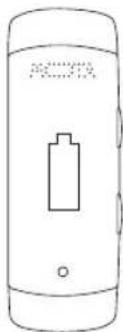
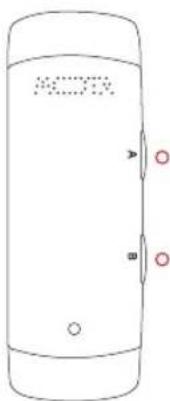
Press and hold button (B) for 5 seconds, until the "MOTA" logo is displayed.
Power OFF:
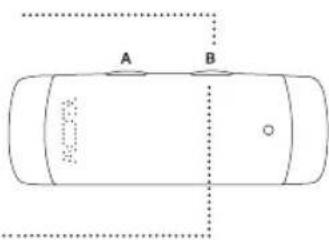
Press and hold button (B) ..... for 5 seconds, until "Power Off" is displayed.
4. SET TIME
With the screen displaying the time, press and hold button (A) for two seconds in order to set the time (minute-hour). The minute digits will begin flashing first.
Press button (B) to advance the minutes until the minute is correct.
To set the hour press button (A), then press button (B) to advance the hours until the hour is correct.
Press button (A) again to save and exit Set Time.
natural_image
Simple line drawing of a mobile phone casing with no text or symbols5. PAIRING
Bluetooth
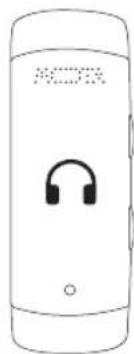
- With the SmartWatch G2 Pro turned off, press and hold the power button. The MOTA logo will appear on the display and a startup tone will be heard. Keep pressing the power button until a second audible tone is heard. You should see a cell phone icon on the upper left hand corner of the display indicating the SmartWatch G2 Pro is in pairing mode.
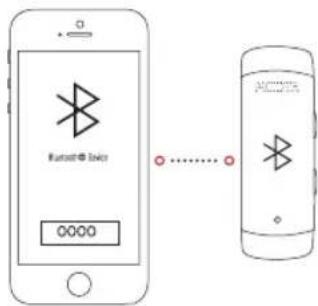
- Place the SmartWatch G2 Pro within five feet of a Bluetooth-capable smartphone and ensure the watch is powered on. Open the Bluetooth option on your phone and look for Bluetooth devices. A notification will appear stating that your phone has found the "MOTA-G2".
natural_image
Line drawing of a smartphone with an earphone icon on the screen (no text or symbols)5. PAIRING
- After pairing, the SmartWatch will display a Connected icon indicating a successful connection. If the Bluetooth connection is lost, the Connected icon will disappear.
- To terminate Bluetooth pairing, go to the Bluetooth setting on your phone and disconnect the device.
6. NFC
The G2 Pro SmartWatch has 2 NFC Chips one on each side of the SmartWatch.
The NFC Chip located on the MOTA logo side stores the NFC ID Information and the one located on the microphone side is for Bluetooth pairing.
6.1 Writing Information to NFC
Please ensure that your Android phone supports NFC and that it is enabled.
In Google Play®, search for and install the free "Mota eBusinessCard" app.
From this app, you can write information (address, phone, website, etc) to the NFC Chip located on the G2 Pro SmartWatch.
6. NFC
6.2 NFC ID Sharing
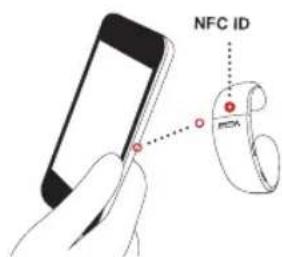
This NFC Chip is located on the MOTA logo side and it stores your information to be shared with others.
Place the G2 Pro NFC ID Chip (MOTA Logo side near the NFC reader located on your phone commonly located on the back of the phone). The phone will read the information that is stored on the chip and display it on your phone. This can be done with the SmartWatch powered on or off.
6. NFC
6.3 NFC Fast Bluetooth Pairing
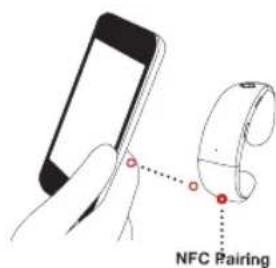
Power on your G2 Pro and place the NFC Pairing side of the G2 Pro to the NFC reader on your phone. If your phone asks for permission to pair the device, press "yes". The G2 and your phone will pair automatically.
After pairing, you can use this NFC Chip to disconnect and connect the G2 Pro from your phone by simply touching the NFC Pairing chip to your phone's NFC reader.
7. SYNC CONTACTS
When the SmartWatch G2 Pro pairs with a smartphone via Bluetooth or NFC, the watch will sync with the phone's contacts. When the sync is finished, the screen will display "Sync Complete". The sync time varies but will generally be within 30 seconds.
After synchronization, the caller's name and number will be displayed on the SmartWatch's screen. If the caller is not in the phone's contacts, the caller's phone number will be displayed instead.
Note: The phone number for a contact stored in your phone and its caller ID must match exactly. For example, if the caller ID displays xxx-xxx-xxxx and the contact's phone number stored in the phone is 1-xxx-xxx-xxxx the sync will not match.
If you need to re-sync due to changes in your contacts, please turn off your SmartWatch G2 and then turn it on. Once paired, the SmartWatch G2 will re-sync the contacts.
8. SILENT / VIBRATE MODE
To toggle between normal and Silent / Vibrate mode, press the (A) and (B) buttons at the same time. An icon will appear at the upper-left-hand corner of the display indicating the G2 Pro is in Silent / Vibrate mode.
9. INCOMING CALL
When you receive a call, the SmartWatch 62 Pro will vibrate and ring, displaying the caller's name or phone number.
When receiving a call, press button (A) to answer. Once the call is connected its duration will be displayed on the SmartWatch.
To reject the incoming call, press button (B).
To increase or decrease the sound's volume during the call, press button (A) or (B) respectively.
To end the call, press and hold button (A) or (B) for two seconds.
10. REDIAL
Press button (A) twice to re-dial the last person you called.
The screen will display "Calling".
Press button (B) to cancel the redial.
11. USING SIRI / GOOGLE NOW
To use Siri or Google Now, Bluetooth or NFC must be enabled and your smartphone paired with the SmartWatch G2 Pro.
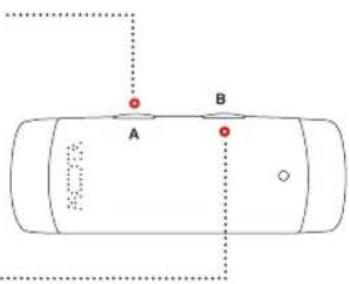
Press button (B) twice to launch Siri or Google Now. "Speak" will be displayed on the screen and you will hear the Siri or Google Now voice prompt. Press any key to exit Siri or Google Now.
If you want to recall/launch Siri or Google Now, press button (B) twice.
Note for Android devices: Google Now will function only if the phone is unlocked. If the phone is locked with no security or slider security, Voice Dial will be activated. If any security feature is activated (i.e. pattern, pin lock, etc.) Google Now and Voice Dial will not function.
12. PLAY MUSIC
When paired with your phone, you can use the music player on your phone to listen to music on your SmartWatch G2 Pro.
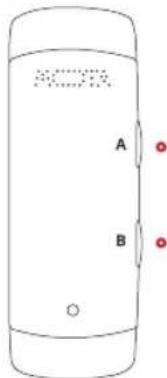
To increase or decrease the sound's volume, press button (A) or (B) respectively.
Press and hold button (B) for two seconds to skip to the next song.
Press and hold button (A) for two seconds to go to the last song.
13. ANTI-LOST
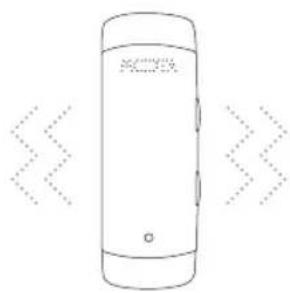
The SmartWatch's anti-lost function will alert you by vibrating and beeping when you are more than 20 feet away from your phone.
natural_image
Line drawing of a smartphone with no visible text, numbers, or symbols on the body14. SAFETY GUIDELINES
Do not immerse your SmartWatch in liquids or expose it to excessively high humidity.
Do not use detergent to wash the SmartWatch.
Do not expose the SmartWatch to extreme temperatures [high or low].
Do not attempt to open the SmartWatch, as this may void your warranty.

15. SPECIFICATIONS
Bluetooth Version: 3.0
Frequency: 2.4 GHz
Voltage: 3.6V - 4.2V
Current: 45 mA
▶ Talk Time: Approximately 2 - 3 hours
▶ Standby Time: Approximately 72 hours
LEGAL
This SmartWatch is meant for use only in conjunction with the appropriate mobile devices. Please consult your device packaging to determine whether this SmartWatch is compatible with your particular mobile device. Manufacturer is not responsible for any damages to any device incurred through the use of this product.
Manufacturer shall not, in any way, be liable to you or to any third party for any damages you or any third party may suffer as a result of use, intended or unintended, or misuse of this SmartWatch in conjunction with any device or accessory other than the appropriate mobile device for which this SmartWatch is designed for.
LEGAL
Warning: Changes or modifications to this unit not expressly approved by the party responsible for compliance could void the user's authority to operate the equipment.
LEGAL
NOTE: This equipment has been tested and found to comply with the limits for a Class B digital device, pursuant to Part 15 of the FCC Rules. These limits are designed to provide reasonable protection against harmful interference in a residential installation. This equipment generates and can radiate radio frequency energy, if not installed and used in accordance with the instructions, it may cause harmful interference to radio communications.
However, there is no guarantee that interference will not occur in a particular installation. If this equipment does cause harmful interference to radio or television reception, which can be determined by turning the equipment off and on, the user is encouraged to try to correct the interference by one or more of the following measures:
LEGAL
▶ Reorient or relocate the receiving antenna.
▶ Increase the separation between the equipment and receiver.
Connect the equipment into an outlet on a circuit different from that to which the receiver is connected.
Consult the dealer or an experienced radio/TV technician for help.
This device complies with Part 15 of the FCC Rules. Operation is subject to the following two conditions: (1) this device may not cause harmful interference, and (2) this device must accept any interference received, including interference that may cause undesired operation.
Thank you for your purchase of MOTA® SmartWatch.
For Support and Warranty Information, please visit
support.mota.com
⑤ Copyright 2014 MOTA®. All rights reserved. MOTA® is a registered trademark of UNorth® LLC. The Bluetooth word mark, figure mark, combination mark, and Bluetooth Smart and Bluetooth Smart Ready marks are all trademarks that are owned by the Bluetooth SIG.