
TV-712 - Skærm Deltaco - Gratis brugsanvisning og manual
Find enhedens vejledning gratis TV-712 Deltaco i PDF-format.


Brugerspørgsmål om TV-712 Deltaco
0 spørgsmål om dette apparat. Besvar dem du kender, eller stil dit eget.
Stil et nyt spørgsmål om dette apparat
Download vejledningen til din Skærm i PDF-format gratis! Find din vejledning TV-712 - Deltaco og tag din elektroniske enhed tilbage i hånden. På denne side er alle dokumenter nødvendige for brugen af din enhed offentliggjort. TV-712 af mærket Deltaco.
BRUGSANVISNING TV-712 Deltaco
Instruction Manual
Thanks for purchasing the products! The products adopts thenewest technology of Electronic Integrate circuit and the New TFT LCD monitors, with the super advanced character of no radiation, low power waste, and stable capability. Please read the instructions carefully before operation, to ensure your complete understanding and to obtain the best possible performance from the unit. After reading this manual, be sure to keep it in a handy place (E.G. glove, compartment).
CONNECTION
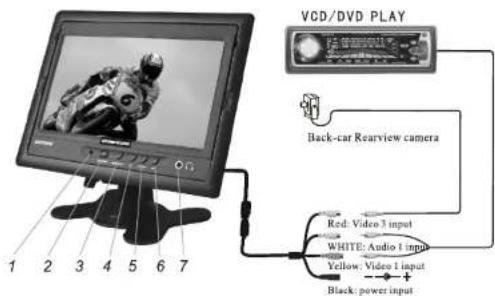
- Remote eyes
3.AV1/AV2 shift key
5.Menu
-
Earphone output
-
Power on/off
4.- Key
6.+ Key
* Remote receiving eye
Receive the remote signal. Remote control signal can be received in the range of the eye from 45 degree left side to 45 degree right side.
Power on/off
To power on or power off the monitor.
AV1 AV2 shift
To shift the AV system.
* - key
To reduce the chosen operating items.
Menu
Press the key to adjust the item in the order of brightness-color→contrast→Tint→Brightness..
6、+ Key
To increase the chosen operating items
REMOTE CONTROL

- Power On/Off
2.Brightness-
3.Brightness+
- Colour-
5.Colour+
-
Contrast-
-
Contrast+
-
Volume-
-
Volume+
-
Video select
-
System auto switch
BACK-CAR REARVIEW FUNCTION
The rear view camera should be connected to AV3 from the red wire. Choose the right system setting according to the camera character. Make sure whether the camera you bough have the mirror function or not. If the monitor has mirror view, please set the product of "SYS1" mode, if the monitor does not have mirror view, set the monitor to "SYS2".
- Monitor at "POWER OFF" Mode
The monitor will be automatically power on and show the picture from AV2(camera). Once the signal from camera disappear, the monitor will be power off automatically.
- Monitor at "POWER ON" Mode
The monitor will automatically show the picture from AV2(Camera).
Once the signal from camera disappear, the monitor returns to the original picture.
MMI
The audio video signal input/out interface. When the monitor is shift to "AV2", it can show the video picture from this plug. With different cable, the monitor can be connected with different devices. The standard accessories with the monitor are: MMI AV Cable. Standard RCA Plug, earphone plug, which can supply 1 way Audio and 1 Way Video input.
"SG818" game player is optional, which can be connect with the product for a game play.
SPECIFICATION
Screen: TFT 7" New panel
Power: 8.5W
Size: W 175 x H 125 x T19mm
Video: 3 Video input
System: PAL/NTSC
Volt: DC12V
Luminance:350-400cd/m²
Weight: 400g
Audio: 2 Audio input


Mærke : Deltaco
Model : TV-712
Kategori : Skærm