
CR6017A - Pladespiller Crosley - Gratis brugsanvisning og manual
Find enhedens vejledning gratis CR6017A Crosley i PDF-format.


Brugerspørgsmål om CR6017A Crosley
0 spørgsmål om dette apparat. Besvar dem du kender, eller stil dit eget.
Stil et nyt spørgsmål om dette apparat
Download vejledningen til din Pladespiller i PDF-format gratis! Find din vejledning CR6017A - Crosley og tag din elektroniske enhed tilbage i hånden. På denne side er alle dokumenter nødvendige for brugen af din enhed offentliggjort. CR6017A af mærket Crosley.
BRUGSANVISNING CR6017A Crosley
CR6017A
Player
Instruction Manual
natural_image
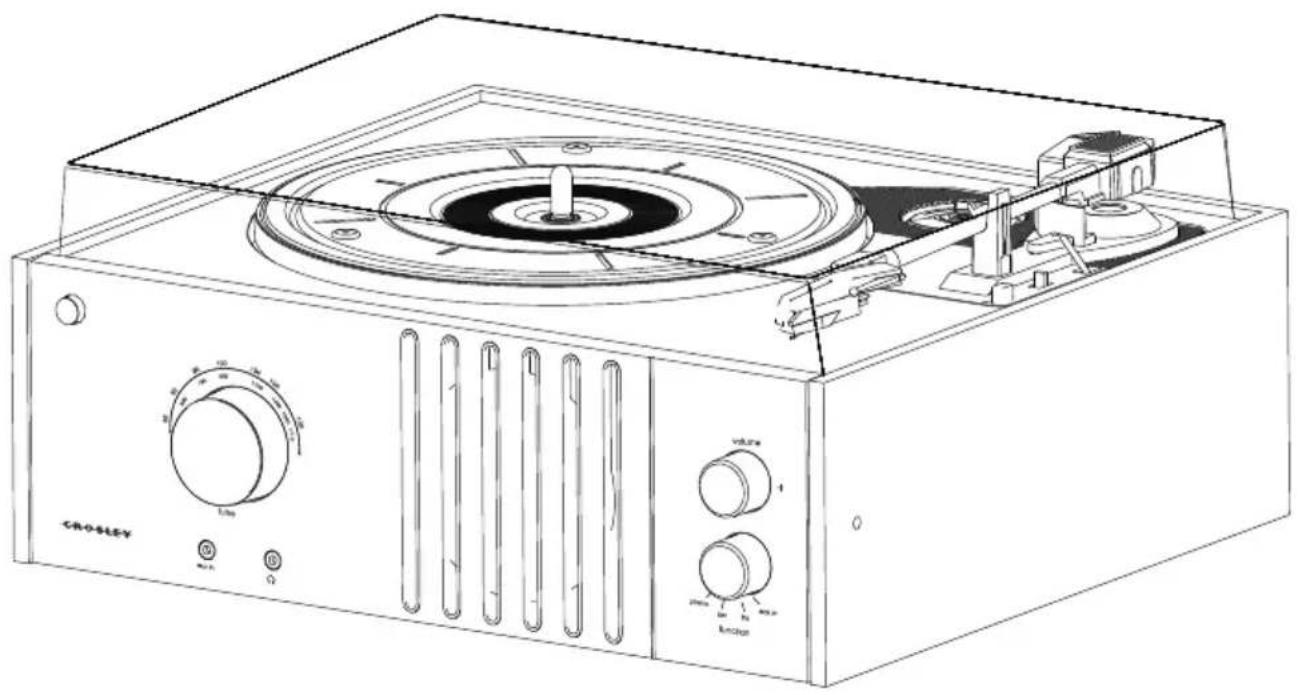
Line drawing of a Crosley radio with control knobs and a central rotary dial (no text or symbols on the device itself)IMPORTANT SAFETY INSTRUCTION
PLEASE READ CAREFULLY ALL THE FOLLOWING IMPORTANT SAFEGUARDS THAT ARE APPLICABLE TO YOUR EQUIPMENT
-
Read Instructions - All the safety and operating instructions should be read before the product is operated.
-
Retain instructions - The safety and operating instructions should be retained for future reference.
-
Heed Warnings - All warnings on the product and in the operating Instructions should be adhered to.
-
Follow Instructions - All operating and use instructions should be followed.
-
Cleaning - Unplug this product from the wall outlet before cleaning. Do not use liquid cleaners or aerosol cleaners. Use a damp cloth for cleaning.
-
Attachments - Do not use attachments not recommended by the product manufacturer as they may cause hazards.
-
Water and Moisture - Do not use this product near water - for example, near a bath tub, wash bowl, kitchen sink, or laundry tub; in a wet basement; or near a swimming pool; and the like.
-
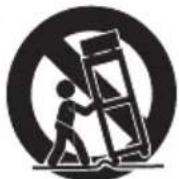
A product and cart combination should be moved with care. Quick stops, excessive force, and uneven surfaces may cause the product and cart combination to overturn.
-
Ventilation - Slots and openings in the cabinet are provided for ventilation and to ensure reliable operation of the product and to protect it from overheating, and these openings must not be blocked or covered. The openings should never be blocked by placing the product on a bed, sofa, rug, or other similar surface. This product should not be placed in a built-in installation such as a bookcase or rack unless proper ventilation is provided or the manufacturer's instructions have been adhered to.
-
Power Sources - This product should be operated only from the type of power source indicated on the marking label, if you are not sure of the type of power supply to your home. Consult your product dealer or local power company. For products intended to operate from battery power, or other sources, refer to the operating instructions.
-
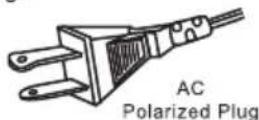
Grounding or Polarization - This product may be equipped with a polarized alternating-current line plug (a plug having one blade wider than the other). This plug will fit into the power outlet only one way. This is a safety feature. If you are unable to insert the plug fully into the outlet try reversing the plug, if the plug should still fail to fit, contact your electrician to replace your obsolete outlet. Do not defeat the safety purpose of the polarized plug.
-
Power - Cord Protection - Power - supply cords should be routed so that they are not likely to be walked on or pinched by items placed upon or against them, paying particular attention to cords at plugs, convenience receptacles, and the point where they exit from the product.
-
Lightning - For added protection for this product during a lightning storm, or when it is left unattended and unused for long periods of time, unplug it from the wall outlet and disconnect the antenna or cable system. This will prevent damage to the product due to lightning and po
-
Power Lines - An outside antenna system should not be located in the vicinity of overhead power lines or other electric light or power circuits, or where it can fall into such power lines or circuits. When installing an outside antenna system, extreme care should be taken to keep from touching such power lines or circuits as contact with them might be fatal.
-
Overloading - Do not overload wall outlets, extension cords, or integral convenience receptacles as this can result in a risk of fire or electric shock.
-
Object and Liquid Entry - Never push objects of any kind into this product through openings as they may touch dangerous voltage points or short - out parts that could result in a fire or electric shock. Never spill liquid of any kind on the product.
-
Servicing - Do not attempt to service this product yourself as opening or removing covers may expose you to dangerous voltage or other hazards. Refer all servicing to qualified service personnel.
-
Damage Requiring Service - Unplug this product from the wall outlet and refer servicing to qualified service personnel under the following conditions;
a. When the power-supply cord or plug is damaged.
b. If liquid has been spilled, or objects have fallen into the product.
c. If the product has been exposed to rain or water
d. If the product does not operate normally by following the operating instructions. Adjust only those controls that are covered by the operating instructions as an improper adjustment of other controls may result in damage and will often require extensive work by a qualified technician to restore the product to its normal operation.
e. If the product has been dropped or damaged in any way.
f. When the product exhibits a distinct change in performance - this indicates a need for service.
-
Replacement Parts - When replacement parts are required, be sure the service technician has used replacement parts specified by the manufacturer or have the same characteristics as the original part. Unauthorized substitutions may result in fire, electric shock, or other hazards.
-
Safety Check - Upon completion of any service or repairs to this product, ask the service technician to perform safety checks to determine that the product is in proper operating condition.
-
Wall or ceiling Mounting - The product should be mounted to a wall or ceiling only as recommended by the manufacturer.
-
Heat - The product should be situated away from heat sources such as radiators. Heat registers, stoves, or other products (including amplifiers) that produce heat.
WARNING: Changes or modifications to this unit not expressly approved by the party responsible for compliance could void the user's authority to operate the equipment.
NOTE: This equipment has been tested and found to comply with the limits for a Class B digital device, pursuant to Part 15 of the FCC Rules. These limits are designed to provide reasonable protection against harmful interference in a residential installation. This equipment generates, uses, and can radiate radio frequency energy and, if not installed and used in accordance with the instructions, may cause harmful interference to radio communications. However, there is no guarantee that interference will not occur in a particular installation. If this equipment does cause harmful interference to radio or television reception, which can be determined by turning the equipment off and on, the user is encouraged to try to correct the interference by one or more of the following measures:
- Reorient or relocate the receiving antenna.
- Increase the separation between the equipment and receiver.
- Connect the equipment into an circuit different from that to which the receiver is connected.
- Consult the dealer or an experienced radio TV technician for help.
WARNING:
TO PREVENT FIRE OR SHOCK HAZARD, DO NOT EXPOSE THIS APPLIANCE TO RAIN OR MOISTURE. DO NOT REMOVE COVER. PILOT LAMPS SOLDERED IN PLACE. NO USER SERVICEABLE PARTS INSIDE. REFER SERVICING TO QUALIFIED SERVICE PERSONNEL.

natural_image
Black triangular warning symbol with a white lightning bolt and downward arrow (no text)The lighting flash with arrowhead symbol, within an equilateral triangle, is intended to alert user to the presence of uninsulated "dangerous voltage" within the product's enclosure that may be of sufficient magnitude to constitute risk of electric shock to persons.
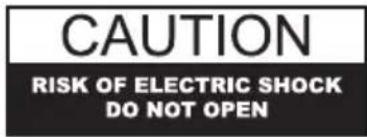
CAUTION: TO REDUCETHE RISK OF ELECTRIC SHOCK, DO NOT REMOVE COVER (OR BACK). NO USER - SERVICEABLE PARTS INSIDE. REFER SERVICING TO QUALIFIED SERVICE PERSONNEL.
natural_image
Black triangular warning symbol with exclamation mark (no text or numbers)The exclamation point within an equilateral triangle is intended to alert user to the presence of important operating and maintenance (servicing) instruction in the literature accompanying the appliance.
SPECIFICATION
Power Supply
Power Consumption
Speed
Speaker
: AC adapter -(DC 9V 0.4A)(Included)
: 5 W
: 33 1/3 / 45 /78 RPM
: 4 / 3W × 1
- DESIGN AND SPECIFICATION SUBJECT TO CHANGE WITHOUT NOTICE.

1220 East Oak Street • Louisville, Kentucky 40204
www.crosleyradio.com
Welcome
Thank you for purchasing the Crosley PLAYER (CR6017A). Before operating this unit, please read this manual thoroughly and retain it for future reference.
About This Manual
Instructions in this manual describe the control functions of the CR6017A.
Included in this package:
- PLAYER
• 45 RPM Adapter - AC Adapter
- Turntable Cover
• 3.5mm Stereo Cable
Table of Contents
Getting Started
Control Locators...... 4
Unpacking.... 5
Power Source 5
Operation
Turntable Operation...... 6
Radio Operation.... 6
Audio Output 6
Aux In 7
General
Troubleshooting Guide...... 7
Warranty.... 8
Control Locators
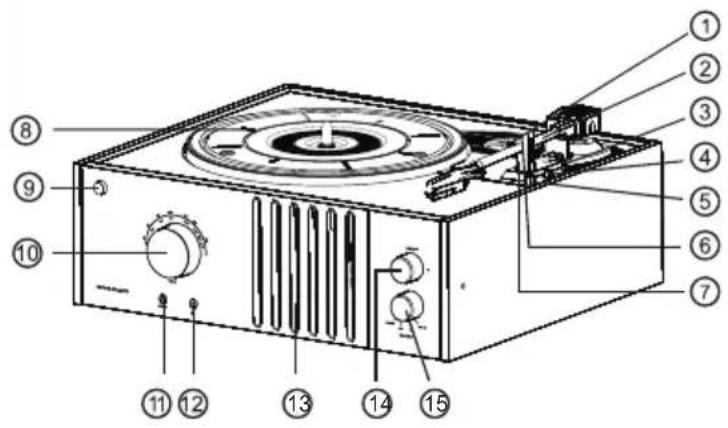
Unit Controls
- 45 RPM Adapter
- Tone Arm
- Tone Arm Control
- Auto Stop Control Switch
- Speed Control Switch
- Hold Down Clip
- Tone Arm Rest
- Turntable
- Power Button
- Tuning Knob
- 3.5mm AUX IN Jack
- Headphone Jack
- Speaker
- Volume Knob
- Function Knob
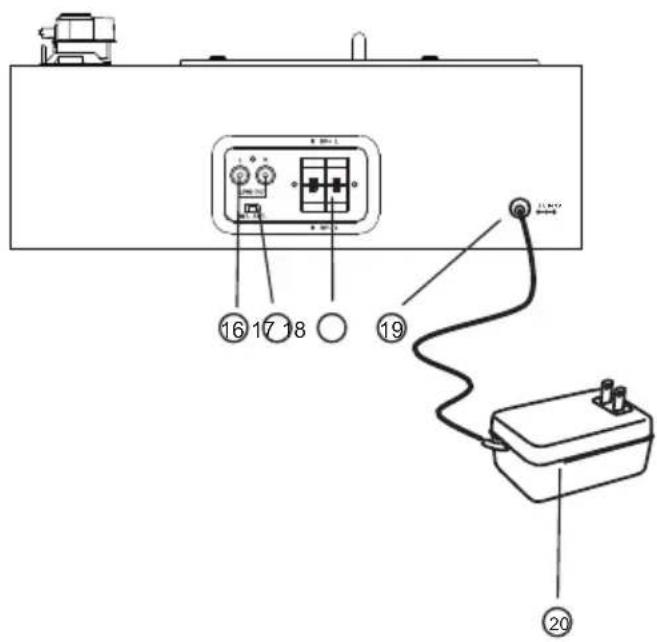
- Line Out Jack
- Internal/External Speaker Switch
- Speaker Out Jack
- Dc Jack
- Ac Adapter
Getting Started
Unpacking
1 Remove packing materials from unit.
Note: Save all packing materials.
2 Remove AC ADAPTER (20) from the giftbox of the unit.
3 Remove tie from AC ADAPTER(20).
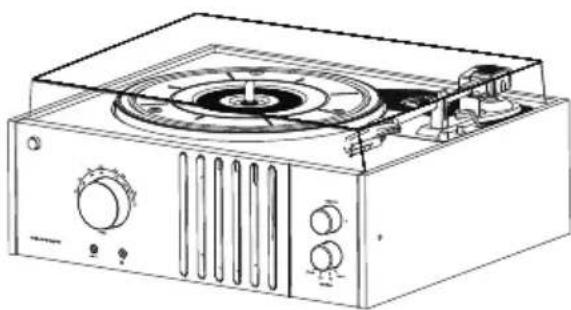
4 Set the unit on its end, open the lid of the unit.
natural_image
Line drawing of a portable radio or megaphone device with control knobs and a central fan (no text or symbols)5 Remove black tie-wrap from under the TONE ARM(2).
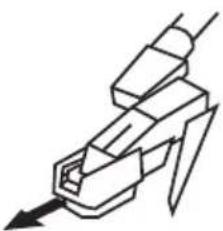
6 Remove white protective needle cover by gently pulling towards the front of the unit.
natural_image
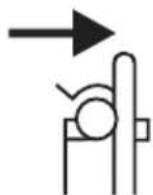
Pure mechanical component diagram without any text, numbers, or symbols7 Release tone arm HOLD DOWN CLIP (6) by gently pushing to the right. This will unlock TONE ARM(2) from its arm rest. Re-lock the HOLD DOWN CLIP (6) when moving the unit to another location.
Power Source
1 Untie the wire on the AC ADAPTER (20).
2 Plug the AC ADAPTER (20) into appropriate wall outlet.
3 Plug the small end of the adapter into the DC JACK(19) on the back of the unit.
Headphone Jack Operation
1 Connect headphone to the Headphone Jack (12).
2 Adjust volume to the desired listening level.
NOTE: When using headphone, the sound from the unit speakers will be cut off.
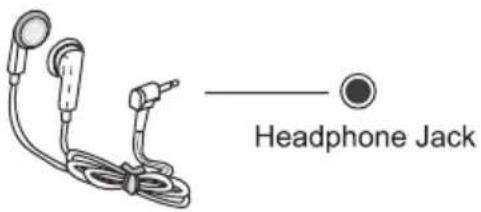
NOTE: Headphone is not included with unit.
Operation
Turntable Operation
1 Set the SPEED CONTROL SWITCH (5) to the correct speed (33 ^1/3 , 45 or 78rpm).
2 Place the record on the turntable.
3 Move the TONE ARM (2) to the desired starting point on the record. The record will start playing.
4 Turn the VOLUME CONTROL(14) to adjust the volume to the desired level.
5 Slide the AUTO STOP CONTROL SWITCH(4) to choose the auto stop function.
6 At the end of the record, the TONE ARM(2) will stop automatically. You must return the TONE ARM(2) to TONE ARM REST(7) manually.
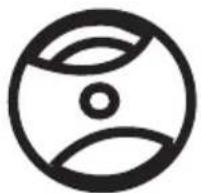
Accessory: ADAPTER FOR 45 RPM
This adaptor allows you to play 45 RPM records.
natural_image
Abstract circular logo with concentric rings and a central dot (no text or symbols)1 Place the 45 RPM ADAPTER(1) over the spindle.
2 Gently place your 45 RPM record onto the turntable.
3 Follow the steps under turntable operation to play your record.
Radio Operation
- Turn the Function Knob (15) to the desired tuning band.
- Rotate the Tuning Knob(10) to select the desired station.
- Adjust volume to the desired level by rotating the Volume Knob(14).
- Position the antenna for optimum reception.
Audio Output
1 You can run the audio from the unit into your home stereo, television or other stereo source by using the Audio output.
2 To make this connection, you need a standard RCA cable (not include). Plug the red and white connectors on one end of the cable into the red and white LINE OUTJACK(16)on the back of the unit. The other end of the cable will plug into the Aux input jacks of your selected component.
3 Operate the unit as usual, you can hear the sound exported from the unit.
NOTE: you can still listen to your unit when using the Audio Output feature.
Audio Output
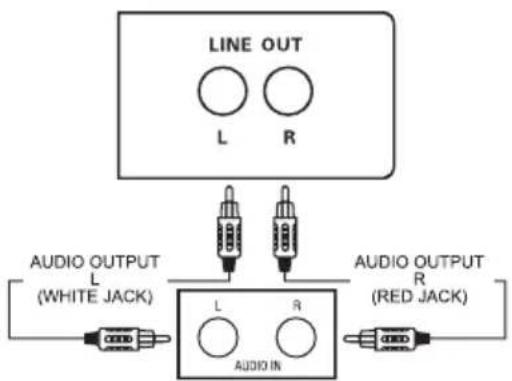
flowchart
graph TD
    A["LINE OUT"] --> B["AUDIO IN"]
    B --> C["L (WHITE JACK)"]
    B --> D["R (RED JACK)"]
    B --> E["L (White JACK)"]
    style A fill:#f9f,stroke:#333
    style B fill:#ccf,stroke:#333
    style C fill:#fff,stroke:#333
    style D fill:#fff,stroke:#333
    style E fill:#fff,stroke:#333
General
AUX IN
The Aux In Jack is located on the front of your unit. This jack uses a 3.5 mm mini pin cable for connection. This connection is especially useful in hooking up smaller audio components like MP3 players. To make this connection, you will need a 3.5mm audio cable(included). Hook one end of the cable into the Aux In Jack on the front of your unit. The other end will plug into the Audio Output or headphone jack on the selected component. For more information on hooking up the external component, see the owner's manual for that component.
Troubleshooting
The unit does not operate.
1 The AC Power cord is not connected. Make sure it is connected to an AC outlet at the back of the unit.
No sound is coming from unit.
1 The white protective needle cover was not removed.
2 The volume is not turned up.
Tone arm will not move.
1 Black tie-wrap was not removed from underneath tone arm.
2 Tone arm hold down clip was not released.
Limited Manufacturer's Warranty
Crosley Radio, Inc. warrants the product to be free from defects in material and workmanship under normal use for a period of one year from the original date of purchase. This warranty is not transferable. If the product is determined to be defective during the warranty period, the unit will be repaired or replaced at Crosley Radio's sole discretion. This warranty covers manufacturing defects and normal consumer use and does NOT cover damage or failure as a result of abuse, accident, alterations, misuse, neglect, abnormal wear and tear, inadequate maintenance, commercial or unreasonable use, damage caused by power surges, mishandling, accident, acts of God or attempted repair by an unauthorized service agent. Also not covered are cosmetic damages, cords and antennas.
Should this product fail to function in a satisfactory manner, it is best to first contact our technical support team for assistance to ensure it is being operated properly.
Tech Support and Product Questions CALL TOLL FREE: 1.888.CROSLEY (1.888.276.7539)
If it is indeed determined that the unit is no longer operational, please contact the retailer from which it was purchased. In many cases, your retailer will be able to provide a replacement unit at no charge within the scope of their return policy. If the retail return period has expired, please contact Crosley Radio directly to participate in the one year protection program.
Crosley 1 Year Warranty Program CALL TOLL FREE: 1.800.926.7801
You will need to contact our offices M-F 8am-5pm EST to obtain an RA (Return Authorization) Number. You will be instructed to send the unit (at your cost) to our offices in its original packaging (or reasonable substitute to prevent damage.) You will need to clearly mark your RA number on the outside packaging and include the original sales receipt (or a copy) indicating date of purchase, amount paid, and place of purchase. You will also need to include your full name, shipping address and daytime contact number. You will be instructed to include a check or money order for any applicable return shipping and handling fees. A Crosley advisor will confirm the fees associated with your product's shipping size/weight. Returned products will not be shipped to PO Boxes. Crosley Radio will not be responsible for delays or unprocessed claims resulting from a purchaser's failure to provide any or all of the necessary information.
There are no express warranties except as listed above. The purchaser's bill of sale is the only proof of warranty entitlement.
This warranty gives the purchaser specified legal rights in addition to any rights which may vary from state to state.
In accordance with the "Moss-Magnuson Warranty Act" of July 10, 1975, this is termed a "limited warranty" which in no way compromises Crosley Radio's high standards of quality and workmanship.