Thump - Højttaler 808 Audio - Gratis brugsanvisning og manual
Find enhedens vejledning gratis Thump 808 Audio i PDF-format.


Brugerspørgsmål om Thump 808 Audio
0 spørgsmål om dette apparat. Besvar dem du kender, eller stil dit eget.
Stil et nyt spørgsmål om dette apparat
Download vejledningen til din Højttaler i PDF-format gratis! Find din vejledning Thump - 808 Audio og tag din elektroniske enhed tilbage i hånden. På denne side er alle dokumenter nødvendige for brugen af din enhed offentliggjort. Thump af mærket 808 Audio.
BRUGSANVISNING Thump 808 Audio
Getting to know Bluetooth
Bluetooth wireless is a quick and easy way to connect a smartphone to a speaker or headset. There are basically two steps to making it work.
"Hi. I'm a phone." "Hi, phone. I'm a speaker."

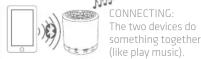
This guide takes you through the steps to get started.
Step 1: Unpack
Make sure the following items came in this package.
- Thump wireless speaker - Micro USB charging cable
Step 2: Charge up!
Before you start using your Thump speaker, you need to charge its built-in battery.
Plug the included USB charging cable into the DC IN jack on the back of the speaker.

Plug the other end of the charging cable into a USB power source (like a computer or a USB charger).
The charging indicator on the back of the speaker illuminates while the speaker is charging. It turns off when the speaker is fully charged. CHARGE Back of the speaker
Step 3: Turn on
Press the ☐ button on the bottom of the speaker to turn the speaker on.
The speaker beeps and the PAIR light on the front of the speaker starts blinking.

PAIR Back of the speaker
Step 4: Pair + Connect
Enable Bluetooth on your smartphone or other device.
OTHER DEVICES:
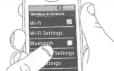

Back of the speaker
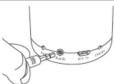
If you've previously paired your phone or other Bluetooth device with this speaker, the speaker will automatically attempt to reconnect to that device when you switch the speaker on. If you want to pair to a new device, press and hold the 📄 button on the bottom of the speaker until the speaker beeps.
Choose 808 THUMP from the pairing options on your smartphone. (If it's not in the list, choose "Scan" from your phone's Bluetooth menu.)
The speaker beeps when it's finished pairing and connecting to your smartphone. The PAIR light on the front of the speaker turns solid blue.
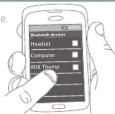

Note: The process of enabling Bluetooth and connecting varies from device to device. See your device's owners manual for more information and specific instructions.
Bluetooth Wireless Connection Tips
• Make sure the Blue phone is turned on.
- Make sure there's nothing plugged into the Thump speaker's AUX IN jack when you're trying to use Bluetooth.
- The speaker's Bluetooth wireless connection works up to a range of roughly 33 feet (10 meters). This range may vary, however, based on other factors, such as room layout, wall material, obstacles, your device's Bluetooth performance, etc. If you're having problems connecting to the Thump speaker, move closer to it.
- If your device asks you for a password to connect, use "0000".
Step 5: Play music Usin
Set your device's volume for music to 75%.
Note: This is to make sure the sound from the speaker isn't too loud when you start streamin
Start playing music or other audio on your device. Within seconds, the speaker starts streaming the audio wirelessly via Bluetooth.
To adjust the volume of your audio: Use the Volume controls on your phone.


he Aux In input Tour of
Use a 3.5mm
audio cable (not
included) to conn
the audio output from your device 1
the AUX IN audio
input on the speaker's back panel.
The speaker automatically switches to the AUX IN audio.
To listen to Bluetooth audio again, unplug the cable from the speaker's AUX IN jack.
s back panel.
ically switches to the
[Non-Text]
n audio again, unplug
eaker's AUX IN jack.
Thump speaker
Back of the speaker
TABLE 1.1.1.1.2.3.4.5.6.7.8.9.10.11.12.13.14.15.16.17.18.19.20.21.22.23.24.25.26.27.28.29.30.31.32.33.34.35.36.37.38.39.40.41.42.43.44.45.46.47.48.49.50.51.52.53.54.55.56.57.58.59.60.61.62.63.64.65.66.67.68.69.70.71.72.73.74.75.76.77.78.79.80.81.82.83.84.85.86.87.88.89.90.91.92.93.94.95.96.97.98.99.100
PAIR indicator light shows the status of the speaker.
(1) Stock levels of the spread sheet
- fast blinking blue while pairing
• Slow blinking blue while reconnecting
- very slow blinking blue when disconnected and in standby mode
in standard mode 1. solid blue when n
• off when the speaker's off
• solid white when the AUX IN jack is in use

AUX IN jack lets you connect an audio
device directly to the Thump speaker using a 3.5mm audio cable
using a 5:5mm audio cable
DC IN jack connects to the provided
micro USB charging cable to recharge the sneaker's battery.
6.1.1 陈晓东、吕新平、吕小
CHAROL indicator light shows the charging status of the speaker: illuminated while
charging, off when full (or unplugged).
Bottom of the speaker
(1) button turns the
speaker on or off.
广力云智慧零售收银系统
② button puts the
speaker into pairing
Mode to connect to a new Bluetooth device, like a smartphone

For more information about your new Thump
speaker, visit 808Audio.com or call our toll-free help line at 1 808 722 6966
WEE Help line at 1 000 752 0000.
SP200 QSG 00
808 | THUMP™
WIRELESS SPEAKER
Welcome!
Thank you for choosing the 808 Thump Wireless Speaker.
This Quick Start Guide has all the info
this quick start date here on the time you'll need to get started.
Mærke : 808 Audio
Model : Thump
Kategori : Højttaler