
1420T(B) - Fjernsyn MATSUI - Gratis brugsanvisning og manual
Find enhedens vejledning gratis 1420T(B) MATSUI i PDF-format.


Brugerspørgsmål om 1420T(B) MATSUI
0 spørgsmål om dette apparat. Besvar dem du kender, eller stil dit eget.
Stil et nyt spørgsmål om dette apparat
Download vejledningen til din Fjernsyn i PDF-format gratis! Find din vejledning 1420T(B) - MATSUI og tag din elektroniske enhed tilbage i hånden. På denne side er alle dokumenter nødvendige for brugen af din enhed offentliggjort. 1420T(B) af mærket MATSUI.
BRUGSANVISNING 1420T(B) MATSUI
Instructions
Matsui 1420T(B)/1420TSIL(B)
Domoye
Where are your TV it is damaged in one way. Always place your TV on a file level surface, including aperture which may be subject to strong vibration. Whether
The obstacle to plug the car on during an electric shock.
Moisture
Do not allow your T' to be exposed to skin, moisture, and if any lipid is still into your T' it can cause serious damage. If you will only liquid in your T' with it at the mine immediately.
interference
Do not show your TV on or near opalance which may occur with electromagnetic interference (TV or H) overhead. If you do, it may adversely affect the working of the unit, and create a detached picture or sound.
Temperature
Avoid external of cooperation, either for or said, please your To wall away from your contact such as reduction or gay/white law.
Ventilation
The TV may be well ventilated. It is not over your TV or plans it inside a small confined space. Note sure that there is a gap of about 1 ton on each side and 200m at the top.
Tarties are easily condensed by young children. Do we allow young children to play with the remote control unit.
Грунга
For use reason any bad options can be may expose dangerous solutions. Standby
The closing button on the remote room doesn't wait at the TV completely and the TV will continue to draw electricity loss to more supply. Therefore in the interests of safety and to avoid temporary energy consumption, not have your TV in closing stake established for long periods of time, night overnight, while or holiday or while out of the house.
Naked Flames
Novel flares such as candles and night lights should not be placed on or near your TV.
Onerdoms Vokes and other water containers as lunar should not be per or top of your TV at.
Power Cord
Note: run your TV or TV stand is nor noring on use of the power card, as the weight of the TV may damage the card and cover a safety seat. Packaging If you can prove the packaging it will press work should you need to manage the TV to protect it while it is in mind by a man packaging whenever you can if you cannot run it, contact your local authority for details of your services recycling facility.
Inserting batteries into the Remote Control
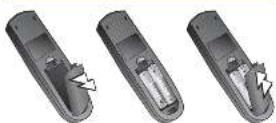
J3M43701A|V'03.10

Follow either instruction i) or ii) below:
All connections must be made with the power disconnected.
i)
Connect your TV to an aerial

A Correct an external serial (not supplied) to the serial socket on the back of your TV.

ii) Connect your TV to an aerial and VCR


A Connect on email and (not supplied) to the social market RT IN on the book of your VCR.

Connect on RF lead to the socket marked RF CUT on your VCR (not supplied) and the other end to the serial socket on your TV.

C If you have a short band we recommend that you use one Connect it to the short socket on the back of your TV and one of the short sockets on the back of your VCR

Switch on your TV and any other connected equipment/Automatic Tuning System


Make sure that your TV and aerial are properly connected.
Plug your TV and any other equipment that you have connected to your TV into the mains and switch on at the wall.
ONLY WHEN YOU TURN ON THIS SET FOR THE FIRST TIME, THE AUTOMATIC TUNING PROCESS WILL BE AVAILABLE.
- Pass the POWER switch on the front of the TV, the red standby indicator will light.
Switch on your transmission by pressing STANDBY (on the remote control. The standby light will go on where the TV is on.)
- Press ENTER. Your TV will now automatically turn in all available channels.
When the programme on the screen steps changing and the sound comes on, the tuning process is complete.
If you have a VCR connected make sure that it is switched on and a video tape a playing. . . your TV screen will be busy
If you have a Satellite/Cable box system in games console connected make sure that it is switched on. Also sure your Satellite/Cable not hit Sky News selected . . . your TV screen will be sunny. Please refer to your Satellite/Cable instruction book to see how to select Sky News.

Select your language

This feature allows you to select the language you want to appear on your TV screen display.
Press MENU on the remote control. The main control menu will appear on your TV screen.
Press CH/PAGE - / - to select language menu.
Prav. ENTER to select language screen
Press CH/PAGE - / - to select desired language.
I're ENTER to store your selling.
I're a MENU to clear the screen.

Tune the channels
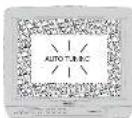
Press MENU on your remote control. The main control menu will operate on your TV screen.
Press CH/PAGE +/ - on your remote control to highlight CH tuning. Press ENTER to confirm, The CH tuning screen display will open.
Press CH/PAGE +/+ to highlight auto, please ENTER to confirm. This will set the automatic hiring process. This process will take a few minutes to complete... please be patient.
When the programme on the screen stops changing and the sound comes on, the being process is complete.
Press MENU twice to clear the display.
Since each programme may be picked up by your TV on more than one frequency the most time process will probably does more than one of each channel. For example, there may be three BBC 2's. This means that once the automatic being process is complete you will need to choose a channel number to the programme with the cleanest motion. To do this go to the red step - Sorting Channels...

Sort the channels
- Press MENU. The main control menu will open.
-
Press CH/PAGE ▲/▼ on your name control to highlight CH using
-
Press ENTER: The CH tuning on screen display will appear
-
Press CH/PAGE + / + on your remote control to highlight CH location
-
Press ENTER The CH allocation on-screen display will appear and the current channel position for the programme on the TV screen will appear in the top right corner of the screen.
-
Pure CH/PAGE */ on your remote control to find a programme with a clear reception. Press ENTER
-
From CH/PAGE to select the channel number that you want the programme to be done in. For example in the TV has automatically stored a BBC2 programme in channel number 6, you will need to change the channel allocation number (in the middle of the screen) to 2 using the CH/PAGE before on your minute control, it no channel is allocated, the on-screen discharge will disappear after 1 minute!
-
Press ENTER once so that the channel number you have elocated to this programme is stored the channel will now have changed position.
Supert this process until you have allocated a channel member to all the programmes on your TV with the clean reception
- Free MENU 3 times to remove the screen displays from the TV screen
Once you have heard in and asked of the channel you want to watch, you will be able to select them by pressing the numbered buttons on your remote control or by pressing CH/PAGE = 1/4 to select channels in sequence eq. 1,2,3,4,5 etc..

Adjusting the picture settings

The picture settings have been adjusted by the factory under optimal signal reception conditions, however conditions may not be the same in your area. After coming at your introduction, allows it to warm up for a low minimum before making any adjustment. Should you wish to use picture controls back to factory settings press NORMAL
Press MENU on your remote control. The main control menu will appear.
Press CH/PAGE = / - on your remote control to highlight picture.
Press ENTER to view brightness. Press CH/PAGE ▲/▼ to view the context, colour or sharpness on screen displays.
Press VOL + or - to adjust the level.
Pictures appear sharper in the daytime by mounting the contrast. In the wearing (when surroundings are dargest the sharper picture can be obtained by reducing the contrast.
From MENU twice to remove the picture menu.
If you do to make an appointment when I know the next will disappear.

Setting the sleep function

the deep functor allows you to automatically watch your information into standby offer a smooth amount of time (up to 120 minutes). In addition, should you let meep or leave your time immediately to tell automatically watch an standby. 15 minutes often be one of milliseconds.
To see the sleep time press SLEEP
The display will clear in four seconds and your television will switch off automatically after 120 minutes.
Reported presses of SLEEP will decrease the sleep timer in 10 minutes intervals from 120 minutes to 10 minutes. 1st price: 120 minutes. 2nd price: 110 minutes.
100,90,80
When you have set the sleep timer your TV will return to a normal picture and automatically switch off after the normal sleep time.
To cancel the sleep timer set the sleep timer to 0. The display will clear in four seconds and your television will not switch off automatically.

Manual tuning

In certain areas with poor reception, the Automatic Timing System may not have your attention to the strongest broadcast signal. If you are not satisfied with the outstanding using you may normally know your television to obtain the best possible picture and card.
Select the IV channel you want to manually tune.
Press MENU on your remote control. The main control menu will appear.
Press CH/PAGE ▲/▼ en your remove control to highlight CH tuning.
Miss ENTER 3-year ### senior to confirm
The CT tuning on screen display will appear.
Press CH/PAGE ▲/▼ to highlight removal. Press ENTER ID confirm
Hross VOL + 1x search up the w/absor of VOL - to search down the w/absor.
From VOL 4 or 7 to previous year, then the station was next is found.
Pass FINE TUNING +/- to find the charest pictures.
Press ENTER to store the station you selected.
Press CH/PAGE ▲/▼ to select your required channel number (1-80).
Press ENTER to store the channel number
Japan's place is the 5 other stores.
14.6. MENS: 2008, 1995, 1996 and the following details
For a later date you wish to skip an unwanted channel when using CH/PAGE ▲/▼, press SKIP on the remote control.
the channel number will both when stop is selected for that channel
To cancel the slip function, type in the channel number i.e. 2 and press SKIP. The channel number will stop flooring
Fault finding guide
| SYMPTOM CAUSE SOLUTION | ||
| No. onshore, your play in 1st | In the way's power needs for the front of your IV 24th Pays the bus or the bus in play 2nd | Pays the bus is more popular (IV 24) used. I have the most power needs. Sides like a bus to play. |
| No platters, no sound, your play in 2nd | In the road to me and how does you do something frequently use a bike. | Pays the bus is more popular (IV 24) used. I can't read some people who has a bike or a dog. I'm interesting really very bad. |
| When I had been many people available about your car. If you have in I don't know your carmer, they are using an emailbook to ensure the quality of broadcast ads. I have the most power needs. I have more people or more than the volume using the bus and control. | ||
| Unable to select channel numbers up to 8th | Eating a car with a key user's ability that I've exemplified why you're a car. I have a car parks? | I have a car that has been used by reading the concrete table. |
| Poor or no colour. | Carls of our children and men who need to be disordered or broken. Color of car is not equal. | Carls of our children and men who need to be in the car. I have a car. The car is a car. I have a car. I have a car. I have a car. I have a car. I have a car. I have a car. I have a car. I have a car. I have a car. I have a car. I have a car. I have a car. I have a car. I have a car. I have a car. I have a car. I have a car. I have a car. I have a car. I have a car. I has a car. I have a car. I have a car. I have a car. I have a car. I have a car. I have a car. I have a car. I have a car. I have a car. I have a car. I have a car. I have a car. I have a car. I have a car. I have a car. I have a car. I have a car. I have a car. I have a car. I want to use the car. |
| Not limited or strange characters later, as soon. | Awards connected to the right side by reading the car. | Cuses of car used by reading the car when you want to use the car and |
| Benedo cated cars not used or are opportunity consisting. | Work in a car made a car made a car. | I have a car. I have a car. I have a car. I have a car. I have a car. I have a car. I have a car. I have a car. I have a car. I have a car. I have a car. I have a car. I have a car. I have a car. I have a car. I have a car. I have a car. I have a car. I have a car. I have a car. |
| Unable to playback, make up. | Do not use a car to use a car to play back. I have a car. I have a car. I have a car. I have a car. I have a car. I have a car. I have a car. I have a car. I have a car. I have a car. I have a car. I have a car. I have a car. I have a car. I have a car. I have a car. I have a car. I have a car. I have a car. I have a Car. | I have a car. I have a car. I have a car. I have a car. I have a car. I have a car. I have a car. I have a car. I have a car. I have a car. I have a car. I have a car. I have a car. I have a car. I have a car. I have a car. I have a car. I have a car. I have a car. I have an Car. |
| Unable to watch wholesale volumes. | It's going to buy any purchase price for the car in a car. | I'll be doing it because I want to buy another vehicle or buy any one Car in a car, purchase and buy another vehicle. |
Portmaster
Partmaster Direct
0870 90 90444
All sales charged to Natural Role
Former occasion as and some service our provide characteristics, costs and replacement instruction books for the area is usually one other domestic workers (any way have 40% more than being accompanied with 24 hours).
We hope you enjoy your new Home (460) E.C. 4251018K to help you get the most from your new
Juman, F. G. and W. H. (1984)
crack, we'd were not liable for the very closest to your door
Yes can also go on to the following website
1.500 For White & Black at 1:30 PM in 7 W/m, parathina/2016
In order we look? (I am I, and a conclusion that our way is not sure, but I can be
Specification
| Model No. | Vermes 1-20073-14523 (kg) |
| Plasma tube | 18" 240 m x 10^4 cm x 10^6 mm x 10^6 mm |
| Dialysis system | 6 (m) |
| Atrial | 100 gm x 250 gm x 200 gm x 200 gm |
| Test solution | 1.5 L·m |
| Atrial output power | 100V |
| Speaker | 2.5 kg x 100 gm |
| Power supply | 40, 200 V x 200 V |
| Power consumption | 100 V x 200 gm x 200 gm |
| Weight | 2.5 Kg |
| Dimensions | 352(20×200×10^6 x 10^6×200×40×40×40×40×40×40×40×40×40×40×40×40×40×40×40×40×40×40×40×40×40×40×40×40×40×40×40×40×40×40×40×40×40×4 |

Teletext functions
Press SUB PAGE to view a sub-page. A dxines will appear, if you do not enter any numbers they
may only be removed by passing TEXT/MIX/TV.
Select the desired sub-page number.
e.g. sub page number 2 press 0 0 0 2 by pressing the direct channel entry buttons
with only 120,000円 3.5mmir V 48150.100cm.
I am a 6000 yen re-veit me holo n vene in abgues, as airtiesis is good! Impulse inurative
the agree will be updated, a 1-race of these rights.
Press QUICK VIEW to switch between the current channel and the local channel selected.
Press MENU to enter the main menu
Press INFO to display the current channel on the screen.
Press INFO again to turn off the display.
Press STATUS/HOLD to freeze a page.
the hold symbol will appear in the top left corner of the screen.
Press STATUS/HOLD a second time to release page.
Pages and sub pages are protected in sequence with on-square page for reading each page. You may
Please use a page which is of pages of interest and lists in all sheets. In addition, otherwise observed with
- 2017年1月1日
Prev. RESET to return to the INDEX
page while you are in telelect mode
Press SKIP/REVEAL to display hidden text
Some pages contain hidden bars, e.g. a quite page with occurred answers.

All Telmost papers are three digit numbers e.g. to select paper 102, press 1, then 0, then 0.
If you accidentally press a wrong Euron, complete the sequence with any three numbers, then remember the
carn. 1906a.
Press CH/PAGE ▲/▼ to advance pages sequentially up or down.
press the four COLOURED FASTEXT
solutions to move around the teletest
pages with greater eye and speed
Press the MUTE button to turn off the
sound. Press the MUTE button again
to turn the sound back on.
Press DISPLAY CANCEL then enter your page number.
This function enables the TV picture to be viewed whilst a selected page is being
located. Once bound the page number will be displayed in the top half of the TV office.
Press TEXT/MIX/TV to view the selected page
To-day Telcstx press TEXT/MIX/TV
1st press
2nd press
3rd press
res TEXT/MIX/TV
lex only
and TV picture
TV picture only
Press NORMAL to reset picture controls back to recovery settings.
Press F/T/B to increase the size of the test on screen.
1st press. View the top of the page
2nd press . View the bottom of the page
3rd press Return to full view of the page (best normal size)
Mærke : MATSUI
Model : 1420T(B)
Kategori : Fjernsyn