
KRIF 3121 - Køleskab BAUKNECHT - Gratis brugsanvisning og manual
Find enhedens vejledning gratis KRIF 3121 BAUKNECHT i PDF-format.


Brugerspørgsmål om KRIF 3121 BAUKNECHT
0 spørgsmål om dette apparat. Besvar dem du kender, eller stil dit eget.
Stil et nyt spørgsmål om dette apparat
Download vejledningen til din Køleskab i PDF-format gratis! Find din vejledning KRIF 3121 - BAUKNECHT og tag din elektroniske enhed tilbage i hånden. På denne side er alle dokumenter nødvendige for brugen af din enhed offentliggjort. KRIF 3121 af mærket BAUKNECHT.
BRUGSANVISNING KRIF 3121 BAUKNECHT
Bauknecht
QUICK GUIDE
EN
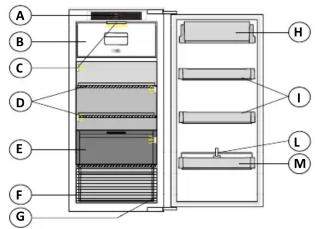
A. Electronic control unit
B. Freezer compartment (if the refrigerator has one)
C. LED indicators (depending on model)
D. Shelves
E. Special compartment (Meet & fish or Zero degree) (if provided)
F. Fruit and vegetable drawer
G. Rating plate (placed on the side of the fruit and vegetable drawer)
H and I. Door shelves
L. Bottle holder (if provided)
M. Bottle shelf

Least cold zone
Coldest zone
Meet & fish or Zero degree zone
Fruit & vegetable zone
Note: All of the drawers, door shelves and shelves can be removed.
The ideal storage temperatures for the food are pre-set in the factory.
Read the instructions carefully before using the appliance.
Features, technical data and images may vary according to the model.
On/Stand-by
Press the button for 3 seconds to turn the appliance off. In Stand-by mode, the icon will light up and the light in the refrigerator compartment does not turn on.
To turn the product on again, a brief press on the button is sufficient.
Note: this procedure does not disconnect the appliance from the electricity supply.
Vacation (holiday mode)
You can use this function in the event of your prolonged absence. Press the "Vacation" Button for 3 seconds to turn the function on. The display will show the temperature of the refrigerator compartment (12°C) and the second light up. After activating the function, remove the food from the appliance and keep the door closed - the appliance will maintain a suitable temperature to prevent odours from forming.
To turn off the function, press briefly the button or act on the C° button °C
Temperature display
The display shows the refrigerator compartment temperature (between 2^ C and 7^ C).

Appliance temperature
It is possible to set a different temperature with the C° button.
Fast Freeze/Cool Function (Fast Cooling)
To quickly cool the refrigerator compartment, or six hours before putting a large quantity of food to be frozen in the freezer compartment (if there is one), turn on the "Fast Cooling" function by pressing the C° button ^C for 3 seconds.
When the function is turned on, the icon will be displayed. The function turns off automatically after 6 hours, or manually by pressing the "C" button for 3 seconds.
Note: do not put foods that are to be frozen in contact with others that are already frozen.
Key Lock
The key lock can be activated/deactivated by keeping the "key lock" button pressed for 3 seconds, until a confirmation sound is heard (the icon lights up immediately and into few seconds disappear). If you press any button while the key lock is active, you will hear a sound and the "Key Lock" icon will flash.
MEAT & FISH BOX (depending on model)
The Meat & Fish box was designed specially to keep foods fresher for longer, without altering nutritional values or original freshness.
Do not store fruit or vegetables in this box, as the temperature may drop below 0°C, causing water contained in the food to freeze.
The following factors are vital for the "Meat & Fish Box" to work properly:
- the refrigerator compartment must be switched on
- no special functions must have been selected (Standby,
Cooling-Off, Vacation).
If one of these special functions has been selected, the "Meat & Fish Box" must be fresh food inside it removed.
When placing small containers and food products on the top shelf of the "Meat & Fish" compartment, make sure they do not accidentally fall.
What to do if... Possible reasons: Solutions:
| The appliance may be in On/Stand-by mode.There may be an appliance power supply problem. | Turn the appliance on pressing the On/Stand-by button. Check that:- there is not a power outage- the plug is properly inserted in the power socket and the mains double-pole switch (if present) is in the correct position (i.e. allows the appliance to be powered)- the household electrical system protection devices are efficient- the power cable is not broken. | |
| The control panel is switched off, the appliance does not work. | ||
| The light may need replacing. | - Models with LED lights: contact the authorised Technical Assistance Service.- Turn the appliance on pressing the On/Stand-by button | |
| The internal light does not work. | The appliance may be in On/Stand-by mode | |
| Check that:- the door close properly- the appliance is not installed near a heat source- the set temperature is adequate- the circulation of air through the ventilation grilles on the base of the appliance is not obstructed. | ||
| The temperature inside the compartments is not cold enough. There could be various causes (see "Solutions") | ||
| There is water on the bottom of the refrigerator compartment. | The defrost water drain is obstructed. | Clean the defrosting water drain (see section "Maintaining and cleaning the appliance") |
| The red 🚗 icon is flashing and a sound signal is activated | Door open alarmIt is activated when the door remains open for a prolonged period of time. | To turn the sound signal off, close the door of the product. |
| The red 🚗 icon will light up, a sound signal is activated and the letter "F" is flashing on the display. | Malfunction alarmThe alarm indicates the malfunction of a technical component. | Call the authorized Technical Assistance Service. To turn the sound signal off, briefly press the "Turn off sound alarm" icon |
Note: some noises, such as gurgles and hissing, caused by the refrigeration system, are normal