
KGIE 2181 - Køleskab BAUKNECHT - Gratis brugsanvisning og manual
Find enhedens vejledning gratis KGIE 2181 BAUKNECHT i PDF-format.


Brugerspørgsmål om KGIE 2181 BAUKNECHT
0 spørgsmål om dette apparat. Besvar dem du kender, eller stil dit eget.
Stil et nyt spørgsmål om dette apparat
Download vejledningen til din Køleskab i PDF-format gratis! Find din vejledning KGIE 2181 - BAUKNECHT og tag din elektroniske enhed tilbage i hånden. På denne side er alle dokumenter nødvendige for brugen af din enhed offentliggjort. KGIE 2181 af mærket BAUKNECHT.
BRUGSANVISNING KGIE 2181 BAUKNECHT
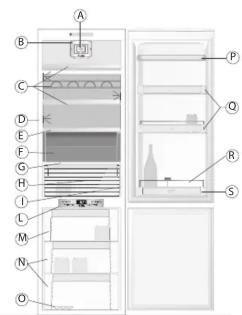
Refrigerator Compartment
A. Fan and anti-bacterial and anti-odour filter (depending on model)
B. Bulb or LED light (depending on the model)
C. Shelves
D. LED lights (depending on the model)
E. Lid for Special Box ("Meat & Fish" or "Zero Degrees") (if included)
F. Special Box ("Meat & Fish" or "Zero Degrees") (if included)
G. Crisper drawer(s) lid
H. Crisper drawer/drawers
I. Rating plate (at the side of crisper drawer)
L. Control panel
P. Dairy drawer
Q. Door trays
B. Bottle holder (if provided)
S. Bottle b

Least cold zone Intermediate temperature zone Coldest zone Fruit and vegetable crisper
Freezer Compartment
M. Upper basket or door (freezer compartment)
N. Middle and lower baskets (storage area for frozen and deep-frozen food)
O. Ice cube tray (if provided)
Note: All shelves, door trays and racks are removable.
The ideal temperatures for the storage of foodstuffs are pre-set in the factory
Read the user handbook carefully before using the appliance.
Specifications, technical data and images may vary from model to model.
Freezer compartment temperature
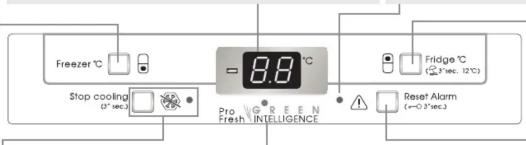
A different temperature can be set using the "Freezer °C" button.
Fast Freezing
To be activated 24 hours before large quantities of food to be frozen are placed in the freezer compartment. Press the "Freezer °C" button repeatedly until "FF" appears on the display.
The function disables automatically after 48 hours or can be switched off manually by pressing the button again. Do not place food to be frozen beside food that is already frozen. When freezing large quantities of food, a temperature alarm may occur (depending on the model).
Stop Cooling
Press and hold the button for 3 seconds to start/stop cooling. In Stop Cooling, the indicator lamp lights up.
Notes: This operation will not disconnect the appliance from the power supply. This function does not disable the internal light which can be switched off by pressing the key on the base of the fan.

The display can show either the temperature in the refrigerator compartment (from 2°C to 8°C) or the temperature in the freezer compartment (between -17°C and -24°C). When "FF" is shown on the display, the "Fast Freezing" function is enabled.
Green Intelligence Pro Fresh. Enables the appliance to quickly reach optimal storage conditions in terms of internal temperature and humidity. The fun must be switched on for it to work properly. The function can be disabled/reactivated (see Fan description).
Fan. The fan is preset to ON. To disable the fan, press and hold the "Freezer °C" and "Fridge °C" buttons at the same time for three seconds. When the Green Intelligence Pro Fresh light is off, it means that the fan is off and the Green Intelligence function is therefore disabled. Repeat the same procedure to renable the fan and Green Intelligence Pro Fresh function. If the ambient temperature goes above 27°C, the fan must be on to assure the proper conservation of foodstuffs. Disabling the fan optimizes energy consumption.
Temperature or Malfunction
Alarm
See table below.
Refrigerator compartment temperature
A different temperature can be set using the "Fridge °C" button
Vacation
This function can be used during extended absences. Press and hold the "Fridge °C" button for 3 seconds to enable/disable the function. The display will show the refrigerator compartment temperature (+12°C). On activating the function, remove all food from the refrigerator compartment and keep both doors closed: the refrigerator will maintain the right temperature to prevent odours from forming. The freezer remains enabled.
Switching off acoustic alarms
To switch off acoustic alarms, press the "Reset Alarm" button.
Key Lock
The key lock can be enabled/disabled by pressing and holding the "Reset Alarm" key for three seconds until a beep sounds to confirm your selection: "LO" appears on the display for a few seconds. A beep will sound and "LO" will appear on the display for a few seconds if a key is pressed while the key lock is enabled.
What to do if... Possible causes: Solutions:
| The control panel is off and the appliance is not working. | There might be a problem with the electric power supply to the appliance. | Check:- There isn't a power supply failure.- If the plug is inserted properly into the power socket and the bipolar mains switch is in the right position (i.e. power supplied to the appliance).- The electric circuit safety devices installed in the house are fully functional.- The power cable isn't broken. |
| Only for the version with double display: the control panel remains it up (even with the door closed), the internal light is not working (or flashes) and a beep sounds (if not previously disabled). | Refrigerator door open alarmThis activates when the refrigerator door is left open at length. | To switch off the acoustic alarm, press the mute alarm button and to remove an alarm completely, close the refrigerator door. On re-opening the door, check the light is working properly. |
| The internal light is not working. | If the control panel has 2 displays, check for a refrigerator door open alarm (see previous line).In all other cases, you may need to replace the light. | Models with standard lights: unplug the appliance from the mains power supply, check the bulb and replace it if necessary with a new one (see section entitled "Changing bulb or LED").Models with LED lights: contact an authorized After-Sales Service. |
| It is not cold enough inside the compartments. There could be various causes (see "Solutions" column). | Check:- The doors close properly.- The appliance is not placed near a heat source.- The right temperature has been set.- The circulation of air through the fan grilles at the bottom of the appliance is not obstructed. | |
| Water collects at the bottom of the refrigerator compartment. | The defrost water drain is obstructed. | Clean the defrost water drain hole (see "Maintenance and Cleaning" section). |
| The front edge of the appliance near where the door seal strikes is warm. | This is not a defect. It is a design feature to prevent condensation from forming. | No action is required. |
| The control panel won't do anything: Every time a key is pressed, "CL" or "LO" appear on one or both displays. | The 'Key Lock' function has been enabled. | Disable the function as explained in the Quick Start Guide. |
| The red indicator lamp will light up and a beep will sound (if not previously disabled). | Temperature Alarm Freezer CompartmentThe temperature alarm indicates that the temperature in the compartment is not ideal. This can happen: When it is first used after defrosting and/or cleaning, when freezing large quantities of food or when the freezer door doesn't close properly. | Press the mute acoustic alarm button to switch off the sound signal. The red indicator lamp goes off automatically when an optimal temperature has been reached. If the temperature alarm persists, contact an authorized After-Sales Service. |
| The red indicator lamp flashing, there are letters on the single display, and a buzzer is sounding (if not previously disabled). | Malfunction AlarmThe alarm indicates that a technical component has malfunctioned. | Call an authorized After-Sales Service. Press the mute acoustic alarm button to switch off the sound signal. |
| A buzzer sounds, and the freezer temperature display and the red indicator lamp (notalled) flash. | Blackout Alarm (where provided)This alarm activates when there has been an extended power failure causing the freezer compartment temperature to rise. The value flashing on the freezer display is the highest temperature reached during the power failure. | Press the mute alarm button to switch off the acoustic signal. Check the state of foodstuffs before consuming them. |
| A buzzer sounds. The red indicator lamp flashes or the letters 'AF' appear on the display (depending on the model). | Antibacterial and anti-odour filter exhausted (if installed).Replace the antibacterial filter. | After replacing the filter, press and hold the mute alarm button for at least three seconds: The red indicator lamp will go off. |