
GKEA 205 Optima - Køleskab BAUKNECHT - Gratis brugsanvisning og manual
Find enhedens vejledning gratis GKEA 205 Optima BAUKNECHT i PDF-format.


Brugerspørgsmål om GKEA 205 Optima BAUKNECHT
0 spørgsmål om dette apparat. Besvar dem du kender, eller stil dit eget.
Stil et nyt spørgsmål om dette apparat
Download vejledningen til din Køleskab i PDF-format gratis! Find din vejledning GKEA 205 Optima - BAUKNECHT og tag din elektroniske enhed tilbage i hånden. På denne side er alle dokumenter nødvendige for brugen af din enhed offentliggjort. GKEA 205 Optima af mærket BAUKNECHT.
BRUGSANVISNING GKEA 205 Optima BAUKNECHT
PRODUCT SHEET
GB
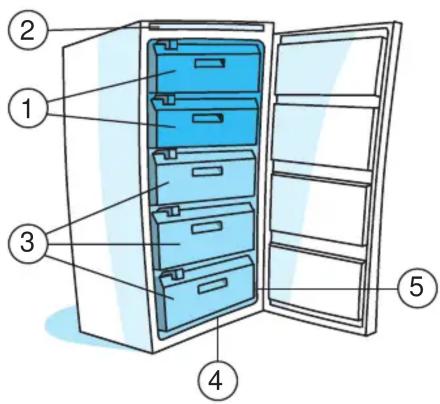
- Compartment for freezing
- Control unit
- Area for drawers and pull-out baskets
- Defrost water drain channel
- Rating plate (inside the appliance).

storage compartment

freezer compartment
Note: the design of drawers and accessories may vary, depending on the model.
Controls
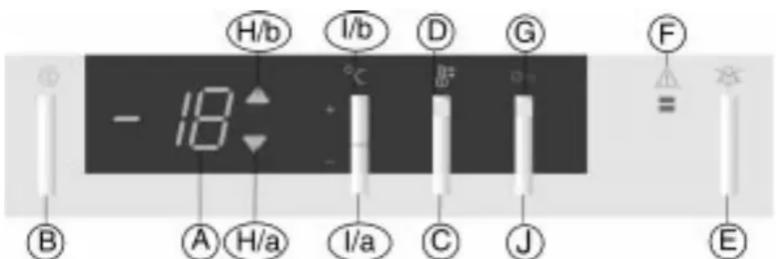
A Digital temperature display.
B Freezer on/off button.
C Fast freeze button.
D Yellow LED: indicates that the fast freeze function is in operation.
E Acoustic alarm mute button.
F Red LED: flashes to indicate that the temperature in the freezer compartment is too high.
G Yellow led: control panel locked.
H Indicator lights: when illuminated, they indicate that the appliance is operating to lower (a) or to increase (b) the internal temperature after settings have been changed.
I Adjustment buttons - (a) for lowering, (b) for increasing - the internal temperature.
J Button for locking the control panel.
Switching on
- Plug in the appliance
Important
If the digital display shows only an illuminated dot, press the freezer on/off button B.
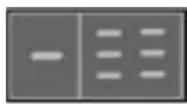
Six horizontal lines appear on the digital display.
After about 3 seconds, when the appliance is warm, (internal temperature above 10^ C) only the two lines in the middle remain illuminated; red led F illuminates and the acoustic alarm sounds.
The acoustic alarm stops while the red led continues to flash.
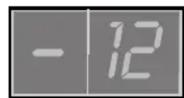
When the temperature reaches -12^ , the red led automatically stops flashing.
- Press button E to mute the acoustic alarm.
- Wait until the temperature indicated on the digital display reaches -12°C.
- Place food to be frozen and/or already frozen food in the freezer.


Freezer compartment temperature adjustment
The appliance is normally factory set to operate at the recommended temperature of -18^ C.
To alter the internal temperature between -16^ and -24^ , proceed as follows:
- Press button I/a or I/b once to adjust the internal temperature: the digital display shows the temperature previously set.
- Each time the button is pressed, the temperature setting is changed by 1°C: the value (between -16°C and -24°C) flashes on the display.
- Approximately 5 seconds after the button has been pressed for the last time, the set temperature is stored, the display stops flashing and the current internal temperature is shown on the display.
Note:
The digital display shows internal temperature values between +10°C and -24°C.
In the event of a power failure, selected functions remain stored in the memory.
Fast freezing
The fast freeze function is automatically deactivated after 48 hours.
Alarm signals
| Signal Cause Solution | |||
| Door open alarm | The acoustic alarm is activated | The door has been left open for more than 1 minute | Close the door |
| Temperature alarm | The acoustic alarm and red led F are activated | The internal temperature is above -12°C | Press button E; wait for the temperature to fall below -12°C again |
| Temperature sensor alarm | The acoustic alarm is activated and the display shows “SF” | Temperature sensor fault Contact After-sales service | |
| Prolonged power failure alarm | The acoustic alarm and red led F are activated; the display flashes, indicating the highest temperature reached following the power failure. | Prolonged lack of power supply, causing the internal temperature to rise to very high values at which correct food storage cannot be guaranteed | Press button E; the display now indicates the current internal temperture. |
Note:
The temperature alarm may activate if the door is left open for a prolonged period of time or following the introduction of fresh food in the freezer compartment; this temporary rise in temperature does not affect the storage of already frozen food in any way.
Defrosting
- Press the freezer on/off button B
An illuminated dot appears on the digital display - Unplug the appliance or switch off at the main switch
- Follow the instructions given in the instructions booklet
- Plug in the appliance once again
- Press the freezer on/off button B. Follow the steps detailed in "Switching on the appliance"
Control panel lock function
This function prevents anyone inadvertently altering operating parameters or switching the appliance off. To lock the control panel: press button J and then button B and hold down for about 5 seconds, until the yellow led G lights up. To unlock the control panel, press the same buttons again until the yellow led G switches off.