
Flex - Tastatur Zagg - Gratis brugsanvisning og manual
Find enhedens vejledning gratis Flex Zagg i PDF-format.


Brugerspørgsmål om Flex Zagg
0 spørgsmål om dette apparat. Besvar dem du kender, eller stil dit eget.
Stil et nyt spørgsmål om dette apparat
Download vejledningen til din Tastatur i PDF-format gratis! Find din vejledning Flex - Zagg og tag din elektroniske enhed tilbage i hånden. På denne side er alle dokumenter nødvendige for brugen af din enhed offentliggjort. Flex af mærket Zagg.
BRUGSANVISNING Flex Zagg
Special function keys
The ZAGG Keyboard has special function keys to give you more control of your device. Use the switch on the back of the keyboard to select either Apple® (iOS) or Android™ specific functions.
Home Displays the device home screen
Search Displays the device search screen
♀ Slide-Show Plays a slide-show of saved pictures*
Keyboard Hide/Show Hides or shows device on-screen keyboard*
✗ Cut Cuts selected text to clipboard
Copy Copies selected text to clipboard
Paste Pastes clipboard content in selected field
Previous Track Skips to previous track on current playlist
▶II Play/Pause Starts or stops current playlist
▶ Next Track Skips to the next track on the current playlist
Mute Mutes audio
Volume Down Decreases volume
Volume Up Increases volume
Lock Activates and deactivates device sleep mode*
≡ Menu Shows and hides drop down menu**
International Keyboard Toggles between international keyboards (if selected in iPad® settings)
← Back Takes you back to previous activity**
* Does not work on Android™
** Does not work on Apple®
Frequently asked questions answered at www.ZAGG.com/flex/faq
©2005 - 2011 ZAGG Inc. All Rights Reserved.
PATENT PENDING | NASDAQ: ZAGG | MADE IN CHINA
Designed by ZAGG® in Utah
iPad ^® 2 and Apple ^® are registered trademarks of Apple, Inc.
Android™ and the Android™ logo are trademarks of Google Inc.
ZAGG, and ZAGGKeys FLEX, are trademarks or registered trademarks of ZAGG, Inc.
The Bluetooth word mark and logos are owned by the Bluetooth SIG, Inc. and any use of such marks by ZAGG is under license.
CE FC RoHS
A STATE OF THE ART TABLET ACCESSORY WITH UNIVERSAL COMPATIBILITY
Positioning
Open the FLEX stand and remove the keyboard. The interior ZAGG ^® logo should be face up.
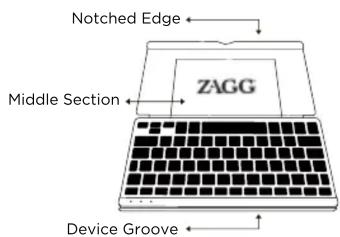
Hold the top half of the stand and push middle section toward you, while leaning the notched edge forward.
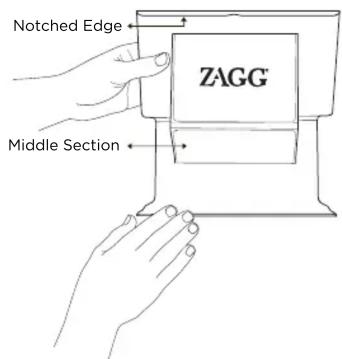
As you break in your new FLEX stand, you will need to push on the middle section, below the ZAGG® logo, to create a groove in which to place your device.

Place your device in the groove formed at the bottom and lean back.

Closing the FLEX Stand
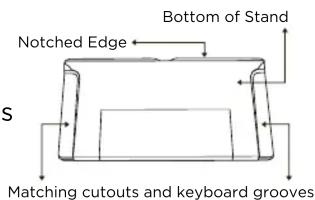
To close the stand around the keyboard, align the grooves on the bottom of the keyboard with the cutouts on the stand and close. The notched edge should be on the outside.
Lights and buttons
Charging light:
Turns on when charging and turns off when fully charged
Status light:
- Flashes when the battery is low (there's about a 20% charge or two to four days of use remaining)
- Flashes when pairing
- Lights briefly when you turn on the keyboard, and then turns off
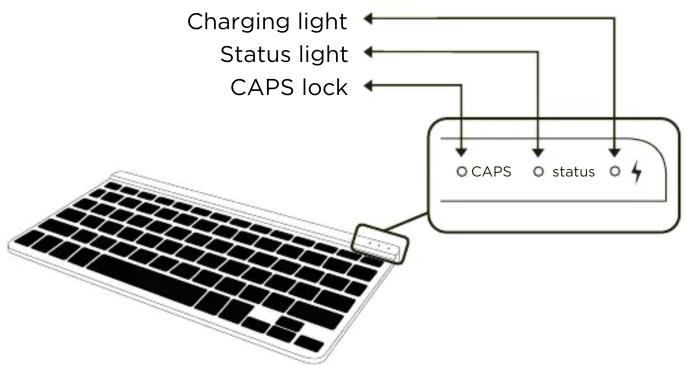
CAPS lock:
Turns on when CAPS lock function is engaged
ON/OFF switch:
Turns keyboard on and off
iOS/ANDROID switch:
Makes the special function keys work for either Apple® (iOS) or Android™ software
Pair button:
Used to connect your device to the FLEX™ keyboard

Powering on and pairing your keyboard
The Bluetooth ^® keyboard should only need to pair to your device once as follows:
- On the keyboard, slide the power switch on. The status light will illuminate for four seconds, then turn off.
- Apple®: Select Settings > General > Bluetooth® > On. Android™: Apps > Settings > Wireless Networks > Bluetooth® (to turn on the Bluetooth®.) Then select Bluetooth® Settings > Find Nearby Devices.
- Press the "Pair" button on the keyboard to make it discoverable. The status light flashes on keyboard and the device displays "ZAGGkeys FLEX" as an available device.
- Select "ZAGGkeys FLEX" on the device. The device will display a unique code*.
- Type the code using the FLEX keyboard and press Enter. The keyboard is now paired to the device.
*If your device initially asks for a code, create a 4-digit code and enter it in your device. Then enter the same 4-digit code into your FLEX keyboard and press enter.
Battery
The FLEX Keyboard uses a long-life, rechargeable battery that gives you several weeks of normal use. The keyboard goes into sleep mode if it's left on and not being used. Press any key and wait a second or two to bring the keyboard out of sleep mode.
The lithium-polymer battery in the keyboard has no memory effect and may be charged whenever you wish.
When not in use for a prolonged period, we recommend that you turn off the keyboard to lengthen the battery life.
Charge the ZAGG ^® Keyboard
Plug the micro-USB cable into the micro-USB port on the keyboard. Plug the other end of the cable into a powered USB port on a computer, your device wall charger, or any other USB compatible charger.
Mærke : Zagg
Model : Flex
Kategori : Tastatur