C145 - Smartphone TELME - Gratis brugsanvisning og manual
Find enhedens vejledning gratis C145 TELME i PDF-format.


Brugerspørgsmål om C145 TELME
0 spørgsmål om dette apparat. Besvar dem du kender, eller stil dit eget.
Stil et nyt spørgsmål om dette apparat
Download vejledningen til din Smartphone i PDF-format gratis! Find din vejledning C145 - TELME og tag din elektroniske enhed tilbage i hånden. På denne side er alle dokumenter nødvendige for brugen af din enhed offentliggjort. C145 af mærket TELME.
BRUGSANVISNING C145 TELME
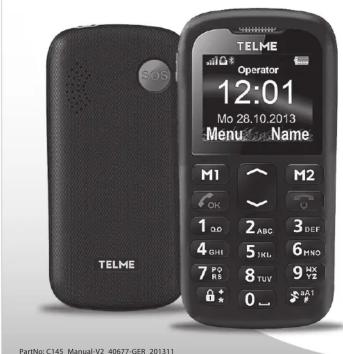
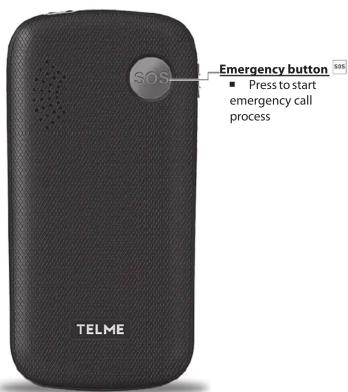
TELME EMERGENCY SYSTEM
You can store up to 4 emergency numbers (family, neighbours, friends, emergency services).
In case of an emergency press and hold the emergency button. The emergency key will still work when the key lock is enabled.
- Press the emergency button to make an emergency call. Up to 4 numbers will be called in a predetermined order until the emergency call is answered.
This process is repeated 3 times. Note: The phone does not recognize whether a person, an answering machine or voice mail takes off and sees this as a successful emergency!
- To abort the emergency call press log - During the emergency call sequence, the mobile telephone sounds a warning signal to alert the people around you about the emergency.
■ If no emergency number is stored, your prepaid-card has run out or you are outside of the reception area of your network operator, the international emergency number 112 will be called.
Note: If you want to save numbers from official services, police, firefighter, etc. as emergency numbers, you have to clarify this with these institutions. No liability will be assumed for possible costs incurred if you dial accidentally.
Saving emergency numbers:
Enter Menu Settings → SOS-Settings → SOS Numbers → Numbers. Highlight number (with up- and down-key) and press M1 → to select number. Now you enter the desired number and press Save: Im Menü Einstellungen → SOS-Einstellungen → Status Ein/Aus then confirm with Yes .
Note: select emergency number: private number (has to confirm as explained above) or official service number, e.g.: ambulance, police, etc. (no confirmation call required).
ALARM CLOCK:
on/off:
■ Press
Edit:
■ to set the alarm time and repetition (once, daily, individually) Turn off the alarm clock: press M1
Mute: press M2 (the alarm clock will go on again after the preset time).
TOOLS
Bluetooth: Switch on: In the menu Bluetooth 1 Power 1 .
Search audio device: M1 to search for new devices select device to be connected M1 Next time you switch on Bluetooth it will automatically be connected.
OTHER FUNCTIONS IN SETTINGS
Enter menu with △ ins Menü ⇒ continue to Settings △ OK ⇒
Sound & Alert:
To choose a phone profile (e.g. silent) and configure your personal settings.
Call waiting:
You can activate/deactivate and check status to get a notification about an incoming call while having a phone talk.
Network settings:
Choose automatic (automatic boot in a network) or manual selection (select a network manually).
Auto power on/Auto power off
Voicemail number: Change the voicemail number
Security settings: Activate, deactivate or change PIN and phonecode (default phone code: 0000).
Restore Factory: Reset the phone to factory settings.
FREQUENTLY ASKED QUESTIONS
Screen shows "Insert SIM card! Only emergency call 112": Check the direction of the SIM card.
A call failed:
Check the selected telephone number and area code again for accuracy (area code entered?).
The mobile telephone display is blank/black: Telephone is in energy saving mode (press keylock). Or it is switched off _ press for 2 seconds to turn it on.
The mobile phone is not responding:
Remove battery, re-insert and switch on the device again. If still no response, please contact the Service Center.
The charging process will not start:
It may take a few minutes. If there's no response after 30 minutes, please contact the Service Center.
SUPPORT
■ TELME Service Center
Industriezeile 36 - 4020 Linz - Austria
Phone: +43 (0)732 · 77 77 17 · 0
Web: www.telme.eu
WARRANTY
■ This warranty is valid only if original TELME batteries were used.
■ Mobile phone: 12 month
■ Battery: 6 month
PACKAGE CONTENT
■ Mobile phone ■ Desktop charger
■ Battery: Li-Ion 3.7V / 800mAh
TECHNICAL PRODUCT DESCRIPTION
■ Dualband GSM 900/1800MHz
■ Dimensions: 109.7 x 55.6 x 13.7 mm
■ weight: 70 q
■ Akku: Li-Ion 3,7V / 800mAh, interchangeable
■ Standby-time: 300h
■ Talk time: 240min
■ Internal antenna: SAR 1,190 W/kg
Subject to print errors, mistakes and technical changes.
DECLARATION OF CONFORMITY (DOC)
We, Emporia Telecom Produktions- und Vertriebs- GmbH & Co. KG. declare under our sole responsibility that the following product is in conformity with the following relevant harmonised standards.
Kind of product: Dual Band Mobile Phone
Article number: C145
Governing EU-regulations: Council Directive R&TTE 1999/5/EC
Radio equipment and telecommunications terminal equipment
Harmonized EN standards:
Health: EN 50360 - 2001; EN 62209-1 - 2006; EN 62209-2 - 2010
Safety: EN 60950-1+ A12 + A11 + A1: 2011; EN 50332-1 2000
EMC: EN 301 489-1 V1.9.2; EN 301 489-7 V1.3.1; EN 301 489-17 V2.2.1;
EN 55013+A2: 2006; EN 55020+A11: 2011
Radio spectrum: EN 301 511 V9.0.2; EN 300 328 V1.7.1
CE 0678

DISPOSAL
Disposal of packaging: Packaging and packaging materials are recyclable and should always be returned.
Disposal of batteries: Batteries must not be disposed of with domestic rubbish! As a consumer you are required by law to recycle used batteries. You may return them to your local collection point or to the dealer.
Disposal of the device: Do not throw your mobile phone into the garbage, once it has outlived its usefulness. For the benefit of the environment, take it to a recycling location for used phones so it can be processed in an environmentally responsible way.

CORRECT USAGE
■ This mobile phone is robust and designed for mobile operation. However, it must be protected from moisture (rain, bath...) and impact.
■ Do not expose it to direct sunlight.
■ Any utilization other than described above will cause damage
to the device, and may be hazardous (electric shock, fire, etc.).
The entire product must not be altered or rebuilt,
and the housing must not be opened.
■ The power plug is suitable only for use with residential-type outlets of the public mains with 230 Volt/50 Hz (10/16A) alternating current.
■ The power supply is the power off mechanism of the device. The desktop charger must be close to the device and be easily accessible.
SAFETY INSTRUCTIONS
- Switch off the mobile phone in hospitals or in the vicinity of medical equipment, as the mobile phone may cause them to malfunction. Keep your mobile phone a minimum distance of 20 cm away from pacemakers, if it is turned on.
■ Never drive a car while holding the mobile phone in your hand.
Observe national law and traffic regulations governing the use
of mobile phones in traffic.
■ Always turn off your mobile phone inside an airplane.
■ You must switch off the mobile phone in the vicinity of petrol stations and other places with explosive materials.
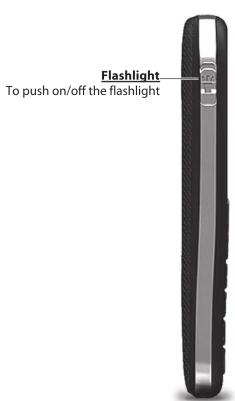
- Don't shine the light directly into the eyes of people or animals.
■ If the speaker or headset is set to a high volume this can cause hearing damage. Never hold the phone to your ear when the speakerphone mode is activated or the emergency button is pressed.
■ The device and its accessories may contain small parts.
Keep this product out of reach of small children.
■ As a precaution, we recommend disconnecting the charger
from the phone during a thunderstorm.


INSERT SIM CARD
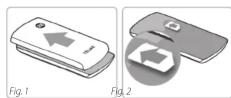
Fig. 1: Remove battery cover (as shown).
Fig.2: Slide SIM card in with the gold contact facing down.
INSERT BATTERY AND CHARGING
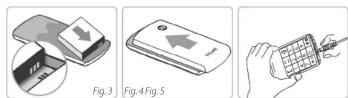
Fig.3: Insert battery (gold contacts on right front side).
Fig.4: Close battery door: slide cover to closed position with a 'click'.
Fig.5: Plug charging cable into the socket on the side of the
phone.
■ Charging: Battery indication bars in upper right corner of the
display are moving
■ Full battery: Bars in upper right display corner are solid Please note: The battery should be charged for at least 4 hours before your first call. Use only batteries and chargers which are approved for use with this model.
![M1/M2 Quick dial keys M1: ■ In Idle screen: press and hold for calling contact ■ In menu: Option/Select/OK M2: ■ In idle screen: press and hold for calling contact ■ In menu: End/Back/Delete ■ Writing numbers or text: Delete ■ During a call: Handsfre Pick-up/OK/Call list-Key ■ Calling: Enter the number, then press ■ Answering an incoming call: press ■ In menu: Confirm selection ■ On standby: Enter call list (dialled, received, missed) ■ in standby: long press: enable key lock / disable key lock ■ press twice: + (for international prefix, e.g. +44 for UK) ■ for SMS: Special characters: (,,?;!@-< > &%[]/#*$$...)](/content/2026/05/859555/images/d753e3f137fa186fe38a05ed91ad3bb0ac15626d66fc0ac19658e29e426a9296.jpg)
SYMBOLE AM DISPLAY
Signal strength
RM Roaming

Battery indicator

Missed call

Call forwarding

New text

alarm on

Profile: Silent (mute)

e: Maximum

Profile: Meeting
FIRST STEPS
Switch on:
the phone: press power on/off-key ☐ or 2 sec.
Switch off:
by pressing power on/off for 2 seconds again. When using a new SIM card, enter the 4 digit PIN Code (Personal Identification Number) and confirm with M1 Note: The PIN-Code is a 4-digit number combination preventing others from switching on your mobile phone. ■ Switch off your PIN-Code: In menu: Settings → Security Settings → PIN → PIN off.
Tip: The first time you switch it on, you will be asked to enter the time and date using the number keypad, and confirm with M1 Furthermore your own telephone number and the device name will be shown: with "to save" and press . M1
Navigation im Menü: Press 📁 button.
- Flick through the menu points with ▼ and △. - Confirm wMto get to the marked chapter.
The device will switch off the illumination after a while in the case of inactivity. To switch the illumination on again, press any button once.
Incoming call:
- Pick up: press the -key - Reject: press the -key
End a call: press the Key
Dial: Enter the telephone number via the keypad (including area code with 0) start call with
Redial list: press ⏻key, scroll through call list with ∇ or △ (all dialled, missed and received calls), select a number and start call with ⏻
Handsfree Speaking: To talk without holding the phone to your ear, switch on/off the handsfree function during a call: press M2 Handsfree.
TELEPHONE BOOK
Save names and numbers (always with international dialling code, e.g. +49 for Germany, +43 for Austria, +41 for Switzerland).
Switzerland).
In standby, press 1x ▼M1drücken (standby screen) ⇒ Menu points: Search for name, new entry, copy, change entry, delete, TB settings.
Storing phone book entries (Name & Number): Enter phone book with △
select Add new contact, press Options-Key M1 select if you want to add your contact to the SIM or to the phone. Edit name and number by pressing Edit Refer to chapter for writing instructions. Press Back M2 to save your entry. A pop-up appears. Press Yes M1
Searching phone book entries:
open the phone book with: ▽
→ Scroll through the entries with ▼nd or △
- Search names: enter the initial letters of the searched name via the keypad (scroll through with ▼). When the requested name is shown, press 🔊 to start a call.
TEXT MESSAGE (SMS)
SMS (Short Message Service) is a short text message, up to 160 characters in length.
Writing text: Enter menu with △⇒ enter New SMS oder New multimedia message (MMS), if you want to send pictures with 📄
Choose Write message with entering text with the keypad. Every key represents several signs, depending on how often you press the key.
(e.g. 2x 42x, 33, 3x 53x fo5 hello6
1 .,!?'"@:1 2 abc2 ä æ å å 3 def3 è è ê 4 ghi4 i í í í 5 jkl5 £ 6 mno6 ö ø ó
7 p q r s 7 B \$ 8 t u v 8 ü ü ú 9 w x y z 9 ý þ 0 Space; 0 * special character: . ? ; :!" @ _ \~ & + - () < > {} [] ...
Use the #ey, to Choose from 4 Writing Styles:
- abc lower case - ABC upper case - Abc Upper and lower - 123 numbers
Sending SMS: After typing the text, press 2x M1 Send. Enter the number or choose from phonebook M1 scroll to the contact and select with M1 auswählen). Press M1 again to send the message.