REXN650-1 - Overvågningskamera REVO - Gratis brugsanvisning og manual
Find enhedens vejledning gratis REXN650-1 REVO i PDF-format.


Brugerspørgsmål om REXN650-1 REVO
0 spørgsmål om dette apparat. Besvar dem du kender, eller stil dit eget.
Stil et nyt spørgsmål om dette apparat
Download vejledningen til din Overvågningskamera i PDF-format gratis! Find din vejledning REXN650-1 - REVO og tag din elektroniske enhed tilbage i hånden. På denne side er alle dokumenter nødvendige for brugen af din enhed offentliggjort. REXN650-1 af mærket REVO.
BRUGSANVISNING REXN650-1 REVO
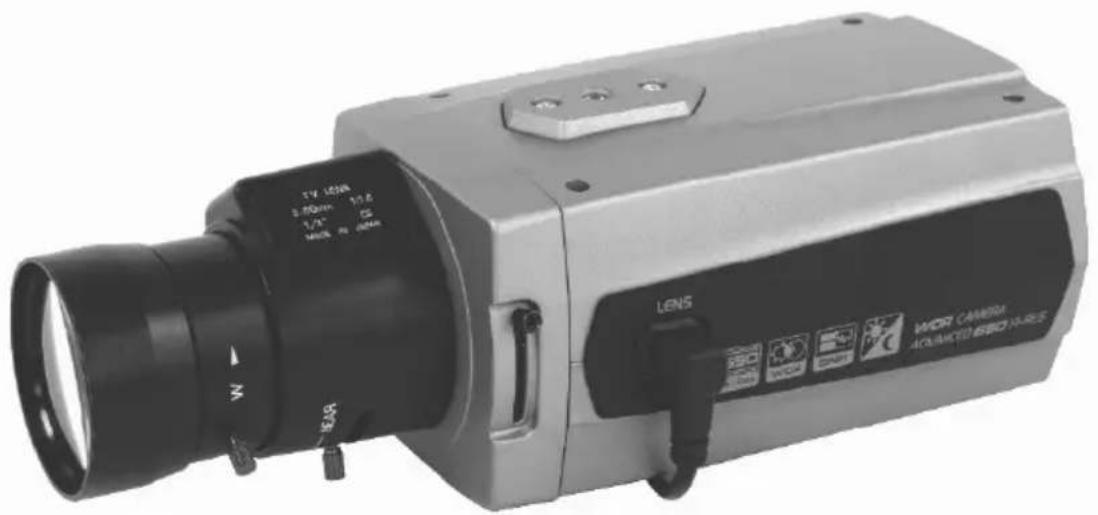
WDR Super High Resolution Day & Night Color Camera
Please read this manual thoroughly before use, and keep it handy for future reference.
WARNING
TO REDUCE THE RISK OF FIRE OR ELECTRIC SHOCK, DO NOT EXPOSE THIS PRODUCT TO RAIN OR MOISTURE.
DO NOT INSERT ANY METALLIC OBJECT THROUGH VENTILATION GRILLS.
CAUTION
CAUTION
RISK OF ELECTRIC SHOCK DO NOT OPEN

WARNING : TO REDUCE THE RISK OF ELECTRIC SHOCK, DO NOT REMOVE COVER(OR BACK).
NO USER-SERVICABLE PARTS INSIDE.
REFFER SERVICING TO QUALIFIED SERVICE PERSONNEL.
EXPLANATION OF GRAPHICAL SYMBOLS
The lightning flash with arrowhead symbol, within an equilateral triangle, is intended to alert the user to the presence of uninsulated "dangerous
voltage" within the product's enclosure that may be of sufficient magnitude to constitute a risk of electric shock to persons.
The exclamation point within an equilateral triangle is intended to alert the user to the presence of important operating and maintenance (servicing) instructions in the literature accompanying the product.
PRECAUTIONS
Safety
Should any liquid or solid object fall into the cabinet, unplug the unit and have it checked by qualified personnel before operating it any further.
Unplug the unit from the wall outlet if it is not going to be used for several days or more.
To disconnect the cord, pull it out by the plug. Never pull the cord itself.
Allow adequate air circulation to prevent internal heat build-up. Do not place the unit on soft surfaces (rugs, carpets, sofas, etc.) or near materials (curtains, draperies) that may block the ventilation holes.
Height and vertical linearity controls located on the rear panel are for special adjustments by qualified personnel only.
Installation
Do not install the unit in an extremely hot or humid place or in a place subject to excessive dust, mechanical vibration.
The unit is not designed to be waterproof.
Exposure to rain or water may damage the unit.
Cleaning
Clean the unit with a slightly damp soft cloth. Use a mild household detergent. Never use strong solvents such as thinner or benzine as they might damage the finish of the unit.
Retain the original carton and packing materials for safe transport of this unit in the future.
INFORMATION TO THE USER: THIS EQUIPMENT HAS BEEN TESTED AND FOUND TO COMPLY WITH THE LIMITS FOR A CLASS A DIGITAL DEVICE, PURSUANT TO PART 15 OF THE FCC RULES. THESE LIMITS ARE DESIGNED TO PROVIDE REASONABLE PROTECTION AGAINST HARMFUL INTERFERENCE WHEN THE EQUIPMENT IS OPERATED IN A COMMERCIAL ENVIRONMENT. THIS EQUIPMENT GENERATES, USES, AND CAN RADIATE RADIO FREQUENCY ENERGY AND IF NOT INSTALLED AND USED IN ACCORDANCE WITH THE INSTRUCTION MANUAL, MAY CAUSE HARMFUL INTERFERENCE TO RADIO COMMUNICATIONS. OPERATION OF THIS EQUIPMENT IN A RESIDENTIAL AREA IS LIKELY TO CAUSE HARMFUL INTERFERENCE IN WHICH CASE THE USER WILL BE REQUIRED TO CORRECT THE INTERFERENCE AT HIS OWN EXPENSE.
CAUTION: CHANGES OR MODIFICATIONS NOT EXPRESSLY APPROVED BY THE PARTY RESPONSIBLE FOR COMPLIANCE COULD VOID THE USER'S AUTHORITY TO OPERATE THE EQUIPMENT.
THIS CLASS A DIGITAL APPARATUS COMPLIES WITH CANADIAN ICES-003.
CET APPAREIL NUMÉRIQUE DE LA CLASSE A EST CONFORME À LA NORME NMB-003 DU CANADA.
CE COMPLIANCE STATEMENT
WARNING: This is a Class A product. In a domestic environment this product may cause radio interference in which case the user may be required to take adequate measures.
- Read these instructions.
- Keep these instructions.
- Heed all warnings.
- Follow all instructions.
- Do not use this apparatus near water.
- Clean only with dry cloth.
- Do not block any ventilation openings. Install in accordance with the manufacturer's instructions.
- Do not install near any heat sources such as radiators, heat registers, stoves, or other apparatus (including amplifiers) that produce heat.
- Do not defeat the safety purpose of the polarized or grounding-type plug. A polarized plug has two blades with one wider than the other. A grounding type plug has two blades and a third grounding prong. The wide blade or the third prong are provided for your safety. If the provided plug does not fit into your outlet, consult an electrician for replacement of the obsolete outlet.
- Protect the power cord from being walked on or pinched particularly at plugs, convenience receptacles, and the point where they exit from the apparatus.
- Only use attachments/accessories specified by the manufacturer.
- Use only with the cart, stand, tripod, bracket, or table specified by the manufacturer, or sold with the apparatus. When a cart is used, use caution when moving the cart/apparatus combination to avoid injury from tip-over.
- Unplug this apparatus during lightning storms or when unused for long periods of time.
- Refer all servicing to qualified service personnel. Servicing is required when the apparatus has been damaged in any way, such as power-supply cord or plug is damaged, liquid has been moisture, does not operate normally, or has been dropped.
- CAUTION – THESE SERVICING INSTRUCTIONS ARE FOR USE BY QUALIFIED SERVICE PERSONNEL ONLY. TO REDUCE THE RISK OF ELECTRIC SHOCK DO NOT PERFORM ANY SERVICING OTHER THAN THAT CONTAINED IN THE OPERATING INSTRUCTIONS UNLESS YOU QRE QUALIFIED TO DO SO.
- Use Certified/Listed Class 2 power source only.
Installation of the camera must be performed by qualified service personnel in accordance with all local and national electrical and mechanical codes.
Carefully remove the colour camera and its accessories from the carton and verify that they were not damaged in shipment.
The content of the package includes:
- Color CCD camera
- Mini-DIN connector (for video-or dc-type auto-iris lens)
- CS adapter ring for C mounting "C" lenses
- This manual
TABLE OF CONTENTS
INTRODUCTION 6
CAMERA OVERVIEW----7
CAMERA ADJUSTMENT----8
CONTROL AND CONNECTIONS / DAY&NIGHT I/O TERMINALS----15
LENS 16
SPECIFICATIONS----17
The camera provided high-quality image using SONY Wide Dynamic 1/3" Super-HADII PS 960H CCD and digital signal processing LSIs.
Features:
| ● 1 / 3 " Super - H A D I I P S 9 6 0 h |
| ● Super high - res o l u t i o n of |
| ● Wide Dynamic Range (~ x 5 |
| ● Excessive High - Light Com |
| ● Back Light Masking ( MAX |
| ● 2 D - N R , 3 D - N R ( D N R Demo ) |
| ● Day & Night ( Auto , Manual |
| ● 0.4 lux(Color), 0.04 lux(B/W), 0.001 lux(Low-Shutter) @ F1.4 Sensitivity |
| ● Sens - Up (~ x 3 2 ) |
| ● Various Detection Method (zone detection, motion trace, face trace, mine area, absent detection, cross object counting, entrance counting) |
| ● Scene Change Detection |
| ● Various Alarm Method ( Pe |
| ● Frame Control ( Auto , 1 ~ 7 |
| ● Privacy Mask or Mosaic (MAX. 15 area/4-point polygonal/transparency) |
| ● Digital PTZ |
| ● White Pixel Remove |
| ● Back Light Compensation |
| ● Digital Effect (H/V reverse, 180 degree rotate, inverse, freeze) |
| ● System Lock ( 4 - Digit pas |
| ● Auto Electronic Shutter modes [1/50 ~ 1/10,000] |
| ● C / CS , back - focus cam for |
| ● Auto and Manual white ba |
| ● Support Line - Lock extern |
| ● RS - 4 8 5 Remote camera co |
| ● On Screen Display ( OSD ) |
| ● Comp atible with Video , D |
| ● Quick connect for Video |
| ● User Certified / Listed ( |
| ● Operates in 1 2 VDC or 2 4 ) |
TOP VIEW
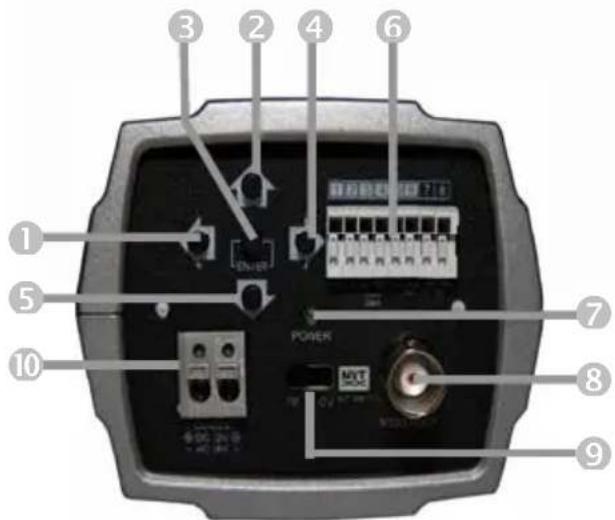
REAR VIEW
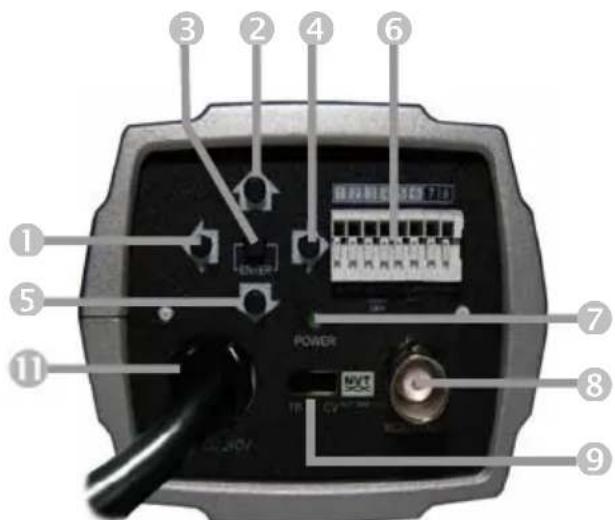
REAR VIEW (Free Voltage)
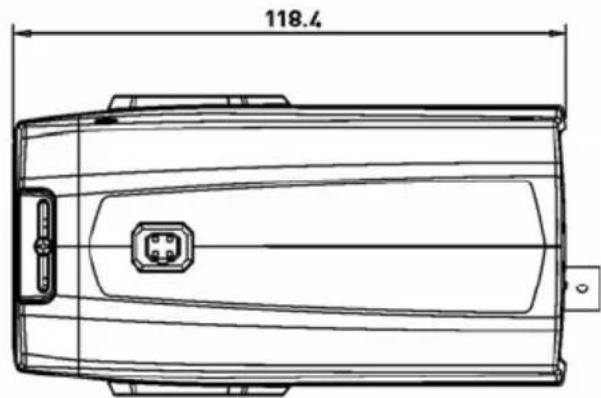
SIDE VIEW
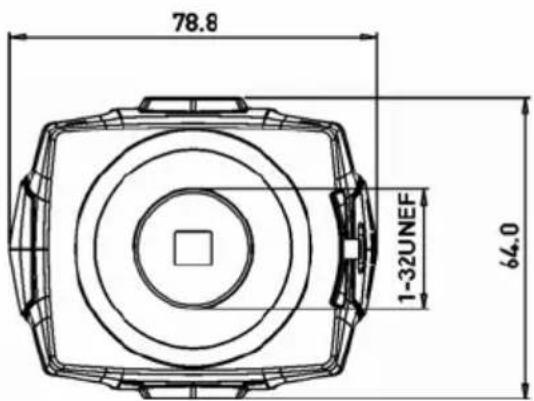
FRONT VIEW
① Left Button
② Up Button
③ Enter Button
④ Right Button
⑤ Down Button
⑥ Day/Night External I/O
M o t i o n A L A R M
RS - 485
UTP(optional)
⑦ Power Indicator
⑧ Video Output Connector (BNC)
⑨ UTP or BNC Transformation Swi (optional)
⑩ AC/DC Compatible Input Terminal
A C P o w e r C o r
1) Auto(Auto White Balance): AWB mode (1800°K \~10500°K)
2) Push/Hold : Push&Hold Mode.
To find the Optimal setting for the current luminance environment in this mode, set the direction towards a sheet of white paper and select Hold and press enter button. If the environment changes, readjust it.
3) CRS Mode(Color Rolling Suppression): Decrease color rolling effect.
This operation take some time about 10 seconds and user can stop operation by pressing enter button.
When CRS Mode is on, color tone can be weak.
4) Indoor : Set color temperature to indoor (3200°K)
5) Outdoor : Set color temperature to outdoor (6300°K)
6) FL(Fluorescent Light): Set color temperature to fluorescent light fixed gain.
7) User(User Set White Balance): Adjust red or blue gain.
➢ R(R-GAIN):Adjust R-GAIN value (0-255)
B(B-GAIN):Adjust B-GAIN value (0-255)
1) SHT(s)(Electronic Shutter) : Select Shutter mode.
➢ Auto(1/60(1/50) \~ 1/100,000 Auto run, Manual 8 step from 1/60(1/50) \~1/10,000).
2) FLC(Flicker-less) : Flicker-less On/Off.
3) AGC(Auto Gain Control): AGC Gain(Off, Low, Middle, High)
4) Sens-Up(Slow Shutter): Maximum Low-Shutter select. (x2-x32 and Off)
5) Offset Add : Force the picture to turn up at low luminance environment.
1) Normal AE : BLC/WDR function off.
2) WDR(Wide Dynamic Range) : Wide dynamic range mode on.
3) EHLC(Excessive High Light Compensation): EHLC mode on.
➢ excessive lighting compensation is performed when the weight high-brightness side is increased.
4) Auto(Auto Weighting BLC) : Auto weighting BLC on.
5) Spot(User Setting BLC area) : Spot metering mode on.
➢ Posi : OSD mode to adjust the position of the spot metering area.
➢ Size : OSD mode to adjust the size of the spot metering area.
6) Zone(Preset BLC area) : Fixed metering area mode. (1-9).
1) Mask: Select mask area(1-15).
2) Func: Select mask function.(Privacy, BLM, Both, Off).
▶ Privacy : Area to screen on the display.
BLM : Back Light Mask.
■ Selected BL Mask area that will be except of the auto exposure
■ If there is a high light apartment parking garage or gas station entrance, removing the high light makes it possible to view car license plates efficiently.
Both : Privacy function and BLM function on.
▶ Off : Function off.
3) Edit : Mask area edit.
- Edit mode take effect during Func not Off.
■ Size : a d j u s t t h e s i z e
■ P o s i : a d j u s t t h e p o s i t
■ T i l t : a d j u s t t i l t i n g o f
■ Color: Select Privacy and BI
■ Transparency: Select Privacy mask transparency (Default 3/0-3).
■ M o s a i c : S e l e c t P r i v a c y
■ A d j . M o s a i c : A d j u s t P r
➢ Func : Detection function selection.
➢ Sens Down : Adjust to Motion Sensitivity using left/right Buttons.
1) OFF : Detection function off.
2) Zone : Area motion detection mode.
➢ Zone : Select Motion detection zone (Zone1-4).
➢ Func : Select Motion detection on/off.
➢ Size : Press Enter button to adjust the size of the Motion detection area.
➢ Posi : Press Enter button to adjust the position of the Motion detection area.
- Link Zoom : Select Motion detection with D-PTZ function that On/Off.
■ When the motion trigger D-PTZ.
3) Motion Trace : Motion trace mode on.
➢ Tracks an object through a scene and generates an alarm.
4) Face Trace : Face Trace mode on.
➢ Tracks face through a scene and generates an alarm.
➢ Sens Down : lower value is more widen the scope to judge face. (0-
➢ Min Size : Minimum face size configuration (0 : minimum face size is to none)
The result of face trace can be inaccuracy.
5) Mine : Mine area mode.
By this function, User can draw motion detection area with free dots
➢ Set Mine : Press the Enter button to Set Mine mode.
■ < > : M o v e : M i n e Z o n e
■ U P : S e t : M i n e Z o n e s e t
■ D N : C I r : M i n e Z o n e c l e
■ E N T : E n d : P r e s s t h e E n
➢ Clr All : Press the Enter button to set Mine area clear.
➢ Display : Select Mine Display On/Off.
6) Absent : Press the Enter button to Absent detection mode.
➢ Absent : Detect object appeared or removed the scene.
➢ Sens Down : Adjust sensitivity of Absent check(0-255).
In low luminance environment, the accuracy is down of the result.
Because object color is effect to auto exposure, the accuracy is down of the result
If the object is too big, the accuracy is down of the result.
7) Cross : Cross counting mode.
➢ Zone : Select Cross Zone using the Left and Right buttons (Zone 1, Zone 2).
➢ Size : Adjust the size of the Cross zone.
➢ Posi : Adjust the position of the Cross zone.
Direction : Select Cross Direction.
➢ Alarm Cnt : Set alarm out cross count. Alarm count number is delay before output alarm.
Reset Cnt : Cross count reset.
If object is passing so fast through the two area, counting is not operating. In this case, adjust to expand space between two area or adjust to decrease size of area.
If passing object is too long, counting result can be inaccuracy. In this case, adjust to expand space between two area or adjust to decrease size of area.
If two object passing the area in the same time, the result can be inaccuracy.
8) Entrance : Entrance counting mode. The object move in through the entrance, counting number increases.
➢ Size : Press Enter button adjust the size of the Entrance zone.
➢ Posi : Press Enter button adjust the Position of the Entrance zone.
➢ Alarm Cnt : Set alarm out entrance count. Alarm count number is de number before output alarm.
➢ Reset Cnt : Entrance count reset.
Crossing object is not considered. / Several object will not be detected.
If the distance is increases between the camera and entrance, the result can be inaccuracy.
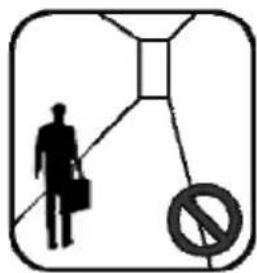
natural_image
Silhouette of a person walking with a briefcase and a no-smoking symbol (no text or numbers present)The distance is too long
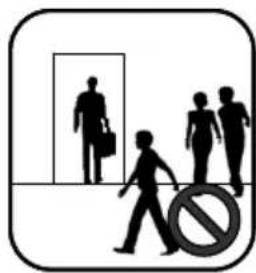
natural_image
Silhouette of people walking with a 'no' symbol in the foreground (no text or symbols on figures)Several Object Crossing Object
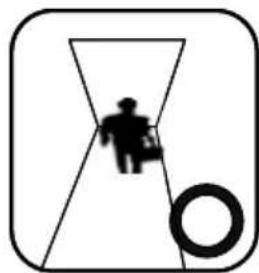
natural_image
Simple line drawing of a person inside a triangular frame with a circular symbol at the bottom (no text or labels)Camera Installed at the ceiling Crossing object is none One object is passing.
1) Sharpness : Adjust sharpness of outlines (0\~15)
2) Resolution : Select high resolution mode (Low/Mid/High)
3) 2D-NR : Select 2D noise reduction level (0\~6)
➢ 2D-NR : Noise reduction on a frame
4) 3D-NR : Select 3D noise reduction level (0\~31)
3D-NR : Noise reduction through the several frame
5) DNR Demo : Select DNR Demo Display On/Off using the Left and Right Buttons
| None DNR Effect Display | DNR Applied Display |
1) d-Effect(Digital Effect): Select digital Flip/Rotate state (Off/Rotation/Mirror/V Flip)
2) Nega : Select negative color state(on/off)
3) d-PTZ (Digital Pan, Tilt, Zoom): Adjust d-PTZ.
➢ Func : Press the Enter button to turn digital zoom on/off.
➢ Zoom : Use the Left and Right buttons adjust to digital zoom(0-255
Pan&Tilt : Press the Enter button to access the Pan&Tilt.
■ Use the Left and Right
■ Use the Up and Down buttons adjust to digital tilt
■ Press the Enter button to exit.
PT Reset(Pan & Tilt Reset) : Press the Enter button to reset digital pan and tilt.
4) Freeze : Select the still mode on/off
5) Frame Control: Select term of refresh rate for output video. This function is useful to reduce the recording data storage.
➢ Func : Select frame control mode to ON/OFF, and Auto.
■ Auto mode: When motion in configured interval. And when the motion is detected, output video is switched to real time video.
■ ON : Always refresh in configured interval.
■ O F F : A l w a y s r e a l t i m e
➢ Renewal(sec) : Select an interval between two frame.
When object start moving, The output video possible to cut a little time.
6) ScnChg/Unfoc : Select scene change/unfocus detection On/Off .
➢ Inform that whether scene have been changed or not. Detect breaki changing in the watching scene (Spray, Screen Camera, Changing Scene...)
This function is linked with alarm out
In low luminance environment, the accuracy is down of the result.
In very low luminance environment, operation is not be performed.
It is not be performed when moving object is exist.
1) Cam Info : Camera basic information display
➢ Cam ID/Baud rate/Protocol/Firmware Ver./CCD Type/Lens Type
2) General Setup
System Lock : Configuration Lock.
■ When system lock is se password to enter OSD menu.
Default password is "0000".
Change PID : Change the administrator's password
■ Move cursor with OSD Key and Press Enter to input the character.
Comm(RS 485 Communication) : Press the Enter button to access the Comm.
■ Cam ID : Select the ca
■ B a u d R a t e : S e l e c t s e r
■ Protocol : RS-485 protocol. (COMMAND/FASTRAX/PELCO-D/Pelco-D)
▶ Title : Edit camera title.
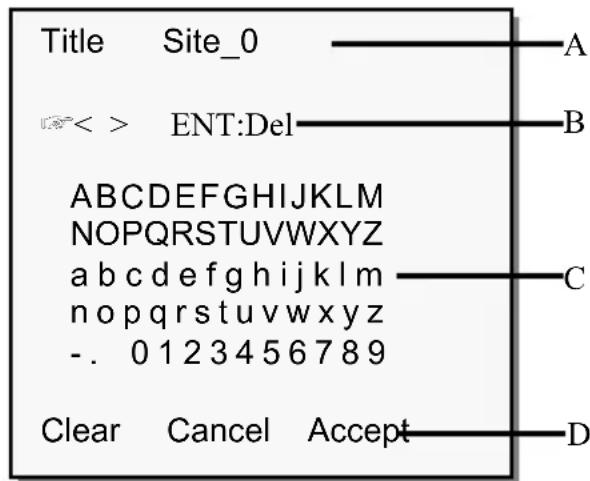
A. Title
B. Delete character
C. Character table
D. Command line
- Clear : Clear Title
- Cancel: Cancel editing
- Accept: Save Title
▶ Display : Display item select.
■ C a m I D : C a m e r a ID display On/Off.
■ T i t l e : T i t l e d i s p l a y O
▶ Alarm .
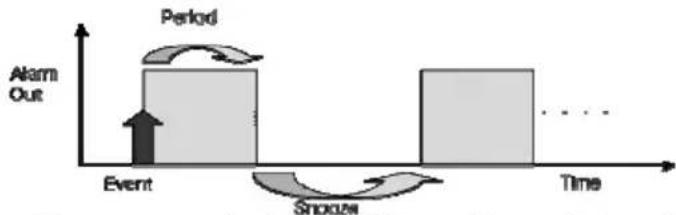
flowchart
graph LR
    A["Event"] --> B["Period"]
    B --> C["Stroozn"]
    C --> D["Time"]
    style A fill:#f9f,stroke:#333
    style B fill:#ccf,stroke:#333
    style C fill:#cfc,stroke:#333
    style D fill:#fcc,stroke:#333
■ Period : Alarm out period (5sec/10sec/20sec/30sec/1min/5min/Cont.)
■ Snooze : Alarm out snooze(Off/5sec/10sec/20sec/30sec/1min/5min)
■ Active pol : Alarm output active state configuration. (Low, High)
System Init
■ C a n c e l : B a c k t o G e n e r
■ Confirm : Initialize a1
3) Lens
➢ Iris : DC, Video, Manual Lens selected Iris : adjust AE Speed
■ D C l e n s a n d v i d e o l e n
➢ Normal AE Ref (Auto Exposure Reference Level) : Press the Enter button to access the AE Ref.
■ R e f L v l : A d j u s t A E b a :
WDR Ref : Press the Enter button to access the WDR Ref.
■ R e f L v l : A d j u s t t h e W I
4) LLC(Line Lock Control): Press the Enter button to access the Line Lock mode.
➢ Func : Select Line Lock function On/Off using the Left and Right buttons.
➢ Phase : Adjust Line Lock sync phase using the Left and Right butto
Activate only AC power inputted.
5) White Pixel
Det Exe : Press Enter button to turn White Pixel Compensation mode Start.
■ ENT to Adj : Press Enter button to start White Pixel Compensation start.
■ Proc : Process to find
■ Done : Process ended
➢ Det Count : Result of white pixel detection.
➢ Func : Select erasing white pixel function On/Off using the Left and Right buttons.
Det Level : Select the judgment level of white pixel using the Left and Right buttons (1\~16)
Det View : Select display of detected white pixel.
6) Day/Night
➢ Mode : Select D&N mode.
■ Auto : Filter operates
■ Day : The camera output
■ Night : The camera outputs the video image only in black and white.
■ Ext : This menu automatically converts the COLOR Mode into the B/W Mode or vice versa depending on illumination with an external sensor.
Night Mode : Select B/W Burst On/Off
➢ Delay(s) : Adjust the working time of the filter when D&N mode is Auto (1-60 sec).
D>N Level : Select switching level Day to Night when D&N mode is Auto (0-15).
N>D Level : Select switching level Night to Color when D&N mode is Auto (0-15).
When user entered in main menu and sub-menus, following menus will be appeared.
I. Main Manu (menu in bottom lines)
A. Exit : Save & Exit.
B. Load : Load Default Value.
II. Sub Menu (menu in bottom lines)
A. Return : Return to previous menu.
B. Exit : Save & Exit
1) Exit Menu
Save&Exit : Current environment values save.
➢ Exit : Disappear menu osd.
2) Load Default Setup
Yes : Load default to current configuration. and return to previous menu.
No : No operation, and return to previous menu.
CONTROL AND CONNECTIONS/DAY&NIGHT I/O / ALARM OUT TERMINALS
| 1 2 3 4 | 5 6 7 8 | ||||||
| UTP-(optional) | UTP+(optional) | D&N I/O | COM | ALARM | RS-485 | ||
| IN OUTGND | OUT RS-4 | 85+(RX)RS | -485-(TX) | ||||
1) UTP Connections/Video output (optional)
• 1 PIN: UTP-
• 2 PIN: UTP+
2) DAY&NIGHT I/O Terminals
To select Day/Night mode using external equipment, by connecting control lines to the appropriate terminals.
• DAY&NIGHT OUTPUT (4pin)
Is the camera function that can turn on an external IR LED Lamp by detecting the sensitivity on the AGC level when the D&N mode is set "AUTO" on the OSD menu of the camera
| 4 | DAY&NIGHT OUTPUT |
| 5 | COM |
- 5V/10mA : IR LED ON (NIGHT)
• 0V : IR LED OFF (DAY)
• DAY&NIGHT EXTERNAL INPUT (3pin)
Is the camera function that can be switched to DAY Mode or NIGHT mode by receiving the D&N on/off signal from external light sensor or IR LED LAMP. This needs the D&N Mode to be set to "External" on the OSD menu of the camera to work
| 5 | COM |
| 3 | DAY&NIGHT INPUT |
Open contact: DAY Close contact: NIGHT
3) ALARM OUT (6pin) - TTL level
Motion detection signals are output through this port. Active state is configurable.
4) POWER INPUT TERMINAL
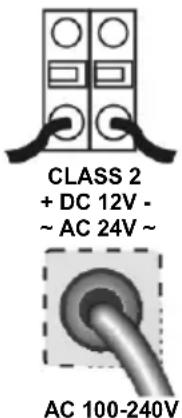
- This terminal accepts a DC12V or AC24V power source from a DC12V or AC24V ac +/-10% 60/50Hz +/- 1Hz.
• Use Certified/Listed Class 2 power supply only. - It is recommended to use the DC power supply that can support inrush current over 0.75A
- AC Power Cord - This power cord accepts a 100-240V \~ 50Hz +/- 1Hz
5) CAMERA CONTROL
- 7 PIN: RS 485+
• 8 PIN: RS 485-
The lens is not supplied with this camera. Purchase a lens suitable for your requirements. These cameras accept both C-and CS-mount type lens.
- For using main functions it is re type.
- If the lens is marked with fingerprints other marks, the image quality might be poor.
- It is recommended to use a high under low illumination.
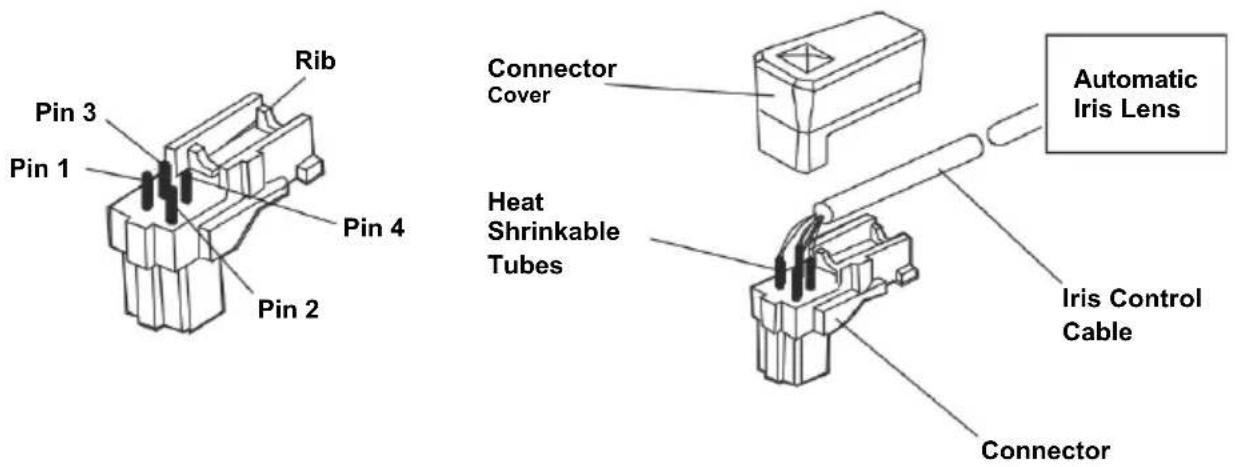
- Remove the cover from the iris lens plug supplied, and solder the lens cable to the plug as shown below.
| ● Video type : | ● DC type : | ||||||||||
| P | i | n | 1 | - | - | - | R | e | R | i | n |
| P | i | n | 2 | - | - | - | N | . | E | i | n |
| P | i | n | 3 | - | - | - | W | h | R | t | a |
| P | i | n | 4 | - | - | - | B | l | d | p | d |
- Remove the protective cap, and attach the lens to the camera by turning clockwise.
| MODEL NTSC PAL PAL(Free) | Voltage) | ||
| GENERAL | Image sensor 1/3" Super-HADII PS 960H CCD | ||
| Effective pixels 976x494 976x582 | |||
| Scanning system 2:1 interlace | |||
| Scanning frequency | 15.734KHz(H), 59.94Hz(V) | 15.625KHz(H), 50Hz(V) | |
| Sync. system Internal / Line lock | |||
| Resolution 650 TVL | |||
| Min. illumination 0.4 Lux (COLOUR), 0.04 Lux (B/W), 0.001 Lux (Low-shutter) | |||
| Video output 1.0 Vp-p (75 ohm, composite) | |||
| S/N Ratio 50dB (AGC OFF) | |||
| Camera Control | RS485 (Faxtrax, Pelco D, Pelco P) | ||
| FUNCTION | White Balance | Auto / CRS / Push&Hold / Indoor / Outdoor / FL / User | |
| Exposure | Auto / Manual Shutter / Flickerless/ Low Light Control / Offset Add | ||
| BLC/WDR | EHLC / AUTO / SPOT / ZONE/ BLM WDR: x512 (Level Adjust) | ||
| AGC Control | Low / Middle / High / Off | ||
| Shutter Speed | 1/60-1/10,000(Auto:1/100,000) | 1/50-1/10,000 (Auto:1/100,000) | |
| Sens-Up | x32 | ||
| Day/Night | Auto / Day / Night / Ext | ||
| Video Analytics | Zone / Motion trace/ Face trace/ Minefield/ Absent / Cross / Entrance/ Scene Change Detection | ||
| D-Zoom | ~ x256(Zoom) / D-PTZ Support | ||
| DNR | 2DNR, 3D NR :Gain Adjust, DNR Demo | ||
| Privacy Zone | Max 15 (Tilt, Color, Transparency, Mosaic) | ||
| Camera Title | Alpha Numeric | ||
| Display | On / Off (Cam ID, Title) | ||
| Cam ID | 001~255 | ||
| Effect | V-Flip / Mirror / Rotation / Nega&Posi / Freeze / Sharpness | ||
| Bad Pixel | Adj/Done (Max 64 point), Detected pixel display | ||
| System Lock | Lock/Unlock (need Password input when Locked) | ||
| Frame Control | Auto, Off ~ 7Sec( Use for saving storage) | ||
| Language | English | ||
| Other Function | Admin Password, Alarm Setting(Period, Snooze, Polarity) | ||
| POWER | Power source | DC 12V / AC 24V ± 10% | 100-240V~50Hz ± 1Hz |
| Power consumption | 4.5 Watts | ||
| Power input | 2-Pin Terminal block | Power Cord | |
| ETC | Video output | BNC, UTP (optional) | |
| Auto iris output | 4-Pin mini din jack (standard connection) | ||
| Lens mount | C/CS mount (Selected through back focus) | ||
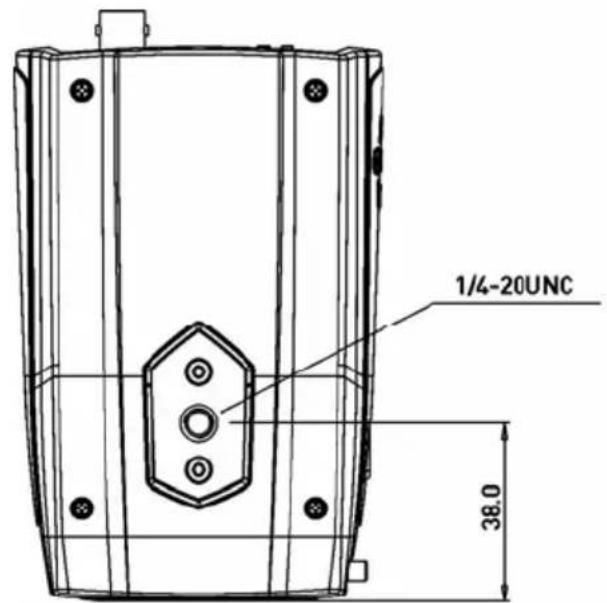
| Mounting hole | 1/4"-20 UNC (top or bottom) | ||
| Operating Temp. | -10°C to +50°C | ||
| Operating humidity | Less than 90% | ||
| External dimension | 78.8 (W) x 64 (H) x 118.4 (D)mm / Weight : 260g | 78.8 (W) x 64 (H) x 118.4 (D)mm / Weight : 285g | |
WDR Super High Resolution
Day & Night Color Camera
PRINTED IN KOREA