
Columa 300 Set S - Højttaler Teufel - Gratis brugsanvisning og manual
Find enhedens vejledning gratis Columa 300 Set S Teufel i PDF-format.


Brugerspørgsmål om Columa 300 Set S Teufel
0 spørgsmål om dette apparat. Besvar dem du kender, eller stil dit eget.
Stil et nyt spørgsmål om dette apparat
Download vejledningen til din Højttaler i PDF-format gratis! Find din vejledning Columa 300 Set S - Teufel og tag din elektroniske enhed tilbage i hånden. På denne side er alle dokumenter nødvendige for brugen af din enhed offentliggjort. Columa 300 Set S af mærket Teufel.
BRUGSANVISNING Columa 300 Set S Teufel
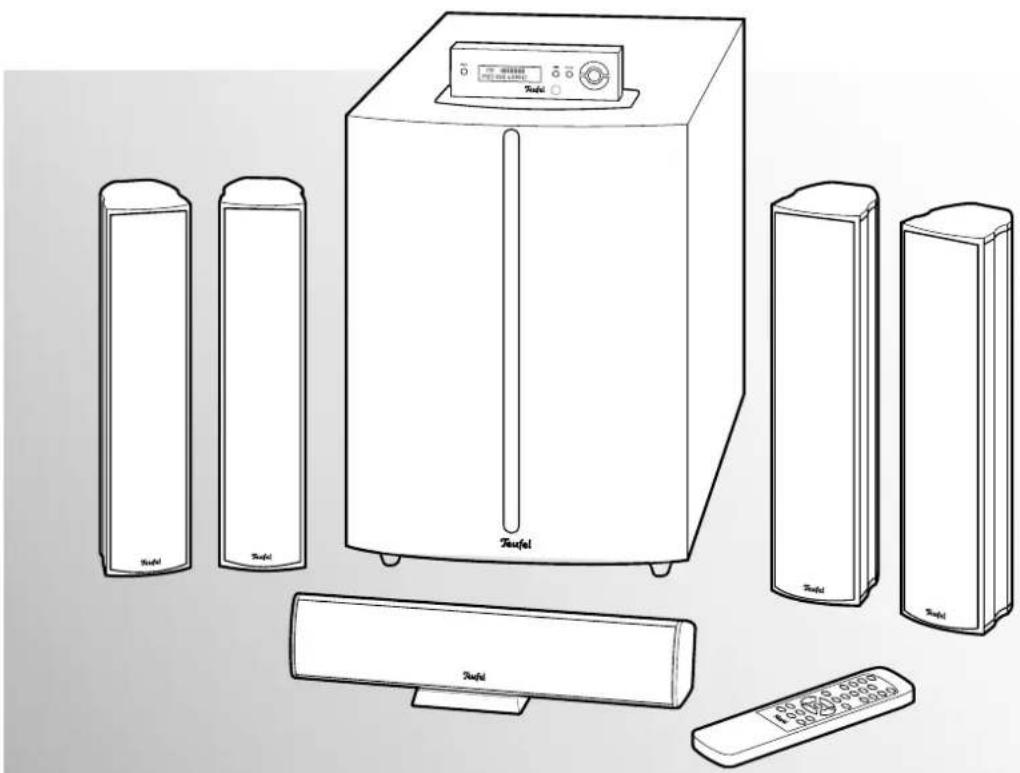
Technical description and operating instructions
natural_image
Line drawing of a household air conditioner unit with multiple speakers and control panel (no text or symbols)Columa 300 R
5.1 Home Cinema System
Teufel
Contents
General notes and information....3
Safety notes....4
Overview....5
Control elements and connections....6
Subwoofer back side....6
Display/control panel 6
Remote control 7
Remote control....7
Setup....8
Assembly....9
Connecting....10
Speakers 10
Antennas 11
FM antenna 11
AM antenna....11
Inputs for source devices 12
Control panel 12
Headphones 12
Connecting to a power supply 12
Basic functions 13
Activating and deactivating 13
Automatic activation 13
Selecting a source. 13
Adjusting the volume 13
Mute 13
Menu functions....14
"INPUT" menu 14
"SURROUND" menu 14
Dolby Digital 5.1 and DTS 14
"LEVEL" menu 14
"DELAY" menu 15
"SPEAKER" menu 15
Special function buttons 16
Surround mode....16
Dolby Digital 5.1 and DTS 16
Test tone 16
Channel level buttons 16
Display 16
Phase 16
Radio playback 17
Setting the radio stations 17
Stereo/mono 17
Station memory 17
Automated program search 17
Saving stations manually 17
Selecting stations from the memory....17
Care and cleaning 18
Protecting the environment....18
Disposing of the unit 18
Batteries and rechargeable batteries....18
Troubleshooting 19
Trademarks 20
Technical data 20
Notice
The information in this document may be changed without prior notice and in no way constitutes any liability on the part of Lautsprecher Teufel GmbH. No part of these instructions may be reproduced in any form or be broadcasted in any way electronically, mechanically, by photocopy or recording without the written permission of Lautsprecher Teufel GmbH.
© Lautsprecher Teufel GmbH
Version 1.1
July 2010
Original packaging
If you wish to exercise your eight-week right of return, we ask that you be absolutely sure to hold onto the packaging. We can only accept the return of the speakers WITH THE ORIGINAL PACKAGING. Empty boxes are not available!
Complaints
In case of complaint we will need the following information to process your enquiry:
1. Invoice number
Can be found on the sales slip (enclosed with the product) or on the order confirmation received as a PDF document, e.g. 4322543
2. Serial number and/or batch number
Can be found on the back of the device, e.g. serial number: CL30000240129A-123.
Many thanks for your support!
Contact
For questions, suggestions or other issues please contact our customer service department:
Lautsprecher Teufel GmbH
Gewerbehof Buelowbogen · Buelowstrasse 66
10783 Berlin (Germany)
Tel.: 00800 200 300 40 (free of charge)
Fax: +49 (0) 30 / 300 930 930
www.teufelaudio.com
Warranty conditions
12 year warranty for speakers and 2 year warranty for amplifiers and electronic equipment from date of purchase covers materials and workmanship, excludes damage caused by improper use or electrical or mechanical overload. Proof of warranty is the original of our invoice. This warranty applies solely to speakers, amplifiers and electronics purchased from Teufel by an end user for private use. The warranty is not valid for loudspeakers,
amplifiers and electronics, which pass to an end user via a third party merchant. In the case of a private re-sale of Teufel products, the warranty may be transferred to the purchaser as long as the original proof of purchase is also passed on to the purchaser.
Returns
Teufel provides the right to exchange or return within eight weeks with refund of the purchase price paid. Return of individual components sold as a package is only possible if these components are also sold individually by Lautsprecher Teufel. In the case of the return of one or more individual components the package price reduction offered by Lautsprecher Teufel on all components in a package no longer applies. The amount refunded to the customer for the components returned will therefore only be the difference between the package price and the purchase price of the individual parts. The economic result for the customer is that it is as if he/she had originally bought the remaining components at their individual prices.
Further information on the subject of returns may be found on the back of the return form enclosed with the order or online in the support area of our website www.teufelaudio.com.
If you need to return your goods please do not act without first speaking to Lautsprecher Teufel.
We can only process or accept your returns if you give us prior notification by telephone and discuss how to proceed!
Proper use
Only use the unit as described in these instructions. Any other use will be deemed as not in accordance with the instructions and may lead to damage to property or even persons. The manufacturer accepts no liability for damage caused by use not in accordance with the instructions.
The unit is intended for private use.

Before operating the unit for the first time please read the safety notes and operating instructions carefully. This is the only way to use all functions and reliably.
Keep the operating instructions safe and pass them on to anyone who may own the unit after you.
Caution icons
You will find the following caution icons used in these instructions:

High risk!
Failure to observe the warning may result in severe personal injury or death.
Attention
Moderate risk!

Failure to observe the warning may result in property damage.

Minor risk!
Points which should be observed when handling the unit.
Safety notes

Risk of electric shock!
Faulty installation of electrical equipment or mains voltage which is too high can cause
electric shocks.
- The device is only suitable for use with a power supply voltage of 230V\~/50 Hz.
- If the unit's case or mains cable is defective or shows other signs of visible damage, disconnect the mains adapter immediately from the socket and do not operate the device.
- If the unit emits smoke or smells of burning or other unusual odours, disconnect it immediately from the power supply and do not operate it.
- Never open the unit case. Repairs may only be carried out by an authorised specialist workshop. Only use parts which conform with the original unit specifications. There are electrical and mechanical parts in this unit which are essential in order to avoid exposure to sources of danger.
- Do not insert any object through the vent slots in the case.
- Only use the unit in indoor areas.
- Do not operate the unit in moist areas and protect it from drops of water or splash water.
Also take care not to stand vases or other containers of liquid on or near the unit in order to avoid liquid getting into the case. If water or other foreign objects should enter the case, disconnect the device immediately from the mains power supply and remove any batteries. Send the unit to our service address. - Never touch the plug with wet hands.
- Check the unit regularly for damage.
Danger
Danger to children!

Children can become trapped in the packing film when playing and suffocate.
- Do not allow children to play with the unit or the packing film. Danger of suffocation.
- Ensure that children do not remove small parts from the unit or take them off of the unit (e.g. control knobs or plug adapters). They could swallow the parts and choke. Never allow children to use electrical devices without supervision.
Danger
Danger to hearing!

Loud noise may lead to hearing loss.
There is a potential risk of sudden very high
noise pressure especially when activating the subwoofer which is set to full volume. This may have psychological consequences and also cause physical injury. Children and pets are particularly at risk.
- Set your signal source unit volume control to a low setting.
- When the volume is set high, always keep a certain distance from the unit and never place your ear directly on the speaker.
- To avoid damage to health, avoid extended listening at high volume.
Danger
Danger of chemical burns!

Leaking battery acid may lead to chemical burns.
- Do not allow battery acid to come into contact with skin, eyes or mucus membranes. In case of contact with acid rinse the affected location immediately with plenty of plain water and if necessary see a doctor.
Danger
Danger of injury/damage!

Incorrect location may result in damage.
- Never use the unit unmounted in vehicles, in unstable locations, on wobbly tripods or furniture, on underdimensioned brackets etc. The speakers could tip or fall down and cause injury to persons or be damaged.
- Arrange the speakers so that they cannot be knocked over accidentally and make sure that the cables do not pose a trip hazard.
- Ensure that any wall mounting is performed in a professional manner.
- Use suitable wall brackets for mounting only. Check the carrying capacity of the walls.
- Do not place the unit near sources of heat (e.g. heaters, ovens, other heat generating equipment such as amplifiers etc.)
Attention Fire hazard!

Improper use may lead to damage or fire.
- Do not place open flames such as burning candles or similar on the unit.
- Ensure sufficient ventilation.
- Do not place the unit in direct sunlight.
- Do not cover the ventilation slots with curtains, cloths, newspapers or similar. Heat build-up inside the unit can shorten the lifetime of the unit.
Attention Risk of damage!

Power overload due to lightning strike may damage or destroy the unit.
- If the unit is to be left unsupervised for a long period (e.g. during a holiday), or if a thunderstorm is forecast, disconnect it from the mains power supply.
Overview
⑨
10
⑪
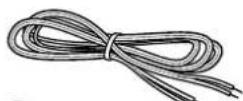
⑫
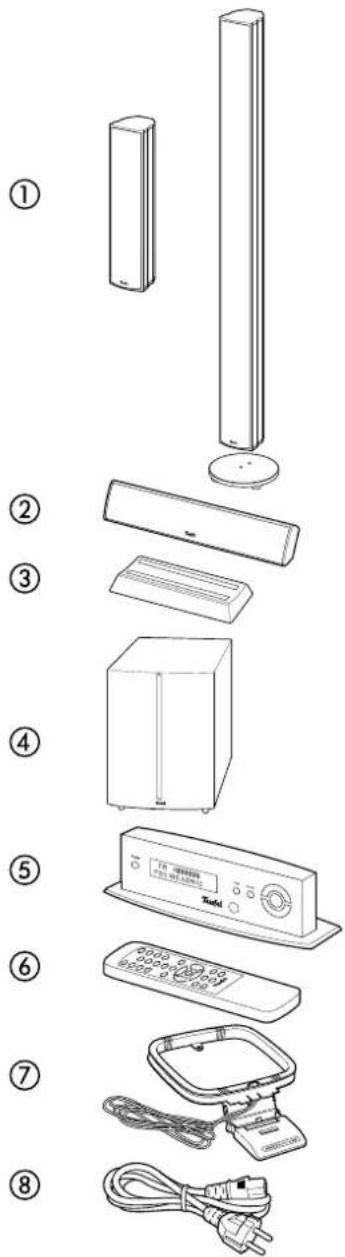
Product contents
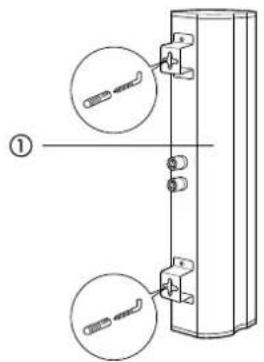
① 4 x satellite speakers (exact types depend on the ordered set). Following combinations are possible:
• 4 wall speakers CL 300 FCR or
• 4 floor speakers CL 300 FR or
• 2 wall and 2 floor speakers each
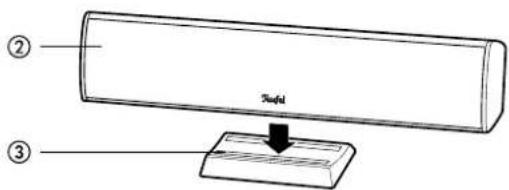
② 1 x center speaker CL 300 C
③ 1 x base for the center speakers ②
④ 1 x active subwoofer US 6110/6 R
⑤ 1 x control unit
⑥ 1 x remote control
⑦ 1 x AM antenna
⑧ 1 x power cord
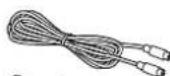
⑨ 1 x system cable for control panel ⑤
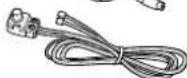
⑩ 1 x FM antenna
⑪ 1 x speaker cable (appr. 30 m)
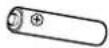
⑫ 2 x batteries for the remote control
Check to be sure
- Check that all items have been delivered and that nothing is damaged.
- If the delivery is incomplete or you find damage sustained in transit, do not operate the unit but contact our service department (see page 3).
Control elements and connections
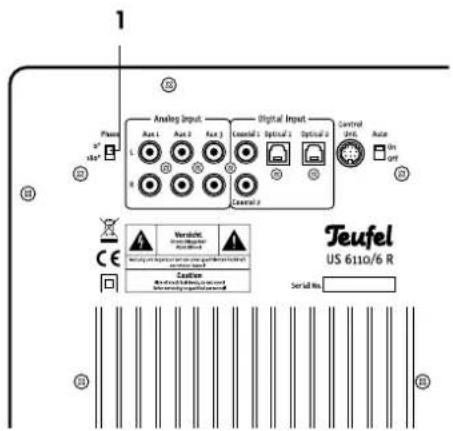
Subwoofer back side
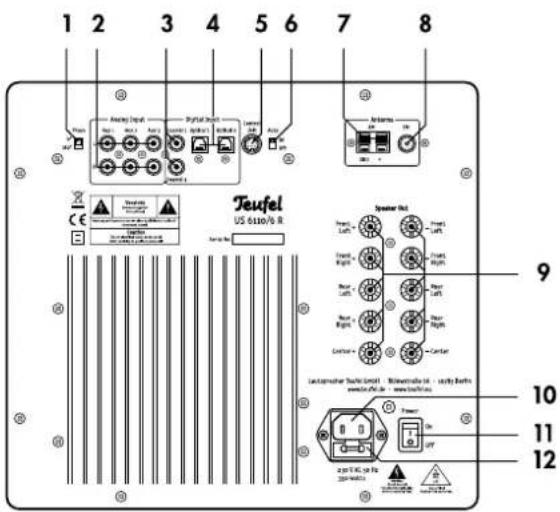
| Pos | Name | Description |
| 1 | Phase | Activate/deactivate phase shift (180°) of the subwoofer |
| 2 | Analog Input Aux 1 - 3 | Analogue input jacks |
| 3 | Digital Input Coaxial 1 - 2 | Digital audio input jacks for coax cables |
| 4 | Digital Input Optical 1 - 2 | Digital audio input jacks for optical cables |
| 5 | Control Unit | Connector for control unit 5 |
| 6 | Auto | Switch to enable/disable automatic wake-up |
| 7 | AM GND/+ | Connector jacks for AM antenna 7 |
| 8 | FM | Connector for FM antenna 10 |
| 9 | Speaker Out | Cable terminals for satellite speakers 1 and 2 |
| 10 | - | Connector jack for mains cord 8 |
| 11 | Power | Mains switch |
| 12 | - | Mains fuse |
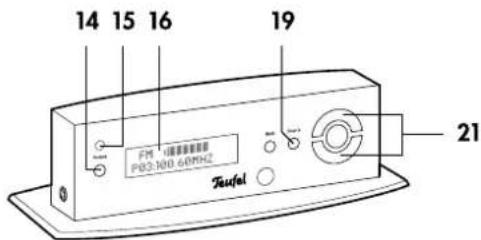
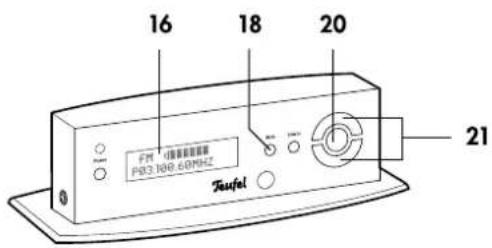
Display/control unit
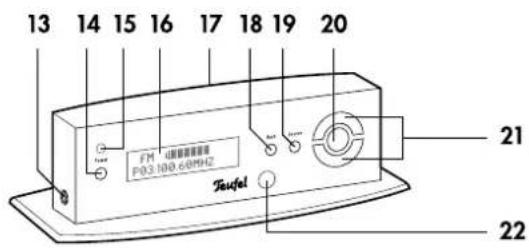
| Pos | Name | Description |
| 13 | Connector for headphones | |
| 14 | Power | Turn the subwoofer on or to standby |
| 15 | - | Standby indicator |
| 16 | - | Display |
| 17 | - | Connector for system cable to subwoofer |
| 18 | Back | Return to parent menu |
| 19 | Source | Switch signal source |
| 20 | O | Selection key (OK) |
| 21 | ▲ / ▼ | Set buttons +/- |
| 22 | - | Infrared receiver for remote control |
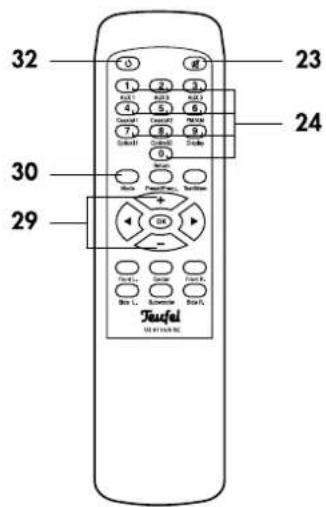
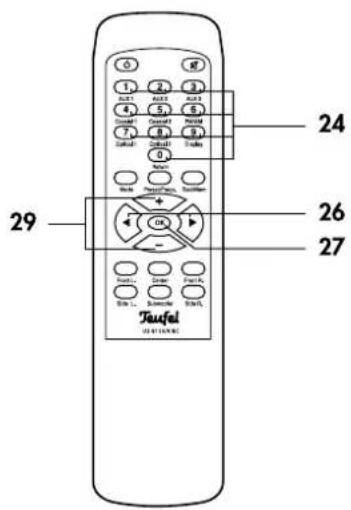
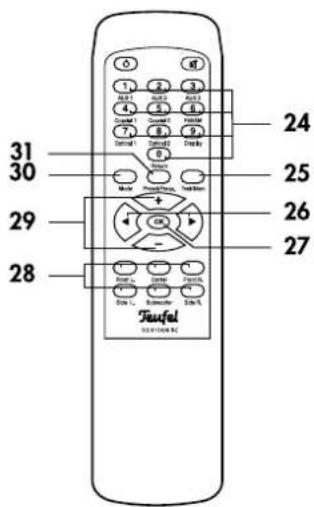
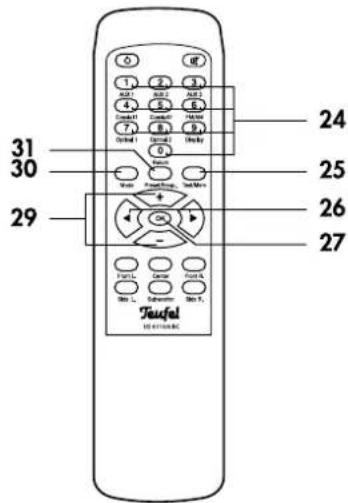
Remote control
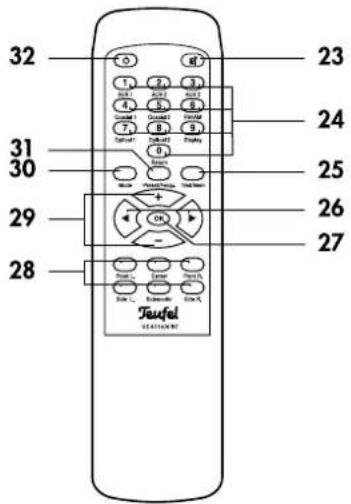
| Pos | Name | Description |
| 23 | Mute speakers | |
| 24 | 0...9 | Number and function buttons |
| 25 | Test/Mem | Activate test tone/store station to memory slots |
| 26 | Set buttons left/right | |
| 27 | OK | Select button |
| 28 | Front L. ...Side R. | Adjust channel level |
| 29 | +/- | Set buttons +/- |
| 30 | Mode | Select surround/stereo mode |
| 31 | Presets/Frequ. | In Radio mode: Select station memory slot or tuning frequency |
| 32 | Turn the subwoofer on or to standby |
Remote control
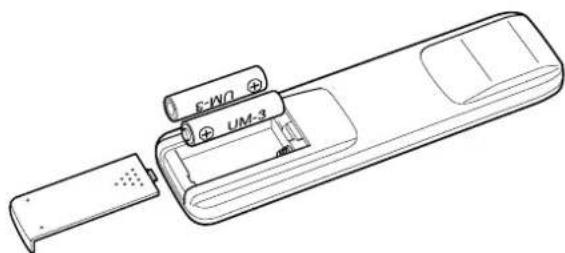
Two 1.5 Volt type AAA batteries (included in the product contents) are required to operate the remote control.
Inserting the batteries
- Gently press down the arrow section of the battery compartment cover on the back of the remote control. Push the cover down and slide it out.
- If applicable, remove any old batteries (please observe the disposal notes on page 16).
- Insert the batteries in the battery compartment as shown in the figure.
- Place the cover back on the compartment and push it into the closed position.
Functionality
The remote control transmits infrared control signals. For proper reception it is necessary to point the remote control towards the control unit (see next page). Make sure that no objects block the infrared signal.
natural_image
Line drawing of a remote control device with battery and USB port (no text or symbols)Setup tips
- Select a stable, level base.
• Make sure that the environment is clean and free of dust. - Avoid placing the unit close to sources of heat or in direct sunlight.
- Do not place any heavy objects on the cables or the speakers.
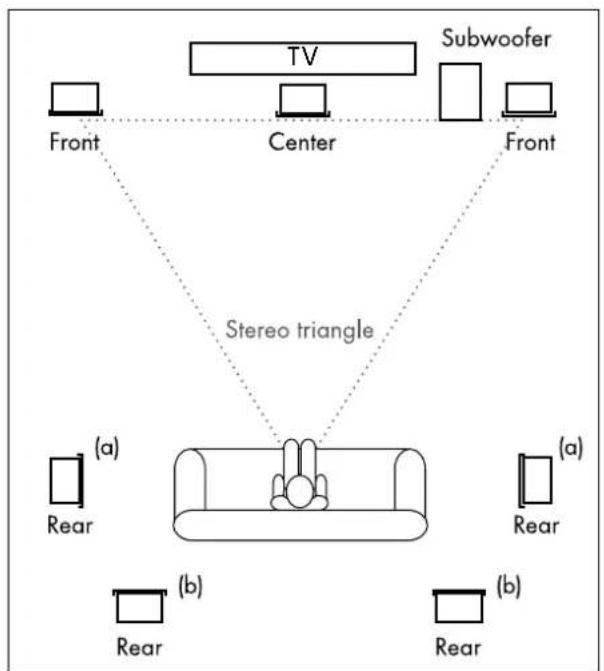
The following information refers to an "ideal home cinema", in which the viewer and/or listener sits in a central position at sufficient distance in front of the television and/or screen (see graphic on the right) and no objects (tables or the like) are located in between. Unfortunately, the room, furnishings or one's partner do not always allow for optimum arrangement.
Just follow this general rule: Always experiment on what works best in your listening room in terms of sound and appearance based on our recommendations. Let your ears (and eyes) be the judge!
Center speakers
Place the center speaker ② on its support foot ③ in an intermediate position under the monitor and/or screen.
Front speakers
The front speakers are set up to the right and left of the screen or hung at a height of approximately 40 to 120 cm. They should be in line with the center speaker and form an equilateral triangle with the listener – the so called stereo triangle (distance from the listener = distance between the speakers). The speakers should project sound directly into the room or slightly towards the listener.
Rear speakers
The rear speakers are set up or hung at head level to the side (a) or behind (b) the listener and directed towards the listener. The distance from the listener should be at least 100 cm and the distance to the back wall of the room should be at least 10 cm.
Subwoofer
You should position the subwoofer on the floor close to the television. A location somewhere between the front speakers is quite common.
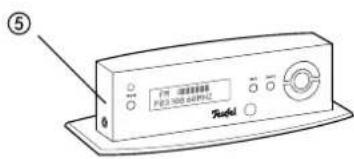
Control unit
The separate control unit ⑤ contains the receiver for the remote control signals. Therefore you should set up the control unit so that it is visible from your sitting position. The system cable to the subwoofer is approximately 5 metres in length.
flowchart
graph TD
    TV["TV"] -->|Stereo triangle| Center["Center"]
    Subwoofer["Subwoofer"] -->|Stereo triangle| Center
    Front1["Front"] -->|Stereo triangle| Center
    Front2["Front"] -->|Stereo triangle| Center
    Rear1["(a)"] -->|Stereo triangle| Rear1["Rear"]
    Rear2["(b)"] -->|Stereo triangle| Rear2["Rear"]
    Rear3["(a)"] -->|Stereo triangle| Rear3["(a)"]
    Rear4["(b)"] -->|Stereo triangle| Rear4["Rear"]
Wall speakers CL 300 FCR
- The brackets on the back of the satellite speakers are for mounting them on a wall or on a support foot. You can purchase installation materials (cables, support feet, wall brackets and resonance dampers) especially designed for to these speakers in our webshop (www.teufelaudio.com) in the "Accessories" area.
Center speaker CL 300 C
- Simply place the center speaker ② on the enclosed support foot ③.
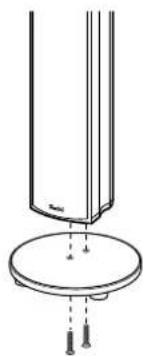
Floor speakers CL 300 FR
The floor speakers have been prepared to be mounted on the enclosed base plates.
- Screw the base plate onto the bottom of the speaker cabinet with the enclosed bolts.
natural_image
Technical line drawing of a mechanical component with a circular base and mounting holes (no text or symbols)Danger

Danger of injury/damage!
Arrange the cables so that they do not pose a trip hazard.
Speakers
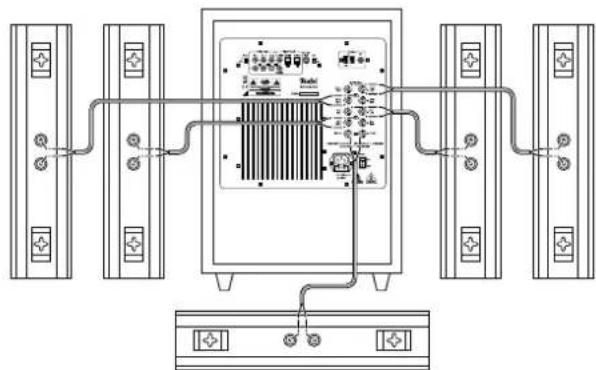
- Lay the speaker cables from your subwoofer to each of the satellite speakers. This cable should be high-quality double-core speaker cable with marked wires.
- A connector terminal with two terminal clips is located on the back of each speaker. You optionally can connect the speaker cables using pin plugs. Here we describe the direct connection without using pin plugs.
• The terminals are each marked red (+) and black (-).

Make sure the polarity is correct!
Always connect terminals with the same colour with each other. Otherwise the sound quality
will suffer. The wires of the speaker cables are marked with different colours or shapes.
- Split the single wires on both ends for approximately 30 mm and remove 10 mm of the insulation on each wire. Twist the copper core so that no strands are protruding.
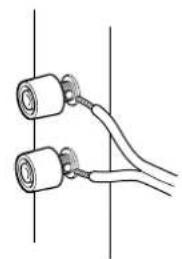
- Turn the connector terminal counterclockwise until it's loose. Run the stripped cable into the hole that is now visible. Turn the terminal clockwise until closed. The cable is now clamped in place.
- Connect all speaker cables this way. The connector terminals 9 "Speaker Out" for the five satellite speakers are located on the back of the subwoofer:
- Front – front speakers, "Left" and "Right".
- Rear – rear speakers, "Left" and "Right".
• Center - center speakers.
Like the speakers, these terminals are each marked red (+) and black (−). Connect all cables from the corresponding speakers here.
natural_image
Pure electrical circuit lines without any symbols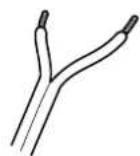
natural_image
Simple line drawing of two cylindrical objects connected by a coiled cable, no text or symbols present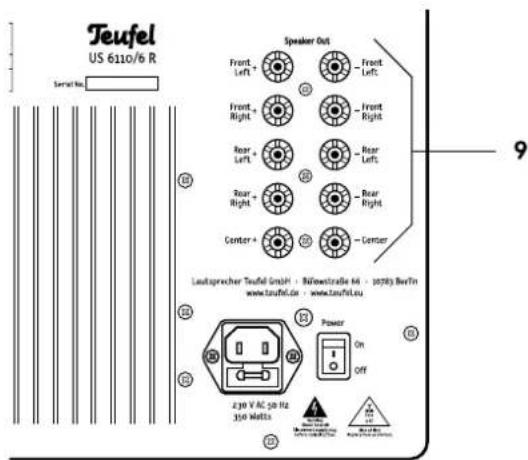
Antennas
Danger Risk associated with lightning strike! If you are using outdoor or roof antennas, be absolutely sure that the antenna is equipped with a lightning rod.
FM antenna
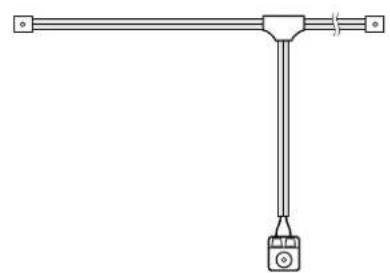
Connect the antenna for receiving FM stations to the jack 8 "FM". This can be a roof/outdoor antenna or a cable television connection. You will need a coaxial cable for this.
If an antenna connection is not available at your setup location, you can use the enclosed throw-out aerial ⑩. Insert the antenna plug into the jack 8 "FM" and adjust the position of the throw-out aerial until you have the best possible reception. Then fix the antenna in place with tape or nails.
natural_image
Pure mechanical diagram of a T-joint lever with a hanging weight (no text or symbols)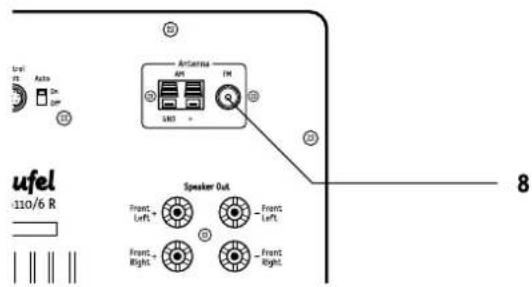
AM antenna
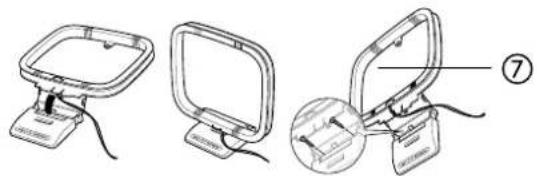
The enclosed antenna ⑦ is intended for receiving AM stations. You can setup this antenna to be freestanding or screw it onto a (cabinet) wall.
Connect the antenna connector cable with the jacks 7 "AM" on the back of the subwoofer. Push down the lever of each connector terminal and insert the cable end into the underneath opening. The cable is clamped in place when the lever is released.
natural_image
Three technical diagrams showing a device with a stand, a computer monitor, and a close-up view of the device (no text or symbols present)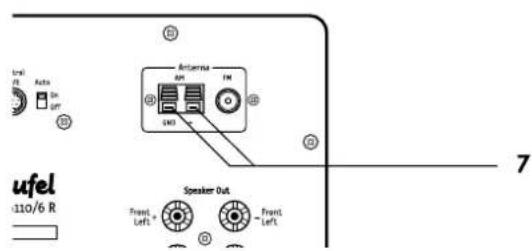
Inputs for source devices
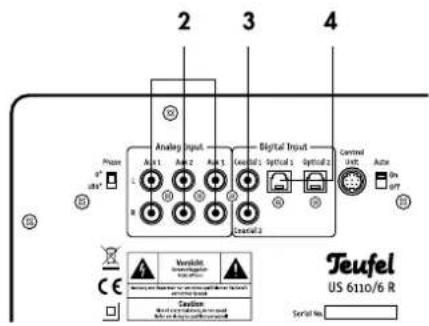
The subwoofer offers you three inputs for analogue source devices (Aux 1 - 3) as well as two optical and two coaxial digital sound inputs.
AUX 1, AUX 2 and AUX 3
You can connect three source devices with analogue sound to the jacks 2. To do so, you will need a double RCA cable (L and R) for each device.
Coaxial 1 + 2
You can connect the coaxial digital sound outputs from two different source devices to the jacks 3. Please use a coaxial cable with RCA plugs for each of the devices.
Optical 1 + 2
You can connect the optical digital sound outputs of two different source devices to the jacks 4. Please use an optical cable with Toslink plugs for each device. Your source device requires either an optical 3.5 mm plug or may also require a Toslink plug.
Control panel
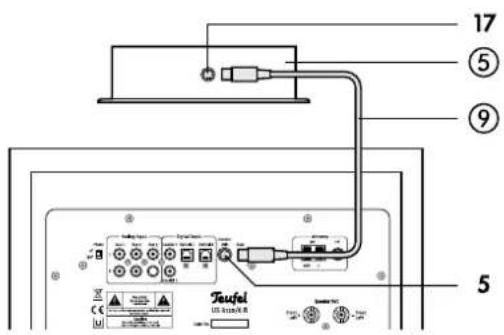
The system cable ⑨ connects jack 17 of the control unit ⑤ with jack 5 "Control Unit" of the subwoofer.

The small plugs only fit in the jacks in the correct rotational position with the groove facing down. Only use minimal force when inserting the plugs.
Otherwise the thin contacts could bend or even break off.
Headphones
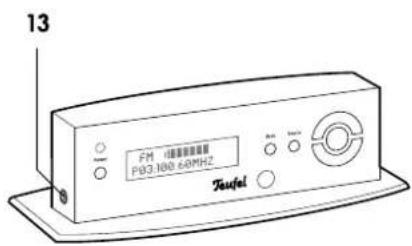
You can connect stereo headphones with a 3.5 mm plug to jack 13 "Ω" – the speakers will automatically be muted while headphones are plugged in.
Connecting to main power
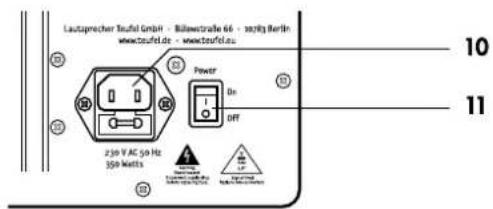
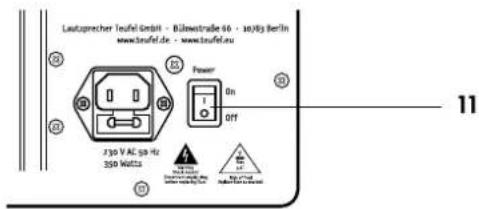
- Ensure that the mains switch 11 "Power" on the subwoofer is switched off ("0 OFF" position).
- Connect the mains connector jack 10 with a mains socket via the mains cord ⑧.
Activating and deactivating
- With the mains switch 11 "Power" on the back of the device you can switch your subwoofer on and off. After activation, the device is in standby mode and the indicator 15 lights up in red.
- With the button 14 "Power" or 32 "O" you can switch your subwoofer to operating and/or standby mode.
Automatic activation
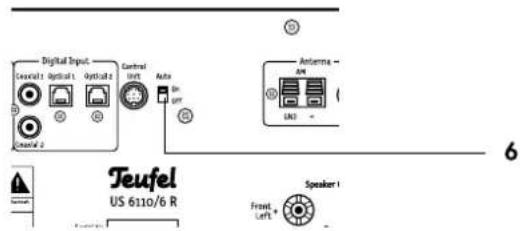
With the switch 6 "Auto" you can enable automatic activation:
On The subwoofer switches on when an audio signal is detected at the input "Aux 1". In this case "Aux 1" is automatically selected as active source.
Off The automatic mode is deactivated.
Selecting a source
The unit will power up with the source that was selected before power down.
- With the button 19 "Source" you switch through the sources in the following order: FM (Radio FM), AM (Radio AM), AUX 1, AUX 2, AUX 3, COAX 1, COAX 2, OPT 1, OPT 2.
- You can also select the source directly using the number/function buttons 24 on the remote control:
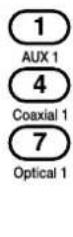
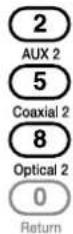
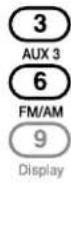
The selected source is shown in the display 16.
Adjusting the volume
- Increase the volume: Push the upper part of the button 21 and/or button 29"+.
- Decrease the volume: Push the bottom part of the button 21 and/or button 29 “-”.
The selected volume is shown in the display panel 16 in the range 0 (low) to 80 (high).
Mute
- With the mute button 23 "A" you can temporarily turn off the sound. In this case "MUTE" will appear in the display 16.
- Reactivating the sound: Push the button 23 "反" again or change the volume.
Set the different subwoofer functions using the menu. You can navigate through the menu as follows:
- Push the select button 20 and/or 27 "OK". The main menu will appear in the display 16.
-
Select the desired submenu with the set buttons 21 and/or 26 "◀/▶" and push the select button 20 and/or 27 "OK".
The submenu will open and you can change the values with the set buttons 21 and/or 26 "◀/▶". -
With the select button 20 and/or 27 "OK" you apply the setting.
- Push the button 18 "Back" and/or the function button 24 "O/Return" to return to the previous menu.
- If no entry is made for a few seconds, the device automatically switches back to the previous menu.
"INPUT" menu
With the set buttons you can select the active source device: FM (Radio FM), AM (Radio AM), AUX 1, AUX 2, AUX 3, COAX 1, COAX 2, OPT 1, OPT 2.
The input is immediately switched – it is not necessary to press the select button 20 and/or 27 "OK".
"SURROUND" menu
With the set buttons you can select the surround mode for 2 channel sources in the following order:
PLII Movie Dolby ProLogic II for movies
PLII Music Dolby ProLogic II for music
2.1 Stereo Stereo via front left/right and subwoofer
5.1 Stereo Stereo via all channels
Some options may not be available if not all satellite speakers are connected.
Dolby Digital 5.1 and DTS
When playing back Dolby Digital or DTS encoded multichannel tracks, surround decoding is locked to these standards; so this button is disabled.
"LEVEL" menu
You can increase or decrease the relative volume for each speaker here. Select the desired speaker with the set buttons 26 "◀/▶":
Front L - Front left
Center - Center
Front R - Front right
Rear L - Rear left
Subwoofer - Subwoofer
Rear R - Rear right
With the set buttons 29 "+/−" you can now set the relative volume within the range of "-12" to "+12". If no button is pressed for three seconds, the device will exit this mode.
"DELAY" menu
When the speakers are located at different distances to the listening position, the surround sound may be compromised. To compensate such run-time differences, you can set a slight delay in the signal for the center and both rear channels in relation to the two stereo channels front left/right here.
• Measure the distance from the listening position to the front speakers.
• Measure the distance from the listening position to the center speaker.
- Subtract the distance to the center speaker from the distance to the front speakers and enter this value for "Center Spk".
Example:
Distance to the front speakers: 3.5 metres distance to the center speaker: 2.6 metres 3.5 m - 2.6 m = 0.9 m
- Repeat the above steps for the rear speakers.
"SPEAKER" menu
Here you can set which satellite speakers are connected to the subwoofer:
5.1 Channel All satellite speakers are connected
3.1 Channel Only the front speakers left, center, right
2.1 Channel Only the stereo speakers left and right
Surround mode
With the button 30 "Mode" you can select the surround mode in this order:
PLII Movie Dolby ProLogic II for movies
PLII Music Dolby ProLogic II for music
5.1 Stereo Stereo via all channels
2.1 Stereo Stereo via front left/right and subwoofer
Some options may not be available if not all satellite speakers are connected.
Dolby Digital 5.1 and DTS
When playing back Dolby Digital or DTS encoded multichannel tracks, surround decoding is locked to these standards; so this button is disabled.
Test tone
With this function you can monitor and set the level for the speaker channels.
- Push the button 25 "Test/Mem". A test tone ("pink noise") is emitted from each of the speakers in sequential order.
- With the set buttons 29 "+/−" you can adjust the volume of the channel that is currently active.
- Push the button 30 "Mode" to stop the test tone.
Channel level buttons
You can increase or decrease the relative volume for each speaker here. Select the desired speaker by tipping the corresponding button 28:
Front L - Front left
Center - Center
Front R - Front right
Rear L - Rear left
Subwoofer - Subwoofer
Rear R - Rear right
With the set buttons 29 "+/−" you can now set the relative volume within the range of “−12” to “+12”. If no button is pressed for three seconds, the device will exit this mode.
Display
With the function button 24 "9/Display" you can control the brightness of the display panel. The display is adjusted each time the button is pressed: bright, dark, off.
Phase
With switch 1 "Phase" you activate and deactivate the phase shift (180°) of the subwoofer, which may improve the sound under certain circumstances.
Select one of the two radio frequency modes (FM/AM) as source (see page 12):
FM – Reception of stereo and mono stations in the range of 87.5 to 108 MHz, RDS mode is possible.
AM – Reception of mono stations in the range of 522 to 1,629 kHz.
Setting the radio stations
Direct entry of the tuning frequency:
- Tip the button 31 "Presets/Frequ." twice so that the tuning frequency appears in the display panel.
- Enter the frequency without any decimals or commas using the number buttons 24 "0...9".
- Push the select button 27 "OK".
Station search:
Change the tuning frequency with the buttons 21 and/or 26 "◀/▶":
- Manually: The frequency is increased and/or decreased by one step each time the button is tipped (FM: 0.05 MHz, AM: 9 kHz).
- Automatically: Holding down the button for a prolonged period of time starts station scanning in the desired direction until a station with sufficiently strong signal is found.
The current tuning frequency is shown in the display 16. If the station is received in stereo, the symbol "☐☐" is also shown. If the station is broadcasting an RDS signal, the station name is displayed in alternation with the frequency after a short time.
Stereo/mono
With weak FM stereo stations interferences may be heard. If this occurs, you can switch to mono (and back to stereo) reception using the button 30 "Mode".
Station memory
The device can save 30 FM stations and 10 AM stations. You can conveniently recall saved stations by RC control.
Automated program search
- Set the desired reception range (FM or AM).
- Push the button 25 "Test/Mem" for approximately three seconds.
The device will automatically save the first 30 stations for FM and/or 10 stations for AM. Memory slots that are already occupied are overwritten in the process.
Saving stations manually
- Set the desired station as described above.
- Push the button 25 "Test/Mem".
The number of the selected memory slot blinks in the display panel, e.g. "P01". - With the number buttons 24 "0...9" you can enter the desired memory slot number or select the desired number with the set buttons 26 "</►".
- Push the select button 27 "OK".
- If the memory slot is already occupied, the question "Overwrite?" will appear.
If you want to select another memory slot, push the function button 24 "O/Return" and enter another number. - To save, press the select button 27 "OK". The notice "SAVE OKAY" will appear briefly in the display panel.
The station has now been saved. If no button is pushed for five seconds, the device switches back to normal mode.
Selecting stations from the memory
- Push the button 31 "Presets/Frequ."
The number of the last-used memory slot appears in the display panel, e.g. "P03". - Enter the two-digit number of the desired memory slot with the number buttons 24 "0...9".
- Push the select button 27 "OK".
Care and cleaning
Clean the subwoofer and the satellites regularly with a soft, damp microfiber cloth. When doing so, please be absolutely sure to observe the following instructions:
Danger

Risk of electric shock!
In contact with live parts, water can lead to electric shock or short circuit.
• Make sure that no liquid penetrates the unit.
- Disconnect the mains plug before cleaning.
Attention Risk of damage!

Using the wrong cleaning materials may damage the delicate surface of the case.
- If possible use only plain water with no cleaning products. In case of stubborn marks, a mild soap solution may be used.
- In no circumstances should caustic cleaning products, white spirit, thinners, petrol or similar be used for cleaning.
Protecting the environment
Disposing of the unit
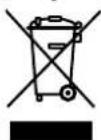
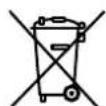
Used units must not be disposed of with household waste.
If the unit is no longer operational, every consumer is required by law to dispose of used devices separate from household waste,
e.g. at a collection point run by the communal authority/borough. In this way, used devices can be recycled and waste materials disposed of in an environmentally friendly manner.
For this reason, electrical equipment is labelled with the displayed symbol.
Batteries and rechargeable batteries
Batteries and rechargeable batteries must not be disposed of with household waste!
Every consumer is required by law to bring all batteries and rechargeable batteries, whether
they contain harmful substances*) or not, to a collection point run by the communal authority or borough or run commercially, so that they can be disposed of in an environmentally friendly manner.
Please only hand in fully discharged batteries and storage batteries!
The following instructions should help you to solve problems. If this doesn't work, please contact our hotline (see page 3). Mind the warranty instructions.
| Problem | Possible cause | Solution | |
| The subwoofer doesn't work, the power LED 14 or the display panel are not illuminated. | The subwoofer is switched off or doesn't have any power. | Turn on the switch 11 ("On I"). Check the mains cord and socket. | |
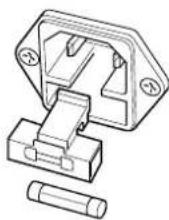
| Fuse is defective. | Replace the fuse: Disconnect the mains cord. Carefully pull out the fuse holder 12 on the mains connection jack 10. Push out the old fuse to the bottom. If necessary, insert a new fuse (2 A delay-action), close the holder. | 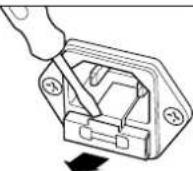 | |
 | |||
| The subwoofer is not working, but the display panel is on. | The volume has been set too low. | Increase the volume with the button 21 and/or 29 "+". | |
| The subwoofer hums. | The subwoofer is connected to another circuit than the rest of the system. | Connect the subwoofer and source device to the same electric circuit. | |
| The buzzing is caused by problems with the power supply. | Buy a line filter and connect both devices to it. | ||
| The buzzing is caused by a multi-way socket. | Use another multi-way socket or plug the subwoofer directly into the wall socket. In the case of two-pin plugs it may help to insert the plug into the socket the other way around. | ||
| Playback is noisy. | Generally speaking, the system has a very low noise level. In the high range area, very good-quality high-resolution speaker systems can expose the poor quality of a signal source (e.g. from MP3 files). | Ensure that the source is sending a clean signal. | |
| The sound seems dull. | Satellite has been connected with incorrect polarity. | Make sure the speaker cables of all satellites are connected properly. | |
| To conduct a test, turn the switch 1 "Phase" on and off. Select the setting with the best sound. | |||
Trademarks
Dolby
Manufactured under license from Dolby Laboratories. Dolby, Pro Logic, and the double-D symbol are trademarks of Dolby Laboratories.
DTS
Manufactured under license under U.S. Patent#s: 5,451,942; 5,956,674; 5,974,380; 5,978,762; 6,487,535 & other U.S. and worldwide patents issued & pending. DTS and DTS Digital Surround are registered trademarks and the DTS logos and Symbol are trademarks of DTS, Inc. ©1996-2009 DTS, Inc. All Rights Reserved.
Technical data
Active subwoofer
| Operating voltage: | 230 V~, 50/60 Hz |
| Max. power consumption during operation: | 300 WattsStandby: < 1 Watt |
| Dimensions (W x H x D): | 34 x 52 x 49 cm |
| Net weight: | 20 kg |
Wall and center speakers
| Impedance: | 4-8 Ohm |
| Dimensions (W x H x D): | 39.9 x 8.6 x 12.4 cm |
| Net weight: | 1.4 kg |
Floor speakers
| Impedance: | 4-8 Ohm |
| dimensions (W x H x D): | 8.6 x 111.4 x 22.0 |
| Net weight: | 4.4 kg |
Technical changes reserved!


This product conforms with Council of the European Union guidelines 2004/108/EC and 2006/95/EC
Teufel
For questions, suggestions or other issues please contact our customer service department:
Lautsprecher Teufel GmbH
Gewerbehof Buelowbogen - Aufgang D1
10783 Berlin (Germany), Buelowstr. 66
Tel.: 00800 200 300 40
Fax: +49 (0)30 - 300 930 930
www.teufelaudio.com
No liability is accepted for the accuracy of this information. Technical changes, typographical errors and other errors reserved.