ENCA-CCDN - Overvågningskamera ENCORE - Gratis brugsanvisning og manual
Find enhedens vejledning gratis ENCA-CCDN ENCORE i PDF-format.


Brugerspørgsmål om ENCA-CCDN ENCORE
0 spørgsmål om dette apparat. Besvar dem du kender, eller stil dit eget.
Stil et nyt spørgsmål om dette apparat
Download vejledningen til din Overvågningskamera i PDF-format gratis! Find din vejledning ENCA-CCDN - ENCORE og tag din elektroniske enhed tilbage i hånden. På denne side er alle dokumenter nødvendige for brugen af din enhed offentliggjort. ENCA-CCDN af mærket ENCORE.
BRUGSANVISNING ENCA-CCDN ENCORE

natural_image
Red and white geometric logo design with diagonal stripes and a stylized 'S' shape (no text or symbols)ENCORE
ELECTRONICS
ENCA-CCDN
All Weather Color CCD Security Camera With Night Vision
NTSC System
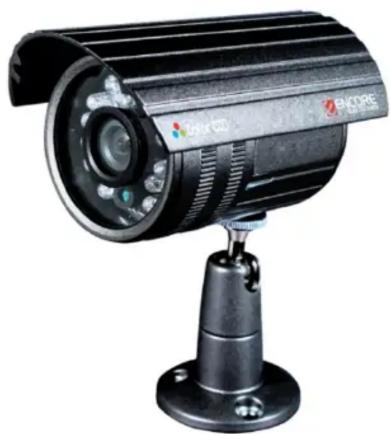
natural_image
Exterior view of a black Encore security camera mounted on a stand (no visible text or symbols)USER MANUAL and SPECIFICATION
INTRODUCTION:
Encore's ENCA-CCDN All Weather Color CCD Security Camera with Night Vision is a high quality indoor and outdoor camera for your Surveillance DVR Setup Box. Safe to place outdoor on any weather type, it features water and lightning proof. It uses a 1/4" Sony High Resolution Super HAD CCD image sensor for superior video quality. Equipped with 24 Infra Read LED's for clear and crisp night vision video recording. It perfectly fits the Encore ENXDVR-4C Video Surveillance Kit.
SPECIFICATIONS:
| SPECIFICATIONVALUE | |
| Image Sensor | 1/4" Sony Super HAD CCD |
| Total Pixels | 510(H) x 492(V) |
| Sensing Area | 2.7mm x 3.6mm |
| Lens | 3.6 mm M12 Lens (Optional) |
| Scanning System2:1 Interlaced | |
| Sync. SystemInternal | |
| Resolution | 420 TV Lines |
| Electronics Shutter | 1/60 - 1/100,000 sec |
| Minimum Illumination | 1.0Lux/F1.2, 0Lux ( IR on ) |
| Lens3.6 mm | |
| Angle View90° | |
| Mini Focal Distance | 20 cm |
| AGCBuilt-in | |
| White Balance | Auto |
| Gain Control | Auto |
| S/N Ratio | 48 dB (AGC Off) |
| Electronic Shutter | Auto, 1/50 (1/60) - 1/100,000 sec |
| Video Output | 20 mA (IR Off), 400 mA (IR On) |
| IR LED | 24 Units Infrared LED ( 5mm / 850mm) |
| IR Distance In Effect | 20 Meter (Indoor) / 15 Meter (outdoor) |
| IR Illumination | 3Lux |
| Environmental Resistance | 1P66 (Waterproof) |
| Operating Temperature | -4°F to 122°F ('-20°C to 50°C) |
| Dimension | 60 x 58 x 96 mm |
| Power Consumption | 12VDC / 200mA (IR On 400mA) |
| Weight | 280 g |
| Regulations & Certifications | FCC, CE, RoHS |
DIMENSION:
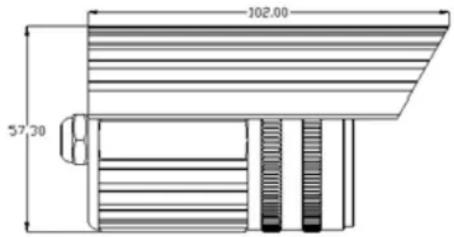
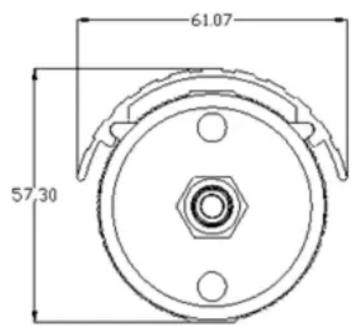
Installation Precautions
- Do not place the camera where there is an extreme temperature condition. Make sure to place the camera where the temperature is within the -4^ 122^ (-20°C to 50°C) limit only.
- Do not install the camera where there is a constant lighting change. Severe light with constant lighting changes can cause the camera to work improperly causing video problems.
- Do install the camera to a very high humid place. It can cause poor quality image.
- Do not disassemble the camera. There are no user serviceable parts inside. Opening the camera housing exposes you to a high and dangerous voltage and other hazards. Refer all servicing to a qualified technician only.
- Do not touch the imaging surface of the sensor. Use only a proper cleaning solutions and materials. Touching or cleaning the sensor using improper cleaning solutions may damage the camera sensor permanently.
- The package does not come with a power adapter. Make sure that the power supply voltage is correct before operating the unit. The voltage requirement is 12 Volts DC. Check your DVR user manual for the power supply unit.
- Do not focus the camera while in operation to any extreme light, like directly to the sun, laser light, etc.
CONNECTION DIAGRAM:
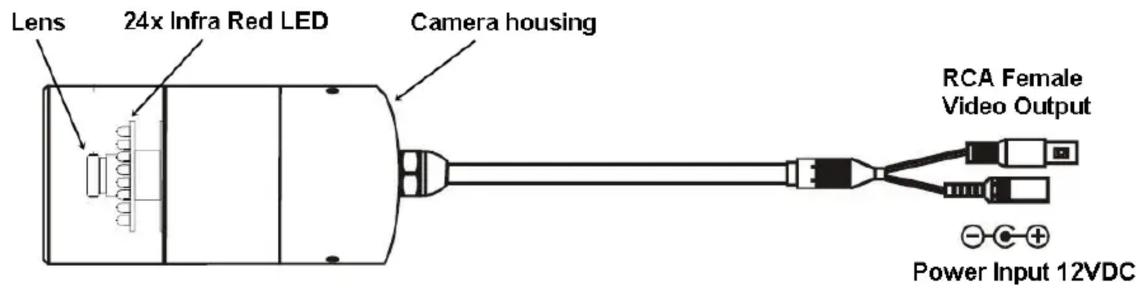
ENCA-CCDP and ENCA-CCDN Surveillance Camera
- Connect the RCA video cable to your surveillance DVR's Video-in port, your RCA video input cable connector must be in the Male form. Check your DVR User Manual on how to connect security cameras to your DVR device. Some DVR setup box requires adapter connectors or sometimes called Balun to be able to use to their DVR Setup Box.
- Connect the power input jack to your DVR Setup Box. Check your DVR user manual for the camera power supply and connection. Most DVR Setup Box comes with multi-connector power adapter intended for cameras. Some requires adapter or Balun to power the cameras.
PACKAGE CONTENTS:
• One CCD Security camera
- Three screws with anchors
• One Ball head camera stand
- User Manual / Specifications