
CXCD109 - CD-afspiller COBY - Gratis brugsanvisning og manual
Find enhedens vejledning gratis CXCD109 COBY i PDF-format.


Brugerspørgsmål om CXCD109 COBY
0 spørgsmål om dette apparat. Besvar dem du kender, eller stil dit eget.
Stil et nyt spørgsmål om dette apparat
Download vejledningen til din CD-afspiller i PDF-format gratis! Find din vejledning CXCD109 - COBY og tag din elektroniske enhed tilbage i hånden. På denne side er alle dokumenter nødvendige for brugen af din enhed offentliggjort. CXCD109 af mærket COBY.
BRUGSANVISNING CXCD109 COBY
COBY®
PORTABLE CD PLAYER USER GUIDE
CX-CD109
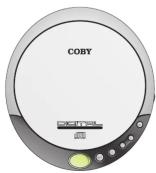
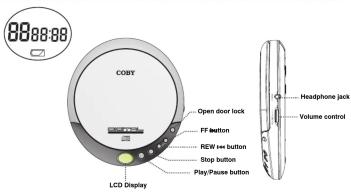
NAME OF PARTS
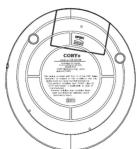
BATTERY OPERATION (BATTERIES NOT INCLUDED) Your unit operates on two(2)AA size alkaline batteries. Open the CD cover and insert the batteries in the battery compartment following the polarity diagram located inside.
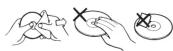
CAUTION Hearing experts advise against the constant use of personal otteress places at high volume. Constant high volume can be load to hearing loss. If you experience ringing in the ears or hearing loss, discontinue use and seek medical advice. HANDLING DISCS To remove the disc from to storage case, press down on the center of the case and lift the disc out. Hold it carefully by the edges as shown below - Insert the disc into the unit with the label of the disc facing UP. -Genely wipe the disc using a soft cloth from the center to the outer direction to remove dust, fingerprinters or any other particles on the disc surface. Never use chemicals, such as record sprays, anti-static sprays, benzene or thinners to clean the CD. These chemicals can damage the disc surface permanently. - To insert sensitive materials on CD, which are then in them in the cases after each use. Scratches can cause the laser pick-up slip in the future play. - Do not place stickers or write anything on the disc.
SPECIFICATIONS
MAINTENANCE AND CARE - Read the instruction manual before operating this unit. - Do not expose the unit to high temperature or humidity. - Use dampened soft cloth to clean the unit. Do not use strong detergent or solvent to clean the unit.
- Consult your dealer if you are ever in doubt about the installation, operation or safety of your equipment.
CD Play Section Frequency Response....20 -20,000Hz Wow and Flutter...Below Measurable Limits Sampling Rate...8 times over sampling D/A Converter...1-BT General Maximum Output(Stereo Headphone.....15mW+15mW(32ohm)) Power Supply DC....3V with 2 size "AA" Batteries Dimension...5.1"x1.1"x5.9"(WHD)
IMPORTANT
The CD mechanism and the sensitive circuitry may cause interference to a radio tuner nearby. Do not operate this unit while operating other radio devices.
Danger This product utilizes invisible laser radiation. Avoid direct exposure to
the beam. Caution Use of control, adjustments or procedures not listed in
this manual may result in hazardous radiation exposure.
CONCERNING COMPACT DISCS
Only compact disc identified with this mark can be used with this player.
OPERATION MANU
POWER ON——AUTO PLAY
(1) Presa PLAY/PAUSE() button to turn
the power on.
(2) LCD screen will display " _ _"
[Non-Text]
(3) LCD screen will display "disc" if CD is not (
in the unit.
(4)LCD screen will display 'Er' if the unit cannot
1053 65 E##d ###
©
(S)When CD track data has been read, LCD screen will display the last track number
with the total play time
2 Issue
(E) Unite will start play from track No.1
(1) (200pt)
STOP
[Non-Text]
* Press STOP( ■) button to stop play.
2 Ice
[Non-Text]
[Non-Text]
FA
(
on/off alternately.
0 10008)
Time display will flash on pause mod
-
PLAYING MODES
LISTEN TO DESIRED TRACK
(1) Press EE +1 (or REW +1) by ton
desired trackw. Press PLAY/PAUSID
button to play. Press FRe>or REW
button to change the track during
mode.
[Non-Text]
MOVE TO THE DESIRED SPOT
During paly, press and hold FF (o)
REW (●) button to fast forward (or
fast reverse) the current track.
[Non-Text]
[Non-Text]
A. 2014年7月25日
LOW BATTERY DE
广力云智慧零售收银系统
(1) is displayed when the battery volt
realized to.
(2) When the voltage is too low, the unit
a) when the voltage is too low, and then automatically turn off.
[Non-Text]
[Non-Text]
[Non-Text]
[Non-Text]
PROF. SE WARNING:
Harlem Q the located electrical wires in this product, explored you at least, a chemical/ironan to the State of California to cause Namox,
and/or directors and other representatives harm Rissh-fomde after use.
[Non-Text]
[Non-Text]
[Non-Text]
[Non-Text]
[Non-Text]
[Non-Text]
[Non-Text]
[Non-Text]
[Non-Text]
[Non-Text]
[Non-Text]
[Non-Text]
[Non-Text]
[Non-Text]
[Non-Text]
[Non-Text]
[Non-Text]
[Non-Text]
[Non-Text]
[Non-Text]
22
CB 00:00
C
[Non-Text]
[Non-Text]
[Non-Text]
[Non-Text]
[Non-Text]
[Non-Text]
[Non-Text]
[Non-Text]
[Non-Text]
[Non-Text]
[Non-Text]
[Non-Text]
[Non-Text]
[Non-Text]
[Non-Text]
[Non-Text]
[Non-Text]
[Non-Text]
[Non-Text]
[Non-Text]
[Non-Text]
[Non-Text]
[Non-Text]
[Non-Text]
[Non-Text]
[Non-Text]
[Non-Text]
[Non-Text]
[Non-Text]
[Non-Text]
[Non-Text]
[Non-Text]
[Non-Text]
[Non-Text]
[Non-Text]
[Non-Text]
[Non-Text]
[Non-Text]
[Non-Text]
[Non-Text]
[Non-Text]
[Non-Text]
[Non-Text]
[Non-Text]
[Non-Text]
[Non-Text]
[Non-Text]
[Non-Text]
[Non-Text]
[Non-Text]
[Non-Text]
[Non-Text]
[Non-Text]
[Non-Text]
[Non-Text]
[Non-Text]
[Non-Text]
[Non-Text]
[Non-Text]
[Non-Text]
[Non-Text]
[Non-Text]
[Non-Text]
[Non-Text]
[Non-Text]
[Non-Text]
[Non-Text]
[Non-Text]
[Non-Text]
[Non-Text]
[Non-Text]
[Non-Text]
[Non-Text]
[Non-Text]
[Non-Text]
[Non-Text]
[Non-Text]
[Non-Text]
[Non-Text]
[Non-Text]
[Non-Text]
[Non-Text]
[Non-Text]
[Non-Text]
[Non-Text]
[Non-Text]
[Non-Text]
[Non-Text]
[Non-Text]
[Non-Text]
[Non-Text]
[Non-Text]
[Non-Text]
[Non-Text]
[Non-Text]
[Non-Text]
[Non-Text]
[Non-Text]
[Non-Text]
[Non-Text]
(
(050325)
C
[Non-Text]
[Non-Text]
m = 311
TECTION
m = 311
age
095308
0
MI
[Non-Text]
[Non-Text]
[Non-Text]
[Non-Text]
[Non-Text]
[Non-Text]
[Non-Text]
[Non-Text]
[Non-Text]
[Non-Text]
PROF. SE WARNING:
Harlem Q the located electrical wires in this product, explored you at least, a chemical/ironan to the State of California to cause nanowires,
and/or directors and other representatives harm Rissh-fomde after use.
[Non-Text]
[Non-Text]
[Non-Text]
[Non-Text]
[Non-Text]
[Non-Text]
[Non-Text]
[Non-Text]
[Non-Text]
[Non-Text]
[Non-Text]
[Non-Text]
[Non-Text]
[Non-Text]
[Non-Text]
[Non-Text]
[Non-Text]
[Non-Text]
[Non-Text]
[Non-Text]
[Non-Text]
[Non-Text]
[Non-Text]
[Non-Text]
[Non-Text]
[Non-Text]
[Non-Text]
[Non-Text]
[Non-Text]
[Non-Text]
[Non-Text]
[Non-Text]
[Non-Text]
[Non-Text]
[Non-Text]
[Non-Text]
[Non-Text]
[Non-Text]
[Non-Text]
[Non-Text]
[Non-Text]
[Non-Text]
[Non-Text]