E-VOL40 - Fjernbetjening APART - Gratis brugsanvisning og manual
Find enhedens vejledning gratis E-VOL40 APART i PDF-format.


Brugerspørgsmål om E-VOL40 APART
0 spørgsmål om dette apparat. Besvar dem du kender, eller stil dit eget.
Stil et nyt spørgsmål om dette apparat
Download vejledningen til din Fjernbetjening i PDF-format gratis! Find din vejledning E-VOL40 - APART og tag din elektroniske enhed tilbage i hånden. På denne side er alle dokumenter nødvendige for brugen af din enhed offentliggjort. E-VOL40 af mærket APART.
BRUGSANVISNING E-VOL40 APART
Introduction
The APart E-VOL40 is a 100 Volt volume control that can handle up to 40 watt of power.
It is very durable due to the step by step attenuation in 11 steps + zero position.
The volume control is equipped with a 24V priority relais. This way a microphone call will always come through at maximum volume, no matter what position the volume control is in.
The E-VOL40 is build on a universal chassis that can easily be integrated with
Gira, Jung and Euro. Different cover plates are available for the UK market.
Please avoid
- Please avoid any power overload, measure your speakerlines before connecting.
- In reality, a lot of speakers have much higher load than the value listed in their specification.
Our APART speakers are especially engineered within their specification, so no risk for overload when using them! - Please never apply clipped or overloaded levels from your amplifier to this volume control.
It may cause overheating and damage! Our APART amplifiers are automatically limited to avoid such distorted signals!
Tech. Specifications
- Type : Euro
- Handling power : 40 watt
- Voltage : 100 Volt
• 24V priority : Yes (20mA) - Attenuation steps: 11 + "0"
• Build-in box : E-MODIN
• Build-on box : E-MODON - Dimensions (H x W x D) : 80 x 80 x 70 mm
- Weight : 0.3 Kg
- Colour : white
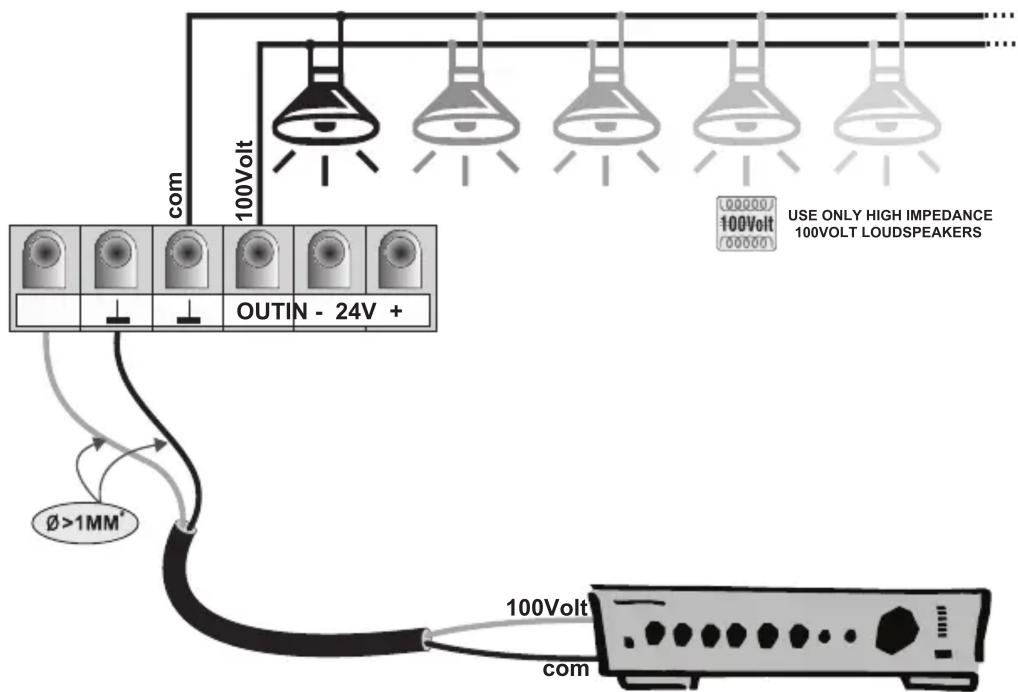
2-WIRE CONNECTION
TOTAL LOUDSPEAKER POWER : 3 - 40 WATTS MAXIMUM !!!
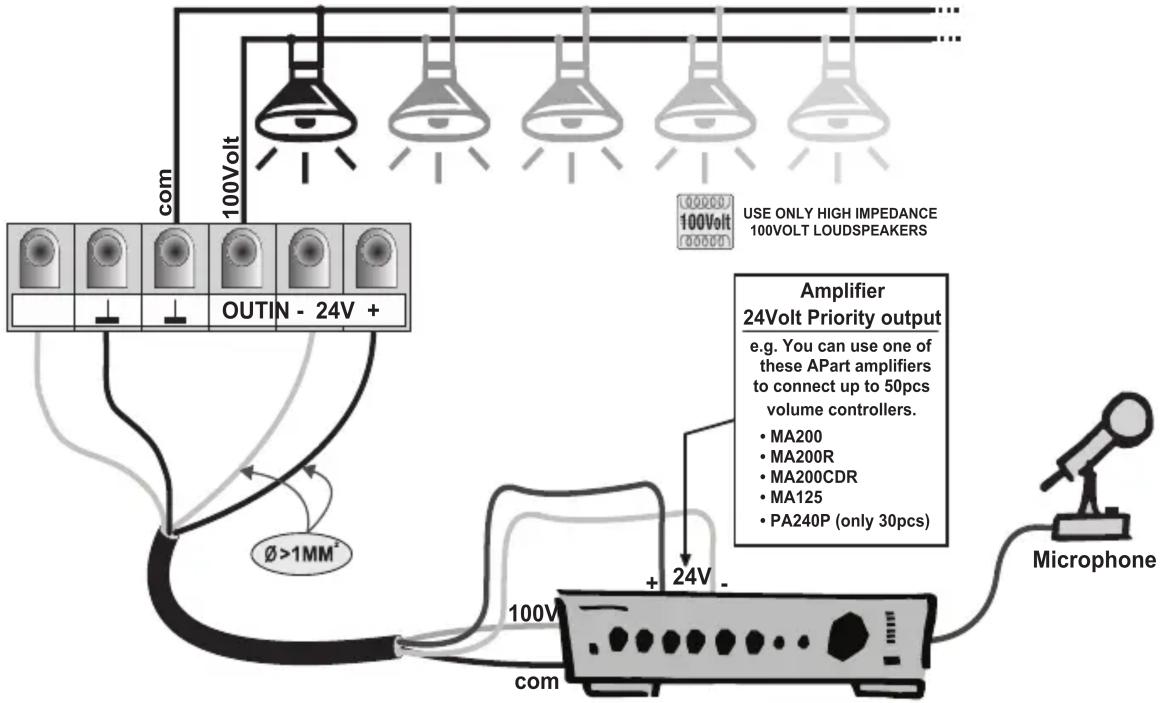
4-WIRE CONNECTION WITH PRIORITY
TOTAL LOUDSPEAKER POWER : 3 - 40 WATTS MAXIMUM !!!
What does a priority system do?
When the volume controller is turned to 0 there is no background-music. (e.g. meeting room, office)
At this moment if there is a microphone call the information is lost.
With the priority system connected, the volume controller is set to maximum volume during the microphone call. In this way there is no information lost.
To be able to use a priority system you need the following components :
- Volume controller with priority relay
- Amplifier with 24Volts priority output contact (24Volts / 1A : you can connect up to 50pcs of volume controllers)
- 4-wire cable connection
- Microphone (MICPAT-D)
Mounting
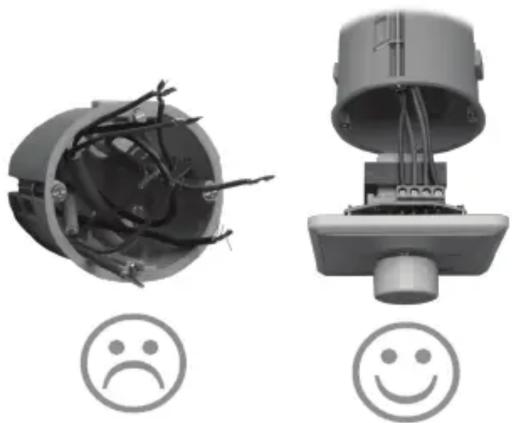
- Keep the inside of the wallbox clear of all wires, this to prevent short circuits between the wires in the wallbox and the printed circuit of the volume controller.
- Don't use solid copper conductor wires, the screw connectors on the printed circuit board of the volume controller are designed for flexible wires.
- Don't connect more then one wire in each onboard screw connectors of the volume controller.
- Don't use force when mounting the volume controller in the wallbox.