6909 - Hovedtelefoner VT - Gratis brugsanvisning og manual
Find enhedens vejledning gratis 6909 VT i PDF-format.


Brugerspørgsmål om 6909 VT
0 spørgsmål om dette apparat. Besvar dem du kender, eller stil dit eget.
Stil et nyt spørgsmål om dette apparat
Download vejledningen til din Hovedtelefoner i PDF-format gratis! Find din vejledning 6909 - VT og tag din elektroniske enhed tilbage i hånden. På denne side er alle dokumenter nødvendige for brugen af din enhed offentliggjort. 6909 af mærket VT.
BRUGSANVISNING 6909 VT
VT 6909 Serles
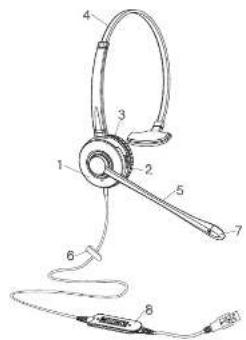
Headset Components
1 Receiver
2 Headband mounting ring
3 Ear cushion
4 Click-stop headband
5 Flexible microphone boom
6 Clothing clip
7 Noise-canceling microphone
8 USB housing
(1)本次股东大会的召开符合《公司法》、《公司章程》的有关规定。
New Feature
• Work with any PC & Softphone(Skype For Business), Microsoft Lync, Microsoft Teams
Connection
- Connect your VT 6909 Series Headset to a free USB port on your PC.
- Make sure that the headset has been selected as the standard audio device in the system control audio settings.
- Check whether you need to adjust these settings to use a headset by reading the operating instructions for your softphone application.
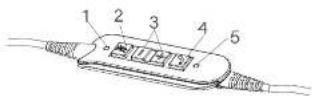
Headset Components
1 Display light for mute microphone
2 Mute microphone
3 Volume control
4 Hook On/Off key
5 Display for Hook Off
Wearing Your Headset

To wear the headband, put the headset on with the receiver(s) covering your ear(s). For monaural headsets, position the stabilizer above your ear. Adjust the length of the headband.

To change wearing ears, rotating the microphone boom over the headband to accommodate the left or right ear.

For fixed boom headsets, position the SoundTube filter close to your mouth,

For flexible boom headsets, position the microphone 1/2' from your lower lip.

Using Your Headset

Connect your VT6909 series Headset to a free USB port on your PC.
Ear Cushion Removal
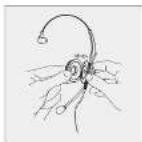
Using both thumbs, remove the ear cushion by gently prying the earplate away from the groove on the receiver,
Maintenance
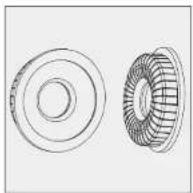
The ear cushions can be removed for cleaning or replacement.
Accessories
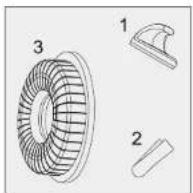
Replacements & enhancements for the VT Series headsets:
1 Headset hook
2 Clothing clip
3 Leatherette ear cushion
Safety
For your own safety, this product should only be used with CE and RoHS approved equipment. Using this headset with non approved equipment can void this product warranty.
FCC Warning
This device complies with Part 15 of the FCC Rules. Operation is subject to the following two conditions
(1) This device may not cause harmful interference, and (2) this device must accept any interference received, including interference that may cause undesired operation.
NOTE is: This equipment has been tested and found to comply with the limits for a Class B digital device, pursuant to part 10 of the FCC Rules. These limits are designed to provide reasonable protection against harmful interference in a residential installation. This equipment generates use and can radiate radio frequency energy and, if not installed and used in accordance with the instructions, may cause harmful interference to radio communications. However, there is no guarantee that interference will not occur in a particular installation. If this equipment does cause harmful interference to radio or television reception, which can be determined by timing the equipment off and on the user is encouraged to try to correct the interference by one or more of the following measures:
- Reorient or relocate the receiving antenna.
- Increase the separation between the equipment and receiver
- Connect the equipment into an outlet on a circuit different from that to which the receiver is connected.
NOTE 2. Any changes or modifications to this unit not expressly approved by the party responsible for compliance could void the user's authority to operate the equipment.
Xiamen VBeT Electronics Co., Ltd
URL: www.vbetglobal.com
Mail: red.zou@vbet.cn
Tel: 0086-592-5778728
Fax:0086-592-5778708
Add: 5th Floor Keji Building#2, No.32 HuojuEast Road, Hull District
Xiamen China
60-02003-A1