Aston FM48614-5CCT - Belysning Kuzco - Gratis brugsanvisning og manual
Find enhedens vejledning gratis Aston FM48614-5CCT Kuzco i PDF-format.


Brugerspørgsmål om Aston FM48614-5CCT Kuzco
0 spørgsmål om dette apparat. Besvar dem du kender, eller stil dit eget.
Stil et nyt spørgsmål om dette apparat
Download vejledningen til din Belysning i PDF-format gratis! Find din vejledning Aston FM48614-5CCT - Kuzco og tag din elektroniske enhed tilbage i hånden. På denne side er alle dokumenter nødvendige for brugen af din enhed offentliggjort. Aston FM48614-5CCT af mærket Kuzco.
BRUGSANVISNING Aston FM48614-5CCT Kuzco
START FROM HERE
- Make sure POWER is COMPLETELY OFF at the fuse box
- Have your fixture installed by a qualified licensed electrician
• Prepare everything in a clear area - Wear gloves at all time during this installation
- Read instructions carefully before you start assembly
- Keep this installation sheet for future reference
Technical Support: 1-855-855-8926
Please Note:
• This Kuzco LED fixture comes with pre-wired LED module(s)
- Unless instructed, Do Not touch any part of the LED module(s) as any unnecessary contact with the module could cause permanent damage
- Use ELV (Electronic Low Voltage) type of dimmer for dimming application
- 120V input
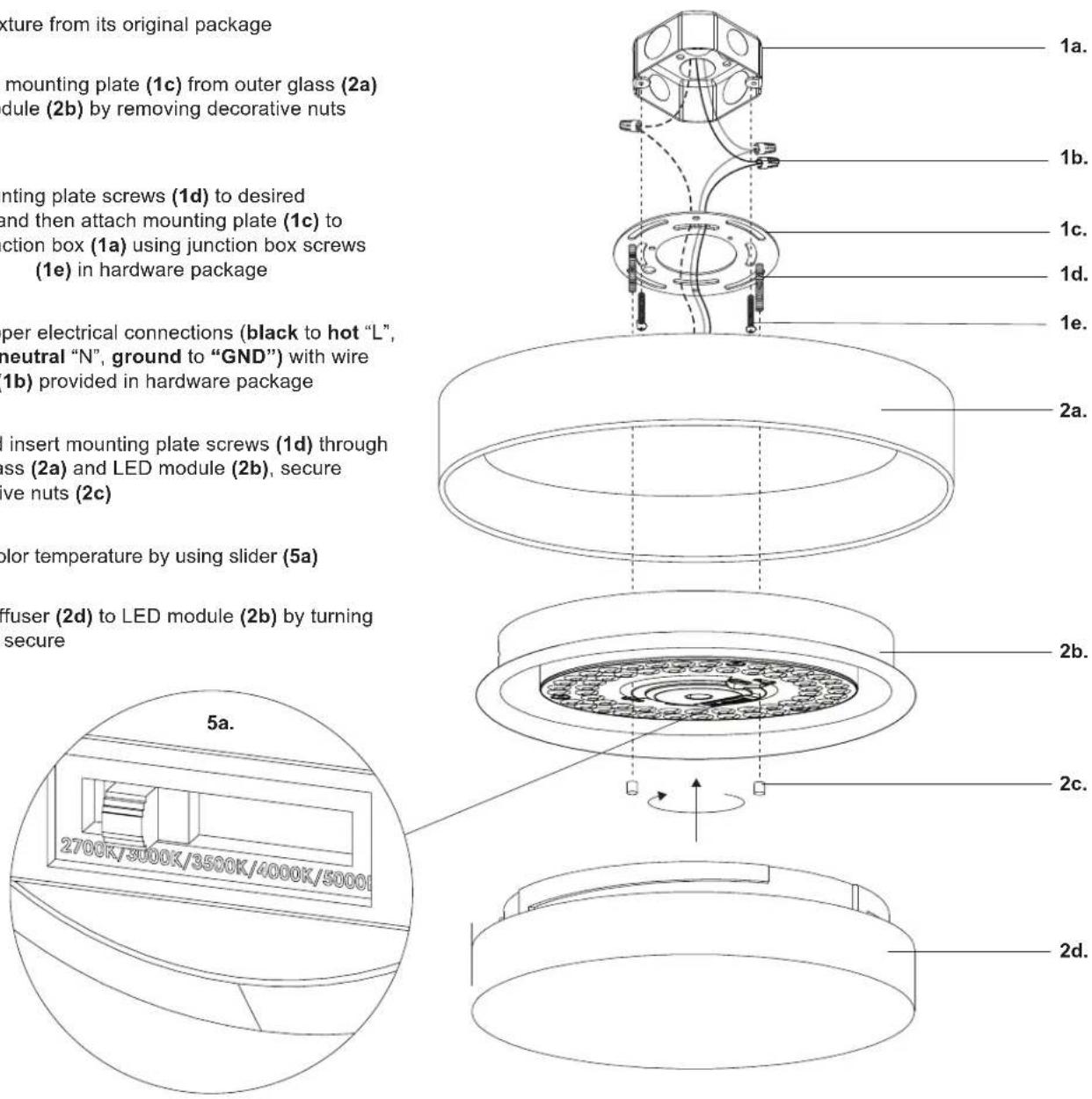
- Remove fixture from its original package
- Separate mounting plate (1c) from outer glass (2a) and LED module (2b) by removing decorative nuts (2c)
- Align mounting plate screws (1d) to desired orientation, and then attach mounting plate (1c) to electrical junction box (1a) using junction box screws provided (1e) in hardware package
-
Make proper electrical connections (black to hot "L", white to neutral "N", ground to "GND") with wire nuts (1b) provided in hardware package
-
Align and insert mounting plate screws (1d) through holes on glass (2a) and LED module (2b), secure with decorative nuts (2c)
-
Choose color temperature by using slider (5a)
-
Attach diffuser (2d) to LED module (2b) by turning clockwise to secure