SK900BT - Dockingstation Havit - Gratis brugsanvisning og manual
Find enhedens vejledning gratis SK900BT Havit i PDF-format.


Pick your language and provide your email: we'll send you a specifically translated version.
Brugerspørgsmål om SK900BT Havit
0 spørgsmål om dette apparat. Besvar dem du kender, eller stil dit eget.
Stil et nyt spørgsmål om dette apparat
Ingen spørgsmål endnu. Vær den første til at stille et.
Download vejledningen til din Dockingstation i PDF-format gratis! Find din vejledning SK900BT - Havit og tag din elektroniske enhed tilbage i hånden. På denne side er alle dokumenter nødvendige for brugen af din enhed offentliggjort. SK900BT af mærket Havit.
BRUGSANVISNING SK900BT Havit
HAVIT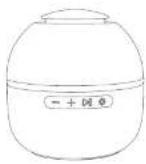 SW300BT bus T-CCOL OR RGBLIGHT when this serverersUSER'S MANUAL SW300BT bus T-CCOL OR RGBLIGHT when this serverersUSER'S MANUAL | Packing list: Product structure:  Speaker #1 Type C ChargingColor #1 Speaker #1 Type C ChargingColor #1 [WHWB]Line manuals 1 Certificate of quality* [WHWB]Line manuals 1 Certificate of quality* |   | Power ON/OFF1. Long press the power button for 2 seconds is turn on. Cyan light is on and then fading.2. Long press the power button or 2 seconds is turn off. RGB light go offWireless connection1. Turn on the speaker Waiting for passing Cyan light is flashing.2. Then active the wireless of your phone and search for "AVIT SK900UT." Click normally to correct Cyan light is on and stop flashing for successful pairing.3. Next time the speaker can reconned the last paired device automatically (keep the wireless of your clothes and speaker turns on)Wireless disconnectionLong press the playpause button for 2 seconds to disconnect wirelessClear wireless pairingLong press the power button for 5 seconds The speaker will clear for records and shut down, replacing battery settings. It can also be used in a certified space.) | Answer incoming callsShort press the playpause button once to answer the current call.1up. Since some portable phone default to snake calls will tell own receiver, please refer to the instructions of your phone and set on your phone.End the callShort press the playpause button once to end the current call.Refuse incoming callsLong press the playpause button to reject when there comes a call.Last number redialDual press the playpause buttonMode switchingDual press the light button to select mode.(KEYF/CK)Light effect switching1. Short press the light button to switch the light effect.(Six light modes in box, last press to |
| Turn off light.)True wireless stereo (TWS) fit for two SK900BT speakersYou can connect two SK900BT speakers as a pair for stronger stereo and surrounding effect.1. Turn on two same mode. Data press the light button enter wireless mode. Keep the wireless of your phone is on.)2. Select one of them as the main unit. Long press the playpause button of the one speaker to enter TWPS pairing. After hearing the loop And they will connect autonomously.3. When TWOS connection is exposed, the main unit's open light's flashing feel, and the secondary unit's cyan light light is on.4. Then active the wireless of your phone are search for "AVIT SK900BT". Click meaning to connect.PC Function1. When the computer is powered on, plug the USB and into the computer (Note: Please use the correct front-core cable for connection).2. Plug the Type-C port at the other end into the TYPE-C charging port of the speaker. At the | Time, the speaker will simultaneously switch to the external audio input mode and you can play the audio on the device. (Note: This mode is only for PC. The mobile phone can only connect to the speaker through Bluetooth mode.)TP card modeImport a TF card, the speaker will recognize and broadcast Mbps format music autonomically.Music playing1. Short press the playpause button to postplay by music.2. Long press the "for PRLV"3. Long press the "for NEXT"4. Short press the "for VOL5. Short press the "for VOL+"Charging1. As product has built-in non-removable and entire flexible battery, please use the provided Type-C charging cable to charge.2. Please choose the charger that is certified by the regular communication. | 3. The battery performance may decrease as repeating charging and using the speaker. It's a new phenomenon for all rechargeable batteries.4. The red power indicator lights is on when charging, and go still when charging is completeSpecification:Wireless Version: VS.3Output Power: SWDeck Power: SWPlaying Time: 6h (medium volume): Charging Time: 2.5hBattery Capacity: 2.7V/1200瓦/hWireless Working Range: 13m (without isolated)Support: DT, TF, TW5, Hands-free calls, PC FunctionPower Input: DC PV/ANProduct Size: 125-129*12 mmCharge Means: Type-CMotorset: PC-Frank. | Warnings:1. Please follow the instruction to operate.2. Please charge the product with input power below DC SW/A to protect the battery.3. Please do not use this product near water; Do not increase this product in any liquid or solach any liquid on this product.4. Please store or use the product in a normal temperature environment.5. Please keep the product from heat source, such as soundors, but so regularly before, shows, or other heat generating instruments. As it is not anti-high temperature.6. Don't pay the parts of the product, such as overweight, hot, LED part and TF card parts.7. In order to protect your hearing and extend the speaker service life. It is not recommended to adjust the volume to the maximum level for a long time.8. Please contact our other sales staff promptly for any damage to the product, regardless of the cause, rather than repairing it yourself. Off course, you will accept that there is no after-sales service. | [2WKZ] |