MB291B= - Radio August - Gratis brugsanvisning og manual
Find enhedens vejledning gratis MB291B= August i PDF-format.


Brugerspørgsmål om MB291B= August
0 spørgsmål om dette apparat. Besvar dem du kender, eller stil dit eget.
Stil et nyt spørgsmål om dette apparat
Download vejledningen til din Radio i PDF-format gratis! Find din vejledning MB291B= - August og tag din elektroniske enhed tilbage i hånden. På denne side er alle dokumenter nødvendige for brugen af din enhed offentliggjort. MB291B= af mærket August.
BRUGSANVISNING MB291B= August
August International Ltd
Rawmec Business Park
Hoddesdon EN11 0EE
United Kingdom
Tel: +44(0) 845 250 0586
EU Distributor:
Daffodil Germany GmbH
Bayernstr. 10
D-30855 Langenhagen
Germany
Tel:+49(0)511 97812978
www.augustint.com
August®
User Manual
MB291
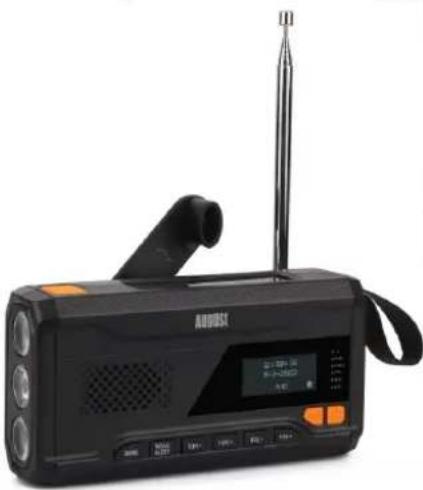
natural_image
Black portable electronic device with antenna, digital display, and control buttons (no visible text or symbols)EN Hand Crank AM/FM/WB Outdoor Radio
FR Radio AM/ FM/ WB à Dynamo Extérieure
ES Radio AM/ FM/ WB con dinamo exterior
User Manual
Thank you for purchasing the August MB291 Hand Crank AM/FM/WB Outdoor Radio. This user manual is designed to familiarize you with all the features of this device. Please take the time to read this user manual carefully, even if you are already familiar with a similar product.
Safety
To ensure the safety of you and others, please read the Safety Instructions before using this device. Please do not disassemble the product, it can be unsafe and will invalidate the manufacturer's warranty.
Disposal
Please ensure the product and accessories are disposed of in compliance with the WEEE (Waste Electrical and Electronic Equipment) Directive and any other regulations applicable to your country. Always check with the environment agency and any other relevant authorities for current disposal regulations.
Declaration of Conformity
The Declaration of Conformity can be found on our website at http://augustint.com/en/declaration/
Customer Service
You can contact us by phone on: +44 (0)845 250 0586 or by email at: service@augustint.com should you require further technical support or customer service.
1. Safety Instructions
1) Do not use this device near water.
2) Clean only with a dry cloth. Switch this product off before cleaning.
3) Do not install near any heat sources such as stoves or other device that produce heat.
4) Only use the accessories supplied by the manufacturer.
5) Do not open the device, as this will invalidate the warrant.
2. Main Features
■ AM/ FM/ WB Enable Radio with Automatic Scanning
■ USB-C/ Hand Crank/ Solar Rechargeable Battery
■ LCD Display with Power Bank, SOS Alarm Function
■ Powerful High and Low Beam Torch Flashlight
3. Box Contents
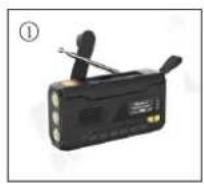
MB291
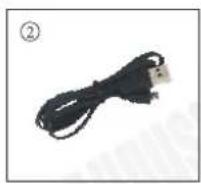
Type-C cable
User Manual
4. Part Names and Functions
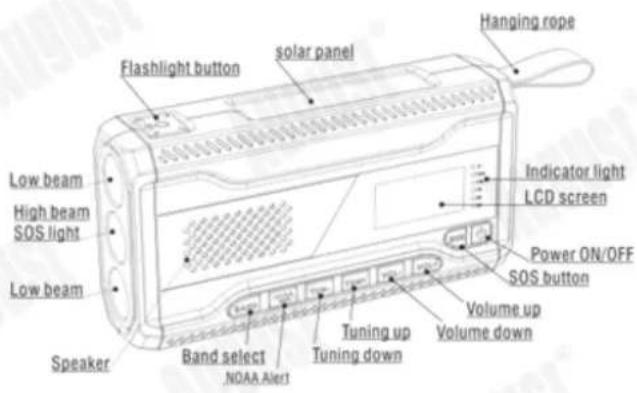
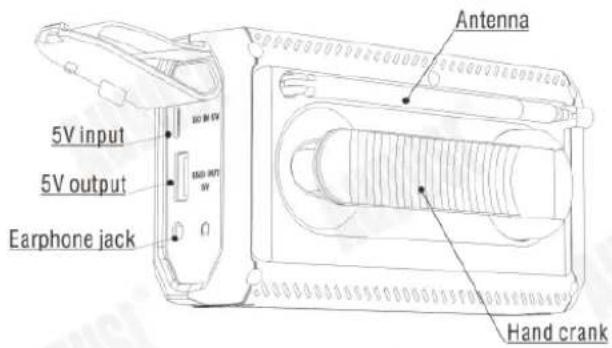
5. Operation
5.1 Power on
- Press and hold the button < Ⓞ> for 3 seconds to turn on the radio and enter standby mode, the screen will display the date and clock.
- Under standby mode, press the button < ⏻ > again to turn on the radio.
5.2 Power off
- Press the button < ⓞ > to enter standby mode, the screen will display the date and clock.
- Press and hold the button < ⏻> for 3 seconds to turn off the radio.
5.3 FM/AM/WB Radio
- Press the band selection button
to select FM/AM/WB. - After selecting band FM/AM/WB, press
to adjust frequency. you can press and hold to scan for station automatically, the scan will stop when a station is located and the green signal strength indicator light will come on. Please extend the antenna and adjust its direction to enhance reception. - Press the volume button
to adjust volume up or down. - In AM mode, press and hold button < BAND > 3 seconds to switch 9KHz (EU) / 10KHz (USA) step, then press < ⏻ > restart the radio.
5.4 NOAA WB and alert
- When the radio is used in the USA, the NOAA weather broadcasting (WB) and Alert functions can work.
- Press the button
to change to WB mode, and press to select your local weather broadcasting. - In any radio BAND, press and hold < NOAA alert > for 3 seconds to enter Weather Alert standby mode. The radio will turn off and 'ALERT' flash on the display when there is an alert message from the National Weather Service. The radio will turn on automatically to let you know an emergency broadcast was received.
- Press and hold < NOAA alert > again to enter the WB band.
Note: Concerning the NOAA Weather Band, you need to identify which channel/frequency receives your local weather band report. When you change locations either to another city or state, you may need to choose a different band to get the local report in that location.
5.5 Indicator light
- Up to down: charging indicator, Signal indicator, Battery power indicator, 100%, 75%, 50%, 25%.
- Signal Indicator: The
light indicates the strength of the signal received. The brighter the light the stronger the signal. - Charging indicator: the < ♦ > charging indicator light will flash red when the crank generator charging the battery inside. (The charging indicator light will change with the charging current strength).
- Battery power indicator: the light will flash blue when charging or discharging. When the battery level exceeds 25%, the first blue light (25% position) changes from a flashing blue light to a constant blue light, and then the second light (50% position) will flash blue light, and so on until the battery is fully charged. After MB291 is fully charged, disconnect the charging cable, the LED light will turn blue on 30s, then off.
5.6 Torch
The torch has one high beam and two low beam flashlights, during the radio is on, press < 🔗 > button on the top once to turn the high beam light on, press again to turn the low beam light on, and once more press to turn all lights on. To turn off the lights, press one more time.
Note: To turn the torch on when the radio is OFF, press and hold the < ⚙> button for 3 seconds to activate the light.
5.7 SOS Alarm
If you press and hold the SOS button, the speaker will remain sounding the alarm and at the same time, the torch will flash the SOS Morse code signal.
5.8 Charge external device
Insert the USB cable into the USB port on the side of the radio and connect to the others devices. The radio will go into charging mode and help to charge your device.
Note:
- This feature is only for charging USB devices during an emergency or outdoors, don't use it as a normal power bank.
- When the radio is fully charged, it can support a 2A charger for the most device.
5.9 Charge the radio
Warning: Before charging the radio, make sure you have read all the following instructions carefully.
5.9.1 By USB Power Source
- To charge the radio, insert the supplied USB cable into the USB power source. Plug the type-C connector into the input port on the side of the radio.
- When the radio is fully charged (takes 2-3 hours), the Indicator light will be on blue for 30s and then off.
Note: It's advised to turn off the radio when the device is being charged.
5.9.2 Hand crank dynamo
The radio can also be charged by turning the handle on the back to activate the dynamo.
- The handle can be turned either clockwise or anticlockwise. The <⚡> charging indicator light will light up when the handle is being turned.
- When using it for the first time, keep the handle rotating at 130-150 PPM for 3-5 minutes. Two minutes of rotation will give you 10 minutes of radio play or 30 minutes of light.
5.9.3 Solar powered
The radio can also be charged by the solar panel on top. Try to place the device in a sunny place to allow it to charge as efficiently as possible.
The charging effect depends on the strength of the sunlight, the stronger the light, the better the result.
Note: It is difficult to fully charge a device with an empty battery with solar panels, which are mainly used for maintaining the battery.
Safety Instruction:
- When the radio is used for the first time or left unused for more than 60 days, place it in strong sunlight (>86000 LUX) for 30 minutes or hand-crank it for one minute to activate the battery.
- When using the radio, please do not over-discharge the battery as this may reduce the life of the battery and even damage the rechargeable battery.
- When cleaning the surface of the radio, use a soft, damp cloth and do not use alcohol or other liquids containing corrosive ingredients to clean the product.
-
The device is not waterproof and is only resistant to fog or raindrops. Do not immerse in water.
-
Specifications
| Radio band | FM: 76-108MHzAM: 520-1710KHz (step 10K)AM: 522-1629KHz (step 9K) |
| WB band | 162.400-162.550MHz |
| Speaker | Max 3w |
| Display | LCD screen |
| Battery | 4500mAh |
| Battery life | Up to 50h (FM)Up to 35h (DAB) |
| Input | 5V 2A |
| Output | 5V 2A (max) |
| Working | 2.7-4.2V |
| Flashlight | 3W |
7. Warranty
This product is guaranteed for twelve months from the date of the original purchase. In the unlikely event of any defect arising due to faulty materials or workmanship, the unit will be either replaced or repaired free of charge(where possible) during this period. An alternative product will be offered in case the product is no longer available or repairable.
This warranty is subject to the following conditions:
- The warranty is only valid within the country where the product is purchased.
- The product must be correctly installed and operated in accordance to the instructions given in this user manual.
- The product must be used solely for domestic purposes.
- The warranty only covers the main unit, and does not cover the accessories.
- The warranty does not cover the damage caused by misuse, negligence, accident and natural disaster.
- The warranty will be rendered invalid if the product is resold or has been damaged by inexpert repairs. The manufactures disclaim any liability for incidental or consequential damages.
- Please consult our customer adviser before returning any product; we are not responsible for any unexpected product returns.
- Any faulty product must be kept and returned in the original packaging with all the accessories and the original copy of the purchase receipt.
The warranty is in addition to, and does not diminish, your statutory or legal rights.
Customer Service:
Telephone: +44(0)845 250 0586
Email: service@augustint.com
This product is in compliance with the essential requirements and other relevant provisions of Directive 2014/53/EU. The Declaration of conformity may be consulted online at http://www.augustint.com/en/declaration
Industry Canada Statement
This device complies with Industry Canada license-exempt RSS standard(s). Operation is subject to the following two conditions: (1) this device may not cause interference, and (2) this device must accept interference, including interference that may cause undesired operation of the device.
Note: This equipment has been tested and found to comply with the limits for a Class B digital device, pursuant to part 15 of the FCC Rules. These limits are designed to provide reasonable protection against harmful interference in a residential installation. This equipment generates uses and can radiate radio frequency energy and, if not installed and used in accordance with the instructions, may cause harmful interference to radio communications. However, there is no guarantee that interference will not occur in a particular installation. If this equipment does cause harmful interference to radio or television reception, which can be determined by turning the equipment off and on, the user is encouraged to try to correct the interference by one or more of the following measures:
- Reorient or relocate the receiving antenna.
- Increase the separation between the equipment and receiver.
- Connect the equipment into an outlet on a circuit different from that to which the receiver is connected.
- Consult the dealer or an experienced radio/TV technician for help
No Unauthorized Modifications: Do not make any changes or modifications to this product without the prior express written approval of August International Ltd. Any changes or modifications made without express written approval could void the user's authority to operate this product.
For details of further relevant technical standards, please contact us at the address above.
