Detroit 1000X DSP - Højttaler Audibax - Gratis brugsanvisning og manual
Find enhedens vejledning gratis Detroit 1000X DSP Audibax i PDF-format.


Brugerspørgsmål om Detroit 1000X DSP Audibax
0 spørgsmål om dette apparat. Besvar dem du kender, eller stil dit eget.
Stil et nyt spørgsmål om dette apparat
Download vejledningen til din Højttaler i PDF-format gratis! Find din vejledning Detroit 1000X DSP - Audibax og tag din elektroniske enhed tilbage i hånden. På denne side er alle dokumenter nødvendige for brugen af din enhed offentliggjort. Detroit 1000X DSP af mærket Audibax.
BRUGSANVISNING Detroit 1000X DSP Audibax

Detroit 1000X DSP
USER'S MANUAL
Specifications
| Model No. | Detroit 1000X DSP |
| Type | 1pc column + 1pc 12" subwoofer |
| Frequency Response [-6dB] | 45 Hz - 20 kHz |
| Max. SPL (1m, free space) | 125 dB |
| Power Output (RMS) | 400W+200W |
| Impedance | 4Ohms |
| Transducer HF | 8pcs * 3' driver, 20mm voice coil |
| Transducer LF | 12" subwoofer, 2.5" voice coil |
| Amplifier | Class-D amplifier |
| DSP Module | DSP-100, 96 kHz, 24-bil DSP processor with presel modes; Monitor, DJ, Live |
| Protection | Short circuit overhealing, over-current |
| Controls | Power On / Off switch, main level, DSP modes switch |
| Indicators | Power, signal |
| Audio Input / Output | 3" Combo XLR/Jack input, 1" L/R Jack input, 1" Aux input, 1" XLR output |
| Power Input / Output | Powercon |
| Power Supply | 230V 50/60 Hz |
| Enclosure | ABS/PP Plastic |
| Dispersion (H * V) | 120° * 16° |

Detroit 1000X DSP
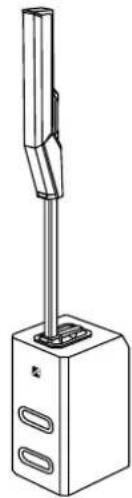
natural_image
Line drawing of a vertical cylindrical device mounted on a base with two side slots, no text or symbols present.Please read the manual before using the product

Detroit 1000X DSP
Please read and keep all safety and use instructions. Important Safety Instructions Refer to the user manual for more information about your Detroit 1000X DSP
- Read these instructions.
- Keep these instructions.
- Heed all warnings.
- Follow all instructions.
- Do not use this apparatus near water.
- Clean only with a dry cloth.
- Do not block any ventilation openings. Install in accordance with the manufacturer's instructions.
- Do not install near any heat sources such as radiators, heat registers, stoves, or other apparatus (including amplifiers) that produces heat.
- Do not defeat the safety purpose of the polarized or grounding-type plug. A polarized plug has two blades with one wider than the other. A grounding-type plug has two blades and a third grounding prong. The wider blade or third prong is provided for your safety. If the provided plug does not fit in your outlet, consult an electrician for replacement of the obsolete outlet.
- Protect the power cord from being walked on or pinched, particularly at plugs, convenience receptacles, and the point where it exits from the apparatus.
- Only use attachments/accessories specified by the manufacturer.

- Use only with the cart, stand, tripod, bracket, or table specified by the manufacturer or sold with the apparatus. When a car is used, use caution
When moving the cart/apparatus combination to avoid injury from tip-over, 13. Unplug this apparatus during lightning storms or when unused for long periods of time.
- Refer all servicing to qualified personnel. Servicing is required when the apparatus has been damaged in any way such as power-supply cord or plug is damaged, liquid has been spilled or objects have fallen into the apparatus, the apparatus has been exposed to rain or moisture, does not operate normally, or has been dropped.
WARNINGS/CAUTIONS:

This symbol on the product means there is uninsulated, dangerous voltage within the product enclosure that may present a risk of electrical shock.

This symbol on the product means there are important operating and maintenance instructions in this guide.

Contains small parts which may be a choking hazard. Not suitable for children under age 3.

This product contains magnetic material. Consult your physician on whether this might affect your implantable medical device.
System Setup
Connections and Controls
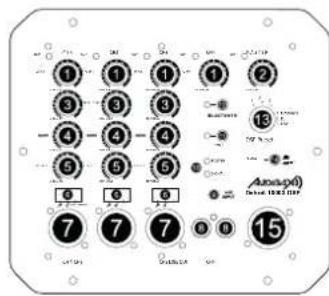
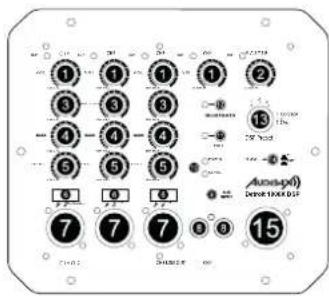
1. CH1/CH2/CH3/CH4 VOL:
Four Channels Volume Control.
- Master VOL:
Master Volume Control.
- Treble VOL:
Treble Volume Control.
- Bass VOL:
Bass Volume Control.
- Effect VOL:
Effect Volume Control.
- Mode Switch:
Swipe to switch modes: Microphone, Guitar,
Line.
7. CH1/CH2/CH3 XLR Input:
Balanced XLR input for getting signals from
mixers or preamplifiers
8. CH4 L/R Jack Input:
Balanced L / R Jack input for getting signals
from mixers or preamplifiers.
9. CH4 Aux Input:
Balanced Aux input for getting signals from
mixers or preamplifiers.
- Indicator Light:
Power / Signal
11. Bluetooth Button:
Press once to connect a Bluetooth device or
disconnect a paired Bluetooth device.
12. TWS Button:
Press once to connect a TWS device or
disconnect a paired TWS device.
13. DSP Preset:
There are three preset mode: Monitor / DJ /
Live.
14. Phase Switch:
Allows user to reverse phase 180°
- Line Out:
Balanced XLR connectors connected in parallel
to the inputs to connect subwoofer.
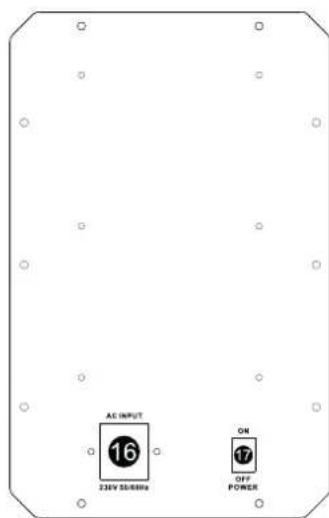
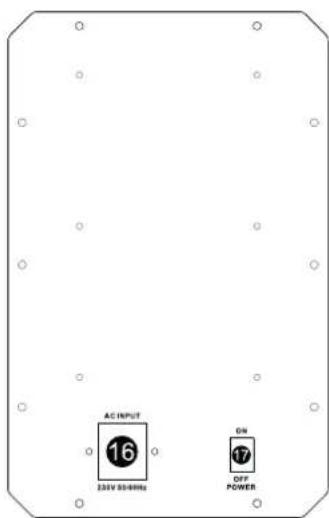
16. AC Input:
Please Use AC input cable from the original
manufacturer only.
17. Power Switch:
Tums unit on or off.

Detroit 1000X DSP
MANUAL DE USUARIO
Especificaciones
| N° de Modelo. | Detroit 1000X DSP |
| Tipo | 1 columna + 1 subwoofer de 12" |
| Respuesta de frecuencia (-6dB) | 45 Hz - 20 kHz |
| Máx. SPL (1m. espacio libre) | 125dB |
| Potencia de salida (RMS) | 400W+200W |
| Impedancia | 4 ommios |
| Transductor de alta frecuencia | Controlador de 8 piezas * 3", bobina de voz de 20 mm |
| Transductor LF | Subwoofer de 12", bobina móvil de 2,5" |
| Amplificador | Amplificador de clase D |
| Módulo DSP | DSP-100. 96 kHz, procesador DSP de 24 bits con modos preestablecidos: Monitor, DJ, Live |
| Proteccion | Sobrecalentamiento de cortocircuito, sobrecorriente |
| Control S | Interruptor de encendido/apagado, nivel principal, interruptor de modos DSP |
| Indicadores | Potencia, señal |
| Entrada/salida de audio | 3 entradas combinados XLR/Jack, 1 entrada L/R Jack, 1 entrada auxiliar, 1 salida XLR. |
| Entrada/salida de energía | Powercon |
| Fuente de alimentación | 230V 50/60Hz |
| Recinto | Plástico ABS/PP |
| Dispersión (H * V) | 120°* 16° |

Detroit 1000X DSP
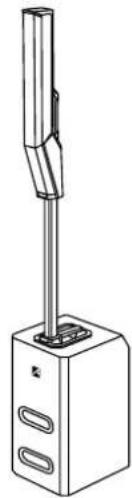
natural_image
Line drawing of a vertical cylindrical device mounted on a base with two side slots, no text or symbols present.Por favor, lea el manual antes de usar el producto

Detroit 1000X DSP
MANUAL DE USUARIO
Lea y guarde todas las instrucciones de seguridad y uso. Instrucciones de seguridad importantes
Consulte el manual del usuario para obtener más información sobre su Detroit 1000X DSP
-
Lea estas instrucciones.
-
Guarde estas instrucciones.
-
Preste atención a todas las advertencias.
-
Siga todas las instrucciones.
-
No utilice este aparato cerca del agua.
-
Limpie solo con un paño seco.
-
No bloquee ninguna abertura de ventilación. Haga la instalación conforme a las instrucciones del fabricante.
-
No lo instale cerca de fuentes de calor, como radiadores, rejillas de calefacción, estufas u otros aparatos (incluidos los amplificadores) que produzcan calor.
-
Na anule el propósito de seguridad del enchufe polarizado o con conexión a tierra. Un enchufe polarizado tiene dos clavijas, una más ancha que la otra. Un enchufe con conexión a tierra tiene dos clavijas y una tercera clavija de conexión a tierra. La hoja más ancha o la tercera punta se proporciona para su seguridad. Si el enchufe provisto no encaja en su tomacorriente, consulte a un electricista para reemplazar el tomacorriente obsoleto.
-
Proteja el cable de alimentación para que no se pise ni se pellizque, especialmente en los enchufes, receptáculos de conveniencia y el punto donde sale del aparato.
-
Utilice únicamente aditamentos/accesarios especificados por el fabricante.

-
Utilicelo únicamente con el carro, soporte, tripode, abrazadera o mesa especificados por el fabricante o vendidos con el aparato. Cuancio se utiliza un carro, tenga cuidado al mover la combinación carro/aparato para evitar lesiones por vuelco.
-
Desenchufe este aparato durante tormentas eléctricos o cuando no se utilice durante largos períodos de tiempo.
-
Encargue todo el servicio a personal cualificado. El servicio es necesario cuando el aparato se ha dañado de alguna manera, como el cable de alimentación o el enchufe, se ha derramado líquido o han caído objetos dentro del aparato, el aparato ha estado expuesto a la lluvia o la humedad, no funciona con normalidad, o se ha caído.
ADVERTENCIAS/PRECAUCIONES:

Este símbalo en el producto significa que hay voltaje peligroso no cislado dentro de la carcasa del producto que pueda presentar un riesgo de descarga eléctrica.

Este símbolo en el producto significa que hay instrucciones importantes de operación y mantenimiento en esta guía.

Contiene piezas pequeñas que pueden ser un peligro de asfixia. No apto para niños menores de 3 años.

Este producto contiene material magnético. Consulte a su médico si esto podría afectar su dispositivo médico implantable.
Configuración del sistema
Conexiones y Controles
1. VOLUMEN DE CH1/CH2/CH3/CH4:
Control de volumen de cuatro canales.
- MASTER VOL:
Control de volumen maestro.
- TREBLE VOL:
Control de volumen de agudos.
- BASS VOL:
Control de volumen de graves.
- EFFECT VOL:
Control de volumen de efectos.
- Cambio de modo:
Desliza para cambiar de modo: Micrófono,
Guitarra, Línea.
- Entrada XLR CH1/CH2/CH3:
Entrada XLR balanceada para obtener señales
de mezcladores o preamplificadores.
- Entrada de conector CH4 L/R:
Entrada balanceado L/R Jack para obtener
señoles de mezcladores o preamplificadores.
- Entrada auxiliar CH4:
Entrada auxiliar balanceada para obtener señales de mezcladores o preamplificadores.
- Luz indicadora:
Potencia / Señal.
- Botón Bluetooth:
Presione una vez para conectar un dispositivo
Bluetooth o desconectar un dispositivo
Bluetooth emparejado.
- Botón TWS:
Presione una vez para conectar un dispositivo
TWS o desconectar un dispositivo TWS
emparejado.
- Preajuste DSP:
Hay tres modos preestablecidos: Monitor / DJ /
Live.
- Interruptor PHASE:
Permite al usuario invertir la fase 180°
- LINE OUT:
Coneclores XLR balanceados conectados en
paralelo a las entradas para conectar
subwoofer.
- AC INPUT
Utilice únicamente cable de entrada de CA del
fabricante original.
- Interruptor POWER:
Enciende o apaga la unidad.