HT270 - Termostat GENERAL Life - Gratis brugsanvisning og manual
Find enhedens vejledning gratis HT270 GENERAL Life i PDF-format.


Brugerspørgsmål om HT270 GENERAL Life
0 spørgsmål om dette apparat. Besvar dem du kender, eller stil dit eget.
Stil et nyt spørgsmål om dette apparat
Download vejledningen til din Termostat i PDF-format gratis! Find din vejledning HT270 - GENERAL Life og tag din elektroniske enhed tilbage i hånden. På denne side er alle dokumenter nødvendige for brugen af din enhed offentliggjort. HT270 af mærket GENERAL Life.
BRUGSANVISNING HT270 GENERAL Life
GENERAL
\$MART ROOM THERMOSTAT
generallife.com.tr

SENNA 270 SMART USER MANUAL
WHAT IS A SMART ROOM THERMOSTAT?
A smart room thermostat is a device that allows you to control your hearing
equipment via APP with the internet even when you are not at home.
HOW DOES BENNA 270 SMART WORK?
SENNA 270 SMART is a smart wireless room thermostat. You can control it with the mobile application after you pair your room thermostat with the receiver, and complete the installation of the smart receiver.
WHAT ARE THE ADVANTAGES OF SENNA 270 SMART?
- You can control your home's temperature via its mobile scuffection, no matter
where you are in the world.
- Van can easily create daily and weekly school bus via its mobile application.
- You can place the room thermostat anywhere in your home, thanks to its use with batteries
- It ensures that your living space stays at the desired temperature at any time. In this way, you can save up to 30% on your bills by preventing your heating unit from working unnecessarily.
RULES THAT NEED TO BE OBSERVED FOR SAFETY
- We sure to read the user manual before using the device and its equipment.
2- Opening, disassembly, or use of plastic parts of the product and equipment other than the intended purpose are out of warranty.
3- Please make sure that the sockets to which you connect your cl
equipment are at the recommended voltage value in the next manual.
- Keep away and protect your product and its equipment from all kinds of external substances such as liquid, dust, heat, etc.
5 Do not expose the device cables to any jamming and pressure. Take care to
correct the devices' energy connection in the seconds you can always reach
-
Turn off the electrical power to prevent damage to your device and apparatus in case of lightning and thunderstorms.
-
Turn off the electrical power when your device is not used for a long time
- Your devices and equipment should be used by paying attention to the matters stated in the case manual. In case of damage and malfunctions, arising from improper use (contact with liquid, falling to the ground, etc.) definitely ask for the installer's help.
- Call our service for maintenance and repair of SLNNA 270 SMART and its equipment. Maintenance and repair of the device and equipment should be carried out only by the technical service of ISIPARK A.G. and its authorized services, spare parts, and accessories specified by the company should be used.
SENNA 270 SMART and EQUIPMENT
SENNA 270 SMART
Room Thermostat
Holder Could already. Receive
Room Thermostat
Battery
- 2017年1月1日
1
4.2
(
□
•
18
||⊗|
1
?
1
m = 311
1
-
- -
m = 311
TECHNICAL DATA
Всоки Thermostat
| Dimensions (HV/L/W) | 85mm / 125mm / 20mm |
| Operating Current | 3V DC [2 x AAA Alkaline Battery] |
| Temperature Measurement Accuracy | 0.1°C |
| Operating Sensitivity | (2.0°C) - (42.0°C) |
| Operating Temperature Range | (5°C) - (90°C) |
| Battery Life | 1 Year (2 x AAA) |
| Operating Temperature | (10°C) - (150°C) |
| Storage Temperature | (20°C) - (160°C) |
Расход
| Dimensions (HP, W) | 90mm / 90mm / 25mm |
| Operating Current | 230V AC |
| Relay NO Switching Current | 7A (240VAC - Resistive Load)10A (120VAC - Resistive Load) |
| Storage Temperature | (-20°C) (+80°C) |
ROOM THERMOSTAT
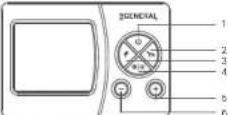
| 1 | ON/OFF and Setting Button |
| 2 | Economy Mode |
| 3 | Comfort Mode |
| 4 | Heating/Cooling Modes (Press and hold for 5 seconds.) |
| 5 | Temperature Adjustment (Increasing) |
| 6 | Temperature Adjustment (Decreasing) |
Product Display Layout
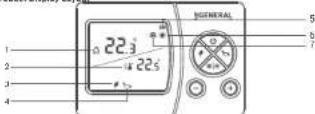
| 1 | Room Temperature | |
| 2 | 4 | Salt Temperature |
| 3 | # | Economy Mode |
| 4 | Comfort Mode | |
| 5 | 8 | Battery Indicator |
| 6 | # | Heating IndicatorIf the Heating indicator is blinking, the heating unit is workingIf the Heating indicator is steady, the cooling unit is not working |
| 7 | # | Cooling IndicatorIf the Cooling indicator is blinking, the cooling unit is working.If the Cooling Indicator is steady, the cooling unit is not working |
Note: During active use of the room thermostat, the symbols indicated by 2, 3, 4, 6 and 7 will not appear on the screen.
RECEIVER
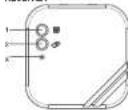
1-Manual Operation Button:
Declarator the receiver and allows users to
manually use the heating/cooling unit.
2-WI-PI Pairing Button:
Stakes the receiver reads for smart installation.
3-Receiver LED Light
4-Receiver Power Cable Input
5-Hasting/Cooling Unit Connection Cable Input
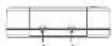
RECEIVER LED DESCRIPTIONS
| Binning Red | The receiver did not get any signal from the hoating/cooling unit for 22 minutes or longer and the heating/cooling unit has shot down. |
| Cast Working Red | Waiting for a piping pipe from the room the motor. |
| Steady Red | The receiver and the rotor the motor was been paired, short installation completed. |
| Blinding Green | The receiver is in Bluetooth's searching mode. |
| Steady Green | Smart installation has been cancelled. The heating/cooling unit is not working. |
| Steady Turquoise | The heating/cooling unit is working. |
| 3 Short Shoe Blinding | The wheel heating/cooling unit and signal has reached the receiver. |
| 3 Short Shoe Blinding | Occurs the heating/cooling unit at signal has reached the receiver. |
(1) 2017年3月3日
ROOM THERMOSTAT PLACEMENT
The room thermostat needs to be placed in the room which is used most frequently. For instance, the living room or lounge. Placing the room thermostat in a spot that has an circulation like the entrance of a room or the side of the window should be avoided. Also anywhere close to heating/cooling units such as a radiator, steve, and spots that get direct sun lights would not be suitable. The room thermostat needs to be located above the floor 150 cm in height. Few kinds may be made in find the most convenient spot.
BATTERY PLACEMENT
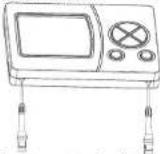
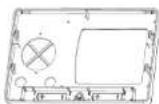
Press the screwdriver forward from the space at the bottom of the room thermostat, bond the tabs and separate the front power. Insert 2 new AAA alkaline batteries in the battery housing with the correct battery direction. Replace both batteries at the same time. Align the front part of your room thermostat with the corresponding slot on the back, and then push gently until the thermostat snaps into place. Low Battery Warning: When the "Lb" icon appears on the screen, it means "low battery warning". It is recommended to replace the battery when this warning appears.
Warning: When the product is not used for a long period (more than 15 days), remove the batteries. Otherwise, malfunctions that may occur would be out of warranty. Please throw your closed batteries into the waste bin for batteries.
RECOVER PLACEMENT
The important things to note for the Receiver placement are avoiding physical contact between the receiver and the heating/cooling unit, and protecting it against materials such as liquid dust, etc.
The devices should be placed to minimize the damage to the received and transmitted signals by paying attention to the following points:
• The devices should not be mounted on metal surfaces.
- The devices should not be installed close to electrical cables and electronic equipment such as computers and televisions units.
• The devices should not be installed near large metal structures or other building
materials using fine metal meshes such as special glass or special concrete.
• Distance between the room thermostat and the Receiver should not exceed 20 meters or 2 floors
- The receiver must be installed at least 60 cm away from the heating/cooling unit.
RECEIVER INSTALLATION
- First, shut down your heating/cooling unit and your heating/cooling unit's power source with all electrical current (fuse, socket, etc.)
- As shown in the connection diagram, connect one end of the hearing/coating unit connection cable to the COM and the other to the NO input of the receiver.
- Connect the other ends of the cable which you connected to the receiver to the room the maximal connection terminal as shown in your heating/moving unit's user manual.
- You must first connect the receiver power cable to the receiver and then to the fuse to which the heating/cooling unit is connected.
- After completing the cable connection process, first turn on your fuse and then your heating/coding unit.
- Finish the installation of the room thermostat to pair the receiver with the room thermostat.
RECEIVER WIRING DIAGRAM
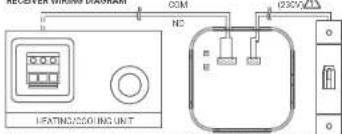
Warning! Operations within the heating/cooling unit or the electrical installation must be carried out by professionally qualified persons.
PAIRING THE ROOM THERMOSTAT WITH THE RECEIVER
To pick the main thermostat with the receiver press the 'Manual Operation Button' and 'Wi-Fi Paring Button' together at the same time and see the receiver's fast drinking red LED.
- Press the "ON/CFT" button for 3 seconds while your device is turned off.
- Press the "ON/OFF" button until" Ad: "the pairing menu appears.
- Press your room thermostat's "Up" or "Down" button while the LED is fast blinking red.
- If the pairing is successful, the heat and flashing LED on the receiver will be steady. - The receiver and room thermost has been paired with each other
SMART RECEIVER SETUP
- For smart receiver setup, download the Smart Life application from App Store or Google Play or scan the QR code below with your smartphone. In this way, you will be able to download the Smart Life mobile application from App Store or Google Play to your smartphone. (You may be required to have a QR code reader application depending on the brand and model of your phone, for this process.)
Click to download.

- Complete the user registration process by opening the mobile application that you downloaded.
- Open the Bluetooth from your mobile phone's settings.
- After you completed the user registration process, press the "+" button in the top-right corner of the main screen of the application. Press the receiver's Wi-Fi pairing button for 5 seconds.
+ The LED on the receiver will start to blink green.
- Setup will begin with Bluetooth in the application. When the device is found, press the "Add" button
- Press the "+" button near the Wi Modem device and press the "Next" button after making sure that you entered the correct Wi-Fi information.
- Wait until the setup process is completed. When you are the green approval symbol on the W Modern press the "Done" button in the top-right corner.
ROOM THERMOSTAT TEMPERATURE CALIBRATION
Temperature sensors which are used in room thermostats are highly sensitive
You may need to celebrate your main thermometer if you would like to get the some temperature values as other thermometers in your living space.
+ While your device is turned off, press the "ON/OFF" button for 3 seconds
- Press the "ON/OFF" button until the "[HL]" means appears. To see the desired temperature, set the temperature difference by pressing the "Temperature
Adjustment Buttons. This value can be arranged between "B" and "+B". To save the settings and exit press the "ON/OFF" button until the device turns off.
Note: Recommended temperature calibration is ^ O C/ ^ C.
ROOM THERMOSTAT HYSTERESIS POSITIVE MENU
The hysteresis positive factory setting of your room thermostat is 0.5°C. This value may be adjusted between 0.1°C and 2.0°C. While the hysteresis positive value is 0.5°C, if the room temperature goes above 0.5°C of the set temperature, your room thermostat will send a signal to your heating/cooling unit. For instance, when you set your room thermostat in 22.0°C, if the room temperature goes above 22.5°C, on the heating mode your heating unit will stop working; on the cooling mode your cooling unit will start working. To characterize the hysteresis positive unit
- 'While your device is turned off, press and hold the ON/CNT button for 3 seconds. - 'Now the ON/CNT button will be the "H" * more appen
- Press the "Open" button, which is not possible. - Adjust the operating sensitivity by using the "Up" and "Down" buttons in the N5 P®
• To save the setting and sell price the ON/OFF button until the device turns off. • Charges have been saved. Your room thermostat will be working with set operating sensitivity when you cover your device.
ROOM THERMOSTAT HYSTERESIS NEGATIVE MENU
The hysteresis negative factory selling of your room thermostat is 0.5°C. This value may be adjusted between -0.1°C and +2.0°C. While the hysteresis negative value is -0.5°C, if the room temperature goes below 0.5°C of the set temperature, your room thermostat will send a signal to your heating/cooling unit. For instance, when you eat your room thermostat to 22°C, if the room temperature goes below 21.6°C, on the heating mode your heating unit will start working on the cooling mode your cooling unit will stop working. To change the hysteresis negative retail
- "While your device is turned off, press and hold the "ON/OFF" button for 3 seconds. - Press the "ON/OFF" button until this page. "menu appears
- Adjust the operating sensitivity by using the 'Up' and 'Down' buttons in the MS n * heatwave negative menu.
- To save the settings and check, please the ON/OFF button until the device turns off. - Changes have been saved. Your room thermostat will be working with an operating sensitivity when you open your device.
OPEN WINDOW DETECTION FEATURE
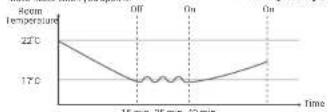
Your room thermostat measures sudden temperature changes in your house with its open window detection feature and prevents unnecessary energy consumption by turning off the heating/cooling unit.
The room thermostat is switched to heating mode while the detection is active. If a decrease in room temperature of more than 5 degrees is detected within 15 minutes, the room thermostat switches to the alarm state and turns off the heating system.
- The heating unit remains switched off for 10 minutes unless around intervention is performed on the room thermostat. A warning appears on the mobile application that an open window has been detected. The heating unit is activated at the end of 10 minutes, if the room thermostat detects that the window is closed, the heating unit continues to work if the temperature continues to drop, the heating unit remains off again.
If the room Thermostat is operated in cooling mode, a sudden temperature rise is taken into account.
This feature can be enabled/disabled from the room thermostat settings: - Pass the 'ON/OFF' button for 3 seconds while your device is turned off
• Break the "ONAGF" information: "OP "manuksenana
- Focus the "Up" or "Down" button while in the "OP" menu to choose the "On" or "Off" option and press the "ON/OFF" button.
- To save the settings and wait, press the "ON/OFF" button until the device turns off.
- The settings you have made are saved. Your device will work with the setting you have made when you open it. ---- Heating/Cooling Unit
FACTORY SETTING RESET
You can reset your Room Thermostat to its default factory settings. This operation resets the mode temperature values, calibration setting, heating/cooling modes, and hysteresis settings to the factory setting. To reset your room thermostat to factory setting
- While your device is turned off, press the ON/OFF button for 3 seconds.
- White in the "5" menu, select the "5" option by using the "1" or "buttons and press the "N/OFF" button
- Your device will be turned off and reset to factory settings
MODE SETTINGS
There are 2 modes in the Room Thermostat. These are Comfort Mode * □ and Economy Mode ** . Modes work according to the pre-set temperature values adjusted by user.
In order to change the comfort mode temperature value.
- Break and heat the comfort film is seen in 3 octahres.
- Change the temperature vol to be opening "1" or "2" burrtes.
- Press the comfort mode button once to save the changes you have made or wait 10 seconds.
In order to change the economy mode temperature value;
- Peak and hold the seasonally billion for 3 seconds.
- Changes the template inside with by prevailing 10 seconds.
- Press the economy mode button once to save the changes you have made or wait 10 seconds.
You can use the "+" and "-" buttons to use the Room Thermostat manually
ROOM THERMOSTAT WORKING LOGIC
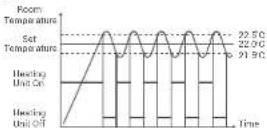
Heating Mode Your room thermostat takes the average room temperature of the last 40 seconds as the basis. If the room temperature goes above the hysteresis positive temperature value you set, your room thermostat will stop the heating unit. If it goes below the hysteresis negative temperature value, your room thermostat will start the heating unit. Thus, it ensures that the room temperature remains within a certain range.
① 765 G 7 B
Cooling Mode
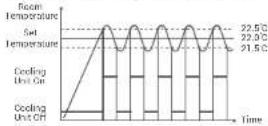
Your Room Thermostat uses the average room temperature of last 40 seconds as basis. If the room temperature goes above the hysteresis positive temperature value you set your Room Thermostat will start the cooling unit. If it goes below the hysteresis negative temperature value, your Room Thermostat will stop the cooling unit. Thus, it ensures that the room temperature remains within a certain range.
Your Room Thermostat sends the best state signal to the Receiver every 3 minutes. Thus, your Room Thermostat and Receiver work synchronously. If the signal cannot reach to the Receiver from the Room: The thermostat for 22 minutes, it perceives that the connection is broken and stops the heating/cooling operation for safety reasons. Likewise, in cases where the electricity comes back after a power failure, the Receiver does not operate the heating/cooling unit until 'sources' signal reaches from the Room Thermostat. However, in this case, if the Room Thermostat continues to operate murnally, it will continue to work properly without any need for intervention since it sends a status signal to the Receiver every 3 minutes.
FREQUENTLY ASKED QUESTIONS
- Is my Room Thermostat compatible with my heating/cooling unit? If your heating/cooling unit has On-Off connections, your Room Thermostat is compatible. You can find information about your heating/cooling unit from your heating/cooling unit operating manual or from your heating/cooling unit service.
- How will I connect my heating/cooling unit with my Receiver?
We recommend that the connection between the receivers and hosting/cealing unit should be made by professionally qualified persons.
2x0.75 mm cable is sufficient for the Receiver - heating/cooling unit connection. Connect one end of the cable pair to the room thermostat connection terminal stated in the user manual of your heating/cooling unit.
Connect the other end of the cable pair in COM and NO inputs of the terminal inside the receiver as shown in the TIECFIVER WINDING DIAGRAM section.
The direction of the cable ends does not matter.
DECLARATION OF CONFORMITY
IS/PARK IQ VE DIS TIC, INS. ISITMA SISTEMILENI OTO. SAN.A.S, which Head Office and production site is located on Esch Mah. 1188 Sk No 13/A Sarin - Gazimir-12MID - TÜRKİYF belücks und können die product mentioned with CFD and its specifications are required by the provisions of the mentioned CFD.
Round GENERAL Life
Product Name : SUNNA 270 SMART
Product Type - Smart Ammon Thermoste
The product manufactured by ISIPARK and mentioned above is connected wirelessly at 2.4 GHz internet and periodically shows the temperature and status information with the server on the internet.
Compatible Directives:
Radio and Telecommunications Terminal Equipment Regulation
2014/58/EU (ETS) EN 301 489-1 V2.2.3 (2010-11)
ETS: EN 301 489-17 V3.2.4 (2020-09), EN 300 220-1 V3.1.1.
EN 300 220-2 V3.2 | (2018-05). EN 62479: 2010, EN 62358-1:2014-A11:2017
Electromagnetic Companyancy Regulation 2014;30:ED
(ETSI EN 301-489-1 V2.2.5, ETSI EN 301-489-6 V2.1 Low Voltage Directive 2014/35/EU IEN 60730-2-9)
Supplementary information. Mentioned product can be used with caribai boxes with an / off output and compatibility with the directives any covers the product. ISPARC is not responsible for the compliance of the entire system with the directives. This declaration does not apply when changes are made to the product without obtaining our consent.
◇
WARRANTY CONDITIONS
1-The warranty period starts from the invoice date and warranted against manufacturing defects for 2 years.
2 Devices and apparatus are delivered to the customer in working condition in our company. On-site commissioning is subject to a service fee.
3-The repair of the devices and apparatus covered by the warranty is carried out in our company factory and should send by contracted transportation company. In on-site services, the transportation and accommodation expenses of the service personnel belong to the customer. The shift fee during transportation is added to the service fee and collected in advance.
-
The maintenance of devices and apparatus is done in our company. For the maintenance of the devices and apparatus, the round travel fares belongs to the customer.
-
In case of malfunctioning of the devices and apparatus whose warranty period continues, it is tested in our company whether the malfunction is caused by a customer or manufacturer fault, and it is reported with a report issued by our company.
6-In case of detection of manufacturer-induced errors of devices and apparatus whose warranty period continues, the customer can request a replacement or repair of the devices and apparatus at full expense by the manufacturer, unless it's higher than the product's price.
7-In the event that the faults of the devices and apparatus whose warranty period continues are determined as caused by the customer, all expenses would be belong to the customer.
- Customers should be aware of damages (if there is any) of product and warm manufacturer since the day warranty duration starts if customer do not warn manufacturer with knowledge of damage, customer lose the rights of article 6.9. Modifications resulting from the use of devices and apparatus contrary to the matters stated in the User Manual are not covered by the warranty.
10-Devices and their apparatus are out of warranty if they are beaten, broken or scratched by the customer.
11-Damages resulting from the use of devices and apparatus belonging to other brands and models without the approval of the manufacturer are not covered by the warranty.
- Battery leakage and errors due to rust, oxidation and liquid contact by working in acidic / humid environments are not covered by the warranty.
- When the product is not used for a long period (more than 15 days), remove
As there the products in that case are in a long period (have been to apply), there the batteries. Otherwise, malfunctions that will occur are out of warranty. 14-Damages that may occur during the transportation of devices and apparatus are not covered by the warranty Customers can take a transportation insurance.
- Damages caused by mains voltage / faulty electrical installation are not covered by the warranty
16 Devices and apparatuses are out of warranty for malfunctions caused by force majeure such as fire, flood, earthquake etc.
17-All of the devices and apparatuses, including all their parts, are under the warranty of our company.
18-In case of malfunction of the devices and apparatuses within the warranty period, the time spent during repairment period is added to the warranty period. The repair period of the product cannot exceed 20 working days. The period starts from the date of notification to the service station of the malfunction related to the product or, in the absence of a service station, to the seller, dealer agency, representative, importer or manufacturer of the product. Consumer can report the problem by, phone, fax, email, registered and reply paid letter or a similar way. However, in case of a conflict, responsibility of prove is belong to the customer. If the malfunction of the product is not repaired within 20 working days, the manufacturer producer or importer has to allocate another product with similar features to the use of the consumer until the repair of the product is completed.
19 Although the consumer uses his/her repair rights.
- If the product breaks down for 4 times in a year or 6 times in warranty duration and these problems effects main purpose of the product. (starting from delivery time during warranty.)
Exceeding the maximum time required for repair,
In the event that the service station is not available, if it is determined that the repair of the defect is not possible with the report prepared (in order) by one of the seller, dealer, agency, representative, importer or manufacturer, a refund or a price discount at the rate of defect can be requested.
20-The customer can make complaints and appeals to consumer courts or consumer arbitration committees.
21-The warranty document must be kept by the customer during the warranty period. If the document is lost, a second document will not be issued. In case of loss, repair and replacement of devices and apparatus will be made for a fee.
WARRANTY CERTIFICATE
Manufacturer
Title: SIPARK IC DIS TIC, A.S.
Adress: Fatih Mah. 1188 Sk. No:13/A Sarniç
Gaziemir izmir-TÜRKİYE
Tel: +90 (232) 457 99 50
Fax +90 (232) 457 91 22
E-Mail: generallife@generallife.com.tr
Authorised Signatory:
Company Stamp:
Product
Type: Smart Room Thermostat
Brand: GENERAL Life
Model: SENNA 270 SMART
Guarantee Period: 2 Years
Max. Time to Repair: 20 Days
Banderole and Serial Number
| Vendor | |
| Title: | |
| Address: | |
| Tel: Fax: | |
| Invoice Date and Number: | |
| Delivery Time and Place: | |
| Authorised Signatory: | |
| Company Stamp: | |
| Product | |
| Type: Smart Room Thermostat Brand: GENERAL Life Model: SENNA 270 SMART | STAMP |
Isipark reserves the rights of changing product specifications and user manuals.
*For all changes, you may visit general life.com.br