D1400-E - Kontor FOURZE - Gratis brugsanvisning og manual
Find enhedens vejledning gratis D1400-E FOURZE i PDF-format.


Brugerspørgsmål om D1400-E FOURZE
0 spørgsmål om dette apparat. Besvar dem du kender, eller stil dit eget.
Stil et nyt spørgsmål om dette apparat
Download vejledningen til din Kontor i PDF-format gratis! Find din vejledning D1400-E - FOURZE og tag din elektroniske enhed tilbage i hånden. På denne side er alle dokumenter nødvendige for brugen af din enhed offentliggjort. D1400-E af mærket FOURZE.
BRUGSANVISNING D1400-E FOURZE
FOURZE
GAMING DESK
Assembly instruction
natural_image
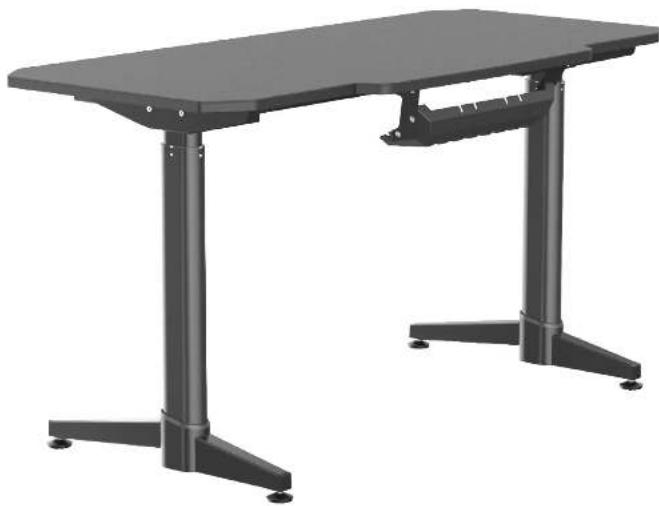
Exterior view of a modern office desk with adjustable legs and a flat top (no text or symbols visible)Precautions:
- Please pay attention to the safety of electricity, children should be used under the supervision of adults;
- Before the product runs, please check if there are any obstacles around the table;
- The table can only be used for home or office use and should not be used for other purposes.
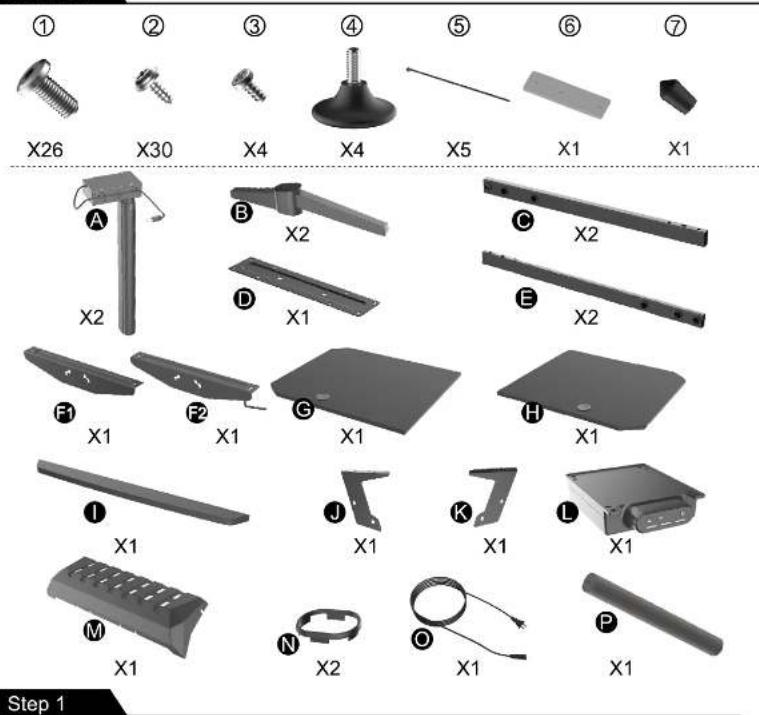
Parts list
Step 2
Step 3
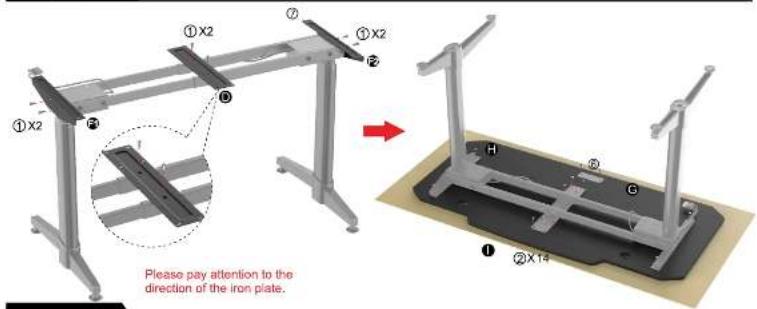
Step 4
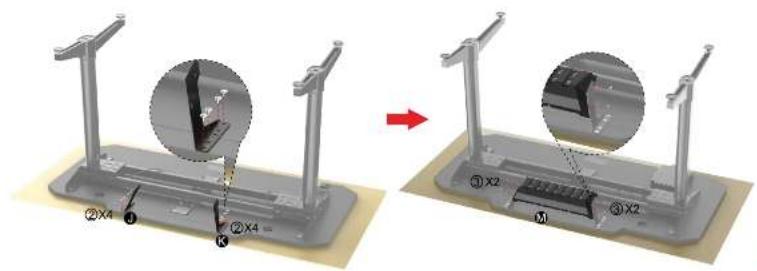
Step 5
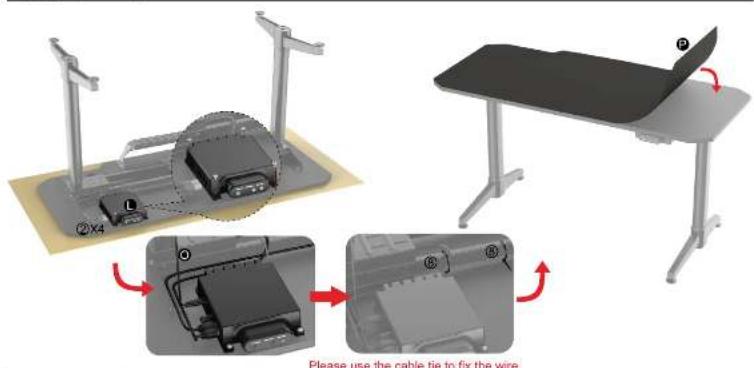
Instructions
1. Product up and down operation.
①Press △ the RGB1 green light will be on and the table will rise. Press △ for more than 3 seconds, the green light flashes, the table will automatically rise to the high memory point;
- Press ▼, the RGB2 green light will be on and the table will drop. Press ▼ for more than 3 seconds, the green light flashes, and the table automatically drops to the low memory point;
2. Height Memory Settings.
① When rising to a certain height, long press 12 for 3 seconds, RGB3 green light is on, then press the or button, RGB3 flashes 5 times and then stops, indicating that the memory is completed;
- The table through the M + and M + combination can remember two heights, one is the high memory point, and the other is the low memory point; long press for 3 seconds to reach the high memory point, long Press for 3 seconds to reach the low memory point;
3.Sedentary reminder.
① RGB3 for white light means that the time is 30 minutes, blue light means that the times 45 minutes, dark blue light means that the time is 60 minutes, the light is off means no timing;
②. After the timing is completed, the RGB1+RGB2+RGB3 green light flashes at the same time to remind, press any button to end, enter the next timing;
4.Fault retrieval and reset.
- When the new table has been installed, please press the △ and the ▼ for 7 seconds. When the RGB1+RGB2 green light flashes, release the button and the table will automatically run up and down. After the automatic operation is completed, the product can be used normally;
-
When the table is not working properly, or when the RGB1+RGB2 red/purple/yellow lights are flashing, please check that all the connecting lines are secure and re-plug all the connecting lines;
-
When the second step cannot solve the fault. On the basis of step 2, press the ▼ for 7 seconds, the RGB1+RGB2 green
light flashes, release the button, and the table will automatically run to check and repair. After stopping the operation, the product can be used normally.