SUM3 - Mikrofon CKMOVA - Gratis brugsanvisning og manual
Find enhedens vejledning gratis SUM3 CKMOVA i PDF-format.


Brugerspørgsmål om SUM3 CKMOVA
0 spørgsmål om dette apparat. Besvar dem du kender, eller stil dit eget.
Stil et nyt spørgsmål om dette apparat
Download vejledningen til din Mikrofon i PDF-format gratis! Find din vejledning SUM3 - CKMOVA og tag din elektroniske enhed tilbage i hånden. På denne side er alle dokumenter nødvendige for brugen af din enhed offentliggjort. SUM3 af mærket CKMOVA.
BRUGSANVISNING SUM3 CKMOVA

CKMOVA
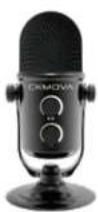
SUM3
Studio Quality USB Condenser Microphone
User Manual
Introduction
The SUM3 is a compact studio-quality cardioid condenser microphone, specially designed for podcasting, live streaming, home-recording, voice-overs and more. Smooth frequency response sounds incredible in a variety of applications-in-built pop filter for reducing plosives. It incorporates headphone monitor jack with volume control, allowing you to monitor the microphone with zero-latency. The SUM3 easily work with all Type-C& Type-A computers and Type-C smartphone without any driver requirements.
Product Structure:
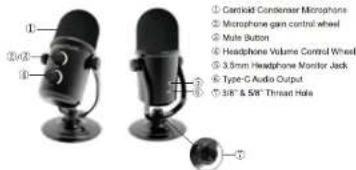
Highlights
• Studio-quality cardioid condenser perfect for podcasting & live streaming
- Smooth frequency response provides natural sound in wide applications
- Microphone gain control
- Mute Function
•Headphone volume control
-3.5mm headphone output with zero-latency monitoring
•Compatible with Type-C and Type-A Windows & Mac computers and Type-C Smartphone devices
•Durable all metal construction
•Work with 3/8" & 5/8" thread hole boom arm
• Includes Type-C to Type-C & Type-C to Type-A audio output cables
Setup Procedure for Smartphone:
Type-C devices Set-up Procedure
Connect the microphone Type-C output jack to your Type-C devices via the supplied Type-C to Type-C output cable
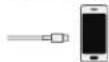
Noted: If your Type-C device requires OTG function manually, set the "OTG Connection" to "ON"
Setup Procedure for Computer:
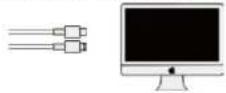
Windows Computer Set-up Procedure
- Connect the microphone to your computer via the supplied Type-C to Type-C or
Type-C to Type-A output cable
- Open the control panel
Select the "Audio" tab then click "SUM3" as input device


MAC Set-up Procedure
- Connect the microphone to your computer via the supplied Type-C to Type-C of
Type-C to Type-A output table
2.Open the "System Preferences" in Applications
- Select the "Audio" tab then click "SUMS" as input device.
Specifications
| Type: | Condenser microphone |
| Polar Pattern: | Cardioid |
| Operating Principle: | Pressure Gradient |
| Frequency: | 50Hz-20kHz |
| Sensitivity: | -32dB±3dB@1kHz |
| Signal to Noise Ratio: | 75dB |
| THD: | <0.5% |
| A/D Conversion: | 18-Bit |
| Sample Rate: | 48kHz |
| Output Impedance: | 32Ohm |
| Operation System: | Windows, macOS/OS X, Android |
| Power Requirements: | Type-C(DC 5V) |
| Weight: | 418.9g |
| Dimension: | 129 × 166.5mm |
Packing List
Microphone *1
Type-C to Type-C Cable *1
Type-C to Type-A Cable *1
Warranty Card *1
User Manual *1
Shenzhen Shenyao Technology Co., Ltd
CROMON is the headstock of Shenzhen Shenyin Technology Co., Ltd.
Rao: Huao 6, Serriocasing, Bakan Street, Longjing Owned, Shenzhen Guangdong, China
Email sales@cknova.com
www.elevo.com