PFF 07 - Køleskab Equator - Gratis brugsanvisning og manual
Find enhedens vejledning gratis PFF 07 Equator i PDF-format.


Brugerspørgsmål om PFF 07 Equator
0 spørgsmål om dette apparat. Besvar dem du kender, eller stil dit eget.
Stil et nyt spørgsmål om dette apparat
Download vejledningen til din Køleskab i PDF-format gratis! Find din vejledning PFF 07 - Equator og tag din elektroniske enhed tilbage i hånden. På denne side er alle dokumenter nødvendige for brugen af din enhed offentliggjort. PFF 07 af mærket Equator.
BRUGSANVISNING PFF 07 Equator
PORTABLE FRIDGE-FREEZER
Model - PFF 07
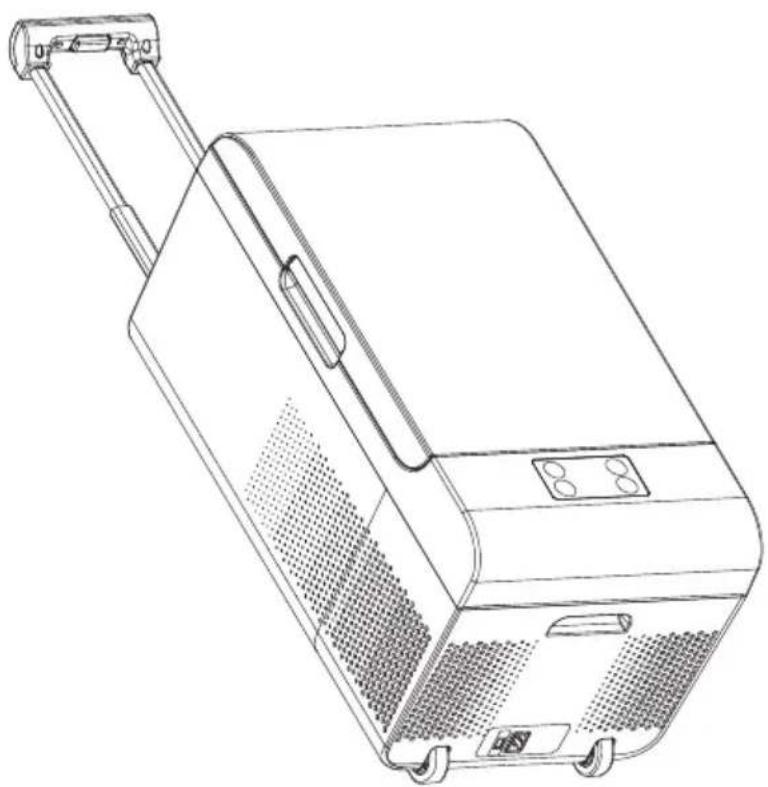
natural_image
Line drawing of a portable air conditioner unit with handle and wheels (no text or symbols)OWNER'S MANUAL
Please read the instructions carefully and keep for future reference. Information may be updated from time to time so please refer to the manual online for the latest version of the manual.
Warranty
Equator Appliances undertakes to the consumer-owner to repair or, at our option, to replace any part of this product which proves to be defective in workmanship or material under normal personal, family or household use, in USA and Canada, for a period of one year from the date of original purchase. For commercial use, the product is warranted for a period of 90 Days. During this period, we will provide all labor and parts necessary to correct such defect, free of charge, if the appliance has been Installed and operated in accordance with the written instructions with the appliance. Ready access to the appliance, for service, is the responsibility of the consumer-owner. Services would be provided from Monday to Friday between normal business hours.
Exclusions
In no event shall Equator Appliances be liable for incidental or consequential damages or for damages resulting from external causes such as abuse, misuse, incorrect voltage or acts of God. This warranty does not cover service calls which do not involve defective workmanship or materials covered by this warranty. Accordingly, diagnosis and repair costs for a service call which does not involve defective workmanship or materials will be the responsibility of the consumer-owner.
Specifically, the following work is not covered under warranty and does not constitute warranty work:
Installation - e.g. Using in confined space, blocking ventilation Maintenance - e.g. Cleaning the appliance using solvents Mishandling - e.g. Breakage of handle and wheels
Most work is covered. The defining factor is, has the machine malfunctioned (Equator Appliances is responsible) or has the customer omitted or done something to cause the machine to malfunction (customer is responsible). Some states do not allow the exclusion or limitation of incidental or consequential damages, so the above limitation of exclusion may not apply to you.
This warranty is given by:
Equator Appliances
10222 Georgibelle Drive, Suite 200
Houston, Texas 77043-5249
For Service:
Call: 1-800-776-3538
Email: service@ApplianceDesk.com
Web: www.ApplianceDesk.com
Business hours: 9:00 am to 5:00 pm weekdays
You can register your Warranty by either of the following methods:
- Scan QR Code
QR Code

text_image
QR code image containing encoded data, no visible human-readable text-
Open Smart Phone
-
Open Photo
-
Scan QR Code
-
Click the Link
-
Register online at ApplianceDesk.com/Warranty
GENERAL
Since it is a responsibility of the consumer-owner to establish the warranty period by verifying the original purchase date, Equator Appliances recommends that a receipt, delivery slip or some other appropriate payment record be kept for that purpose.
This warranty gives you specific legal rights, and you may also have other rights which vary from State to State.
All rights reserved. Manual subject to change without notice.
Safety
Do not store explosive substances such as aerosol cans with a flammable propellant in this appliance.
Do not transport caustic materials or solvents in the appliance.
Ensure that the refrigerant circuit is not damaged.
Keep ventilation openings clear of obstructions.
When positioning the appliance, ensure the electrical cord is not tangled or damaged.
Do not place multiple portable socket-outlets at the rear of the appliance.
Never unplug the appliance by pulling on the power cord. Grip the plug firmly and pull straight out to remove from wall socket.
Do not use a damaged power cord.
Do not use an extension cord.
Do not use mechanical devices or sharp tools to accelerate the defrosting process. Never immerse the appliance in water.
Never handle plugs and switches with wet hands or if you are standing on a wet surface.
Children should be supervised to ensure that they do not climb on or play with the appliance.
This appliance is not intended for use by persons (including children) with reduced physical, sensory or mental capabilities, or lack of experience and knowledge, unless they have been given supervision or instruction.
Safe Disposal
Before discarding the appliance, remove the cover in order to prevent risk of child entrapment.
Please dispose of this appliance in accordance with local regulations.
Description
The Portable Fridge Freezer (PFF) can be used as a refrigerator or as a freezer and can be used in homes, cars, trucks, RVs and boats. The retractable handle and sturdy wheels make it easy to transport.
A maintenance-free refrigerant circuit with a compressor provides the cooling function.
Place the appliance out of direct sunlight and away from sources of heat and high humidity.
Keep the ventilation opening away from walls and other obstructions.
The PFF comes equipped with a multi-use divider, which is stored under the cover. It can be used as a divider inside the unit and can also be used as a cutting board.
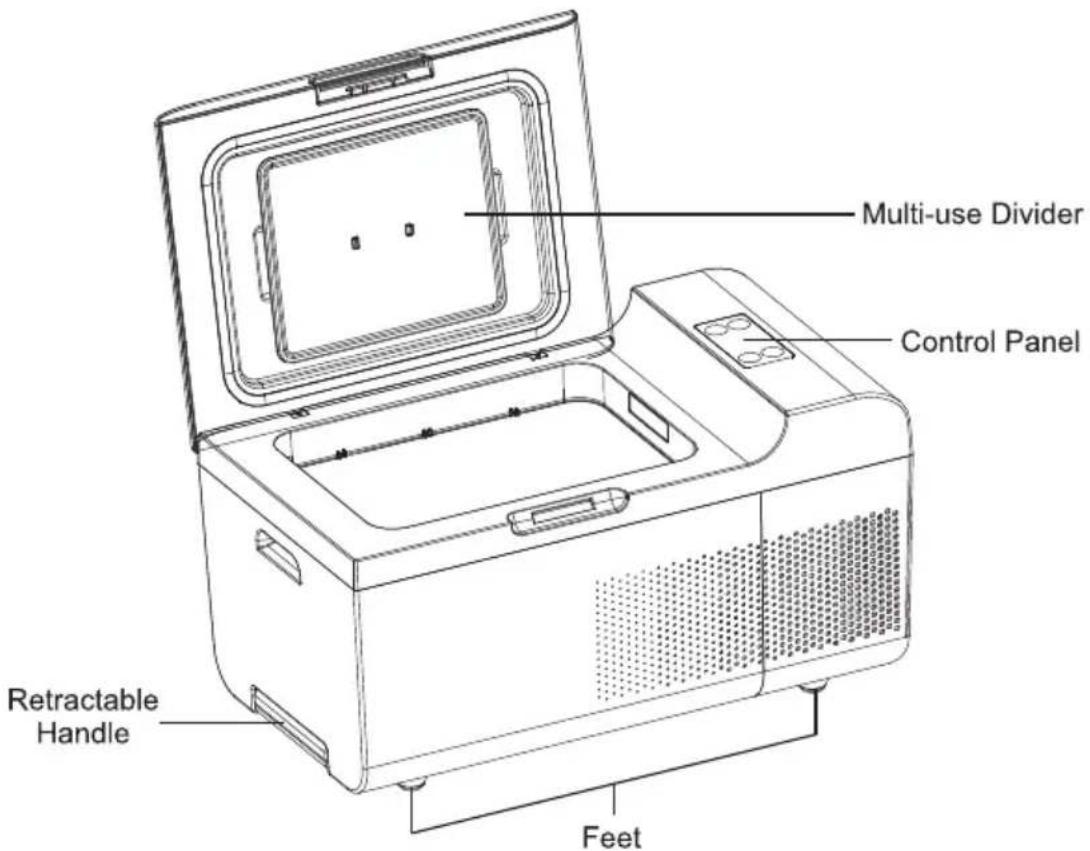
text_image
Multi-use Divider Control Panel Retractable Handle FeetCheck the plug and cable before you connect the power and ensure it is 110 voltage.
Only connect the device as follows:
- With DC cable to a 12/24V plug socket in a vehicle (e.g. cigarette lighter)
- With AC power supply connection cable to AC mains supply
When connected to the DC socket, disconnect it or turn Power o ffwhen the engine is turned off, to prevent discharge of the battery.
There is an Emergency Override switch on the side of the PFF. If an electronic failure occurs, push down the switch from "Normal Use" to "Emergency Override" mode.
The PFF switches o ffautomatically at low battery voltage.
If the PFF is operating with battery power supply and if the battery voltage is low, the display will automatically shut off and the error code "E1" will be displayed.
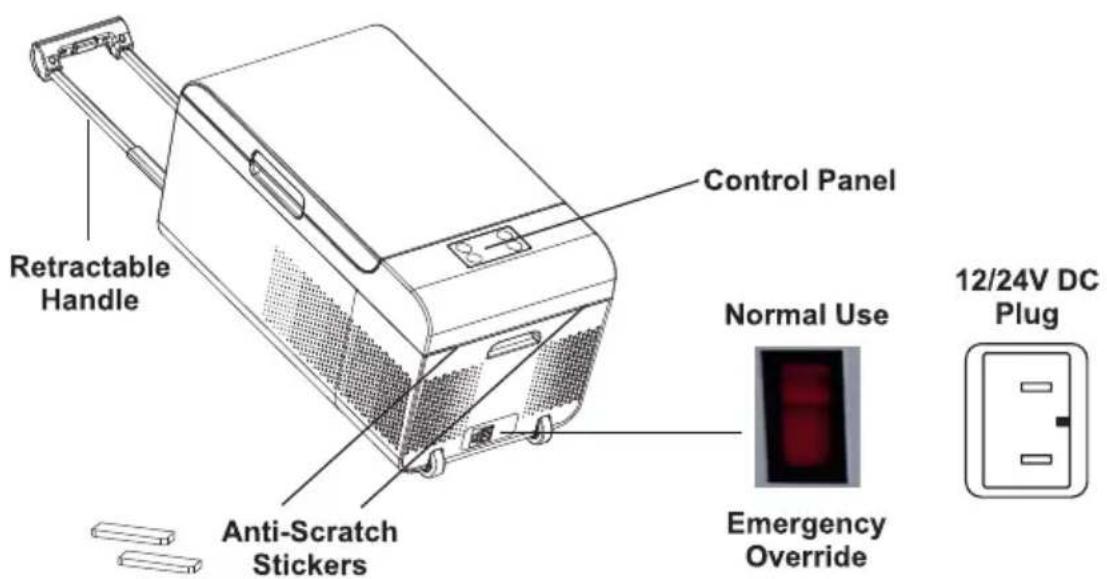
text_image
Retractable Handle Control Panel Anti-Scratch Stickers Normal Use Emergency Override 12/24V DC PlugApply the two Anti-Scratch Stickers made of silicone that are provided in order to protect the exterior of the PFF.
Operation
Before using the PFF for the first time, clean the inside compartment with a damp cloth and mild detergent.
Store food in appropriate packaging and containers to ensure that raw meat does not come in contact with other foods.
Connecting to a battery (vehicle or boat)
The PFF can be operated with any 12/24V DC portable battery station.
Disconnect the PFF and other consumer units from the battery before you connect the battery to a charging device. Overvoltage can damage the electronics of the device.
For safety reasons the PFF is equipped with an electronic system to prevent polarity reversal. This protects it against short-circuiting when connected to a battery.
Plug the 12/24V connection cable into the DC voltage socket or into a 12V cigarette lighter socket.
If connecting PFF to an external portable battery, the battery should be at least 60W with output of 11V-16V.
Connecting to 100 \~ 240V AC power supply mains (e.g. at home)
Plug the 100 \~ 240V connection cable into the 100 \~ 240V AC voltage mains and the AC power supply's output end connection into PFF's socket.
If using the PFF on board a boat from a mains AC power supply connection of 100 \~ 240V, install a surge protector between 100 \~ 240V AC mains and the PFF.
Control Panel
The temperature range of the PFF is 0°F (-18°C) to 50°F (10°C).
• The range for refrigeration is: 32^ F ( 0^ C) to 50^ F ( 10^ C).
• The range for freezing is: 0^ F ( -18^ C) to 32^ F ( 0^ C).
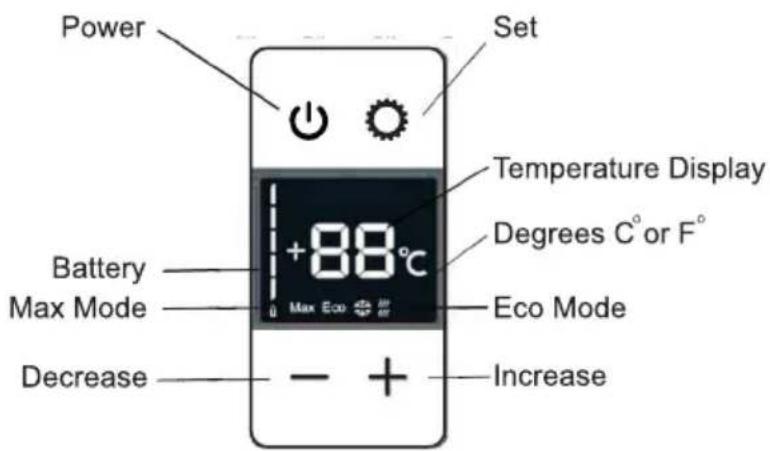
text_image
Power Set Temperature Display Batter Max Mode +88°C Max Eco Eco Mode Decrease IncreasePress the Power button to turn the PFF on and off.
The Set button is used for:
- Temperature
• Celsius or Fahrenheit selection - Max or Eco mode
- Battery monitor
Setting Temperature
Press the Set button one time to input the desired temperature.
The + and - buttons enable selection of the temperature by increasing or decreasing in one degree increments.
The Display Window shows the selected temperature.
Setting Eco or Max mode
Max mode provides fast cooling.
Eco mode provides energy saving
- Press the Power button to turn on.
- Press the Set button 2 times.
- Press + and – buttons to select Max or Eco
Using the Battery Monitor
The PFF is equipped with a multi-level Battery Monitor that protects your vehicle battery against excessive discharging when the device is connected to the on-board 12/24 V supply.
If the PFF is operated when the vehicle's ignition is switched off, the PFF switches o ffautomatically as soon as the supply voltage falls below a set level. The PFF will switch back on once the battery has been recharged to the restart voltage level.
Select the Battery Monitor Mode based on the following table:
| Battery Monitor Mode | H1 | H2 | H3 |
| Switch-o ffvoltage at 12 V | 10.1 V | 11.4 V | 11.8 V |
| Restart voltage at 12 V | 11.1 V | 12.2 V | 12.6 V |
| Switch-o ffvoltage at 24 V | 21.5 V | 22.5 V | 23.0 V |
| Restart voltage at 24 V | 23.0 V | 24.0 V | 24.5 V |
- Press the Power button to turn on.
- Press the Set button 3 times.
- Press + and – buttons to select H1, H2 or H3.
NOTE:
When Power to PFF is supplied by the starter battery of a car, select the battery monitor mode "H3". If the PFF is connected to a supply battery, the battery monitor mode "H1" will suffice.
If you operate the PFF from an AC power supply, set the battery monitor to "H1".
Defrost
Do not use sharp tools to defrost and remove ice.
- Remove all the food and beverage items.
- Switch offthe unit.
- Leave the cover slightly open.
Wipe o ffdefrosted water.
Replacing the Plug Fuse (12/24V)
- Pull off the adapter sleeve of the plug.
- Unscrew the screw from the upper half of the housing.
- Carefully raise the upper half of the housing from the lower half.
• Take out the contact pin. - Replace the defective fuse with a new one that has the same rating.
- Re-assemble the plug in the reverse order.
Replacing the PCB Light Blub
- Shut off the power supply.
- Carefully pry out the plastic light cover with a Flathead screwdriver.
- Unscrew the PCB mounting screws.
- Pull out the PCB.
- Replace with a new PCB.
- Fit the screws in with a screwdriver.
- Press the transparent part of the lamp back into the housing.
- Connect the power supply to the PFF.
Maintenance
Ensure the power cord is unplugged before moving or cleaning the appliance.
Clean the outside and inside of the appliance regularly, using a damp cloth and mild detergent.
Do not use abrasive materials to clean.
Do not wash under running water or immerse the PFF in water.
If turning O ffthe PFF for long periods of time:
- Remove all the food and beverage items.
- Switch offthe unit.
- Pull out the power cable connection.
- Leave the cover slightly open to prevent odors.
Troubleshooting
| Problem | Possible Cause | Solution |
| Not Working | There is no voltage in the 12/24V socket (cigarette lighter) in vehicle. | The vehicle ignition must be on to apply current. |
| No voltage present in the AC voltage socket. | Try using another plug socket. | |
| Not Cooling | Battery voltage is too low. | Test the battery and charge it as needed. |
| When operating from 12/24V socket (cigarette lighter), it may have debris resulting in poor electrical contact. | Clean debris from socket. |
In addition to the Troubleshooting table above, the following Error Codes may display on the appliance. For some of the Error Codes, please call Customer Service for help.
| Error Code | Explanation |
| E1 | Battery voltage too low – Charge battery |
| E2 | Defective Fan |
| E3 | Defective compressor |
| E4 | Defective PCB (Printed Circuit Board) |
| E5 | High temperature protection – Ensure vents are not blocked. |
| E6 | Defective NTC (Negative Temperature Coefficient) |
Technical Specifications for PFF 07
| Model | PFF 07 |
| Capacity | 0.7 cu.ft |
| Rated Voltage | DC 12V / 24V |
| Rated Current | 4.2 A / 2.1a |
| Rated Power | 50 W |
| Refrigerant | R134a |
| Working Temperature | -0.4° F ~ -50° F |
| Weight Net / Gross | 27.5 / 33 lbs |
| Product Dimensions (HxWxD) | 12.6 x 23 x 12.8 (inch) |
| Packaging Dimensions (HxWxD) | 16 x 26.4 x 16.7 (inch) |
California Proposition 65
WARNING: This product contains chemical known to the State of California to cause cancer and birth defects or other reproductive harm.

natural_image
Simple geometric diagram of a circle with a horizontal line crossing through it (no text or symbols)EQUATOR®
ADVANCED Appliances ≡
Equator Advanced Appliances USA, founded in 1991, offers Efficient, High-Quality, and Innovative household appliances.
Our Mission is to simplify domestic chores and save Time, Space, and Energy.
Our Vision is to enhance our Customer's Quality of Life!