6404 - Røgalarm STI - Gratis brugsanvisning og manual
Find enhedens vejledning gratis 6404 STI i PDF-format.


Brugerspørgsmål om 6404 STI
0 spørgsmål om dette apparat. Besvar dem du kender, eller stil dit eget.
Stil et nyt spørgsmål om dette apparat
Download vejledningen til din Røgalarm i PDF-format gratis! Find din vejledning 6404 - STI og tag din elektroniske enhed tilbage i hånden. På denne side er alle dokumenter nødvendige for brugen af din enhed offentliggjort. 6404 af mærket STI.
BRUGSANVISNING 6404 STI
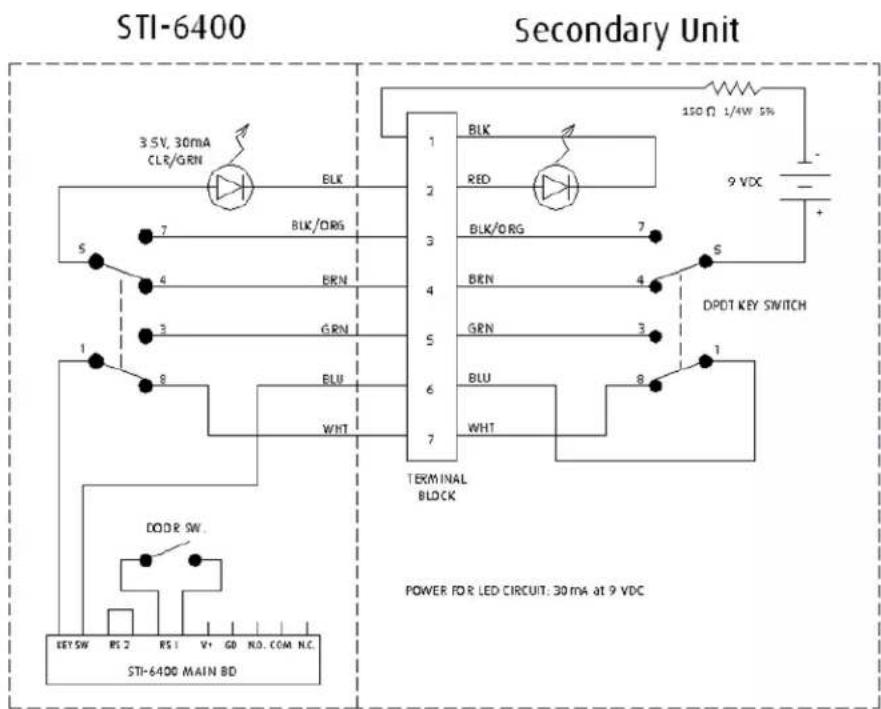
Addendum for STI-6406 with Dual Access Control
Description:
This system contains a STI-6400 with a DPDT key switch to be mounted on one side of a door or wall; and a similar looking housing, also with a DPDT key switch, but without an alarm for the opposite side of the door. An authorized person with a key can disable the alarm on either side of the door. When disabled, and LED will illuminate, and the door can be opened without setting off the alarm. After passing through the door, the alarm can be armed again from the opposite side.
Installation:
- Follow STI-6400 mounting instructions and set switches to the desired positions for alarm timing and volume.
- For straight through door or wall installation, mark the center of the 5/16 inch hole in the mounted base, then remove the base from the door or wall.
- Drill a 5/16 inch diameter hole through the door or wall at the marked location.
- Align the same diameter hole in the secondary unit base to the back side of the door or wall and mount.
- Route the wire from the STI-6400 unit through the hole and into the secondary unit.
- Attach the 6 wires to the terminal block pins 2 thru 7 matching wire colors on the terminal block label.
-
Seal the hole around the wires with an effective fire stop material, if required.
-
Attach the battery in the secondary unit and install the cover.
- Cycle the key switch to be sure the LED's turn "ON" and "OFF". Leave the LED's "ON" until ready to test the alarm.
- Attach the battery to the STI-6400 and install the cover.
- Close the door and test.
Operation:
- With the door closed, turn either key switch to arm the alarm. The LED's on both sides of the door should turn "OFF".
- If the door is opened while the LED's are "OFF", then the alarm will sound according to the switch settings of the STI-6400.
- To reset the alarm, turn either key to the opposite position (the LED's will turn "ON"), close the door and turn either key switch again (the LED's will turn "OFF").
- When the system is armed, authorized passage can be accomplished by turning either key switch until the LED's turn "ON", and remove key. The door can now be opened without sounding the alarm. When passage is complete, close the door, turn the key switch (the LED's will turn "OFF"). The door alarm is once again armed.
Schematic Diagram:

Safety Technology International
Exit Stopper®
STI-6400 Series
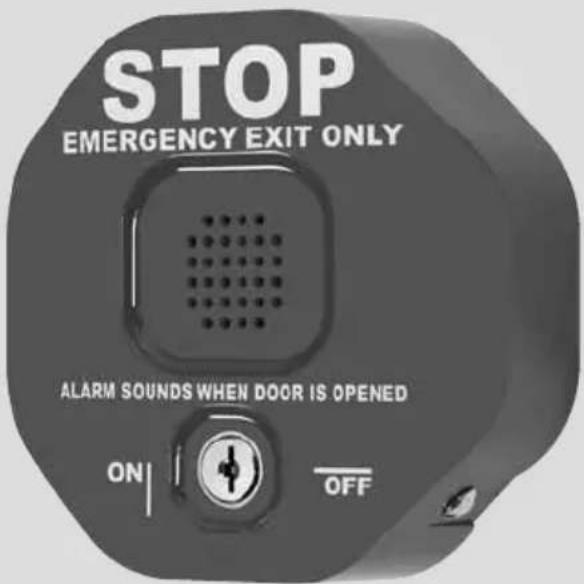
Features
- Alarm helps prevent unauthorized exits/entries through doors.
- Easy to install.
- Select volume, alarm duration and delay settings.
- May be mounted on top, right, left or next to almost any door.
- User can select on-site whether to use an alarm or annunciator.
- Less expensive than heavy horizontal bar type units and practical for all emergency doors.
- Contact STI for custom applications.
We protect the things that protect you.®
Table of Contents
- Warnings and Cautions...... Page 2
- Warranty Information...... Page 2
- Specifications ...... Page 3
- Dimensions.... Page 3
- Polycarbonate...... Page 3
- Electronics ...... Page 3
- Remote Horn Page 3
- Circuit Board Set-Up...... Page 4
- Terminal Strip Layout...... Page 4
- Switch Settings...... Page 4
- Alarm Feature Description...... Page 5
- Installation Instructions All Units / STI-6400...... Page 5
- Mounting Options ...... Page 6
- STI-6402 Double Door additional install notes...... Page 6
- STI-6403 Remote Horn additional install notes...... Page 6
- STI-6404 Double Door with Remote Horn additional install notes...... Page 6
- STI-6405 Exit Stopper with Momentary Reset...... Page 6
Warnings
All units are recommended for indoor use, not for outdoor use. Unit must be tested periodically to verify the life of battery. STI recommends you change the 9 Volt battery twice a year. Installer may need to purchase a simple audio-meter, typically available at your local electronics store, to measure the sound in areas where the alarm is expected to be heard during normal noise environment. Results from this test may prove it beneficial to purchase additional exit stopper units. When purchasing a remote unit (STI-6403 or STI-6404) you will need to periodically test the connections to make sure audibles function at a sound level to alert staff. Maximum of three remote alarms may be used in parallel.
All specifications and information shown are current as of publication and subject to change without notice.
Warranty Information
- Three year guarantee against breakage of polycarbonate in normal use (one year on electro mechanical and electronic components).
- Electronic warranty form at www.sti-usa.com/wc14
Polycarbonate Enclosure
| Dimensions 5.375” W x 5.375” H x 2 “ D (137mm x 137mm x 51mm) |
| Flammability UL94 V-2 |
| Wall Thickness 0.12 in (3.05mm) |
Electronics: STI-6400 - All Units
| 9 VDC Alkaline or 9V-24VDC wiredPower SourceClass II UL Listed transformer | |
| Horn Volume at 1 ft. 95 dB low / 105 dB high | |
| Relay Output Form C Dry Contacts 0-30 VDC or VAC, 1 Amp | |
| Stand by Current 10uA | |
| Alarm Current 130mA at 95 dB / 200mA at 105 dB | |
| Operating TemperatureRange | 32° to 113°F (0° to 45°C) |
Electronics: STI-6403 and STI-6404 - Remote Horn Unit
| Power Source 9 VDC operating power* only |
| Horn Volume at 1 ft. 95 dB low / 105 dB high |
| Stand by Current 0 A |
| Alarm Current 50mA at 95 dB/ 200 mA at 105 dB |
* Power source for the STI-6403 and STI-6404 Remote Horn uses a separate power source from the STI-6400 alarm. The Remote Horn contains an internal 9 volt battery. Horn operates when the Form C contact at main unit is activated on alarm.
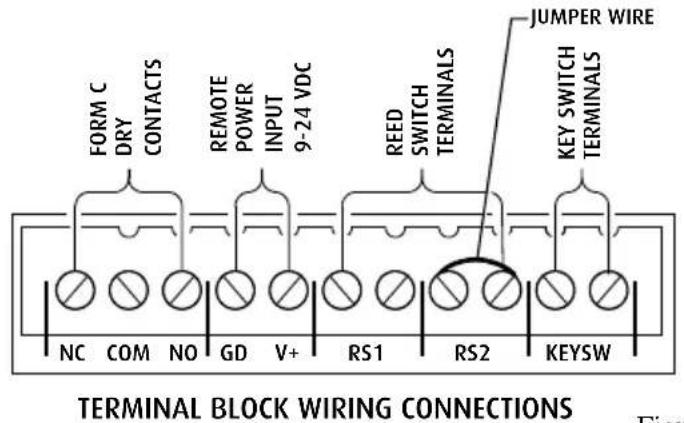
All models are shipped with jumper wire installed for use with one reed switch (RS2). If using second reed switch, remove jumper wire and insert second reed switch.
Figure 1
Switch Settings
| FEATURE | JP2 | JP3 | JP4 | JP5 | JP7 |
| Volume - High (105 dB) at 1 ft. ON* | |||||
| Volume - Low (95 dB) at 1 ft. OFF | |||||
| Duration - 30 Second Alarm OFF* OFF* | |||||
| Duration - 180 Second Alarm OFF ON | |||||
| Duration - Continuous Alarm ON OFF | |||||
| Duration - Annunciator Mode ON ON | |||||
| Trip - Immediate | |||||
| Door Prop Mode | |||||
| Arming - Immediate | |||||
| Arming - 30 | Second | Delay |
ON
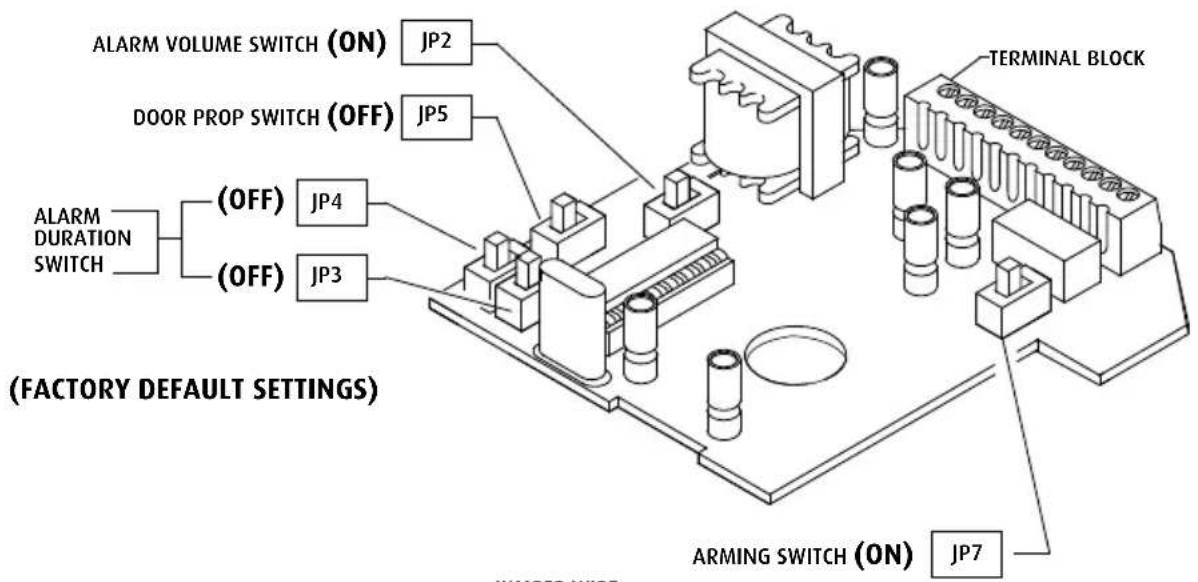
Slide black lever to desired ON/OFF position as labeled on circuit board.
*Factory Settings
Alarm Feature Description
• Volume Switch JP2 - Sets alarm volume to high 105 dB or low 95 dB.
- Duration Switch JP3 and JP4 - Amount of time alarm sounds after trip. Arming resets at end of duration if door is closed. Alarm will not reset if in continuous mode; alarm will sound until reset with the key or until battery is drained.
Annunciator mode will sound a series of short beeps until door is closed or 15 seconds.
- Door Prop Mode Switch JP5 - Once unit is armed with the key (OFF to ON) the alarm will sound if the door remains open for 15 seconds. If the door opens and closes within 15 seconds, the alarm will not sound.
- Arming Delay Switch JP7 - Delays arming of alarm for 30 seconds. To start arming delay timing, cycle the key switch (OFF to ON). Door must remain closed for 30 seconds for alarm to arm.
Test Alarm
Note: STI recommends testing the alarm in factory settings (see Switch Settings) prior to mounting.
- Make sure key switch is in the OFF position.
- Remove tamper screw on the side of the unit using the tamper wrench provided. Remove housing cover. Save the tamper wrench for future service and battery replacement (Fig. 2).
- Connect battery.
- Place magnet next to reed switch. Note: For STI-6402 model, insert jumper wire in RS2 terminals or install second reed switch and place magnet next to reed switches 1 & 2.
- Turn the key switch to the ON position.
- Move magnet away from reed switch. Unit should alarm immediately.
- Turn unit off with the key to silence alarm.
Installation Instructions
- Set switches on circuit board to desired alarm settings (Fig. 1).
- If using external power source, use Class II UL Listed transformer. 9V battery will be in no-load standby.
- Mount main unit on or next to the door using hardware provided. Reed switch may be moved to one of four positions shown in Fig. 2 or you may route the reed switch through the knockout in the bottom of the cover as shown in Fig. 3.
- Mount magnet using hardware provided. Magnet must be within 34 " of the reed switch when door is closed. Please refer to figures 7, 8 and 9 for other mounting options.
Note: When mounting on metal doors or door frame, use plastic spacers provided. Magnet must be within 3/8" of the reed switch when door is closed.
- If installing STI-6402, STI-6403, STI-6404orSTI-6405continuetopage6.
- Replace cover by sliding flanges on inside of cover into slots on base, snap closed and replace the tamper screw.
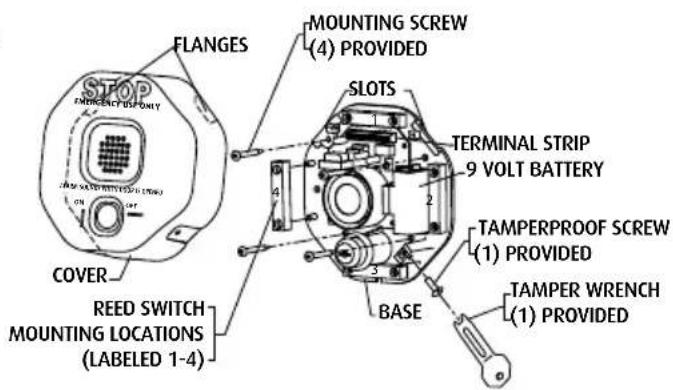
Figure 2
VIEW SHOWING MAGNET INSTALLATION
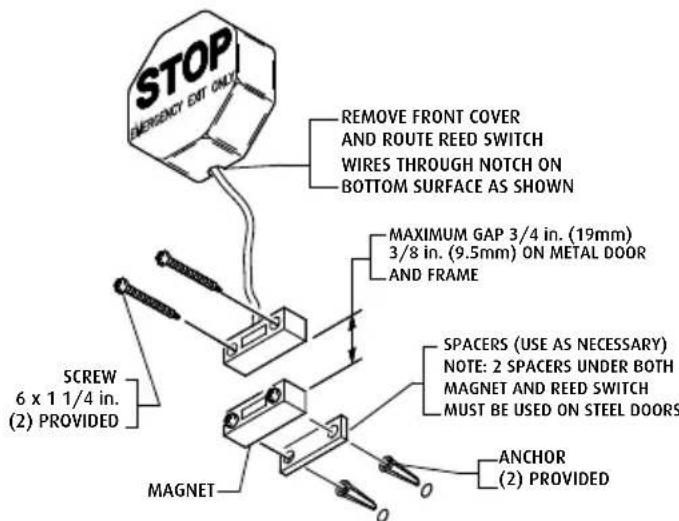
Figure 3
STI-6402 Double Door Install Notes
-
If not using extra reed switch, leave jumper wire across terminals RS2 on terminal block.
-
Determine length needed for reed switch wires. STI provides 1 reed switch with 6 ft. wires. Cut to desired length.
-
Connect first reed switch in RS1 and second in RS2 (Fig. 5). (Refer to Fig. 1 for additional details.)
*Note: Alarm will sound when either door is opened.
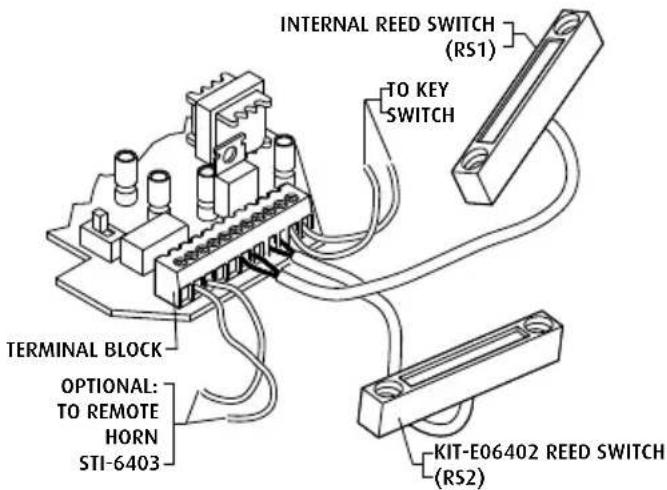
VIEW SHOWING INSTALLATION OF ADDITIONAL REED SWITCH KIT-E06402 Figure 4
STI-6403 Remote Horn Install Notes
- Remove cover.
- Connect two conductor wire (14-24 AWG) from main unit terminal block pins COM and NO to remote horn unit terminal block. (wire not provided). Units can be set up to 300 ft. apart. Not polarity sensitive (refer to Fig. 1 and Fig. 5 for details).
- Connect internal battery.
- Mount similar to main unit with #8 x 1 in. screws and anchors if necessary.
- Replace cover and screws.
- Turn key switch to ON position.
*Note: The ON/OFF key position is opposite from 6400 main unit. Remote horn sounds when main unit alarm is activated.
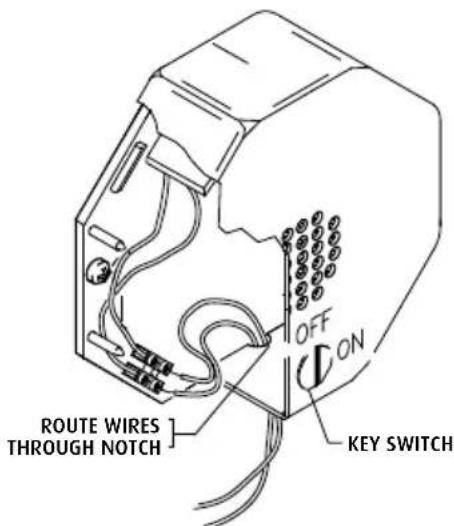
STI-6403 REMOTE HORN UNIT INSTALLATION
Figure 5
STI-6404 Double Door with Remote Horn Install Notes
The STI-6404 is a combination unit for double doors with a remote horn. Reference the installation instructions for the main unit, the STI-6402 and the STI-6403 for complete installation.
STI-6405 Exit Stopper with Momentary Reset
The STI-6405 uses a momentary switch. After initial installation, unit is always on and you do not have to remember to turn it on when you leave a protected area. This model also eliminates having to remember to re-arm it because it is never off.
When the alarm is triggered, to silence the alarm, insert the key and turn completely to the "RESET" position and hold for 2 seconds, then release. The switch will spring back to its original position and push the key out. To turn the unit off, supply power must be removed.

Figure 6
TYPICAL FLUSH MOUNT DOOR JAMB
INSTALLATION
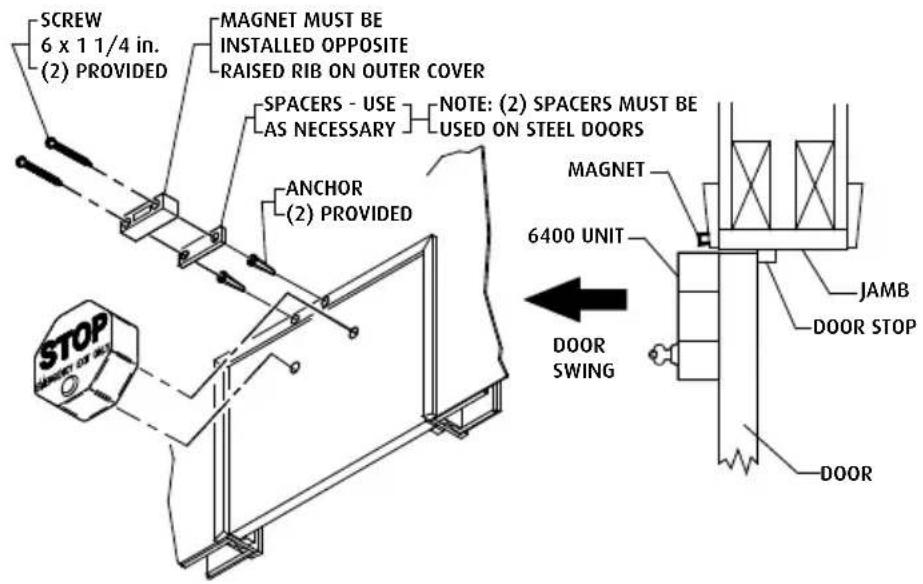
Figure 7
TYPICAL RECESSED MOUNT DOOR JAMB INSTALLATION
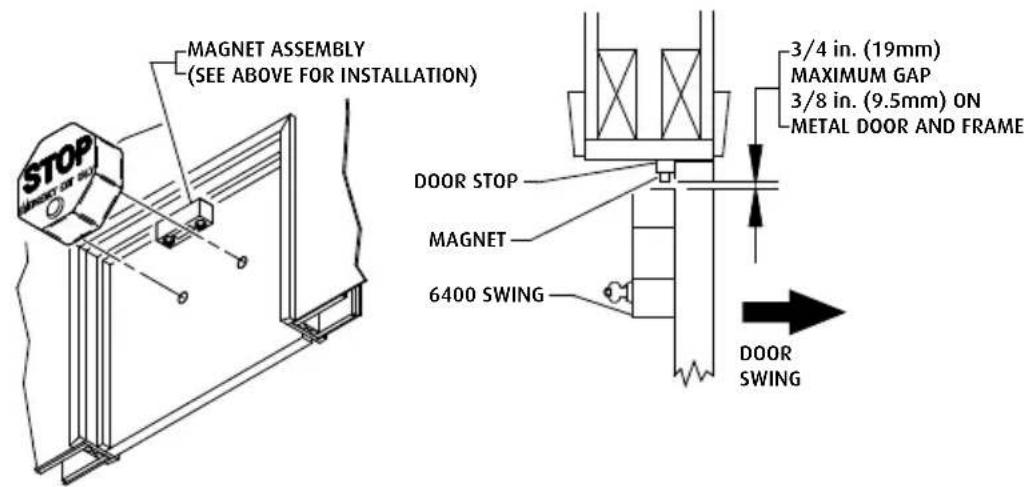
*Note: When mounting reed switch on door and the main unit on wall, wire service loop must be used.
Figure 8
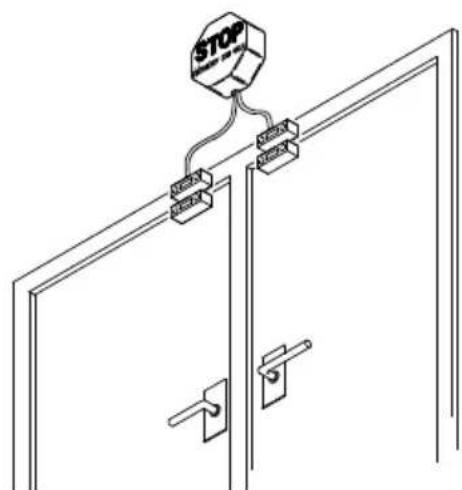
TYPICAL DOUBLE DOOR INSTALLATION
STI-6402
Figure 9

Safety Technology International
2306 Airport Rd · Waterford, MI 48327, USA
Phone: 248-673-9898 · Fax: 248-673-1246
info@sti-usa.com · www.sti-usa.com
Safety Technology International Ltd
Taylor House · 34 Sherwood Road · Bromsgrove
Worcestershire • B60 3DR • England • Tel: +44 (0)1527 520 999
Fax: +44 (0)1527 501 999 • info@sti-emea.com • www.sti-emea.com