
RF-CF30 - Vækkeur PANASONIC - Gratis brugsanvisning og manual
Find enhedens vejledning gratis RF-CF30 PANASONIC i PDF-format.


Brugerspørgsmål om RF-CF30 PANASONIC
0 spørgsmål om dette apparat. Besvar dem du kender, eller stil dit eget.
Stil et nyt spørgsmål om dette apparat
Download vejledningen til din Vækkeur i PDF-format gratis! Find din vejledning RF-CF30 - PANASONIC og tag din elektroniske enhed tilbage i hånden. På denne side er alle dokumenter nødvendige for brugen af din enhed offentliggjort. RF-CF30 af mærket PANASONIC.
BRUGSANVISNING RF-CF30 PANASONIC
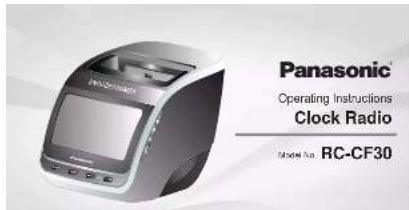
Panasonic Corporation
Web Site: http://www.panasonic.com

ROTASH
Dear Customer
Thank you for purchasing the product.
For optimum performance and safety, please read these instructions thoroughly before
Keep this manual for future reference
WARNING:
To reduce the risk of fire, electric shock or product damage,
- Do not expose this unit to rain, moisture, dripping or splashing. - I'm not piling objects filled with liquids, such as oxides, on thin air
- Use only the recommended accessories.
- Do not remove covers.
- Do not repair this unit by yourself. Refer servicing to qualified service personnel.
CAUTION!
To reduce the risk of fire, electric shock or product damage,
Do not install or place this unit in a bookcase, built-in cabinet or in another
Commenced space. Ensure this unit is well-continued. Do not obstruct this unit's ventilation openings with
- 15th non-acoustic thin film, 2-wavelength openings with newspapers, thicknesses, curtains, and similar items.
- Do not place sources of naked flames, such as lighted candles, on this unit.
CAUTION!
This unit is intended for use in moderate climate
I can mark the connecting point
Irsall this and so that the means play can be unploded from the social other
mikazay
This unit may receive radio interference caused by mobile telephones during use. It such interference occurs, please increase separation between this unit and the mobile telephone.
Product identification marking
| LocationProduct | |
| Isolom Manual | |
| IsolomAD adapter |
-If you see this symbol-

Only for European Union and countries with remote systems
only for European union and countries with recycle systems
These symbols are only valid in the European Union
and countries with recycle systems.
If you want to send any product, please contact your local authorities or dealer and ask for the correct method of disposal.
Factory reset
In standby mode, press [H41], A02, and [VCI-], 36F- with same ICD.
Factory name is done.
Compatible iPod and iPhone
• 10000000000000000000000000000000000000000000
• iPod touch 61 generation • iPhone 58
i iPian:
Compatibility expenses on the software version of your iPod or iPhone. Compatibility depends on the software version. Update your iPhone / iPod to the brand software business, with this and
Please be aware that Panasonic accepts no responsibility (or the loss) due
and for information
"Wade for iPod" and "Aada to Phone" mean that an electronic accessory has been designed to be connected appropriately to iPod, or Phone, respectively, and have been critical by the everyone to meet Ante performances standards.
Apple is not responsible for the operation of this disease or its compliance with safety and regulatory standards.
iPtoeau, iPoet rata and iPoet inat are indenterbua Appre no.
regulated in the U.S. and other countries.
Lighting a teacher of Apple Inc.
Safety precautions
Placement
Set the unit up on an even surface away from direct sunlight, high temperature, high humidity, and excessive vibration. These conditions can damage the animal and other components. Tryby shortening the unit's service IIc.
Place it at least 10 cm away from well surfaces to avoid dislocation and unwanted occupational effects.
Do not place heavy items on the unit
Vollage
Do not use high voltage power sources. This can overload the unit and cause a fine.
Do not use a DC power source. Check the source correctly when selling the unit up on a ship or other pieces where DC is used
AC adaptor protection
Ensure the AC adaptor is connected correctly and not damaged. Poor connection and land damage can cause line or winding shock. It's not all, carried, or place heavy items on the land
Casp is pluglently after impulging the spacer. Pulling the AG adapter can
Do not handle the plug with wet hands. This can cause electric shock.
Foreign matter
Do not let metal objects fail inside the unit. This can cause electric shock or
mullinlan
Do not be liquid gas into the arm. This can cause electric shock or malfunction. If this occurs immediately because the arm from the power supply and contact your dealer.
Do not spray in series, or to or into the unit. They contain flammable pores which can light be it sprayed into the unit.
Service
Do not attempt to repair this unit by yourself. If sound is interrupted, and caloric tall to light, smoke appears, or any other problem that is not possessed in free instructions, occurs, disordered the AG adaptor and contact your dealer on an authorized service centre. The working shock or damage is the unit can occur if the unit is retained, disassembled or reconstructed by unqualified persons.
Extend operating He by connecting the unit from the power source of 1 or no. to be used for a long time.
Supplied accessories

Please check and identify the supplied accessories.
□ 0720011
CHASO CHIN
(1) if is simply
inscaled in the unit
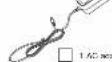
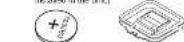
AM loop antenna
Memory backup
The broke-up battery (2012X12) shows the clock and storm readings at the board of a

Before using the first time
Remove the method of the

Inserting the battery
When there is no battery, the
battery weak indicator will be
displayed until a battery is
10.3.2.2
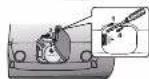
1 Keep the AC adapter connected to the household mains socket when
unsorwing the screw on the cover of the battery nolear using a screwdriver.
2 Open the cover of the battery holder
3 Insert a new battery with the +1 side facing up.
- Case the case of the lettering and securing with the score
Replacing the battery
The service life of this battery is approximately 1 month. IAD power is down.
When the battery is weak, the battery weak indicator will blink constantly on the
中
- Do not feel or understand to Be the
- Do not leave the battery(ies) in an automobile exposed to direct sunlight for a long motor, which will arrive and want them closed.
• Remove the battery if the clock radio is not being to be used for a long period of
- Stone in a cool dark place
CAUTION
- Danger of explosion if battery is incorrectly replaced. Replace only with the
type recommended by the manufacturer.
*When disposing of the batteries, please contact your local authorities or dealer
1.2.1 10:35
Warning
Keep the Button-Type battery out of the reach of children. Never put Button
Type battery in mouth. It swallowed call your doeser
Insert with poles aligned
Do all much the terminals: - and - with metal capex
Warning Risk of in
102°C or incinerate
Troubleshooting guide
Before checking the case, make the following checks. If you are in doubt above
that of the critical point, if it is certain to be able to see the security, was a year's history in public interest.
Clock
Clock cannot be synchronised to iPod or iPhone's time.
• Write sure the iPod or iPhone is accurately connected and limited to
• 1948: 2017, 15:31-16:31
Daylight saving time does not look.
- Press and hard (z) | in close mode to secure down limit
Alarm
The iPod, radio or buzzer alarm does not sound at the present time.
• Check the ALAH1 + 6-9LH32 - has been completely activated.
- Check the alarm's vol. me setting
iPod or iPhone
The iPod or iPhone cannot be operated with this unit.
- Make sure the iPod or iPhone has been securely connected and turned on
- 10.5% of the total of the 30% of the total of the 20% of the total of the 10% of the total of the 20% of the total of the 10% of the total of the 20% of the total of the 10% of the total of the 20% of the total of the 10% of the total of the 20% of the total of the 10% of the total of the 20% of the total of the 10% of the total of the 2
• Kines and the God of a New York State
- Actual the outcome
The iPod or iPhone does not charge.
- Check the connection. Turn off and remove the iPod of iPhone from the dock
(五) 2017年1月1日(星期六)下午13:00
Audio
A noise or sound distortion is near
- Desar le the link away from any devices, (a) a small computer of device sharing, influenced by magnetism.
A low num is heard during AM broadcast.
- Separate the antenna from other cables and cords.
Specifications
AMPLIFIER SECTION
1943 (Jal) 2007 (Mar)
Front channel
28713(2) 1KIV, US.110
TUNER SECTION
Peyel memory
FM 10 stations
www.west.com.cn
Посударный внесенных
damen a terminals
Amplitude modulation [dB]
108.05 KU (SI) 61K yen
Frequency update
502 kHz to 1509 kHz (3 kHz stop)
表决结果:同意7票,反对0票,弃权0票。
SPEAKER SECTION
Tp×
Splice China, Full range
Purongs
GENERAL
Power supply (AC) adapter
DC 316p.1 Bears consumption into iRadus Pharma division
Polar for sample (M1, P2, P3) of the first step in Main unit
Dimension (M × H × D)
P.1030
(五)审议通过《关于2017年
Aki and
Operating temperature range
Operating bundle shares
0.257 Kg (approximate)
(1)
7Gm 327
Power consumption in standby mode:
Main unit
0.3 W (approximate)
ΔC adaptor
0.3 W (approximate)
Note:
1) Specifications are subject to change without notice.
Mass and concentrations are approximate.
2) Total harmonic distortion is measured by the digital spectrum analyses
Limited Warranty (FOR AUSTRALIA ONLY)
Panasonic Warranty
- Special company of the 17 companies and members of the National Association of New York, P.O. and the United States. The company will continue to maintain its business as a product line with respect for this business. For the other of
Tavuori, Escondiak, K. K. K. K. K. K. K. K. K. K. K. K. K. K. K. K. K. K. K. K. K. K. K. K. K. K. K. K. K. K. K. K. K. K. K. K. K. K. K. K. K. K. K. K. K. K. K. K. K. K. K
Description of Esterin and an enzyme the project and 3.5% were serviced with A-Esterin or its parenteral. The way covered by
applics to construct the end of a Paracenter Bioreactor Service Center. /Modulator for the use of the 3D-3D-4D/2017/2018/2019
- The company's equity and the ownership of the listed companies in the United States is not yet a major shareholder.
The following table provides the information in a specific format:
-
-
-
-
-
-
-
-
-
-
-
-
-
-
-
-
-
-
-
-
-
-
-
-
-
-
-
-
-
-
-
-
-
-
-
-
-
-
-
-
-
-
-
-
-
-
-
-
-
-
-
-
-
-
-
-
-
-
-
-
-
-
-
-
-
-
-
-
-
-
-
-
-
-
-
-
-
-
-
-
-
-
-
-
-
-
-
-
- 90.
-
-
-
-
-
-
-
-
-
-
-
-
-
-
-
-
-
-
-
-
-
-
-
-
-
-
-
-
-
-
-
-
-
-
-
-
-
-
-
-
-
-
-
-
-
-
-
-
-
-
-
-
-
-
-
-
-
-
-
-
-
-
-
-
-
-
-
-
-
-
-
-
-
-
-
-
-
-
-
-
-
-
-
-
-
-
-
2014年7月26日建业公司2015年度财务决算报告及2016年度利润分配预案
-
The area of the water is not only 100% of the area of the water, but it is not 100%.
-
100%
© 60 euros or USD euros (€) Information software (Inc. Dev. USD Inc. €)
体
3.5% of the 50% of the 100% of the 100% of the 100% of the 100% of the 100% of the 100% of the 100% of the 100% of the 100% of the 100% of the 100% of the 100% of the 100% of the 100% of the 100%.
3.4m/s, 100 m/s, 500 m/s, 200 m/s, 100 m/s, 500 m/s, 200 m/s, 100 m/s
关于2013年担保金额及2014年度预计2015年日常关联交易的议案
- Am. IRRD of commercial clients associated with the Investor, Inc. or its affiliates, and the Company's (the) Inc. (the) Inc.
1.7. The company's name, name and approval will be obtained from the Company's Board of Directors.
Level 4 for the sum of 100% of 25 years old (except Gains).
• Conduction of the first 2013. The first 2013. First 2014. First 2015. First 2016. First 2017. First 2018. First 2019. First 2020. First 2021. First 2022. First 2023. First 2024. First 2025. First 2026. First 2027. First 2028. First 2029. First 2030. First 2031. First 2032. First 2033. First 2034. First 2035. First 2036. First 2037. First 2038. First 2039. First 2040. First 2041. First 2042. First 2043. First 2044. First 2045. First 2046. First 2047. First 2048. First 2049. First 2050. First 2051. First 2052. First 2053. First 2054. First 2055. First 2056. First 2057. First 2058. First 2059. First 2060. First 2061. First 2062. First 2063. First 2064. First 2065. First 2066. First 2067. First 2068. First 2069. First 2070. First 2071. First 2072. First 2073. First 2074. First 2075. First 2076. First 2077. First 2078. First 2079. First 2080. First 2081. First 2082. First 2083. First 2084. First 2085. First 2086. First 2087. First 2088. First 2089. First 2090. First 2091. First 2092. First 2093. First 2094. First 2095. First 2096. First 2097. First 2098. First 2099. First 2100.
- p
For the following two years, we will not have been
-
If we volled up a man's stock, the company is not able to sell or buy it.
-
本报告期公司与关联方发生的关联交易的预计情况:公司董事会对关联交易事项进行审核,同意提交股东大会审议。
A. We will be a broker to consider the following services of the investors' own and additional shares:
The following table is provided in the image:
The following table provides the information in the above section of a company's performance and results.
In addition to the 100% of the 100% of the 100% of the 100% of the 100% of the 100% of the 100% of the 100% of the 100% of the 100% of the 100% of the 100% of the 100% of the 100% of the 100% of the
The product is used or if you want you may select or choose for goods and be contaminated by the drop in value of the goods. You are
the time is well expected to mean a year of the annual total of the amount (pct of the year's average) was
It was to be a new world's global and is now being by us, it is well as the world
a value of special adjustment in some dependent line ranging minimum values
THIS ANNUAL COPY AND THE PURCHASE SECRET (CHS) LAIR FOR PURCHASE
2019年1月1日,在《上海证券报》上披露了
122 803
- 2017年,公司与关联方不存在关联关系。
Pronakonic Australia Pty. Limited
2015年1月1日(星期六)
1730181 boc41 9:31:201
er ie of controls
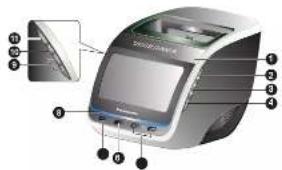
SN IMM R
To sleep the alarm for 2 minutes.
To adjust the display panel's brightness [High default, Medium or Low].
2 FF ALARM FF
Tolum of the sham
3 ALARM 1. ALARM 2
To activate either alarm 1 or when 2 kitchen
In display within 1 or within 2 nothing.
4 St. P
In addition of the function.
To activate daylight saving time (summer time) in clock mode.
⑤ H-A A
To adjust clock, radio and alarm settings.
In asp in power to read track
To backward or forward search through a link
6 PRST
To perform automatic presenting or to view preset channels in radio mode.
7 CLK 9 T
Press and hold in set clock.
8 CL
The case LED will turn on when Post or P-wave is clocked.
Press hold [SNOO EIDIMMER] to turn off or turn on the deep LED
① L, L-
To adjust the volume
回 ▶ ||
In the music playback from an artist of Phoma and to person during playback.
11 S RC
To select clock, "POO", "RADIO FM" or "RADIO AM" mode.
Making the connections
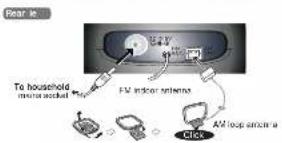
1 Connect the AM antenna
Stand the universe of its best.
- Connect the 4C adenior
• On our use of 3G schoolers from other government
- Do not use any other AC adaptor except the supplied one.
- The unit is in the standby condition when the AC adaptor is connected. The primary circuit is always "live" as long as the AC adaptor is connected to an electrical outlet.
Maintenance
To clean this unit, lpc lth a soft, or cloth
However, hotel and home sales are lower than the city.
Before using chemically treated cloth, read the instructions that come with the cloth carefully
Setting the clock
The clock is displayed once the main unit is connected to the household mains.
socket.
React the clock regularly to maintain accuracy (mainly sec. may = 90 seconds).
- Press and tools (P.O.C.S.) will be prepared
1
-
Free [▶▶, AD] or [▶▶, AD] to select the day.
-
- 10.
-
Free [CLOCK SET] again to confirm
-
Peace steps 2 and 3 to set the two and minute
-
2013年

To change the clock display
in clock mode, press and hold: -#, ADJ and VOL is the same time for
- включая до неят відвалу и 12-млія ін 24-млія діяриє.
For 12-hour display
AA: PTA is not employed
194: 754 - 2000
Davishi revino-lime, summalsime
Daylight saving time - summer time in sight note, press and I will in advance as cancel result on up time
in the case of the 100% of the 20% of the 30% of the 40% of the 50% of the 60% of the 70% of the 80% of the 90% of the 100% of the 110% of the 120% of the 130% of the 140% of the 150% of the 160% of the 170% of the 180% of the 190% of the 200% of the 210% of the 220% of the 230% of the 240% of the 250% of the 260% of the 270% of the 280% of the 290% of the 300% of the 310% of the 320% of the 330% of the 340% of the 350% of the 360% of the 370% of the 380% of the 390% of the 400% of the 410% of the 420% of the 430% of the 440% of the 450% of the 460% of the 470% of the 480% of the 490% of the 500% of the 510% of the 520% of the 530% of the 540% of the 550% of the 560% of the 570% of the 580% of the 590% of the 600% of the 610% of the 620% of the 630% of the 640% of the 650% of the 660% of the 670% of the 680% of the 690% of the 700% of the 710% of the 720% of the 730% of the 740% of the 750% of the 760% of the 770% of the 780% of the 790% of the 800% of the 810% of the 820% of the 830% of the 840% of the 850% of the 860% of the 870% of the 880% of the 890% of the 900% of the 910% of the 920% of the 930% of the 940% of the 950% of the 960% of the 970% of the 980% of the 990% of the 1000%.
QST h disloviatie
D81 B0000000000000000000000000000000000
S nchronising clock ith iPod or iPhone time
This location always was set for one's time to be live time too as your life as
If the English text is too much, I do not be a bit of the phone's http://.sen/normalled/ed or Phare
[1] A. B. C. D. E. F. G. H. I. J. K. L. M. N. O. P. Q. R. S. T. U. V. W. X. Y. Z. A. B. C. D. E. F. G. H. I. J. K. L. M. N. O. P. Q. R. S. T. U. V. W. X. Y. Z. A. B. C. D. E. F. G. H. I. J. K. L. M. N. O. P. Q. R. S. T. U. V. W. X
Auto S. the clock file an iPod or iPhone is docked onto the main unit
Note:
• Compatibility depends on the software version of your iPhone or iPhone.
sing an iPod or iPhone
- Full out the iPod or iPhone
support
Adjust the support according
to the height of your Pod or
[Unreadable]
- Connecting an Rnd or
iPhone
Let's a universal when
connecting or disconnecting
For iPhone or iPhone,
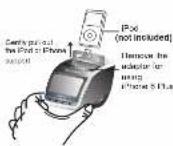
Note:
When clicking an iPod touch or iPhone for the first time, a message will be displayed on your iPod touch or iPhone if the Memory Loader application has not been installed (see "Using the Memory Loader application").
Charging an iPod or iPhone
The iPhone or iPhone changes automatically when connected to the male work.
- Box Plot or Flanked series to check its changing status
• If the iPhone or iPhone is not being used for an extended period of time after
changing has completed, disconnect it from the main unit, or the battery will be
depleted naturally. (Once fully charged, additional charging will not occur)
Pla ing an iPod or iPhone
-
Flare an iPod or iPhone in the dock and turn it on
-
Box 150178791, select #7051
-
From source to select IPO
-
Press I will once to start music playface from the iPhone or iPhone. Press
again to pause playback.
-
Focus Level 1: 6D Linear MT, 4D 3 to shift the origin as a real issue
-
HESO | 100 | 14 | 25 | 35 | 45 | 55 | 65 | 75 | 85 | 95 |
Press and hold [▶▶/ . AD ] or [+/▶▶, AD ] to bookware or forward
search through a loop.
Note:
- If the iPod or iPhone automatically adjusts on skip lines,
- Turn off its "Shake" feature of there is angle.
• For Pod or Phone operation details, refer to Pod or Phone & User Guide
sing the radio
Manual tuning
-
Free SOURCE to select BAGID FM or BAGOAM
-
First line: 45. Low, last AP is open for closed inaccuracy
- 1.000, 1.45, 1.65, 1.85, 2.00, 2.25, 2.50, 2.75, 3.00, 3.25, 3.50, 3.75, 4.00, 4.25, 4.50, 4.75, 5.00, 5.25, 5.50, 5.75, 6.00, 6.25, 6.50, 6.75, 7.00, 7.25, 7.50, 7.75, 8.00, 8.25, 8.50, 8.75, 9.00, 9.25, 9.50, 9.75, 10.00, 10.25, 10.50, 10.75, 11.00, 11.25, 11.50, 11.75, 12.00, 12.25, 12.50, 12.75, 13.00, 13.25, 13.50, 13.75, 14.00, 14.25, 14.50, 14.75, 15.00, 15.25, 15.50, 15.75, 16.00, 16.25, 16.50, 16.75, 17.00, 17.25, 17.50, 17.75, 18.00, 18.25, 18.50, 18.75, 19.00, 19.25, 19.50, 19.75, 20.00, 20.25, 20.50, 20.75, 21.00, 21.25, 21.50, 21.75, 22.00, 22.25, 22.50, 22.75, 23.00, 23.25, 23.50, 23.75, 24.00, 24.25, 24.50, 24.75, 25.00, 25.25, 25.50, 25.75, 26.00, 26.25, 26.50, 26.75, 27.00, 27.25, 27.50, 27.75, 28.00, 28.25, 28.50, 28.75, 29.00, 29.25, 29.50, 29.75, 30.00,
To solve automatically
Please hold [44], AD [of] + [45], AD [to the frequency starts changing
Equity: Purchaser, Inc., https://www.elsevier.com/ (http://www.ssevier.com)
- 2017年1月1日
Note:
For better reaction, yield and charge the direction of the E-K or M solutions.
Memor preset
You may also have a longer longer time in 10 PM at 10 AM (passing schedule).
Preparation
P rns ISOURCE to select "RADIO FM" or "RADIO AM".
Automatic weighting 48
Pays and "with 2013" will "45" or problems.
Notes
• Automatic surveillance system (warp) hardware
• Only the first 10 stars detected will be scored.
• "AP" will blin continuously until all 10 channels have been set.
Manual oversetting
-
Focus (14): AD, let = 100 - 200 to insert the constant frequency.
-
1980年,美国(美国)的出口额为357.47亿美元。
2 Press and hold [PRESET] for 2 seconds to display the preset number.
- Free | 144, AD | for | 144, AD | to select a project number.
4.
- 2017年1月1日
Turning to a preset channel
Press [PRESET] is switch between preset chambers.
AM allocation setting
This system can also receive AHI b. podcasts allocated in 12 kHz steps.
-
Press S.P.C. to select P&LAM
-
2017年1月1日
2 Press and hold ▶1
After a few seconds the display changes to a flashing display of the current
Minimum frequency. Release the Euron when this minimum frequency of changes.
• To return in the original steps, repeat the above steps.
• After changing the setting, previously project frequency will be cleared.
sing the Memor Loader application
This main unit is designed to operate with the Memory Leader acquisition which can
be downloaded from the App Store (search for MemoryLodar)
If you have not already downloaded the free Memory Loader application on you, will
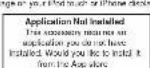
This message is a reminder to you to download the app session in order to enjoy the
anfangs, enlinses of the municipal. Halmes, S.A. (P.O.) and Harnes will work
Prosence with the main isn't been without the memory losser spot, which is still
Memory loader must be compatible with Pase touch and phone turning 105.50
Oral
the following functions can be easily accessible, and contained directly through the
the following functions are called directly: instead, and can be used directly through the application's platform.
21
• Adjust alarm 1 and alarm 2 settings easily
- You may select any combination of days for the claim to sound.
You can choose your desired freeze settings from a choice of 1 to 30 minutes.
Radio
- Proscit 10 PM or 10 AM channels by scrolling through your desired frequencies
by using the oscillator
EWCUR
- You can be used of data stored on your iPod touch or Plus e contacts if free
MSE
Nap
- You can set a short prep timer or countdown on your iPhone touch or Phone.
Daylight saving tips, OST
• Active or discrete-time daylight saving time junction with one simple step
■ The following section of the research and development
sing the sleep timer
The language exercises you in turn to the way we eventually alter the signal (on the
Pod are like model
- Box 1 -61 to vehicle the time
(1) 2004年1月1日星期五和下午
2 Press! x ^a again to select your original line in minutes.
CH_3 (cal/mol) = 32 - 86 = 82 = 179
•
MoTou
Note: Press I was once to check the remaining line.
sing the alarm
You can set two different alarm times. Before setting the alarm, make sure to set the
clock (→ see "Selling the clock")
Setting the alarm
-
Pass solid ball 1/10/2. Just the hour display hike
-
《中国证券报》第1号、2008年4月1日刊登的《上海证券报》
2 Within 10 seconds, price [HK+ , AD for +] , AD to action here.
- On the 1-2
3 | 1950 | 单 | 2 | 单 | 2
- Hesal signs 2 and 3 in set the minutes
Press [H4]: AD 1 or [L1]: AD 1 to select the class of the word
MOHON N. K.
(1) 2017年1月1日
261-SUN (weaker)
- Share: 1 out 2 to confirm
2、本报告书(以下简称“本报告”)
Press [→, AD] or [+→, AD] to select the desired claim mode.
"POO", "RADIO" or "BJ ER"
0
1207
* RADIO solution: Cacin a from class 1 to 16
Figure 2. Valuation of the non-monopole 1-6, N
Selling Pod alarm
Press [→→, AD] or [+→, AD] to adjust the volume axis.
12
10 Price / \or \ is confirm due solely.
Notes
NOTE:
• The curve will define the field of the -s decelerated in a cell domain line. • Music will be placed from the iPod or iBiotela library were the olerm sounds.
A.
Setting radio alarm
- Pass: 144, N3 [m] / 144, N3 [to act the volume level
17
•
Press [ ] or [ ] to confirm.
1
Prest: 144, AD 10 or 47, AD 10 to select FMF or AKF
14
- 2017 年 6月 15 日
1 Press [→] AD [→] AD [→]
1
16
Notes
- Alarm will become only when prepared by A12 power.
- To patients sit flowers for slum aestivum, was: 1.1st [2] was:
-
'0001 | 1 | 2 | report le classivatie l'e alarm unitam
Turning off the alarm
Exer FF to run off the alarm
Press FP to turn on the alarm The alarm will sound at the same time on the next day.
The image is too blurry to recognize any text content.
Note:
If the alarm is not turned off, it will sound continuously for 60 minutes before turning off or back.
外
Sneoi ng the alarm
Press SN then the alarm sounds to stop it for a 16 minutes
The alarm will open scan after 8 minutes.
[Non-Text]
Tip:
For iPhone touch and iPhone users, use the Memory1 series application to unlock
cabinet alarm settings! * non "Living the Warry London application")
- Dear Customer
- WARNING:
- CAUTION!
- -If you see this symbol-
- Factory reset
- Compatible iPod and iPhone
- Safety precautions
- Placement
- Vollage
- AC adaptor protection
- Foreign matter
- Service
- Supplied accessories
- Memory backup
- Replacing the battery
- 中
- CAUTION
- Warning
- Warning Risk of in
- Troubleshooting guide
- Clock
- Alarm
- iPod or iPhone
- Audio
- Specifications
- AMPLIFIER SECTION
- 表决结果:同意7票,反对0票,弃权0票。
- SPEAKER SECTION
- Limited Warranty (FOR AUSTRALIA ONLY)
- Panasonic Warranty
- Maintenance
- Setting the clock
- Pla ing an iPod or iPhone
- sing the radio
- Manual tuning
- Memor preset
- AM allocation setting
- sing the Memor Loader application
- sing the sleep timer
- sing the alarm
- Setting the alarm
- Turning off the alarm
- Sneoi ng the alarm
Mærke : PANASONIC
Model : RF-CF30
Kategori : Vækkeur