Touch 2.6 - Smartwatch Overmax - Gratis brugsanvisning og manual
Find enhedens vejledning gratis Touch 2.6 Overmax i PDF-format.


Brugerspørgsmål om Touch 2.6 Overmax
0 spørgsmål om dette apparat. Besvar dem du kender, eller stil dit eget.
Stil et nyt spørgsmål om dette apparat
Download vejledningen til din Smartwatch i PDF-format gratis! Find din vejledning Touch 2.6 - Overmax og tag din elektroniske enhed tilbage i hånden. På denne side er alle dokumenter nødvendige for brugen af din enhed offentliggjort. Touch 2.6 af mærket Overmax.
BRUGSANVISNING Touch 2.6 Overmax
Touch 2.6
Instrukcja obsługi
User Manual
Bedienungsanleitung
Használati utasítás
Handleiding
OVERMAX
You • unlimited

Download on the
App Store
App Store: SMART-TIME

Android app on
Google play
2
natural_image
Close-up of a modern smartwatch with a black lens and beige strap, showing no visible text or symbols on the device itself.3
4
PL
Wprowadzenie
Drogi Kliencie!
Dziękujemy za obdarzenie nas zaufaniem i wybranie marki Overmax.
Dzięki wykorzystaniu wysokiej jakości materiałów i nowoczesnych rozwiązań technologicznych oddajemy w Twoje ręce produkt idealny do codziennego użytkowania. Jesteśmy pewni, że dzięki ogromnej staranności wykonania spełni on Twoje wymagania. Przed użyciem produktu zapoznaj się dokładnie z poniższą instrukcją obsługi.
Jeśli masz jakiekolwiek uwagi lub pytania do zakupionego produktu, skontaktuj się z nami:
pomoctechniczna@overmax.pl
Pierwsze uruchomienie
Aby w pełni korzystać z funkcji smartwatcha należy ściągnąć i zainstalować na telefonie aplikację Smart - Time. Za pomocą tej aplikacji możesz wyznaczać sobie sportowe cele, analizować ich postęp, weryfikować dostępne dane (np. długość snu, ilość kroków) oraz wiele więcej.
W celu dokładnej analizy zebranych przez smartwatch danych zostaniesz poproszony o podanie swojego wzrostu, wagi i płci. Ma to na celu celniejsze określenie np. ilości spalonych kalorii czy innych parametrów.
Przyjaciele, których dodasz do listy znajomych w aplikacji będą widzieli Twoje imię, dzienną ilość wykonanych kroków oraz Twoje miejsce w rankingu.
Touch 2.6 wspiera łączność Bluetooth o standardzie 3.0 oraz 4.0. Aplikacja
Smart - Time jest kompatybilna z urządzeniami mobilnymi o systemie iOS 8.0 lub wyższym, oraz Android 4.4 lub wyższym.
Przed pierwszym uruchomieniem naładuj do pełna baterię.
- Włącz Bluetooth, zarówno w telefonie jak i w zegarku. Upewnij się, że oba mają zaznaczone pole „widoczność”.
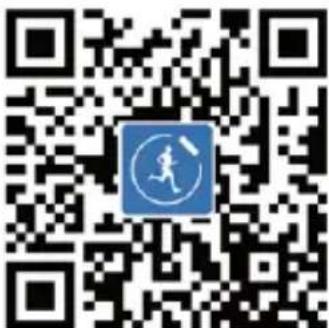
- Zainstaluj aplikację Smart - Time (możesz w tym celu zeskanować kod QR, znajdujący się na rys. 1) i założ w niej konto.
- Upewnij się, że telefon i zegarek są w pobliżu.
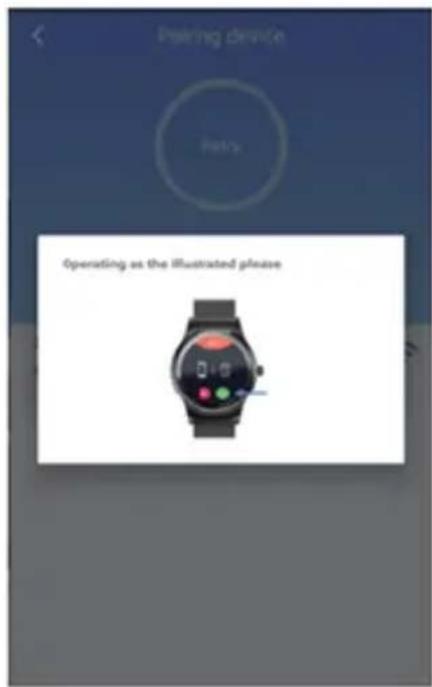
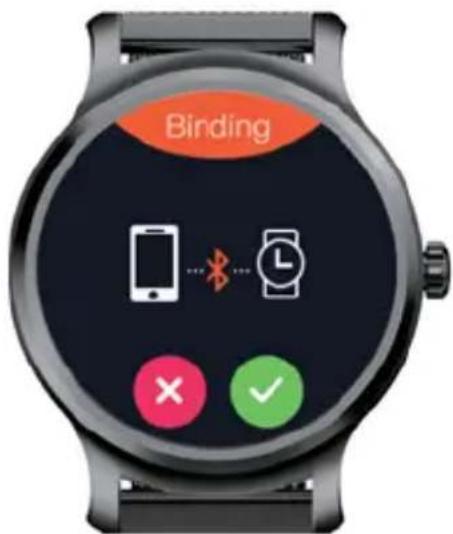
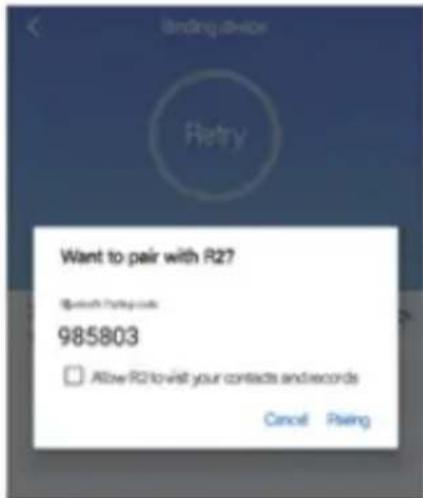
- Wejdź w aplikację Smart - Time. Przejdź do zakładki URZĄDZENIE a następnie wybierz DODAJ NOWE URZĄDZENIE. Wybierz swoje urządzenie z listy. Na zegarku pojawi się komunikat o parowaniu (rys.
2), zaakceptuj go poprzez kliknięcie w - W zakładce Bluetooth na telefonie wyszukaj „OV-Touch 2.6” i wybierz swoje urządzenie.
- W aplikacji wyskoczy żądanie parowania. Potwierdź żądanie (rys. 3). Telefon poprosi Cię teraz o inne uprawnienia, np. o dostęp do wiadomości, aby mogły się one wyświetlać na smartwatchu.
Uwaga! Touch 2.6 może być sparowany wyłącznie z jednym telefonem.
Jeśli chcesz połączyć zegarek z innym smartfonem, usuń wpierw pierwsze parowanie.
W aplikacji: URZĄDZENIE -> USUŃ PAROWANIE
W telefonie*: ustawienia Bluetooth -> wybierz swoje urządzenie -> anuluj powiązanie.
*Wygląd opcji Bluetooth w telefonie może się różnić w zależności od modelu telefonu.
Ładowanie
UWAGA! Przed każdym ładowaniem dokładnie przetrzyj gniazda
PL
ładowania, aby usunąć z nich resztki wilgoci i innych zanieczyszczeń.
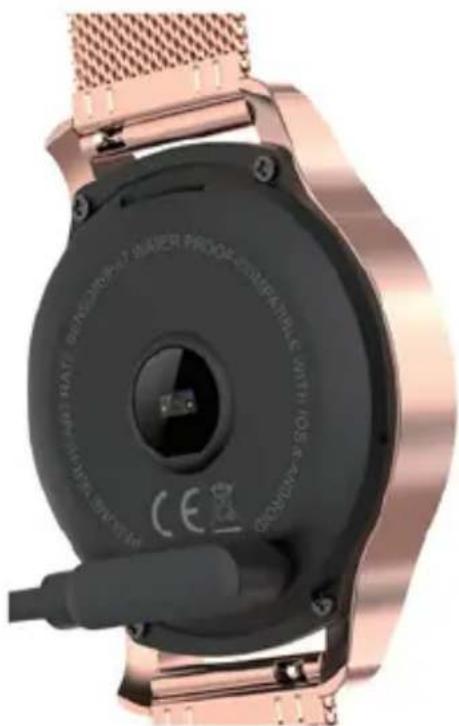
Aby naładować urządzenie, przystaw końcówkę ładowarki do gniazd ładowania (tak, jak wskazuje rys. 4). Elementy te połączą się magnetycznie. Po 10 sekundach od podłączenia na ekranie smartwatcha pojawi się ikona baterii. Smartwatch potrzebuje około dwóch godzin do pełnego naładowania.
Funkcje smartwatcha
1. Wykonywanie połączeń
Po poprawnym sparowaniu telefonu z urządzeniem możesz wykonywać, odbierać i odrzucać połączenia z poziomu smartwatcha.
2. Wiadomości
Wejdź w aplikację i wybierz zakładkę URZĄDZENIE. Następnie wejdź w USTAWIENIA POWIADOMIENÍ i zaznacz opcję POWIADOMIENIA SMS. Po zaznaczeniu tej opcji powiadomienia o nowych wiadomościach będą widoczne na tarczy zegara.
3. Powiadomienia
Wejdź w aplikację i wybierz zakładkę URZĄDZENIE. Następnie wejdź w USTAWIENIA POWIADOMIEN i zaznacz te aplikacje, których powiadomienia chcesz otrzymywać na smartwatchu.
4. Tryb Sportowy
Przesuń ekran w prawo aby wejść do trybu sportowego. Z tego miejsca możesz wybrać dowolną aktywność sportową, którą chcesz zacząć. Smartwatch będzie mierzył Twój wynik.
5. Ciśnienie krwi
Wejdź do menu i wybierz opcję CIŚNIENIE KRWI. Zegarek zmierzy Twoje ciśnienie i poda wartość.
6. Trening oddechu
Zegarek posiada funkcję treningu oddechu, którą możesz wybrać z menu głównego.
7. Krokomierz
Wybierz tę opcję z menu głównego aby zobaczyć: ile wykonałeś kroków, jaki dystans został pokonany a także ile kalorii zostało spalonych.
8. Tetno
Aby odczytać swoje tętno upewnij się, że zegarek założony jest prawidłowo. Wejdź w menu główne i wybierz TĘTNO. W tym miejscu możesz manualnie zmierzyć swoje tętno.
Możesz też ustawić automatyczne mierzenie co 15/30/60 oraz 120 minut z poziomu aplikacji.
9. Monitor snu
Jeśli będziesz spał z założonym zegarkiem, zbierze on informacje dotyczące Twojego snu i przekaże je na aplikację mobilną. Możesz je wtedy przejrzeć na telefonie i uzyskać informacje np. o średniej długości snu, godzinie zaśnięcia i pobudki, czasie spędzonym w fazie głębokiego snu.
10. Zdalne robienie zdjęć
Opcja ta pozwala na zdalną kontrolę migawki aparatu telefonu. Wybierz tę opcję z menu głównego i wciśnij, aby zrobić zdjęcie na swoim smartfonie.
11. Monitor braku aktywności
Siedzenie zbyt długo w jednej pozycji nie jest dobre dla zdrowia. Ustaw swojego smartwatcha aby przypominał Ci co jakiś czas o konieczności ruchu.
12. Alarm
Ustaw alarm za pomocą aplikacji lub smartwatcha. Maksymalna ilość alarmów: 8.
13. Funkcja anti - lost.
PL
Wybierz na zegarku z menu głównego opcję ZNAJDŻ TELEFON. Twój smartphone wyda wtedy dźwięk który pozwoli go zlokalizować.
Ta sama funkcja działa także w drugą stronę – jeśli wybierzesz w aplikacji opcję ANTI – LOST, Touch 2.6 wyda z siebie dźwięk, który pomoże go znaleźć.
14. Zmiana tarczy zegara
Przytrzymaj obecną tarczę zegara, po czym wybierz jeden z dostępnych motywów.
15. Zmiana wyglądu menu
Aby zmienić wygląd menu, wejdź w opcje a następnie wybierz MOTYW. Możesz teraz wybrać wygląd menu zegarka.
16. Sterowanie ruchem
Niektóre funkcje smartwatcha mogą być sterowane ruchem. Wejdź w menu główne i wybierz opcję RUCH a następnie dostosuj swój smartwatch według preferencji.
Uwagi
Nie należy naprawiać oraz dokonywać modyfikacji urządzenia. Czynności te może dokonać tylko autoryzowany serwis.
Nie uruchamiaj urządzenia, jeżeli zauważyłeś jakiekolwiek uszkodzenia.
Nie używaj urządzenia, gdy zaczyna wadliwie działać, zostało upuszczone lub nadmiernie zamoczone (powyżej poziomu wodoodporności), nadmiernie nagrzewa się, pojawią się odbarwienia, wybrzuszenia, wydaje nienaturalne dźwięki, zapachy oraz gdy wystąpią inne, nietypowe zjawiska. W takich wypadkach niezwłocznie skontaktuj się z autoryzowanym serwisem producenta.
Przed ładowaniem dokładnie przetrzyj gniazda ładowania, aby usunąć
z nich resztki wilgoci i innych zanieczyszczeń, pozostałych np. po aktywności fizycznej.
Używaj urządzenia z dala od źródeł ciepła, wysokich temperatur, gorących powierzchni, bezpośredniego światła słonecznego, źródeł iskrzenia, otwartego ognia, olei oraz ostrych krawędzi.
Nie używaj urządzenia w otoczeniu zawierającym łatwopalne, wybuchowe lub toksyczne substancje.
Nie używaj substancji chemicznych do czyszczenia urządzenia.
Nie używaj urządzenia do innych celów, niż do których zostało ono zaprojektowane.
Nie zostawiaj urządzenia podłączonego do ładowania bez nadzoru.
Po naładowaniu odłącz urządzenie od przewodu ładującego.
UWAGA!
Dane i informacje zbierane przez zegarek odnośnie tętna są orientacyjne i obarczone pewnym błędem. Wynik pomiaru nie powinien być przeznaczony do diagnozy medycznej oraz do modyfikacji swojej terapii.
Samodzielna diagnoza i samodzielna terapia są niebezpieczne. Tylko wykwalifikowany lekarz może diagnozować i leczyć wysokie ciśnienie lub inne choroby serca. Skontaktuj się z lekarzem, aby uzyskać fachową poradę i zostać zbadanym profesjonalnym sprzętem.
Zdjęcia mają charakter poglądowy, rzeczywisty wygląd produktów może różnic się od prezentowanego na zdjęciach
Introduction
EN
Dear customer!
Thank you for placing trust in us and choosing Overmax.
Thanks to the use of high-quality materials and modern solutions, we provide you with a product perfect for everyday use. We are convinced that the product will satisfy your requirements as it has been designed with utmost care. Before you use the product, please read this manual carefully.
Should you have any remarks or questions concerning the product, please do not hesitate to contact us:
pomoctechniczna@overmax.pl
First use
To make the most of the smartwatch features, download and install Smart - Time app on your mobile. You can use this application to set sport goals, analyze their progress, verify data (e.g. sleep length, number of steps) and many, many more.
In order to analyze the data collected by the smartwatch precisely, you will be asked to enter your height, weight and age. Thanks to this, you can specify the number of calories burnt or other parameters more accurately. The friends whom you add to a list of friends in the application will see your first name, number of steps you take a day as well as your position in the ranking list.
Touch 2.6 supports Bluetooth 3.0 or 4.0. Smart - Time application is compatible with mobile devices based on iOS 8.0 or higher, and Android
4.4 or higher.
Before the first use, charge the battery fully.
- Enable Bluetooth on the phone and in the watch. Make sure the field "visibility" is marked in both.
- Install Smart - Time application (to do so, you can scan QR code in the fig. 1) and open an account there.
- Make sure the mobile and watch are close to each other.
- Enter Smart - Time app. Go to DEVICE tab and then select ADD NEW DEVICE. Select your device from the list. You will see a pairing message on the watch (fig. 2), accept it by clicking √.
- In Bluetooth section on the phone - search „OV-Touch 2.6" and select your device.
- A pairing request will pop up in the application. Confirm it (fig. 3). The phone will ask you now for other entitlements, e.g. access to the message, so that they can be displayed on the smartwatch.
Note! Touch 2.6 can be paired with one mobile only. If you want to pair a watch with other smartphone, delete the first pairing in the first place.
In the app: DEVICE -> DELETE PAIRING
In the mobile*: Bluetooth settings -> select your device -> cancel pairing.
*Bluetooth options view in the mobile may differ, depending on the phone model.
Charging
NOTE! Every time you plan to charge the product, please wipe the charging ports carefully to remove moisture and other pollutants.
To charge the device, attach the charger tip to the charging ports (as presented in the fig. 4). These elements will contact each other
magnetically. After 10 seconds the smartwatch's screen will show a battery icon. The smartwatch needs to charge for about two hours to be full.
EN
Smartwatch functions
1. Making phone calls
Once you have paired the mobile with the device correctly, you can make, answer and reject calls via a smartphone.
2. Messages
Enter the application and select DEVICE. Next enter NOTIFICATION SETTINGS and select SMS NOTIFICATIONS. After you have selected this item, notifications about new messages will be visible on the dial of the watch.
3. Notifications
Enter the application and select DEVICE. Next go to NOTIFICATION SETTINGS and select the applications whose notifications you wish to receive on the smartwatch.
4. Sport mode
Slide the screen right to enter the sport mode. From here you can choose any sport activity you wish to start. The smartwatch will measure your result.
5. Blood pressure
Enter the menu and select BLOOD PRESSURE. The watch will take your pressure and display the value.
6. Breathing training
The watch offers a breathing training feature which you can find in the main menu.
7. Pedometer
Select this option in the main menu to see number of steps you have taken, distance you have covered as well as number of calories you
have burnt.
8. Pulse
To read your pulse, make sure you have attached the watch properly.
Enter the main menu and select PULSE. Here you can take your pulse manually. You can also set automatic measurement every 15/30/60 and 120 minutes from the application.
9. Sleep monitor
If you sleep with your watch on, it will collect information on your sleep and transmit it into the mobile application. Then you can see them on the mobile and gain information about average sleep length, falling asleep and wake-up time, deep sleep time.
10. Remote photographing
This feature lets you control the mobile phone's shutter remotely. Select this option in the main menu and press to take a picture in your smartphone.
11. No activity monitor
Sitting in one position for a long time is not healthy. Set your smartphone so that it reminds you to move from time to time.
12. Alarm
Set the alarm via the application or smartwatch. The maximum number of alarms is 8.
13. Anti-lost feature.
Select FIND PHONE in the main menu of the watch. Your smartphone will emit a sound to localize it. The same feature works the other way round - if you select ANTI-LOST feature in the application, Touch 2.6 will emit a sound to help you find it.
14. Change of dial of the watch
Hold the existing dial of the watch and then select one of the available THEMES.
15. Change of menu view
EN
To change the menu view, enter the options and then select THEME. Now you can select the watch menu view.
16. Movement control
Some features of the smartwatch can be controlled through movement. Enter the main menu and select MOVEMENT, and next adjust your smartwatch according to your preferences.
Notes
Do not repair or modify the device. Only an authorized service technician is allowed to perform these operations.
Do not switch the device on if you have noticed any damage.
Do not use the device when it starts acting up, has been dropped or got wet (above waterproof threshold), overheats extensively, is discolored or deformed, emits abnormal sounds and odors, and when other atypical circumstances occur. This being the case, contact the manufacturer's authorized service center immediately.
Before you charge it, wipe the charging ports carefully to remove any moisture and other pollutants.
Use the device away from source of heat, high temperatures, hot surfaces, direct sunlight, sources of ignition, naked flame, oils and sharp edges.
Do not use the device in the inflammable, explosive or toxic atmosphere.
Do not use chemicals to clean the device.
Do not use the device for other purposes than designed.
Do not leave the device unattended if it is plugged in.
When charging is over, unplug the device.
NOTE!
The data and information on the pulse collected by the watch are approximate and may be inaccurate. The measurement result must not be intended for medical diagnosis and modification of your therapy.
Own diagnosis and therapy are dangerous. Only a competent doctor may diagnose and treat high blood pressure and other heart diseases. Contact your doctor to take a professional advice and undergo a professional examination.
The pictures are for reference only. The real design of the products may differ from the pictures presented.
Einleitung
Sehr geehrte Kunden!
Wir bedanken uns für Ihr Vertrauen und Auswahl der Marke Overmax.
Wir geben zu Ihren Händen ein Produkt über, das dank hochwertigen Materialien und innovativen
technologischen Lösungen perfekt für den täglichen Gebrauch ist.
Wir sind sicher, dass dank einer sehr sorgfältigen Ausführung unser Produkt Ihre Anforderungen
erfüllt. Vor dem Gebrauch lesen Sie genau die vorliegende Bedienungsanleitung durch.
Falls Bemerkungen oder Fragen zum gekauften Produkt, nehmen Sie mit uns Kontakt auf:
pomoctechniczna@overmax.pl
Erststart
Um die Funktionen der Smartphone voll zu nutzen, sollen Sie die Smart-Time- App herunterladen und auf Smartphone installieren. Mit Hilfe dieser App können Sie sich selbst die Sportziele setzen, ihren Fortschritt analysieren, vorhandene Daten (z.B. Schlaflänge, Schrittanzahl) verifizieren und viel mehr.
Um die von der Smartphone gesammelten Daten genau zu analysieren, werden Sie um solche Informationen wie ihre Größe, Gewicht, Geschlecht erbeten. Dies hat zum Ziel eine bessere Feststellung z.B. der gerannten Kalorien oder anderen Parameter.
Freunde, die Sie Ihrer Freundesliste in der App hinzufügen, werden Ihre
Name, tägliche Schrittanzahl und Ihren Platz in der Rangliste.
Touch 2.6 unterstützt Bluetooth mit einem Standard 3.0 und 4.0. Die App Smart – Time ist mit anderen Mobilgeräten mit dem System iOS 8.0 oder einem höheren und Android 4.4 oder einem höheren kompatibel.
Vor dem ersten Gebrauch laden Sie vollständig die Batterie auf.
- Aktivieren Sie die Bluetooth-Funktion, sowohl auf Ihrer Smartphone als auch in der Armbanduhr. Stellen Sie sicher fest, ob das Feld „Sichtbarkeit“, auf beiden Geräten markiert wurde.
- Installieren Sie die App Smart – Time (Sie können auch QR-Code scannen, der sich in der Abbildung 1 befindet) und eröffnen Sie ein Benutzerkonto.
- Prüfen Sie, ob die Smartphone und Smartwatch sich in der Nähe befinden.
- Wählen Sie die App Smart - Time. Dann wählen Sie einen Reiter GERÄT und dann NEUES GERÄT HINZUFÜGEN. Wählen Sie Ihr Gerät aus der Liste. Auf der Armbanduhr wird eine Meldung über Pairing der Geräte (Abb. 2), bitte diese durch ein Klicken ✅ akzeptieren.
- Im Reiter Bluetooth auf Smartphone finden Sie „OV-Touch 2.6“ und wählen Sie Ihr Gerät.
- In der App wird eine Anforderung der Pairing angezeigt. Bestätigen Sie die Anforderung (Abb. 3). Jetzt werden Sie um andere Berechtigungen gebeten, z.B. um Zugang zu den Nachrichten, um es zu ermöglichen, sie auf Smartwatch anzuzeigen.
Achtung! Touch 2.6 kann ausschließlich mit einer Smartwatch gepairt werden. Wenn Sie die Smartwatch mit anderer Smartphone verbinden möchten, löschen Sie zuerst erste Pairing.
In App: GERÄT -> PAIRING LÖSCHEN
In Smartphone*: Bluetooth-Einstellungen -> Ihr Gerät wählen -> Verbindung annullieren.
*Das Aussehen der Bluetooth-Funktionen kann je nach dem Modell der Smartphone unterschiedlich sein.
DE
Aufladen
ACHTUNG! Vor jedem Aufladen reinigen Sie genau die Ladebuchsen, um alle Reste der Feuchtigkeit und anderer Verschmutzungen zu entfernen.
Um das Gerät aufzuladen, stellen Sie die Endung des Ladegeräts an die Ladebuchse (laut der Abb. 4). Die Elemente werden magnetisch verbunden. Nach 10 Sekunden nach dem Anschließen wird auf dem Bildschirm der Smartwatch ein Symbol der Batterie angezeigt. Smartwatch braucht ca. 2 Stunden für ein volles Aufladen.
Smartwatch-Funktionen
1. Anrufe
Nach der richtigen Pairing der Smartphone mit dem Gerät können Sie die Anrufe mit Hilfe der Smartwatch aufnehmen, abnehmen und ablehnen.
2. SMS-Nachrichten
Gehen Sie zur App und wählen Sie den Reiter GERÄT. Dann wählen Sie die EINSTELLUNGEN DER NACHRICHTEN und tippen Sie auf SMS-NACHRICHTEN. Nach dem Tippen dieser Option werden die Benachrichtigungen über die neuen Nachrichten auf dem Zifferblatt der Smartwatch sichtbar sein.
3. Benachrichtigungen
Gehen Sie zur App und wählen Sie den Reiter GERÄT. Dann wählen Sie die EINSTELLUNGEN DER BENACHRICHTIGUNGEN und tippen Sie diese Apps, derer Benachrichtigungen Sie von der Smartwatch bekommen möchten.
4. Sportmodus
Wischen Sie auf dem Bildschirm nach rechts, um den Sportmodus auszuwählen. Hier können Sie auch eine beliebige Sportaktivität wählen, die Sie beginnen möchten. Smartwatch wird Ihre Ergebnisse messen.
5. Blutdruck
Gehen Sie zum Menü und wählen Sie die Funktion BLUTDRUCKMESSUNG. Smartwatch wird Ihren Blutdruck messen und Ihnen die Werte angeben.
6. Atemtrainer
Smartwatch verfügt über eine Funktion des Atemtrainers, die Sie im Hauptmenü wählen können.
7. Schrittzähler
Wählen Sie diese Option im Hauptmenü, um zu prüfen, wie viele Schritte und welche Distanz Sie gemacht haben und wie viele Kalorien Sie verbrannt haben.
8. Puls
Um Ihren Puls abzulesen stellen Sie sicher fest, ob Ihre Smartwatch richtig getragen wird. Gehen Sie zum Hauptmenü und tippen Sie auf PULS. Hier können Sie Ihren Puls manuell messen. Sie können auch in der App ein automatisches Messen alle 15/30/60 und 120 Minuten einstellen.
9. Schlafmonitor
Wenn Sie mit der Smartwatch schlafen werden, sammelt sie die Informationen über Ihren Schlaf und sendet diese auf die Mobile-App. Sie können dann alle Informationen auf Ihrem Smartphone
DE
durchschauen und Daten über z.B. eine durchschnittliche Länge des Schlafens, Zeit des Einschlafens und des Weckrufs, Länge der Tiefschlafphase bekommen.
10. Fernauslöser
Diese Option ermöglicht, einen Verschluss des Fotoapparats in der Smartphone zu kontrollieren. Wählen und drucken Sie diese Option im Menü, um ein Foto aufzunehmen.
11. Monitoring des Bewegungsmangels
Ein zu langes Sitzen in gleicher Position ist ungesund. Stellen Sie Ihre Smartwatch so ein, um ab und zu eine Erinnerung an Bewegungsnotwendigkeit zu bekommen.
12. Alarm
Stellen Sie den Alarm mit Hilfe der App oder Smartwatch ein. Eine maximale Anzahl der Alarme: 8.
13. Anti-Lost-Funktion.
Im Hauptmenü der Smartwatch tippen Sie auf SMARTPHONE FINDEN. Ihre Smartphone macht dann einen Piepton, der Ihnen ermöglicht, die Smartphone zu lokalisieren. Die gleiche Option funktioniert auch in die andere Richtung – wenn Sie auf die ANTI-LOST – OPTION tippen, mach Touch 2.6 einen Ton, der Ihnen hilft, die Smartwatch zu finden.
14. Änderung des Zifferblatts
Drucken und halten Sie das aktuelle Zifferblatt, dann wählen Sie ein von den vorhandenen Motiven aus.
15. Änderung des Menüs
Um das Aussehen des Menüs zu ändern, gehen Sie zu den Optionen und tippen Sie auf MOTIV. Jetzt können Sie das Aussehen des Menüs der Smartwatch ändern.
16. Steuerung der Bewegung
Einige Funktionen der Smartwatch können mit der Bewegung
gesteuert werden. Gehen Sie zum Hauptmenü und tippen Sie auf BEWEGUNG, dann passen Sie Ihre Smartwatch an die eigenen Präferenzen an.
Hinweise
Bitte das Gerät nicht reparieren oder modifizieren. Diese Tätigkeiten dürfen nur durch ein autorisiertes Service durchgeführt werden.
Betätigen Sie das Gerät nicht, wenn Sie irgendwelche Beschädigungen bemerkten.
Das Gerät soll nicht verwendet werden, wenn es fehlerhaft funktioniert, wenn es fallen gelassen oder übermäßig eingeweicht wurde (über das Niveau der Wasserbeständigkeit), wenn es sich übermäßig erwärmt, es kommen Verfärbungen oder Wölbungen vorkommen, wenn es unnatürliche Geräusche hervorbringt, unnatürliche Gerüche ausströmt oder, wenn andere ungewöhnlichen Erscheinungen vorkommen. In solchen Fällen nehmen Sie Kontakt mit dem autorisierten Service des Herstellers auf.
Vor dem Laden, wischen Sie sorgfältig die Ladebuchse, um die Reste der Feuchtigkeit und anderen Verschmutzungen, die z.B. nach einer körperlichen Aktivität geblieben sind.
Benutzen Sie das Gerät weit von den Wärmequellen, hohen Temperaturen, heißen Flächen, direkten Sonnenstrahlung, Funkenquellen, offenem Feuer, Ölen und scharfen Kanten.
Benutzen Sie das Gerät nicht in der Nähe von brennbaren, explosiven oder toxischen Stoffen.
Verwenden Sie keine Chemikalien zur Reinigung des Gerätes.
Das Gerät soll nur bestimmungsgemäß verwendet werden.
Lassen Sie das Gerät nie unbeaufsichtigt, wenn es an die Stromversorgung angeschlossen ist.
Nach dem Laden trennen Sie das Gerät vom Ladekabel.
ACHTUNG!
Die von der Smartwatch gesammelten Daten und Informationen, die den Puls betreffen, sind nur geschätzt und mit Fehlern behaftet. Das Messungsergebnis ist nicht für die medizinischen Diagnosen und Modifizierungen eigener Therapie bestimmt.
Eine Selbstdiagnose und Selbsttherapie sind gefährlich. Nur der qualifizierte Arzt kann einen hohen Blutdruck und andere Herzkrankheiten diagnostizieren und heile. Nehmen Sie Kontakt mit dem Arzt auf, um eine Fachberatung zu erhalten und mit Hilfe der professionellen Ausrüstung untersucht zu werden.
Die Fotos und Zeichnungen sind anschaulich, das tatsächliche Aussehen der Produkte kann von der gezeigten Abbildung abweichen.
DE
BEVEZETÉS
Kedves Ügyfelünk!
Köszönjük bizalmát, hogy az Overmax márkát választotta.
A kézébe adunk egy mindennapi használatra ideális terméket, a magas minőségű anyagok és modern technológiai megoldásoknak köszönhetően. Biztosak vagyunk abban, hogy a gondos kivitelezésnek köszönhetően teljesíti az Ön elvárásait. A termék használata előtt részletesen ismerje meg az alábbi használati utasítást.
Ha bármilyen észrevétele vagy kérdése van a vásárolt termékről, lépjen kapcsolatba velünk:
pomoctechniczna@overmax.pl
Első üzembehelyezés
Az intelligens óra funkció teljes kihasználása érdekében töltse le és telepítse a Smart-Time alkalmazást a telefonjára. Ezzel az alkalmazással beállíthat sportcélokat, elemezheti azok előrehaladását, ellenőrizheti a rendelkezésre álló adatokat (pl. Alvás időtartama, lépések száma) és még sok minden mást.
Az intelligens órával összegyűjtött adatok alapos elemzése érdekében meg kell adnia a magasságát, a súlyát és a nemét. Így pontosabban meghatározza például az elégetett kalória mennyiségét vagy más paramétereket.
A barátok, akiket hozzáad az alkalmazásban az ismerősök listájához fogják látni az Ön nevét, a megtett napi lépésmennyiségét valamint az Ön
helyét a rangsorban.
A Touch 2.6 támogatja a Bluetooth 3.0 és 4.0 szabványú kapcsolatot. A Smart-Time alkalmazás kompatibilis az iOS 8.0 vagy újabb és az Android 4.4 vagy újabb verziókkal rendelkező mobileszközökkel.
Az első üzembe helyezés előtt töltse fel teljesen az akkumulátort.
- Kapcsolja be a Bluetooth-t a telefonon és az órán is. Győződjön meg arról, hogy mindkettőnél be van jelölve a „láthatóság” négyzet.
- Telepítse a Smart - Time alkalmazást (ezt megteheti a 1. ábrán található QR-kód beolvasásával) és hozzon létre benne egy fiókot.
- Győződjön meg arról, hogy a telefon és az óra egymás közelében van.
- Lépjen be a Smart - Time alkalmazásba. Nyissa meg az ESZKÖZ fület, majd válassza az ÚJ ESZKÖZ hozzáadása lehetőséget. Válassza ki a saját készülékét listából. Az óra párosítási üzenetet fog megjeleníteni (2. ábra), fogadja el, a -ra kattintva.
- A telefon Bluetooth fülén keresse meg a „OV-Touch 2.6”-ot és válassza ki a készüléket.
- Párosítási kérelem jelenik meg az alkalmazásban. Fogadja el a kérelmet (3. ábra). A telefon most más engedélyeket is kér, például hozzáférést az üzenetekhez, hogy azok is megjelenjenek az intelligens órán.
Figyelem! A Touch 2.6 kizárólag egy telefonnal párosítható. Ha óráját másik okostelefonhoz szeretné csatlakoztatni, előbb távolítsa el az előző párosítást.
Az alkalmazásban: ESZKÖZ -> FELELÖSSÉG TÖRLÉSE
A telefonban *: Bluetooth beállítások -> válassza ki az eszközt -> a párosítás törlése.
* A Bluetooth opció megjelenése a telefonon a telefon típusától függően változhat.
Töltés
FIGYELEM! Minden egyes töltés előtt alaposan törölje le a töltőaljzatokat, hogy eltávolítsa azokból a nedvességet és az egyéb szennyeződéseket.
Az eszköz feltöltéséhez csatlakoztassa a töltő végét a töltőaljzatokhoz (a 4. ábra szerint). Ezek az elemek mágnesesen kapcsolódnak egymáshoz. 10 másodperccel a csatlakozás után az akkumulátor ikon megjelenik az intelligens óra képernyőjén. Az intelligens órának kb. Két órára van szüksége a teljes feltöltődéshez.
Intelligens óra funkciók
1. Hívások kezdeményezése
A telefon és a készülék megfelelő párosítása után az intelligens óráról hívásokat kezdeményezhet, fogadhat és elutasíthat.
2. Üzenetek
Lépjen be az alkalmazásba, és válassza az KÉSZÜLÉK fület. Ezután lépjen az ÜZENETEK BEÁLLÍTÁSAI elemre, és jelölje meg az az SMS ÜZENETEK opciót. Ha ezt a lehetőséget választja, az új üzenetek értesítései az óra felületén láthatók lesznek.
3. Üzenetek
Lépjen be az alkalmazásba, és válassza az KÉSZÜLÉK fület. Ezután lépjen az ÜZENETEK BEÁLLÍTÁSAI elemre, és válassza ki azokat az alkalmazásokat, amelyek üzeneteit az intelligens óráján szeretné megkapni.
4. Sport mód
Húzza el jobbra a képernyőt a sportmódba lépéshez. Innen bármilyen sporttevékenységet kiválaszthat, amelyet el szeretne kezdeni. Az intelligens óra mérni fogja az Ön eredményeit.
5. Vérnyomás
HU
Lépjen be a menübe és válassza ki a VÉRNYOMÁS opciót. Az óra meg fogja mérni az Ön vérnyomásár nyomást, és megadja az értékét.
6. Légzés tréning
Az órának lélegzés tréning funkciója is van, amelyet a főmenüböl választhat ki.
7. Lépésszámláló
Válassza ezt a lehetőséget a fömenüböl, hogy megnézze: hány lépést tett, milyen távolságot tett meg és hány kalóriát égetett el.
8. Pulzus
A pulzusszámának leolvasásához ellenőrizze, hogy az órát megfelelően viseli-e. Lépjen be a főmenübe, és válassza ki a PULZUST. Itt manuálisan mérheti meg a pulzusát.
Be is állíthatja a 15/30/60 és 120 percenkénti automatikus mérést is, az alkalmazási szinttöl.
9. Alvás monitor
Amikor alszik, viselve óráját, az információkat gyűjt az alvásról, és továbbítja azokat a mobil alkalmazásra. Ezután megnézheti őket a telefonján, és információkat kaphat, például az alvás átlagos időtartamáról, az elalvás és az ébredés idejéről, a mély alvás szakaszában töltött időről.
10. Távoli képrögzítés
Ez az opció lehetővé teszi a telefon fényképezőgépe redőnyének távvezérlését. Válassza ezt a lehetőséget a fömenüböl, és nyomja meg a gombot, hogy képet készítsen okostelefonján.
11. Inaktivitás monitor
Túl hosszúan ülve egy helyzetben nem jó az egészségre. Állítsa be az intelligens óráját, hogy időröl időre emlékeztesse Önt a mozgás szükségességére.
12. Riasztás
Állítson be a riasztást az alkalmazás vagy az intelligens óra használatával. A riasztások maximális száma: 8.
13. Elveszett funkció.
Válassza ki az óra fömenüjében a TALÁLD MEG A TELEFONT opciót. Az okostelefon ekkor hangot bocsát ki, amely lehetővé teszi annak megtalálását. Ugyanez a funkció fordítva is működik - ha az ELVESZETT opciót választja az alkalmazásban, Touch 2.6 hangjelzést ad, ami segít azt megtalálni.
14. Az óra képernyőjének megváltoztatása
Tartsa az aktuális óralapot, majd válassza az elérhető témák egyikét.
15. A menü megjelenésének megváltoztatása
A menü megjelenésének megváltoztatásához nyissa meg az opciókat, majd válassza a TÉMA lehetőséget. Most kiválaszthatja az óra menüjének megjelenését.
16. Vezérlés mozgással
Néhány intelligens óra funkciót mozgással lehet irányítani. Lépjen be a fömenübe, válassza a MOZGÁS lehetőséget, majd testre szabhatja az intelligens óráját az Ön preferenciái szerint.
Megjegyzések
Ne javítsa, és ne hajtson végre módosításokat a készüléken. Ezeket a tevékenységeket csak szakszerviz végezheti el.
Ne üzemeltesse a készüléket, ha észrevesz bármilyen rajta bármilyen sérülést.
Ne használja a készüléket, ha az elkezd hibásan működni vagy túlzott nedvesség érte (vízállósági szint felett), túlzottan felmelegszik, elszíneződés jelenik meg felpúposodik furcsa hangot vagy szagot
áraszt, valamint ha más szokatlan jelenségek lépnek fel. Ilyen esetben haladéktalanul lépjen kapcsolatba a gyártó hivatalos szervizével.
Töltés előtt alaposan törölje le a töltőaljzatokat, hogy eltávolítsa a maradék nedvességet és más szennyeződéseket, pl. testmozgás után.
Használja a készüléket távol a höforrásoktól, magas hömérséklettől, forró felületektől, közvetlen napsugárzástól, szikraforrásoktól, nyílt lángtól, olajoktól valamint éles sarkoktól.
Ne használja a készüléket gyúlékony robbanásveszélyes vagy mérgező anyagok környezetében.
Ne használjon vegyianyagokat a készülék tisztításához.
A készüléket ne használja más célokra, mint amire azt tervezték. Ne hagyja felügyelet nélkül a töltésre csatlakoztatott készüléket. A feltöltés után csatlakoztassa le a készüléket a töltővezetékről.
FIGYELEM!
Az óra által a pulzusszámra vonatkozó gyűjtött adatok és információk tájékoztató jellegűek és hibával terhelt. A mérési eredményt nem szabad orvosi diagnózisra és terápia módosítására felhasználni.
Saját diagnózist és saját terápiát felállítani veszélyes. Csak képzett orvos diagnosztizálhat és gyógyíthat magas vérnyomást vagy más szívbetegségeket. Lépjen kapcsolatba orvossal, szakmai tanácsadásért és professzionális eszközzel történő vizsgálatért.
A fényképek illusztrációk, a termékek megjelenése eltérhet a bemutatott képeken láthatóaktól.
Inleiding
Beste Klant!
Bedankt voor het vertrouwen dat u in ons stelt en voor het merk Overmax heeft gekozen.
Dankzij het gebruik van hoogwaardige materialen en moderne technologische oplossingen bieden wij u een product dat ideaal is voor dagelijks gebruik. Wij zijn er zeker van dat het dankzij veel vakmanschap aan uw eisen voldoet. Lees voor het gebruik van het product de volgende gebruiksaanwijzing zorgvuldig door.
Als u opmerkingen of vragen heeft over een gekocht product, neem dan contact met ons op:
pomoctechniczna@overmax.pl
Eerste inbedrijfstelling
Om de smartphone-functie volledig te kunnen gebruiken, moet u de Smart - Time applicatie downloaden en installeren op uw telefoon. Met deze applicatie kun je jezelf sportieve doelen stellen, de voortgang ervan analyseren, de beschikbare gegevens (bijv. slaapduur, aantal stappen) controleren en nog veel meer.
Voor een grondige analyse van de gegevens die door smartwatch worden verzameld, wordt u gevraagd om uw lengte, gewicht en geslacht op te geven. Het doel is om bijvoorbeeld het aantal verbrande calorieën of andere parameters nauwkeuriger te bepalen.
Vrienden die je toevoegt aan je vriendenlijst in de app zien je naam, het
dagelijkse aantal stappen dat je hebt genomen en je rangschikking.
Touch 2.6 ondersteunt Bluetooth-connectiviteit van 3.0 en 4.0-standaarden. Smart - Time applicatie is compatibel met mobiele apparaten met iOS 8.0 of hoger en Android 4.4 of hoger.
Laad de batterij volledig op voor het eerste gebruik.
- Zet Bluetooth aan, zowel op uw telefoon als op uw horloge. Zorg ervoor dat beide zijn voorzien van het vakje „zichtbaarheid”.
- Installeer de applicatie Smart - Time (u kunt de QR-code in Fig. 1 scannen) en maak een account aan.
- Zorg ervoor dat uw telefoon en horloge in de buurt zijn.
- Voer de toepassing Smart - Time in. Ga naar het tabblad DEVICES en selecteer vervolgens ADD A NEW DEVICES. Selecteer uw apparaat uit de lijst. Op het horloge verschijnt een koppelingsbericht (fig. 2), accepteer het door erop te klikken √.
- Zoek in het Bluetooth-tabblad op uw telefoon naar „OV-Touch 2.6” en selecteer uw apparaat.
- Er verschijnt een koppelingsverzoek in de toepassing. Bevestig het verzoek (fig. 3). Uw telefoon zal u nu vragen om andere machtigingen, zoals toegang tot berichten, zodat deze op uw smartphone kunnen worden weergegeven.
Letop! 2.6 kan slechts met één telefoon worden gekoppeld. Als u uw horloge met een andere smartphone wilt verbinden, verwijder dan eerst de eerste koppeling
In de applicatie: APPARAAT -> KOPPELING VERWIJDEREN
In de telefoon: Bluetooth-instellingen -> selecteer uw apparaat -> annuleer de koppeling.
*Het uiterlijk van Bluetooth op uw telefoon kan variëren afhankelijk van het model van uw telefoon..
Opladen
WAARSCHUWING: Veeg vóór elke lading de laadcontactdozen grondig schoon om eventueel restvocht of ander vuil te verwijderen.
Om uw apparaat op te laden, sluit u de oplaadpunt aan op de oplaadcontactdozen (zoals getoond in Figuur 4). Deze elementen zullen magnetisch verbinden. Na 10 seconden verbinding verschijnt het batterijpictogram op het scherm van de smartphone. Smartwatch laad ongeveer twee uur om volledig op te laden.
NL
Functies smartwatch
1. Gesprekken voeren
Zodra uw telefoon correct is gekoppeld met het apparaat, kunt u oproepen van uw smartphone maken, ontvangen en weigeren.
2. Berichten
Ga in de applicatie en selecteer het tabblad DEVICE. Ga dan naar STATEMENTINSTELLINGEN en selecteer de optie STATEMENT SMS. Als deze optie is geselecteerd, worden meldingen van nieuwe berichten op de wijzerplaat van de klok weergegeven.
3. Allerts
Ga in de applicatie en selecteer het tabblad DEVICE. Ga dan naar STATEMENTINSTELLINGEN en selecteer de allarts die je op je smartphone wilt ontvangen..
4. Sportmodus
Verplaats het scherm naar rechts om naar de sportmodus te gaan.
NL
Vanaf hier kunt u elke sportactiviteit selecteren die u wilt starten.
Smartwatch zal je score meten.
5. Bloeddruk
Ga naar het menu en selecteer BLOEDDRUK. De horloge meet uw bloeddruk en geeft u een waarde.
6. Ademtraining
De horloge heeft een ademhalingstrainingsfunctie die u kunt kiezen uit het hoofdmenu.
7. Stappenteller
Selecteer deze optie in het hoofdmenu om te zien hoeveel stappen je hebt genomen, welke afstand je hebt afgelegd en hoeveel calorieën je hebt verbrand.
8. Hartslag
Om uw hartslag af te lezen, moet u ervoor zorgen dat uw horloge correct wordt gedragen. Ga naar het hoofdmenu en selecteer HEART. Hier kunt u uw hartslag handmatig meten.
U kunt de automatische meting ook om de 15/30/60 en 120 minuten vanaf het toepassingsniveau instellen.
9. Slaapmonitor
Als u met uw horloge aan slaapt, verzamelt het informatie over uw droom en geeft het door aan de mobiele app. U kunt ze dan op uw telefoon bekijken en informatie krijgen over bijvoorbeeld de gemiddelde slaapduur, de tijd dat u slaapt en wakker wordt, de tijd die u in uw diepe slaapfase doorbrengt..
10. Op afstand fotos maken
Met deze optie kunt u de sluiter van de telefooncamera op afstand bedienen. Selecteer deze optie in het hoofdmenu en druk op om een foto te maken op je smartphone.
11. Inactiviteitsmonitor
Te lang in één positie zitten is niet goed voor je gezondheid. Stel
uw smartphone zo in dat deze u van tijd tot tijd herinnert aan de behoefte aan beweging.
12. Alarm
Stel het alarm in met behulp van de applicatie of smartphone. Maximaal aantal alarmen: 8.
13. functie anti-lost.
Selecteer FIND PHONE in het hoofdmenu van uw horloge. Uw smartphone zal dan een geluid maken waarmee u hem kunt lokaliseren. Dezelfde functie werkt ook andersom - als u ANTI-LOST in een toepassing selecteert, zal Touch 2.6 een geluid maken om u te helpen het te vinden.
14. De wijzerplaat van de horloge wijzigen
Houd de huidige wijzerplaat van de horloge ingedrukt en selecteer een van de beschikbare thema's.
15. Het uiterlijk van het menu wijzigen
Om het uiterlijk van het menu te wijzigen, gaat u naar de opties en selecteert u vervolgens MOTIVE. U kunt nu het uiterlijk van het horlogemenu selecteren.
16. Beweging controle
Sommige functies van de smartwatch kunnen door beweging worden bestuurd. Ga naar het hoofdmenu en selecteer de MOVE-optie en pas vervolgens je smartphone aan je voorkeuren aan.
Opmerkingen
Probeer het apparaat niet te repareren of aan te passen. Dit kan alleen worden gedaan door een erkend servicecentrum.
Gebruik het apparaat niet als u schade opmerkt.
Gebruik het apparaat niet als het defect begint te werken, is gevallen of nat
is (boven de waterbestendigheid), te heet wordt, te warm wordt, verkleurt, uitpuilt, onnatuurlijke geluiden, geuren of andere ongewone verschijnselen veroorzaakt. Neem in dergelijke gevallen onmiddellijk contact op met het geautoriseerde servicecentrum van de fabrikant.
Veeg voor het opladen de laadcontactdozen grondig schoon om eventueel restvocht en ander vuil, zoals fysieke activiteiten, uit de contactdozen te verwijderen.
Gebruik het apparaat niet in de buurt van hitte, hete oppervlakken, direct zonlicht, vonken, open vuur, olie en scherpe randen.
NL
Gebruik het apparaat niet in een omgeving die ontvlambare, explosieve of giftige stoffen bevat.
Gebruik geen chemicaliën om het apparaat te reinigen.
Gebruik het apparaat niet voor andere doeleinden dan waarvoor het is ontworpen.
Laat het apparaat niet onbeheerd achter aan de lader.
Na het opladen moet het apparaat van de laadkabel worden losgekoppeld.
Let op!
De gegevens en informatie die het horloge verzamelt over de hartslag zijn bij benadering en zijn onderhevig aan een bepaalde fout. Het resultaat van de meting mag niet worden gebruikt voor medische diagnose of voor wijziging van een therapie.
Zelfdiagnose en zelfbehandeling zijn gevaarlijk. Alleen een gekwalificeerde arts kan hoge bloeddruk of andere hartaandoeningen diagnosticeren en behandelen. Neem contact op met uw arts voor professioneel advies en om met professionele apparatuur te worden onderzocht.
De foto's zijn slechts ter illustratie, het werkelijke uiterlijk van de producten kan afwijken van de foto's die worden getoond.
NL
DEKLARACJA ZGODNOŚCI UE
F02/0V/19
Producent:
BrandLine Group Sp. z o. o.
ul. A. Kręglewskiego 1,
61-248 Poznań, POLAND
OVERMAX
oświadcza, że wyrób:
grupa wyrobów:
zegarek
symbol modelu:
OV-Touch 2.6
nazwa wyrobu:
Touch 2.6
opis:
smartwatch
spełnia wymogi zasadnicze następujących dyrektyw:
RAD Directive 2014_53_UE - Dyrektywa radiowa
EMC Directive 2004/108/EC - Dyrektywa kompatybilność elektromagnetyczna
LVD Directive 2014_35_UE - Dyrektywa niskonapięciowa
RoHS Directive 2011/65/EU - Dyrektywa w sprawie ograniczenia stosowania niektórych niebezpiecznych substancji w sprzęcie elektrycznym i elektronicznym
oraz spełnia wymogi następujących norm i norm zharmonizowanych:
EN 62479: 2010 - Ocena zgodności elektronicznych i elektrycznych urządzeń małej mocy z ograniczeniami podstawowymi dotyczącymi ekspozycji ludności w polach elektromagnetycznych (10 MHz - 300 GHz)
PN-EN 62479:2011 - Ocena zgodności elektronicznych i elektrycznych urządzeń małej mocy z ograniczeniami podstawowymi dotyczącymi ekspozycji ludności w polach elektromagnetycznych (10 MHz - 300 GHz)
EN 60950-1: 2006+A11: 2009+A1: 2010+A12: 2011+A2: 2013 - Bezpieczeństwa Urządzeń Informatycznych, Telekomunikacyjnych i Biurowych
PN-EN 60950-21:2005 - Bezpieczeństwa Urządzeń Informatycznych, Telekomunikacyjnych i Biurowych EMC:
EN 301 489-1 V 1.9.2 (2011-09) - Norma kompatybilności elektromagnetycznej (EMC) dotycząca urządzeń i systemów radiowych
PN-ETSI EN 301 489-1 V2.1.1:2017-08 - Norma kompatybilności elektromagnetycznej (EMC) dotycząca urządzeń i systemów radiowych
EN 301 489-17 V 2.2.1 (2012-09) - Norma kompatybilności elektromagnetycznej (EMC) dotycząca urządzeń i systemów radiowych
PN-ETSI EN 301 489-17 V3.1.1:2017-08 - Norma kompatybilności elektromagnetycznej (EMC) dotycząca urządzeń i systemów radiowych
EN 300 328 V1.8.1 (2012-06) - Szerokopasmowe systemy transmisyjne -- Urządzenia transmisji danych pracujące w paśmie ISM 2,4 GHz i wykorzystujące techniki modulacji szerokopasmowej
PN-ETSI EN 300 328 V2.1.1:2017-05 - Szerokopasmowe systemy transmisyjne -- Urządzenia transmisji danych pracujące w paśmie ISM 2,4 GHz i wykorzystujące techniki modulacji szerokopasmowej
Niniejsza deklaracja zgodności UE wydana została na wyłączną odpowiedzialność producenta. Dokument wraz z dokumentacją techniczną jest podstawą do oznakowania
wyrobu znakiem C€
Poznań, dnia 19.09.2019
(miejsce i data wystawienia)
Imię i nazwiskio
WICEPREZES ZARZADU
Członek zarządu
(podpis)
UE DECLARATION OF CONFORMITY
F02/0V/19
Manufacturer:
BrandLine Group Sp. z o. o.
ul. A. Kręglewskiego 1,
61-248 Poznań, POLAND
OVERMAX
declares that the product:
product group:
watch
model symbol:
OV-Touch 2.6
product name:
Touch 2.6
description:
smartwatch
meets the essential requirements of the following Directives:
RAD Directive 2014_53_UE - Radio Directive
EMC Directive 2004/108 / EC - Electromagnetic Compatibility Directive
LVD Directive 2014_35_UE - Low Voltage Directive
RoHS Directive 2011/65 / EU - Directive on the restriction of the use of certain hazardous substances in electrical and electronic equipment
and meets the requirements of the following harmonized norms and standards:
EN 62479: 2010 - Assessment of compliance of low-power electronic and electrical devices with basic restrictions regarding population exposure in electromagnetic fields (10 MHz - 300 GHz)
PN-EN 62479: 2011 - Assessment of compliance of low-power electronic and electrical devices with basic restrictions regarding population exposure in electromagnetic fields (10 MHz - 300 GHz)
EN 60950-1: 2006 + A11: 2009 + A1: 2010 + A12: 2011 + A2: 2013 · Security of IT, telecommunications and office equipment
PN-EN 60950-21: 2005 - Security of IT, telecommunications and office equipment EMC:
EN 301 489-1 V 1.9.2 (2011-09) - Electromagnetic Compatibility (EMC) standard for radio equipment and systems
PN-ETSI EN 301 489-1 V2.1.1: 2017-08 - Electromagnetic Compatibility (EMC) standard for radio equipment and systems
EN 301 489-17 V 2.2.1 (2012-09) - Electromagnetic compatibility (EMC) standard for radio equipment and systems
PN-ETSI EN 301 489-17 V3.1.1: 2017-08 - Electromagnetic compatibility (EMC) standard for radio equipment and systems
EN 300 328 V1.8.1 (2012-06) - Broadband transmission systems - Data transmission equipment operating in the 2.4 GHz ISM band and using broadband modulation techniques
PN-ETSI EN 300 328 V2.1.1: 2017-05 - Broadband transmission systems - Data transmission devices operating in the 2.4 GHz ISM band and using broadband modulation techniques
This UE declaration of conformity has been issued under the sole responsibility of the manufacturer. The document together with the technical documentation is the basis
for marking the product with the markCE
Poznań, 19.09.2019
(place and date of issue)
Name and surname
WICEPREZES ZARZADU
Member of the Board
(signature)
KONFORMITÄTSERKLÄRUNG UE
F02/0V/19
Hersteller:
BrandLine Group Sp. z o. o.
ul. A. Kręglewskiego 1,
61-248 Poznań, POLAND
OVERMAX
erklärt, dass das Produkt:
Produktgruppe:
Uhr
Modellsymbol:
OV-Touch 2.6
Produktname:
Touch 2.6
Beschreibung :
smartwatch
erfüllt die grundlegenden Anforderungen der folgenden Richtlinien:
RAD Directive 2014_53_UE - Funkrichtlinie
EMV-Richtlinie 2004/108 / EG - Richtlinie zur elektromagnetischen Verträglichkeit
LVD Directive 2014_35_UE - Niederspannungsrichtlinie
RoHS-Richtlinie 2011/65 / EU - Richtlinie zur Beschränkung der Verwendung bestimmter gefährlicher Stoffe in Elektro- und Elektronikgeräten
und erfüllt die Anforderungen der folgenden harmonisierten Normen und Standards:
EN 62479: 2010 - Bewertung der Konformität von elektronischen und elektrischen Geräten mit geringer Leistung mit grundlegenden Einschränkungen hinsichtlich der Exposition der Bevölkerung in elektromagnetischen Feldern (10 MHz - 300 GHz)
PN-EN 62479: 2011 - Bewertung der Konformität von elektronischen und elektrischen Geräten mit geringer Leistung mit grundlegenden Einschränkungen hinsichtlich der Exposition der Bevölkerung in elektromagnetischen Feldern (10 MHz - 300 GHz)
EN 60950-1: 2006 + A11: 2009 + A1: 2010 + A12: 2011 + A2: 2013 - Sicherheit von IT-, Telekommunikations- und Bürogeräten
PN-EN 60950-21: 2005 - Sicherheit von IT-, Telekommunikations- und Bürogeräten EMC:
EN 301 489-1 V 1.9.2 (2011-09) - Elektromagnetische Verträglichkeit (EMV) für Funkgeräte und -systeme
PN-ETSI EN 301 489-1 V2.1.1: 2017-08 - Elektromagnetische Verträglichkeit (EMV) für Funkgeräte und -systeme
EN 301 489-17 V 2.2.1 (2012-09) - Elektromagnetische Verträglichkeit (EMV) für Funkgeräte und -systeme
PN-ETSI EN 301 489-17 V3.1.1: 2017-08 - Elektromagnetische Verträglichkeit (EMV) für Funkgeräte und -systeme
EN 300 328 V1.8.1 (2012-06) - Breitbandübertragungssysteme - Datenübertragungsgeräte, die im 2,4-GHz-ISM-Band arbeiten und Breitbandmodulationstechniken verwenden
PN-ETSI EN 300 328 V2.1.1: 2017-05 - Breitbandübertragungssysteme - Datenübertragungseinrichtungen, die im 2,4-GHz-ISM-Band arbeiten und Breitbandmodulationstechniken verwenden
Diese UE-Konformitätserklärung wurde unter der alleinigen Verantwortung des Herstellers ausgestellt. Das Dokument bildet zusammen mit der technischen Dokumenta-
tion die Grundlage für die Kennzeichnung des Produkts mit der Kennzeichnung C€
Poznań,19.09.2019
(Ort und Datum der Ausstellung)
Vor- und Nachname
WICEPREZES ZARZADU
Vorstandsmitglied
(Unterschrift)
OVERMAX
You • unlimited
OVERMAX
You • unlimited