EV-2766-N3WQ - Overvågningskamera Enforcer - Gratis brugsanvisning og manual
Find enhedens vejledning gratis EV-2766-N3WQ Enforcer i PDF-format.


Brugerspørgsmål om EV-2766-N3WQ Enforcer
0 spørgsmål om dette apparat. Besvar dem du kender, eller stil dit eget.
Stil et nyt spørgsmål om dette apparat
Download vejledningen til din Overvågningskamera i PDF-format gratis! Find din vejledning EV-2766-N3WQ - Enforcer og tag din elektroniske enhed tilbage i hånden. På denne side er alle dokumenter nødvendige for brugen af din enhed offentliggjort. EV-2766-N3WQ af mærket Enforcer.
BRUGSANVISNING EV-2766-N3WQ Enforcer
SECO-LARM
Mid-Size Vandal Dome Camera
Manual
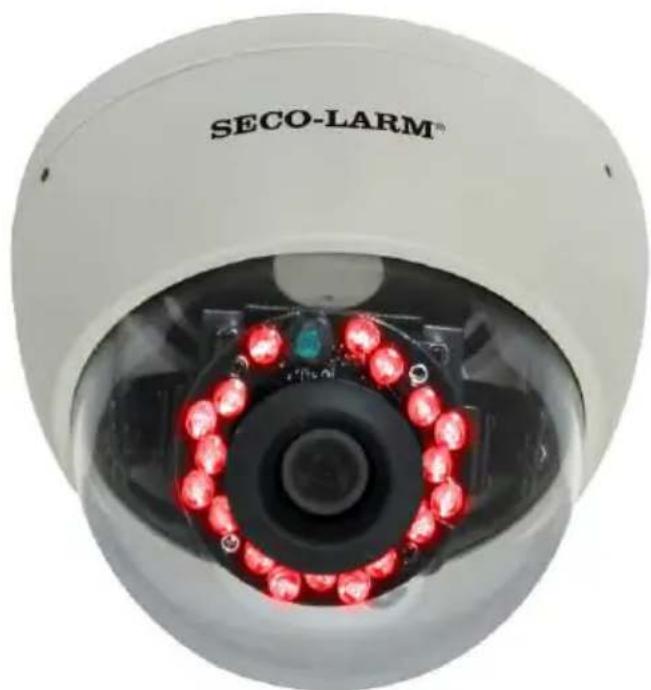
natural_image
Close-up of a white SECO-LARM security camera with red LED lights on the cornea (no text or symbols visible on the device itself)| Model No. | Resolution | Lens Size |
NTSC
| EV-2166-N3WQ | 480 TV lines | 3.6mm |
| EV-2166-NVWQ | 480 TV lines | 4~9mm varifocal |
| EV-2766-N3WQ | 600 TV lines | 3.6mm |
| EV-2766-NVWQ | 600 TV lines | 4~9mm varifocal |
PAL
| EV-2166-P3WQ | 480 TV lines | 3.6mm |
| EV-2166-PVWQ | 480 TV lines | 4~9mm varifocal |
| EV-2766-P3WQ | 600 TV lines | 3.6mm |
| EV-2766-PVWQ | 600 TV lines | 4~9mm varifocal |
Specifications:
| NTSC | 2166-N3WQ | 2166-NVWQ | 2766-N3WQ | 2766-NVWQ | |
| PAL | 2166-P3WQ | 2166-PVWQ | 2766-P3WQ | 2766-PVWQ | |
| Type | Mid Size Vandal Dome | ||||
| CCD | 1/3 " Sony Super HAD II | ||||
| Resolution | 480 TV lines | 600 TV lines | |||
| Lens | 3.6mm | 4~9mm | 3.6mm | 4~9mm | |
| # of IR LEDs | 18 (850nm) | ||||
| IR range | 65ft (20m) | ||||
| Pickup elements | 510x492 pixels (NTSC)500x528 pixels (PAL) | 768x494 pixels (NTSC)752x582 pixels (PAL) | |||
| Sync | Internal | ||||
| Video output | 1Vp-p composite video, 75Ω | ||||
| Minimum illumination | 0-lux (LEDs ON) | ||||
| S/N ratio | >48dB | ||||
| Shutter control | Auto Electric Shutter (AES) | ||||
| Gain control | Auto | ||||
| White balance | Auto | ||||
| Operating voltage | 12VDC ±10% | ||||
| Current draw | 100mA (LEDs OFF), 200mA (LEDs ON) | ||||
| IP Rating | IP65 | ||||
| Operating temperature | -4°~122°F (-20°~50°C) | ||||
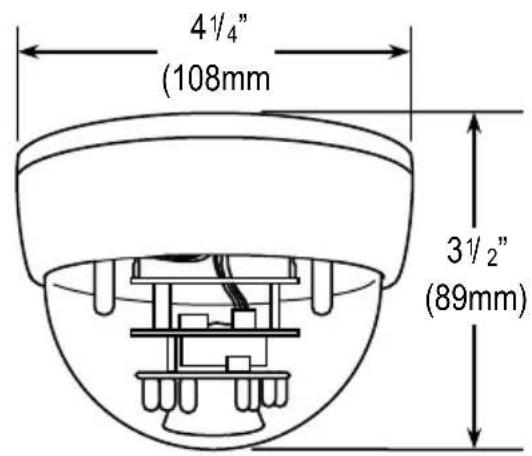
| Dimensions | 4^1/_4 "x 3^1/_2 " (108x89 mm) | ||||
| Weight | 18-oz (500g) | ||||
Parts List:
1 x Manual
3 x Mounting screws
1 x DC plug with terminal block
1 x Camera
3 x Screw anchors
1 x Allen wrench
Dimensions:
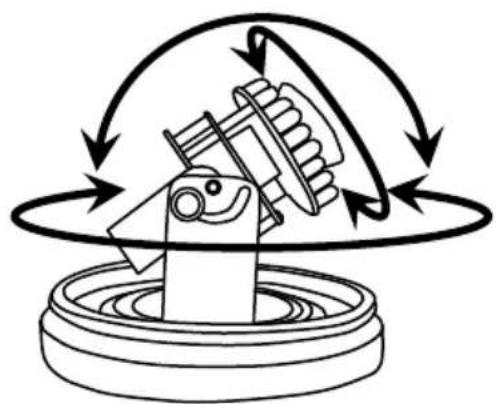
Adjusting the 3-Axis Gimbal:
natural_image
Diagram of a mechanical assembly with rotating gears and motion arrows (no text or symbols)Move the camera vertically, horizontally, or rotate the lens to change the lens angle.
Overview:
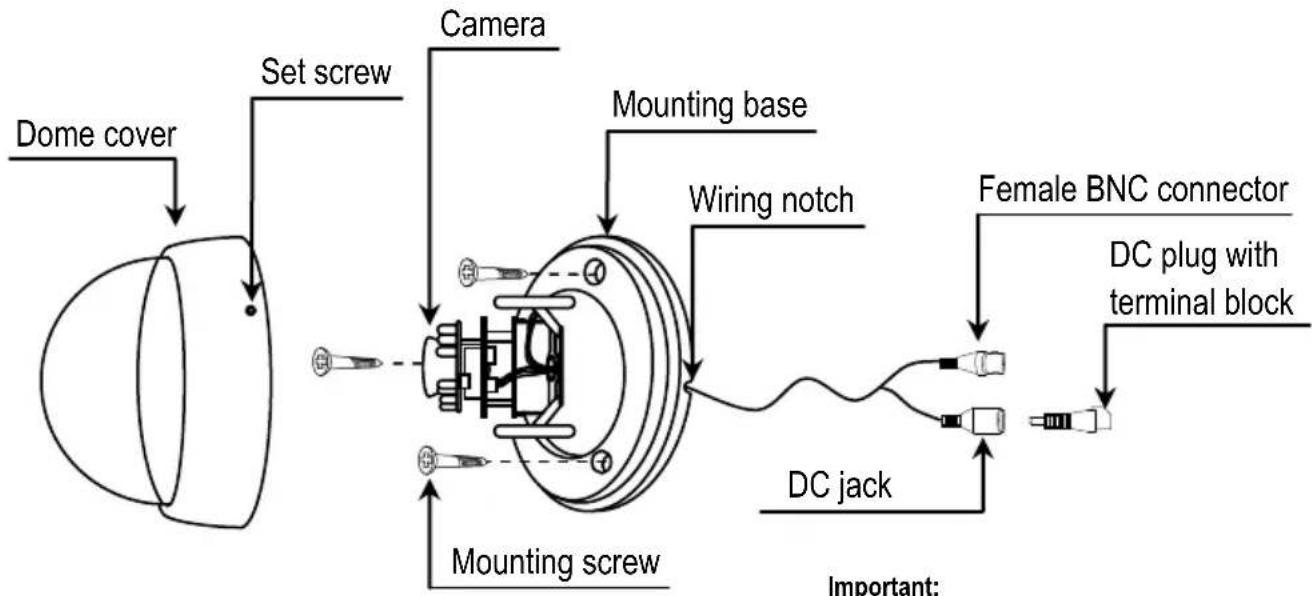
flowchart
graph TD
    A["Dome cover"] --> B["Set screw"]
    B --> C["Camera"]
    C --> D["Mounting base"]
    D --> E["Wiring notch"]
    E --> F["Female BNC connector"]
    F --> G["DC plug with terminal block"]
    G --> H["DC jack"]
    H --> I["Mounting screw"]
    I --> J["Important:"]
Important:
Do not cut the DC jack or the female
BNC connector as this will void the warranty.
Before Starting:
- Please read this manual carefully and keep it for future reference.
- Use the camera within given temperature and electricity limits.
- Do not point the camera at the sun. Heat could damage the camera, even when not in use.
-
Do not mount the camera in areas exposed to radiation, strong magnetic fields, or strong electrical signals*
-
Do not drop the camera or subject it to strong vibrations.
* Note: Many video monitors produce strong electromagnetic fields close to the display CRT, especially when the monitor is turned on or during de-gaussing, which occurs automatically with many monitors when turned on.
Installation:
- Undo the 3 set screws on the side of the dome cover using the included allen wrench.
- Remove the dome from the base.
- Temporarily connect the camera's female BNC connector to a monitor.
- Temporarily connect the camera's DC jack to a 12VDC power supply.
- Hold the mounting base with your hand against the wall, ceiling, or other mounting surface. Try various locations and angles while watching the monitor to find the location that offers the best protection. Mark that location with a pencil
-
If the installation involves surface wiring, use the wiring notch located on the side of the mounting base to run wires.
-
Mount the mounting base to the wall using the 3 included mounting screws. If necessary, use the included screw anchors.
- Run a hidden, permanent video cable from the monitor to the camera.
- Run a hidden, permanent power cable from a 12VDC power supply to the camera.
- Make any necessary adjustments to the camera angle by gently twisting the camera on its axis.
- Reattach the dome to the camera base by giving the dome a slight twist.
- Use the included allen wrench to tighten the set screw, securing the dome to the base.
- Test the camera again under the exact lighting conditions under which it is expected to be used.
Troubleshooting:
| The screen is blank. | Check that the camera is powered up.Check that the power supply's polarity is correct.Check that the monitor is powered up.Check that the video cable connecting the camera to the monitor is connected properly. |
| The screen image is dim | Clean the lens using a soft, clean cloth.Check that the light source is adequate. |
| The screen image has poor contrast. | Adjust the monitor's contrast knob.Change the position of the camera. |
| The screen image flickers. | Change the position of the camera. |
| The screen image is distorted. | Change the position of the camera. |
| The camera case is hot. | Check that the correct power supply is in use. |
| IR LEDs do not turn on. | Check that the correct power supply is in use. |
IMPORTANT
Users and installers of this product are responsible for ensuring this product complies with all national, state, and local laws and statutes related to monitoring and recording audio and video signals. SECO-LARM will not be held responsible for the use of this product in violation of any current laws or statutes.
WARNING
Stop using the camera if you see a malfunction such as smoke or unusual heat, as it could cause fire or electric shock. Do not open the case of this device, as there are no field-serviceable components inside.
FCC COMPLIANCE STATEMENT
Information to the user: This equipment has been tested and found to comply with the limits for a class B digital device, pursuant to part 15 of the FCC rules. These limits are designed to provide reasonable protection against harmful interference when the equipment is operated in a commercial environment. This equipment generates, uses, and can radiate radio frequency energy and, if not installed and used in accordance with the instruction manual, may cause harmful interference to radio communications. Operation of this equipment in a residential area is likely to cause harmful interference in which case the user will be required to correct the interference at his or her own expense.
WARRANTY: This SECO-LARM product is warranted against defects in material and workmanship while used in normal service for a period of one (1) year from the date of sale to the original customer. SECO-LARM's obligation is limited to the repair or replacement of any defective part if the unit is returned, transportation prepaid, to SECO-LARM.
This Warranty is void if damage is caused by or attributed to acts of God, physical or electrical misuse or abuse, neglect, repair or alteration, improper or abnormal usage, or faulty installation, or if for any other reason SECO-LARM determines that such equipment is not operating properly as a result of causes other than defects in material and workmanship.
The sole obligation of SECO-LARM and the purchaser's exclusive remedy, shall be limited to replacement or repair only, at SECO-LARM's option. In no event shall SECO-LARM be liable for any special, collateral, incidental, or consequential personal or property damages of any kind to the purchaser or anyone else.
NOTICE
The information and specifications printed in this manual are current at the time of publication. However, the SECO-LARM policy is one of continual development and improvement. For this reason, SECO-LARM reserves the right to change specifications without notice. SECO-LARM is also not responsible for misprints or typographical errors.
Copyright © 2012 SECO-LARM U.S.A., Inc. All rights reserved. This material may not be reproduced or copied, in whole or in part, without the written permission of SECO-LARM.
SECO-LARM U.S.A., Inc.
16842 Millikan Avenue, Irvine, CA 92606
Tel: 800-662-0800 / 949-261-2999
Website: www.seco-larm.com
E-mail: sales@seco-larm.com

PICSN4
MiEV-2x66-xxWQ_1011 - 480_600TVL.docx